Rawtherapee: Full-apply applies partial profile from Filmstrip
5.4-454-gbe07fd83
Steps to reproduce:
- Open a raw file, enable black-and-white
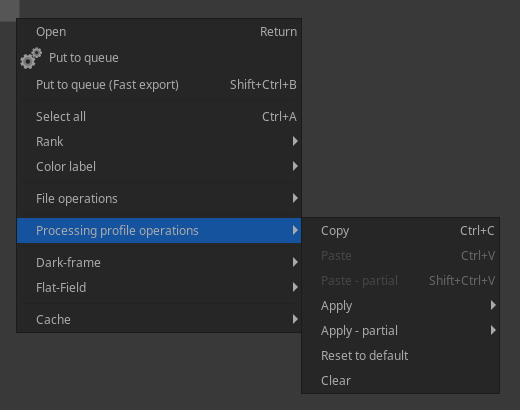
- Right-click on this raw file from the Filmstrip, Processing Profile Operations > Apply > Bundled Profiles > Auto-Matched Curve - ISO Low
Since you're not using "Apply - partial", you would expect to see a colored photo, but the black-and-white tool remains enabled.
 Beep6581
All 12 comments
Or it could be that the Auto-Matched Tone Curve button is always enabled when pasting a profile.
I just added the old "Default.pp3" to the profiles folder so that it will show up in the context menu, opened RT 5.4-454-gbe07fd83, cleared the profile from a photo, applied the old Default, and when I examine the photo in Batch Edit or in the Editor, Auto-Matched Tone Curve is enabled.
Need further investigation.
@agriggio @Hombre57 could you please look into this when time permits?
Beep6581
on 2 Jul 2018
I deleted the cache, applied the old Default to a photo, and cat of the pp3 shows:
[Exposure]
Auto=true
(...)
HistogramMatching=true
@Beep6581
Since you're not using "Apply - partial", you would expect to see a colored photo, but the black-and-white tool remains enabled.
I disagree. We simply need a 'Processing profile fill mode' button in toolbar of filebrowser/filmstrip.
 heckflosse
on 2 Jul 2018
heckflosse
on 2 Jul 2018
I haven't checked in detail, but here's a possible explanation of what is happening: the profile you are applying is partial, and it doesn't get completed with default values for the missing entries. So, if the old profile for the photo had HistogramMatching=true, that will not get overwritten.
I tend to agree with @heckflosse that this is not necessarily a bug, but just a lack of feature...
(I might be completely off though, needs to be double checked...)
 agriggio
on 4 Jul 2018
agriggio
on 4 Jul 2018
Yes, it does seem so, though I wonder how it went unnoticed for so long.
In my opinion the fill mode for the File Browser/Filmstrip should be hard-coded to "filled". I wouldn't object to making it optional, but see no use case for having it non-filled.
Beep6581
on 4 Jul 2018
Or we add new context menu options:
- Apply as-is
- Apply as-is, filled
- Apply partial
- Apply partial, filled
I suppose the same for pasting
Beep6581
on 4 Jul 2018
What are your thoughts on setting the context-menu operations to "filled" mode?
Beep6581
on 30 Oct 2018
@Beep6581 The "beauty" of the mechanism is that you can actually partially apply a partial profile, which sounds logical to me : your profile contains a subset of the whole parameter list, and for those who's there, you select in the Partial Profile window which one to keep. I'd definitely keep this behavior because it's very flexible. :+1: for having the 4 solutions you proposed above.
 Hombre57
on 30 Oct 2018
Hombre57
on 30 Oct 2018
By the way, you could still set to neutral first then apply your - partial - profile. Having a dedicated entry would saves some thumbnail reprocessing.
Hombre57
on 30 Oct 2018
I agree that this is good behavior, but it's maybe not intuitive as it is now - it certainly surprised me. I'll bump this for 5.6 so we have time to decide on a solution.
Beep6581
on 30 Oct 2018
@Beep6581
In my opinion the fill mode for the File Browser/Filmstrip should be hard-coded to "filled". I wouldn't object to making it optional, but see no use case for having it non-filled.
The typical use case is to separate subtopic in their own partial profile : one for controlling denoising and nothing else, one to controls resize/crop/sharpening and nothing else, one to control color, etc... Then the idea is to apply the partial profiles from the menu depending on what you want to achieve, and not going into the "Apply Partial Profile" menu and select the entries, they are already filtered out ! It would be a big regression to remove that possibility.
One possible solution would be to go with more menu entries, as you proposed, or add a "Use default values for unset parameters" switch in the menu.
Hombre57
on 15 Sep 2019
@Hombre57 I agree that this can be useful and should be kept.
Summary of the problem: currently the context menu is counter-intuitive - there is an "Apply - partial" entry, and then there is an "Apply" entry which is also partial. And both operate using a hard-coded fill mode which cannot be known to the user by looking at the user interface and is not documented.
Beep6581
on 16 Sep 2019
Related issues
 srjacob999
·
98Comments
srjacob999
·
98Comments
 Desmis
·
140Comments
heckflosse
·
76Comments
Desmis
·
297Comments
heckflosse
·
110Comments
Desmis
·
140Comments
heckflosse
·
76Comments
Desmis
·
297Comments
heckflosse
·
110Comments
Most helpful comment
@Beep6581
I disagree. We simply need a 'Processing profile fill mode' button in toolbar of filebrowser/filmstrip.