Rawtherapee: MEOW mode has some bugs
This issue is to report and fix them step by step.
 heckflosse
All 76 comments
First bug: Size of tool panel in MEOW mode depends on size of main rt window instead of size of MEOW window. To reproduce:
1) Start rt
2) reduce size of rt so that it fills only a quarter of the screen
3) open a file
6) Because the size of the tool panel depends on the size of the main rt window it looks like this then, which is bad:

Fixed with aecfaa2 in the new meow_fixes branch
heckflosse
on 7 Jul 2017
Next bug, but this time without a fix:
1) open an image in MEOW mode
2) Use the save button to save the processed image as tiff
=> progress bar of main rt window is used to show the save to tiff status
That's not critical, but makes no sense
heckflosse
on 7 Jul 2017
Fix confirmed, no side-effects after 30 whole seconds of using RT in SETM-VT ;)
 Beep6581
on 8 Jul 2017
Beep6581
on 8 Jul 2017
@Beep6581 Thanks for testing :+1:
heckflosse
on 8 Jul 2017
I merged the first commit of meow_fixes into dev
heckflosse
on 8 Jul 2017
From #3962
Short: secondary window does not maximize correctly
Version: 5.1
Setting: MultiTab on multiple monitors if available
OS: Windows
I have a three Monitor setup (2x 1920x1080 and 1x 1920x1200). The primary display is the large one.
Maximizing the secondary window on the primary screen does not result in a maximized window. There is some space around the window. So it is centralized but not maximized.
 Luncher91
on 9 Jul 2017
Luncher91
on 9 Jul 2017
@Luncher91 On which monitor was the primary rt window when the secondary window opened?
heckflosse
on 11 Jul 2017
@Luncher91 I would like to fix the bug you reported. Unfortunately I have only one monitor and can't test it. So, what I need, is the help from someone who can test it, for example you ;-)
By following this guide step by step you can build RT on windows. That's about one or two hours of work to set up the build system.
Once that's done, making a new build usually takes only a few minutes.
Then I can provide blind patches and you could test them to see whether the bug is fixed or not.
heckflosse
on 11 Jul 2017
Current MEOW code does not remember the monitor where the secondary window (the editor window) has been closed. Instead it always opens the Editor window on second monitor when the primary rt window is on first monitor and on first monitor when the primary rt window is not on first monitor.
With this patch RT remembers the number of the monitor where the editor window was closed in last session.
That means, if editor window was on nth monitor when editor window was closed, it will open on nth monitor next time if that monitor is still available. If that monitor is not available it will be opened at the (n-1)th monitor if available and so on.
diff --git a/rtgui/editwindow.cc b/rtgui/editwindow.cc
index 36340f7a..88897e81 100644
--- a/rtgui/editwindow.cc
+++ b/rtgui/editwindow.cc
@@ -28,7 +28,7 @@
 // Check if the system has more than one display and option is set
 bool EditWindow::isMultiDisplayEnabled()
 {
-    return options.multiDisplayMode > 0 && Gdk::Screen::get_default()->get_n_monitors () > 1;
+    return options.multiDisplayMode > 0 && Gdk::Screen::get_default()->get_n_monitors() > 1;
 }

 // Should only be created once, auto-creates window on correct display
@@ -40,12 +40,17 @@ EditWindow* EditWindow::getInstance(RTWindow* p)

         explicit EditWindowInstance(RTWindow* p) : editWnd(p)
         {
-            // Determine the other display and maximize the window on that
-            const Glib::RefPtr< Gdk::Window >& wnd = p->get_window();
-            int monNo = p->get_screen()->get_monitor_at_window (wnd);
-
+            int meowMonitor = 0;
+            if(isMultiDisplayEnabled()) {
+                if(options.meowMonitor >= 0) { // use display from last session if available
+                    meowMonitor = std::min(options.meowMonitor, Gdk::Screen::get_default()->get_n_monitors());
+                } else { // Determine the other display
+                    const Glib::RefPtr< Gdk::Window >& wnd = p->get_window();
+                    meowMonitor = p->get_screen()->get_monitor_at_window(wnd) == 0 ? 1 : 0;
+                }
+            }
             Gdk::Rectangle lMonitorRect;
-            editWnd.get_screen()->get_monitor_geometry(isMultiDisplayEnabled() ? (monNo == 0 ?  1 : 0) : monNo, lMonitorRect);
+            editWnd.get_screen()->get_monitor_geometry(meowMonitor, lMonitorRect);
             editWnd.move(lMonitorRect.get_x(), lMonitorRect.get_y());
             editWnd.maximize();
         }
@@ -245,7 +250,12 @@ bool EditWindow::on_delete_event(GdkEventAny* event)
     filesEdited.clear();
     parent->fpanel->refreshEditedState (filesEdited);

+    if(isMultiDisplayEnabled()) {
+        options.meowMonitor = get_screen()->get_monitor_at_window (get_window());
+    }
+
     hide ();
+
     return false;
 }

diff --git a/rtgui/options.cc b/rtgui/options.cc
index 1f29264b..baa349d8 100644
--- a/rtgui/options.cc
+++ b/rtgui/options.cc
@@ -295,6 +295,7 @@ void Options::setDefaults ()
     windowX = 0;
     windowY = 0;
     windowMaximized = true;
+    meowMonitor = -1;
     saveAsDialogWidth = 920;
     saveAsDialogHeight = 680;
     savesParamsAtExit = true;
@@ -1258,6 +1259,10 @@ int Options::readFromFile (Glib::ustring fname)
                     windowY    = keyFile.get_integer ("GUI", "WindowY");
                 }

+                if (keyFile.has_key ("GUI", "MeowMonitor")) {
+                    windowMaximized = keyFile.get_integer ("GUI", "MeowMonitor");
+                }
+
                 if (keyFile.has_key ("GUI", "WindowMaximized")) {
                     windowMaximized = keyFile.get_boolean ("GUI", "WindowMaximized");
                 }
@@ -2009,6 +2014,7 @@ int Options::saveToFile (Glib::ustring fname)
         keyFile.set_integer ("GUI", "WindowHeight", windowHeight);
         keyFile.set_integer ("GUI", "WindowX", windowX);
         keyFile.set_integer ("GUI", "WindowY", windowY);
+        keyFile.set_integer ("GUI", "MeowMonitor", meowMonitor);
         keyFile.set_boolean ("GUI", "WindowMaximized", windowMaximized);
         keyFile.set_integer ("GUI", "DetailWindowWidth", detailWindowWidth);
         keyFile.set_integer ("GUI", "DetailWindowHeight", detailWindowHeight);
diff --git a/rtgui/options.h b/rtgui/options.h
index 46a6d67e..5bbeba54 100644
--- a/rtgui/options.h
+++ b/rtgui/options.h
@@ -134,6 +134,7 @@ public:
     int historyPanelWidth;
     int windowWidth;
     int windowHeight;
+    int meowMonitor;
     int windowX;
     int windowY;
     bool windowMaximized;
Because I have only one monitor, I don't know whether it works as designed on multi-monitor systems.
heckflosse
on 11 Jul 2017
To help @Luncher91 while he learns how to build, you can find RawTherapee_dev_5.1-135-#3957_WinVista_64.zip at https://drive.google.com/open?id=0B2q9OrgyDEfPS2FpdDAtMVI1RG8
 gaaned92
on 11 Jul 2017
gaaned92
on 11 Jul 2017
@heckflosse Originally I did not plan to set up a build environment. But I think I can not avoid it ;-) I will set it up but not today. I will get back here as soon as I am ready to receive patches to test.
@gaaned92 thank you for your help but I think I will go the hard way using the actual repository. That might be handy some time to report additional bugs or enhancement proposals.
Luncher91
on 11 Jul 2017
@Luncher91 Great!
@gaaned92 Thanks for making a new build so quickly!
heckflosse
on 11 Jul 2017
@gaaned92 Did you make the build before or after I edited the patch in the comment?
I had a std::max in first version which I changed to a std::min in corrected version
heckflosse
on 11 Jul 2017
@Luncher91 Don't hesitate to ask here or on irc channel #rawtherapee if you run into problems setting up the build system. On irc #rawtherapee you can contact qogniw (that's me)
heckflosse
on 11 Jul 2017
The space around the secondary window is a known problem and related to the CSS theme. Let me see...
 Hombre57
on 12 Jul 2017
Hombre57
on 12 Jul 2017
@Hombre57 Great to see that you investigate!
heckflosse
on 12 Jul 2017
@heckflosse it uses std::min
gaaned92
on 12 Jul 2017
Just a short ad for all our developers
If you're after a min() or max() implementation with an arbitrary number of arguments, take a look at rtengine/rt_math.h. Ingo and I made nicely scheduable constexpr versions some time ago.
 Floessie
on 12 Jul 2017
Floessie
on 12 Jul 2017
@heckflosse Following up to my ad, here's a patch for current dev:
diff --git a/rtengine/imageio.cc b/rtengine/imageio.cc
index d252b501..01bbddf1 100644
--- a/rtengine/imageio.cc
+++ b/rtengine/imageio.cc
@@ -867,8 +867,8 @@ int ImageIO::loadTIFF (Glib::ustring fname)
                   );

 #endif
-        float minVal = min( min( minValue[0], minValue[1] ), minValue[2] );
-        float maxVal = max( max( maxValue[0], maxValue[1] ), maxValue[2] );
+        float minVal = rtengine::min(minValue[0], minValue[1], minValue[2]);
+        float maxVal = rtengine::max(maxValue[0], maxValue[1], maxValue[2]);
         normalizeFloat(minVal, maxVal);
     }

diff --git a/rtengine/lcp.cc b/rtengine/lcp.cc
index 554634e5..c09d2d9b 100644
--- a/rtengine/lcp.cc
+++ b/rtengine/lcp.cc
@@ -447,7 +447,7 @@ int LCPProfile::filterBadFrames(double maxAvgDevFac, int minFramesLeft)
         }

         if (aPersModel[pm]->hasModeData(2)) {
-            errChrom += std::max(std::max(aPersModel[pm]->chromRG.mean_error, aPersModel[pm]->chromG.mean_error), aPersModel[pm]->chromBG.mean_error);
+            errChrom += rtengine::max(aPersModel[pm]->chromRG.mean_error, aPersModel[pm]->chromG.mean_error, aPersModel[pm]->chromBG.mean_error);
             chromCount++;
         }
     }
Best,
Flössie
Floessie
on 12 Jul 2017
@Floessie Will you commit this patch or shall ...?
heckflosse
on 12 Jul 2017
@heckflosse Please do. I'm currently busy...
Floessie
on 12 Jul 2017
@heckflosse I set up the build environment. I checked out the dev branch and built RT. It ran like a charm ... just a bit slow. The problem with the gap around the window still exists with the current sources.
I am awaiting your questions and/or instructions.
Luncher91
on 12 Jul 2017
@Luncher91 just a bit slow : did you make a debug build instead of a release build?
heckflosse
on 12 Jul 2017
@heckflosse no, but don't worry about that. That might have other reasons.
Luncher91
on 12 Jul 2017
@Luncher91 Though not related to your issue, I would like you to test this:
1) start rt on first monitor
2) open an image (secondary window of rt should open on second monitor)
3) move secondary window to third monitor
4) close rt
5) start rt
6) open an image (now the secondary window should open on third monitor)
heckflosse
on 12 Jul 2017
@heckflosse Test failed. I moved the window to the free monitor and maximized it. Then I closed RT (clicking X - Is there another way?) and opened it again. Opening an image results in a secondary window on the same monitor as the first time I did it.
My Monitor Setup is as follows: FULLHD (2) - 1920x1200 (3; primary) - FULLHD (1)
RTs primary window opens on display 3 and the seondary window opens every time on the second display (on my left hand side).
Luncher91
on 12 Jul 2017
@Luncher Ok, thanks for the the first test. I will take a look now to solve this. Blind patching really is bad....
heckflosse
on 12 Jul 2017
@Luncher91 My fault. The patch was not yet commited to dev. I will create a new branch now where you can test. I will report back in a few minutes
heckflosse
on 12 Jul 2017
@Luncher91 I just pushed to branch meow_fixes.
Can you please
git pull
git checkout meow_fixes
and build and try again? Sorry for the trouble :(
heckflosse
on 12 Jul 2017
@heckflosse essentially the behaviour is the same. But when I closed the secondary window by clicking the X, and reopen the secondary window during the same session again it opens abough the primary window. Restarting RT results in the first behaviour again.
I observed that the edit profile tile is maximized so the image area is not visible after I moved the secondary window during the previous session on to my right hand side monitor.
I hope I got that with the right words so you understand what exactly happened. I totally agree, that remote debugging sucks. Is there no possibility to run a VM with multiple displays to test that behaviour? That might be a much better solution especially for future devlopment ;-)
Luncher91
on 12 Jul 2017
@Luncher91 Silly copy/paste error from me... I just pushed a fix to meow_fixes branch
heckflosse
on 12 Jul 2017
@heckflosse you should mention me @Luncher91 instead of Luncher.
I did not a full compilation but I think is should be enough to recompile without removing the build directory.
I observed that if I close the secondary window before closing the primary window the position is saved as you told me. The weired size of the "edit profile" tile still happens.
Luncher91
on 12 Jul 2017
@Luncher91 Yes, I saw that I mentioned you Luncher instead of @Luncher91 by accident.
It's perfectly fine to just make install after git pull. No need to start from scratch.
Fine, that the position of the secondary window is saved now.
Can you post a screenshot of the "edit profile" bug?
heckflosse
on 12 Jul 2017
Empty space around EditWindow fixed in changeset 14f5d52.
PS: @heckflosse Sorry, pushed the commit into dev, it's a safe fix and overlooked your branch
Hombre57
on 13 Jul 2017
@Hombre57 I merged your fix into branch meow_fixes
heckflosse
on 13 Jul 2017
@Hombre57 @heckflosse Great! The window does now maximize correctly. But There are two things left:
- Edit profile tile is sometimes maximized to the left as well (see screenshot)
- The position of the window is not saved correctly. The first time I ran RT it did open the secondary window on my right hand side. After closing it and reopen it again it opens always on my primary (middle) screen since then. It does not matter where the primary RT window at that time is.
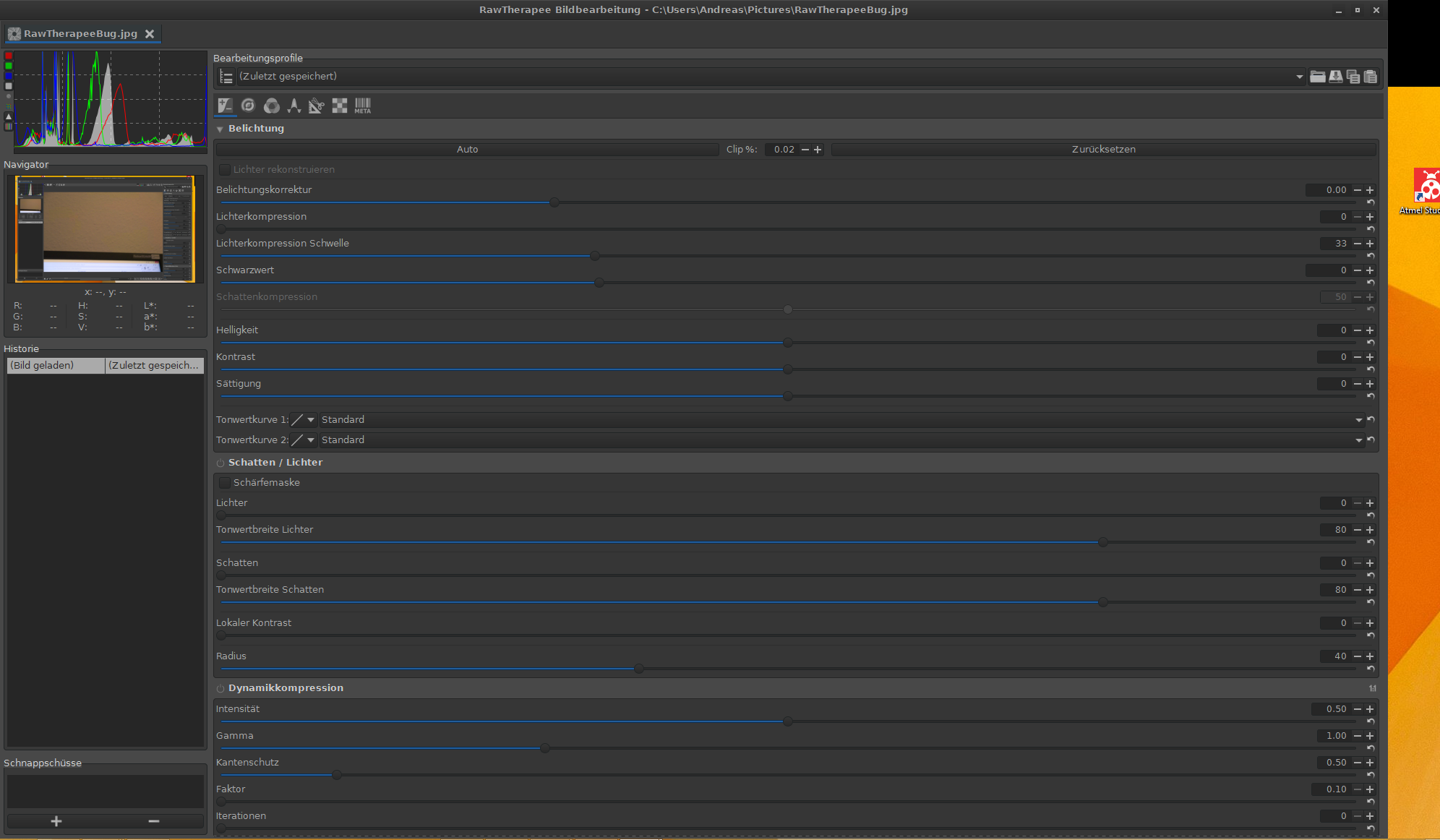
Luncher91
on 15 Jul 2017
@Luncher91 Today I set up a virtual machine with three virtual monitors to simplify testing.
I will commit a patch which solves 2. tomorrow. Already works fine here.
I still can not reproduce 1.
heckflosse
on 15 Jul 2017
@Luncher91
76dba8f should fix 2. and maybe also fixes 1.
heckflosse
on 15 Jul 2017
There may be some corner cases to 2. when primary rt window is closed before secondary window but I'm sure to be be able to solve them now as I can test on my machine...
heckflosse
on 15 Jul 2017
With fbf8999 RT remembers fullscreen state (F11) of the secondary window.
heckflosse
on 15 Jul 2017
Thanks for the patch, works almost fine. Here is a patch to fix some caveats (see below) :
diff --git a/rtgui/editwindow.cc b/rtgui/editwindow.cc
index d4e3191..ebc478c 100644
--- a/rtgui/editwindow.cc
+++ b/rtgui/editwindow.cc
@@ -58,8 +58,8 @@
         instance_.editWnd.get_screen()->get_monitor_geometry(meowMonitor, lMonitorRect);
         instance_.editWnd.move(lMonitorRect.get_x(), lMonitorRect.get_y());

+        instance_.editWnd.maximize();
         if(!options.meowFullScreen) {
-            instance_.editWnd.maximize();
             instance_.editWnd.setFullScreen(false);
         } else {
             instance_.editWnd.fullscreen();
@@ -107,6 +107,13 @@
     mainBox->pack_start (*mainNB);

     add (*mainBox);
+}
+
+EditWindow::~EditWindow () {
+
+    if(isMultiDisplayEnabled() && get_visible()) {
+        options.meowMonitor = get_screen()->get_monitor_at_window(get_window());
+    }
 }

 void EditWindow::on_realize ()
@@ -237,7 +244,7 @@
 void EditWindow::toggleFullscreen ()
 {
     isFullscreen ? unfullscreen() : fullscreen();
-    isFullscreen = !isFullscreen;
+    options.meowFullScreen = isFullscreen = !isFullscreen;
 }

 bool EditWindow::on_delete_event(GdkEventAny* event)
@@ -267,8 +274,6 @@
     if(isMultiDisplayEnabled()) {
         options.meowMonitor = get_screen()->get_monitor_at_window(get_window());
     }
-
-    options.meowFullScreen = isFullscreen;

     hide();
     unmaximize();
diff --git a/rtgui/editwindow.h b/rtgui/editwindow.h
index c536361..ac2799f 100644
--- a/rtgui/editwindow.h
+++ b/rtgui/editwindow.h
@@ -43,6 +43,7 @@
     static EditWindow* getInstance(RTWindow* p);

     explicit EditWindow (RTWindow* p);
+    ~EditWindow ();

     void addEditorPanel (EditorPanel* ep, const std::string &name);
     void remEditorPanel (EditorPanel* ep);
This fix the following problems :
- when RT closed by the main window, the secondary window doesn't remember fullscreen sate. To correct this, I've moved
options.meowFullScreen = isFullscreen;fromon_delete_eventwhich is not called in this case totoggleFullscreen - when RT closed by the main window, the secondary window doesn't remember its monitor. To correct this, I've copied
options.meowMonitor = get_screen()->get_monitor_at_window(get_window());to the destructor. - when RT is started and a first secondary window is opened in fullscreen mode, using
unfullscreenset the window unmaximized. This is becausemaximize()has not been called prior tofullscreen().
Hombre57
on 15 Jul 2017
And I don't get expanded right panel anymore, so I guess it is fixed too. Well done !
Hombre57
on 15 Jul 2017
Still one pending problem :
- When unmiximized, the secondary window is very small (e.g. to move it to a second monitor). Not really an issue, be could you add
options.meowWidthandoptions.meowHeight? Or do you want that I do it myself ?
Btw, should I commit the previous patch ?
Hombre57
on 15 Jul 2017
@Hombre57 Thanks for the patch! I will test it and report back asap.
heckflosse
on 15 Jul 2017
@Hombre57 as we are on meow_fixes branch feel free to commit your patch and also to add options.mewoWidth...
heckflosse
on 15 Jul 2017
@Hombre57 I tested your patch on my virtual box running linux with 3 virtual monitors.
1) I started rt on first monitor in meow mode
2) opened a file and moved the secondary rt window to the third monitor
3) pressed F11 to fullscreen the secondary window
4) went to primary rt window on first monitor and closed rt
5) started rt again on first monitor
6) opened a file => It opened on third monitor in fullscreen mode which is perfect
7) pressed F11 to unfullscreen the secondary window because I wanted to move it from third to second monitor
That resulted in a small secondary rt window without a title bar which I can not move at all
Screenshot:
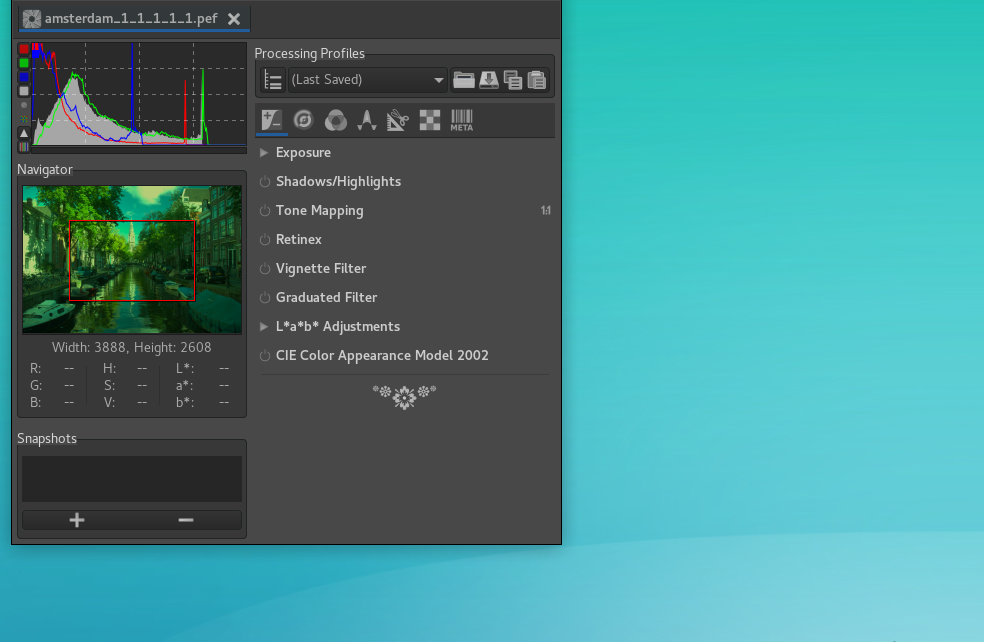
Edit: I tested without your patch and it behaves same. Means, it's not caused by your patch (maybe by my patch?) but still needs to get fixed.
heckflosse
on 15 Jul 2017
I made another short test session with my windows machine on meow_fixes branch. The secondary window position seems now being saved correctly.
But the full stretched panel is still an issue. Recently I had also the case that the panel is only stretched half the distance.
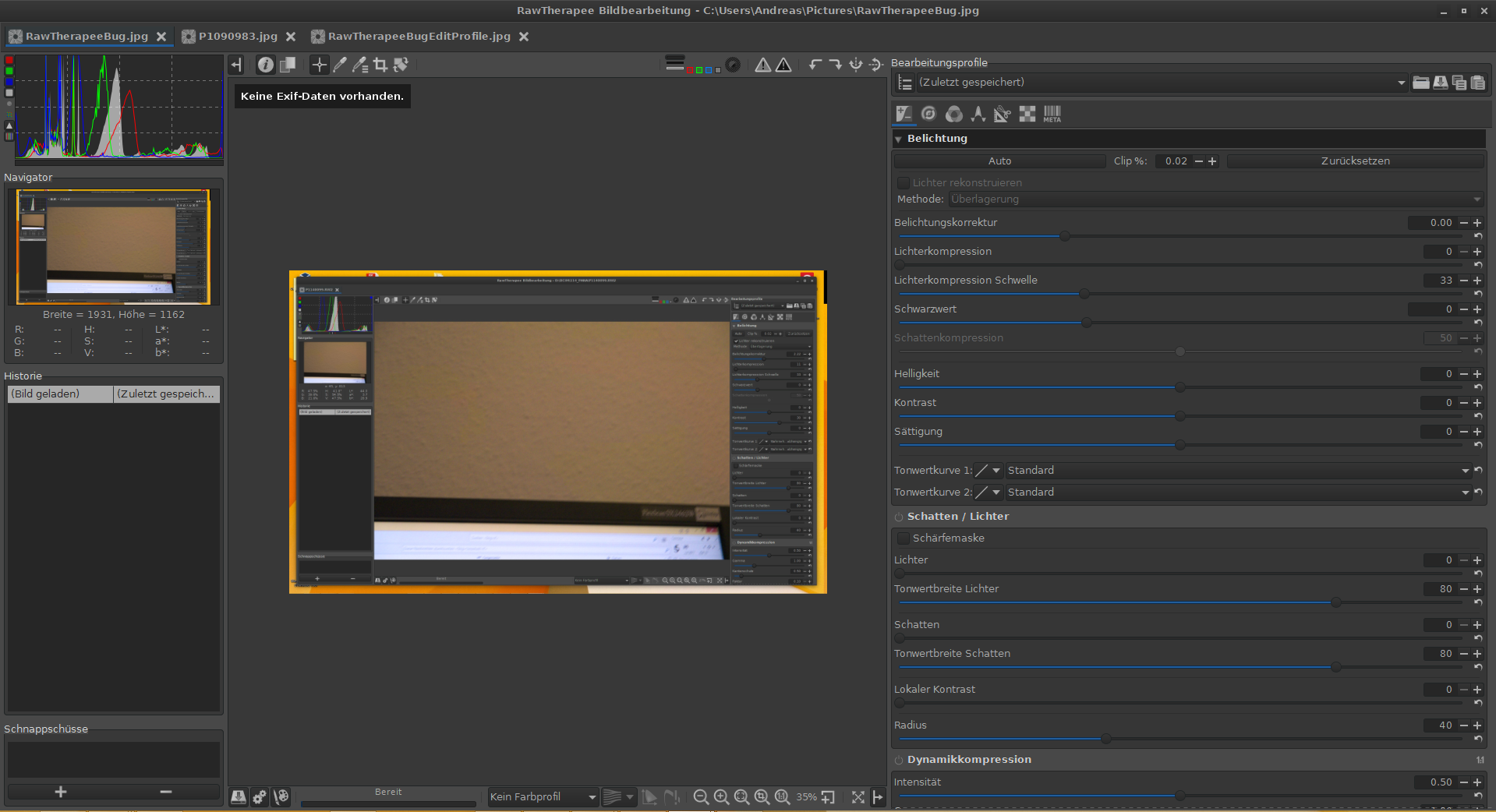
Opening another picture results in a maximized secondary window even if I made it smaller before.
Edit: The secondary window gets maximized sometimes on another screen than the window is placed. Is the position being loaded even if the secondary window is still open?
Maybe another bug: After a while playing around I got the message "Too many editor open." even I have just a single editor open. It seems like there is something not destructed correctly. Should I open a new ticket for that?
All in all, we are progressing. Good job guys.
Luncher91
on 15 Jul 2017
I'm trying to fix point 5, I hope to get it today. Otherwise I'll commit the patch above.
Hombre57
on 15 Jul 2017
@Luncher91
Opening another picture results in a maximized secondary window even if I made it smaller before.
Yes, that's on my todo list
I got the message "Too many editor open." even I have just a single editor open. It seems like there is something not destructed correctly. Should I open a new ticket for that?
That's a damn Windows/gtk3 thing where we run out of windows gdi handles. To avoid crashes I implemented the limitation Too many editors open... with 56eaeca . No need to open a new ticket for that. I'll keep an eye on it.
heckflosse
on 15 Jul 2017
@heckflosse Please post AboutThisBuild.txt, I have the decoration when following your process. The window size is what I'm trying to fix, but decoration is here and the window switch to fullscreen to maximized (with my patch).
@Luncher91 Have you made your last test with my patch ? Please post AboutThisBuild.txt too.
Here is mine : AboutThisBuild.txt
Hombre57
on 15 Jul 2017
@Hombre57
Version: 5.1-144-gfbf89990
Branch: meow_fixes
Commit: fbf89990
Commit date: 2017-07-15
Compiler: cc 7.1.1
Processor: x86_64
System: Linux
Bit depth: 64 bits
Gtkmm: V3.22.1
Build type: release
Build flags: -std=c++11 -march=native -Werror=unused-label -fopenmp -Werror=unknown-pragmas -Wall -Wno-unused-result -Wno-deprecated-declarations -O3 -DNDEBUG
Link flags: -march=native
OpenMP support: ON
MMAP support: ON
your patch was applied on top of the above version
heckflosse
on 15 Jul 2017
I did not apply any manual patches. I pulled the most current version and ran it. Here is my AboutThisBuild.txt:
Version: 5.1-144-gfbf8999
Branch: meow_fixes
Commit: fbf8999
Commit date: 2017-07-15
Compiler: gcc 6.2.0
Processor: undefined
System: Windows
Bit depth: 64 bits
Gtkmm: V3.22.0
Build type: release
Build flags: -std=c++11 -march=native -Werror=unused-label -fopenmp -Werror=unknown-pragmas -Wall -Wno-unused-result -Wno-deprecated-declarations -O3 -DNDEBUG
Link flags: -march=native
OpenMP support: ON
MMAP support: ON
Luncher91
on 15 Jul 2017
@Hombre57 Though unrelated to this topic, it seems that you did not pacman -Syu since a while ;-)
heckflosse
on 15 Jul 2017
@Luncher91 Can you
pacman -Syu
in msys2 command line, build from scratch and try again?
Don't know whether it solves any of your issues though
heckflosse
on 15 Jul 2017
@heckflosse MSYS updated, RT rebuilt and tested again : works fine. I don't understand what happen on your side.
Hombre57
on 15 Jul 2017
I updated now and built it from scratch. Beside the warnings for depracted functions I got during the build there are some things to mention:
the stretched panel seems no longer to be an issue.
AboutThisBuild.txtI got an issue which I would like to describe:
Open RT and a picture within the secondary window.
Move the window to the second screen and close it.
Open an image again and the secondary window appears on the secondary screen. Great!
But moving it now to the third screen or even to the first screen (it doesn't matter if it is maximized or not) and then open another picture without closing before will result in a maximized secondary window on the secondary screen - ?the last saving point, maybe?.
And while I am typing this and reproducing the desctribed steps I am getting the stretched panel again :-(
Edit: But I cannot reproduce the error with the panel. That seems to happen by chance and I could imagine that is a problem of concurrent threads. Resizing/maximizing VS resizing the panels
Luncher91
on 15 Jul 2017
@Hombre57 I just tested.
1) the myriad of warnings in console when closing primary window while secondary window was open, is gone, great!
2) when closing the primary window while secondary window was open, rt remembers the fullscreen state of secondary window, great!
3) Tested on my virtual machine with three virtual monitors:
Start rt on 1st monitor
Open an image
move the secondary window to 2nd or 3rd monitor
close the secondary window
Open an image. Should open on the monitor the last instance of secondary window was closed, but opens on the monitor of primary window => bug.
heckflosse
on 16 Jul 2017
I tested 3 and works fine, the only problem is that it doesn't maximize, but I know how to solve that. I'll do it tomorrow if I have time. I'd like to know if point 3 happens with 3 real monitors. @Luncher91 ?
Hombre57
on 16 Jul 2017
I opened the secondary windows which appears to be on my left hand screen.
I moved it to my right hand side screen and closed the main window of RT.
Then I restarted RT and opened an image again which results in a secondary window on the left hand side screen.Another issue:
make secondary window non-fullscreen and close it.
Reopen an image which result in a small secondary window (as we would expect) but on top of the primary window (middle screen) instead of the position where I closed it before.Fixed is the issue that the secondary window becomes maximized everytime.
Issue 3 still appears to me:
Open RT and an image using the secondary window. It opens on my left hand screen maximized.
I moved it to my right hand side screen, maximized it and closed it.
Open an image again will result in a resized secondary window on my right hand side screen.
Restarting RT (close secondary window first) and open an image resulted in a maximized window on the right hand side screen. Even though the scondary window wasn't maximized when I closed it.Edit: I am getting errors when I close RT. It does not matter which window I close first.
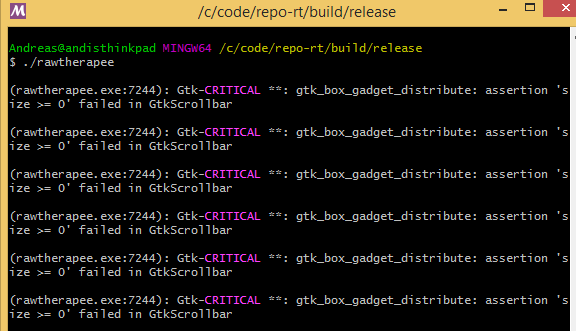
Edit 2: And another one here:
Open RT and an image within a secondary window which was in my case maximized on the left screen. I moved this window and maximized it on the right screen. Then I closed the primary window. No additional errors occur, so good job here. But when I restart RT it hasn't saved the state of the secondary window -> It opens on the left screen.
Edit 3: added numbering
Luncher91
on 16 Jul 2017
@Luncher91 Thanks for testing and adding numbering
@Hombre57 I'm already fixing the issues, ok?
heckflosse
on 16 Jul 2017
@Luncher91
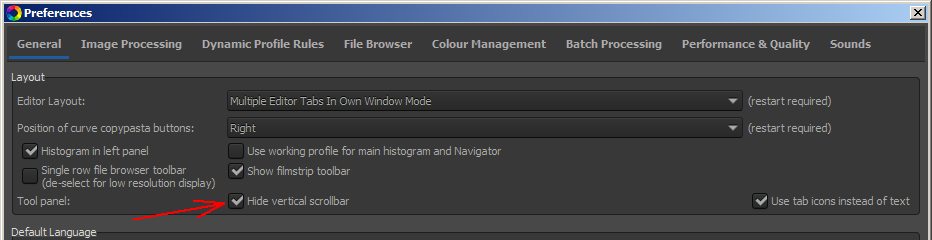
- is a different issue. It only happens when you don't hide the vertical scroll bar for the toolpanel
heckflosse
on 16 Jul 2017
confirmed!
Luncher91
on 16 Jul 2017
@heckflosse :
I'm already fixing the issues, ok?
Ok.
Hombre57
on 16 Jul 2017
@Luncher91 @Hombre57
with last commit:
- fixed
- fixed
- was already fixed
- fixed
- different issue
- fixed
I tested on Linux with three virtual monitors and on Windows7 with a single monitor
@Desmis, this commit should make this patch obsolete
heckflosse
on 16 Jul 2017
@heckflosse That's a very good work, but you should add my suggestion (posted in your patch) to fix a bug. I've still found a corner case but you don't need to fix it (not sure it can be fixed) :
- open an image (in screen A)
- maximize it
- drag it by the header bar and make it maximized to screen B directly (it becomes a window while being dragged)
- close this secondary window
- open an image and unmaximize it -> the window size is lost.
I wouldn't care of such corner case.
However there is something that would be worth to add : let the main window remember its screen too. This can be very useful with setups like mine, where I activate my laptop's monitor only when editing images, the main monitor being a 27" external monitor (which is Monitor 2 for Windows). If available, RT should open on the monitor we've moved it too. When I'm done with editing, I prefer disabling monitor 1 (the laptop's monitor). This could be done after 5.2 if you will.
Hombre57
on 16 Jul 2017
@Hombre57
I will try whether I can fix the corner case you mentioned above.
The bug you mentioned in the patch should be fixed with the latest commit already.
let the main window remember its screen too.
Absolutely! And maybe also the fullscreen state of the main window?
heckflosse
on 16 Jul 2017
@heckflosse
And maybe also the fullscreen state of the main window?
No, I don't think that it would be wise for the main screen. I mean that no other application I know of start fullscreen by default. Doing this for the secondary window is acceptable, but would be very uncommon for the main window I think.
Hombre57
on 16 Jul 2017
@Hombre57 Agreed
heckflosse
on 16 Jul 2017
- fix confirmed
- fix confirmed
- was already fixed
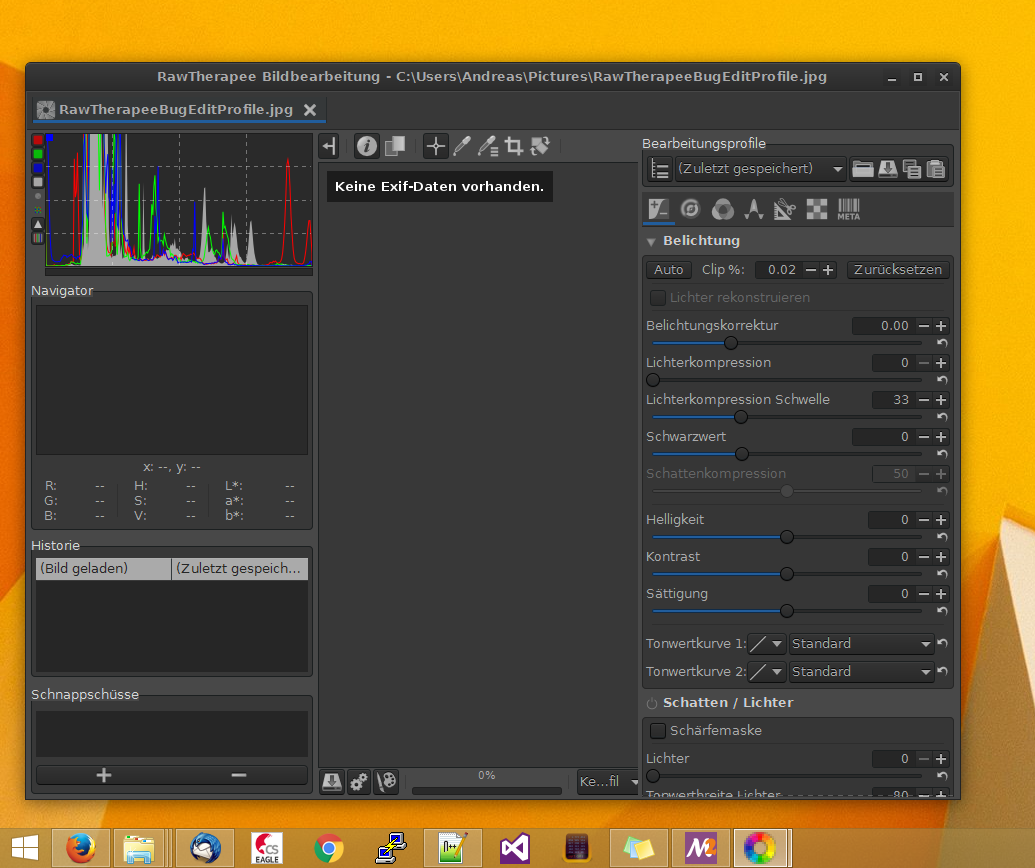
- slightly off-screen will be moved onto the screen completly with a bit of a margin - but I'd say it is fixed
- different issue
- fixed
Good job, @heckflosse !!!
Edit: According 4.
Move it slightly off the screen on the bottom left and close it
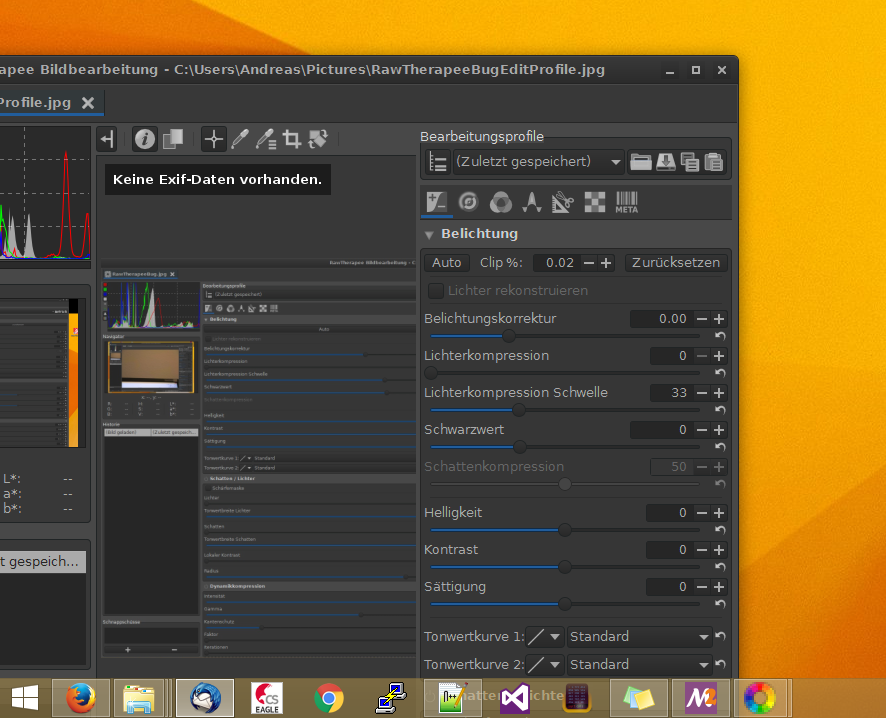
It will restore like that:
Luncher91
on 16 Jul 2017
As most of the meow issues are fixed now, I would like to merge meow_fixes into dev asap to get more tests before we release 5.2.
The remaining corner cases can be solved afterwards imho.
@agriggio @Beep6581 @Desmis @Floessie @Hombre57 any objections?
heckflosse
on 16 Jul 2017
Go!
Beep6581
on 16 Jul 2017
A Go! from Beep6581 here and one from Hombre57 on irc.
I will merge now...
heckflosse
on 16 Jul 2017
Hello all
I just tested all these new features... Now all seems to work fine in MEOW :)
A big thanks to all persons that improves MEOW
@Hombre57 , @heckflosse , @Beep6581 , etc.
I made a test with GDiview with branch : "locallab_dev" and "newlocallab" (newlocallab add Vibrance)
With 6 editors and "locallab_dev" ==> 7763 GDI
With 6 editors and "newlocallab" ==> 7767 GDI
"newlocallab" is different from "locallab_dev"
- more 1 expander
- more 3 sliders
- more 1 slider threshold
- more 1 diagonal curve
- more 3 checbox
and with that only more 4 GDI
jacques
 Desmis
on 17 Jul 2017
Desmis
on 17 Jul 2017
@Desmis Jacques, did you measure under the same conditions? For example the number of gdi handles is much larger when all expanders are expanded vs. all expanders collapsed.
heckflosse
on 17 Jul 2017
@heckflosse
Ingo
In exactly the same conditions !
:)
Desmis
on 17 Jul 2017
As suggested by @Hombre57, RT now remembers also the monitor of main window
aab3a60
heckflosse
on 17 Jul 2017
Related issues
heckflosse
·
88Comments
 agriggio
·
74Comments
Desmis
·
140Comments
Beep6581
·
77Comments
Floessie
·
94Comments
agriggio
·
74Comments
Desmis
·
140Comments
Beep6581
·
77Comments
Floessie
·
94Comments