All 110 comments
@heckflosse
Ok, but I am not at all a user of batch
Even I don't know at all, as I see WB settings in batch is different from Preview in File Browser.
For me, and I don't think, it's an algorithm problem with Itcwb, it is a mystery...a "black box"
Perhaps you have an idea ?
I will be absent all until this late afternoon
jacques
jacques
 Desmis
on 28 Feb 2020
Desmis
on 28 Feb 2020
I will have a look
 heckflosse
on 28 Feb 2020
heckflosse
on 28 Feb 2020
@heckflosse
Thank you
I don't understand how work "batch"...and where is this "specific" code ?
I tried with an "old" RT (whithout Itcwb), the behavior is erratic - especially with WB auto
jacques
Desmis
on 28 Feb 2020
@Desmis Jacques, I will use autold here
https://github.com/Beep6581/RawTherapee/blob/dev/rtengine/rtthumbnail.cc#L1133
and here
https://github.com/Beep6581/RawTherapee/blob/dev/rtgui/thumbnail.cc#L219
and here
https://github.com/Beep6581/RawTherapee/blob/dev/rtengine/improccoordinator.cc#L1587
heckflosse
on 28 Feb 2020
Now the old behaviour should be restored, but in batchedit setting autoitc still does not work correctly, looking...
heckflosse
on 28 Feb 2020
Another bug
1) open the image from above and apply auto RGB grey
2) open a different image
3) open image from above
4) apply auto itc
bug, nothing changes
5) apply camera wb
6) apply auto itc
now it works
heckflosse
on 28 Feb 2020
@Desmis Jacques, I think I found another bug. It's in this line
https://github.com/Beep6581/RawTherapee/blob/dev/rtengine/rawimagesource.cc#L4727
shouldn't that be 86 instead of 68 and all other nh after that incremented by 1?
As I am currently working on rawimagesource.cc I can change that if you agree
heckflosse
on 28 Feb 2020
@Desmis Jacques, probably some more bugs. Let me make an example for this line
https://github.com/Beep6581/RawTherapee/blob/dev/rtengine/rawimagesource.cc#L3910
If yc[y][x] has value 0.09 then it will be counted in nh = 1.
I guess that's wrong and it shouldn't be counted at all. Am I right?
heckflosse
on 28 Feb 2020
@heckflosse
Ingo
I just come back and I read your post
You are true in the 2 cases.
Like it's good that someone else rereads the code to avoid recklessness
Thank you again
Jacques
Desmis
on 28 Feb 2020
@Desmis Jacques, I will fix the issues in branch rawimagesource_cleanup
heckflosse
on 28 Feb 2020
@heckflosse
Ok, thank you very much
Desmis
on 28 Feb 2020
@heckflosse
Ingo
I compile branch "rawimagesource_cleanup", no problem
I read the code,...big improvment and optimization. Thank you :)
When I run Itcwb, the system crash
When I use "Batch edit" and white balance, neither "Auto rgb grey" or "Itcwb" does not work
Jacques
Desmis
on 29 Feb 2020
@Desmis I will merge dev into rawimagesource_cleanup. That should fix some bugs.
heckflosse
on 29 Feb 2020
@Desmis I fixed the crash
heckflosse
on 29 Feb 2020
@heckflosse
I just compile, no problem
I run , no crash :)
Thank you again
jacques
Desmis
on 29 Feb 2020
@Desmis Jacques, I made some changes to colortemp.cc which gave a good speedup for itcwb.
heckflosse
on 29 Feb 2020
@heckflosse
Yes there is a good speedup, but the results are wrong :)
Always T=5002 and tint=1
Jacques
Desmis
on 29 Feb 2020
Yes there is a good speedup, but the results are wrong :)
looking
heckflosse
on 29 Feb 2020
@Desmis Bug fixed
heckflosse
on 29 Feb 2020
@heckflosse
Ingo
Itcwb works well :)
Speedup about 70%
Example before 130ms now 40ms
Very good job
Thank you
Desmis
on 29 Feb 2020
Speedup about 70%
Example before 130ms now 40ms
I just detected that the real culprit is getrgbloc()
Takes 3 seconds for a 50 MP file. Looking...
heckflosse
on 29 Feb 2020
@Desmis Should be much more responsive now........
heckflosse
on 29 Feb 2020
@heckflosse
An explanation to my 70% !!
In fact I compare the "real" wb final process. With the old branch "automatic wb" (before suppression of others WB auto), there was for example "autorobust" who used much time...up to 3 seconds)
Of course there are 3 parts in WB auto
1) upstream with getrgbloc (you just improve)
2) general calculation of multiplier and orientation
3) Itcwb algorithm
I just add your name in the copyright of Itcwb
All your improvments are good, I agree
Thank you
Jacques
Desmis
on 1 Mar 2020
@Desmis Jacques, I'm just working on another speedup...
heckflosse
on 1 Mar 2020
@Desmis Jacques, about the 3 seconds I measured:
This was caused by my AMD CPU having only 4-way L1 cache. On Intel CPU with 8-way L1 cache this was no issue.
heckflosse
on 1 Mar 2020
@Desmis Jacques, I just pushed a new speedup. Now it's fast :smiley:
heckflosse
on 1 Mar 2020
@heckflosse
I just tested
Real speedup
Works fine :)
jacques
Desmis
on 1 Mar 2020
@Desmis Jacques, I just merged into dev. Will have a look now how to use autoitc in batch edit...
heckflosse
on 1 Mar 2020
@heckflosse
Ok thank you :)
Desmis
on 1 Mar 2020
@Desmis Jacques, are you interested in a raw where autoitc fails, though it was shot at daylight?
D700_20100125_2696.zip
heckflosse
on 4 Mar 2020
Of course
Thank you
Le mer. 4 mars 2020 18:59, Ingo Weyrich notifications@github.com a écrit :
@Desmis https://github.com/Desmis Jacques, are you interested in a raw
where autoitc fails, though it was shot at daylight?—
You are receiving this because you were mentioned.
Reply to this email directly, view it on GitHub
https://github.com/Beep6581/RawTherapee/issues/5676?email_source=notifications&email_token=ADJAQWMPQGUGA77LXFUDHYDRF2JIFA5CNFSM4K5MGAQKYY3PNVWWK3TUL52HS4DFVREXG43VMVBW63LNMVXHJKTDN5WW2ZLOORPWSZGOENZIWKY#issuecomment-594709291,
or unsubscribe
https://github.com/notifications/unsubscribe-auth/ADJAQWKMTN7JIKMPVBMYULTRF2JIFANCNFSM4K5MGAQA
.
Desmis
on 4 Mar 2020
@Desmis Jacques, don't get me wrong.
I really like itcwb as it gives very good results !!!
But sometimes it fails. Improving it could make it perfect ;-)
heckflosse
on 4 Mar 2020
No problem at all :)
Le mer. 4 mars 2020 20:04, Ingo Weyrich notifications@github.com a écrit :
@Desmis https://github.com/Desmis Jacques, don't get me wrong.
I really like itcwb as it gives very good results !!!
But sometimes it fails. Improving it could make it perfect ;-)—
You are receiving this because you were mentioned.
Reply to this email directly, view it on GitHub
https://github.com/Beep6581/RawTherapee/issues/5676?email_source=notifications&email_token=ADJAQWKFNL3NIWS2GJ53GLTRF2Q3PA5CNFSM4K5MGAQKYY3PNVWWK3TUL52HS4DFVREXG43VMVBW63LNMVXHJKTDN5WW2ZLOORPWSZGOENZUNYI#issuecomment-594757345,
or unsubscribe
https://github.com/notifications/unsubscribe-auth/ADJAQWJM5KGWUZJQY6TFRLTRF2Q3PANCNFSM4K5MGAQA
.
Desmis
on 4 Mar 2020
@heckflosse
Ingo
it's a very good example :)
The good question is "what is the good result in this case ?"
First, this case is typical for using Cat02 adaptation in Ciecam02.
Indeed Camera and "auto" give temp near 5600K.
If illuminant = D50 (majority of cases), our eyes , our brain will "adapt" this temp.
This is what "Preset cat02 automatic" does....
Try it.
However, this image has the characteristic of having a very reduced chroma range.
Which can lead to erroneous values.
I will examine if on the one hand we can refine histoxyY and in other hand spectrals datas...and see if there is differences.
Thank you
Jacques
But, there is no fire
Desmis
on 5 Mar 2020
@heckflosse
Hello Ingo
Branch "wbimprov"
I brings some changes (not very important, but refine the result)
- to histoxyY now there is 192 values instead of 158. All values added are near "neutral"
- to spectral datas : now there is 203 instead of 200. Values added are neutral with small red and small blue (In Lab 0..100 : a = +1 or +4 b= -3 or -10
The results are quite the same, in some cases a little different.
In the case of this photo
- what is the real illuminant ? D50, D45, D55, D60 ??? difficult because the sky is dumped...probably D60 ???
- what is the good result ? A good question ? It's only the person who take this photo, who can remember what were the real conditions.
But in this case, and if we remember the scene conditions (???) Ciecam is quasi indispensable
Jacques
But I think Itcwb does not failed here...It give a different result
Desmis
on 5 Mar 2020
@Desmis Jacques
It's only the person who take this photo, who can remember what were the real conditions.
I remember the scene was close to what camera wb gives
heckflosse
on 5 Mar 2020
@Desmis Jacques, I can provide more raw files from this loaction shot at the same day during some hours of walking around, if you like.
heckflosse
on 5 Mar 2020
@heckflosse
No problem to provide files, but if the illuminant is not "Daylight" (what I think) the results will always be not good....
The only exception is to have the real spectral datas of this illuminant this day. :) :)
It is the limit of each algorithm. as I said there is no "miracles", and itcwb by principle can only work with known illuminant
jacques
Desmis
on 5 Mar 2020
@Desmis Jacques, I just detected that itcwb is not recalculated when demosaicer is changed. May I include a fix into your new branch?
heckflosse
on 5 Mar 2020
@heckflosse
No problem you can do whatever you want, of course if it's usefull :)
Desmis
on 5 Mar 2020
@heckflosse
Somebody has reported that sometimes WBauto is not recalculated with upstream operations
Some of these opeartions influence Itcwb, I think at
- demoisaicing
- retinex
- white point
Could you in the "same" fix, make all this possible changes
Thank you :)
jacques
Desmis
on 5 Mar 2020
@Desmis
Maybe we should search the culprit somewhere else. Here's a screenshot showing the different output from different demosaicers when using itcwb. DCB and VNG4 look much better than AMaZE and RCD
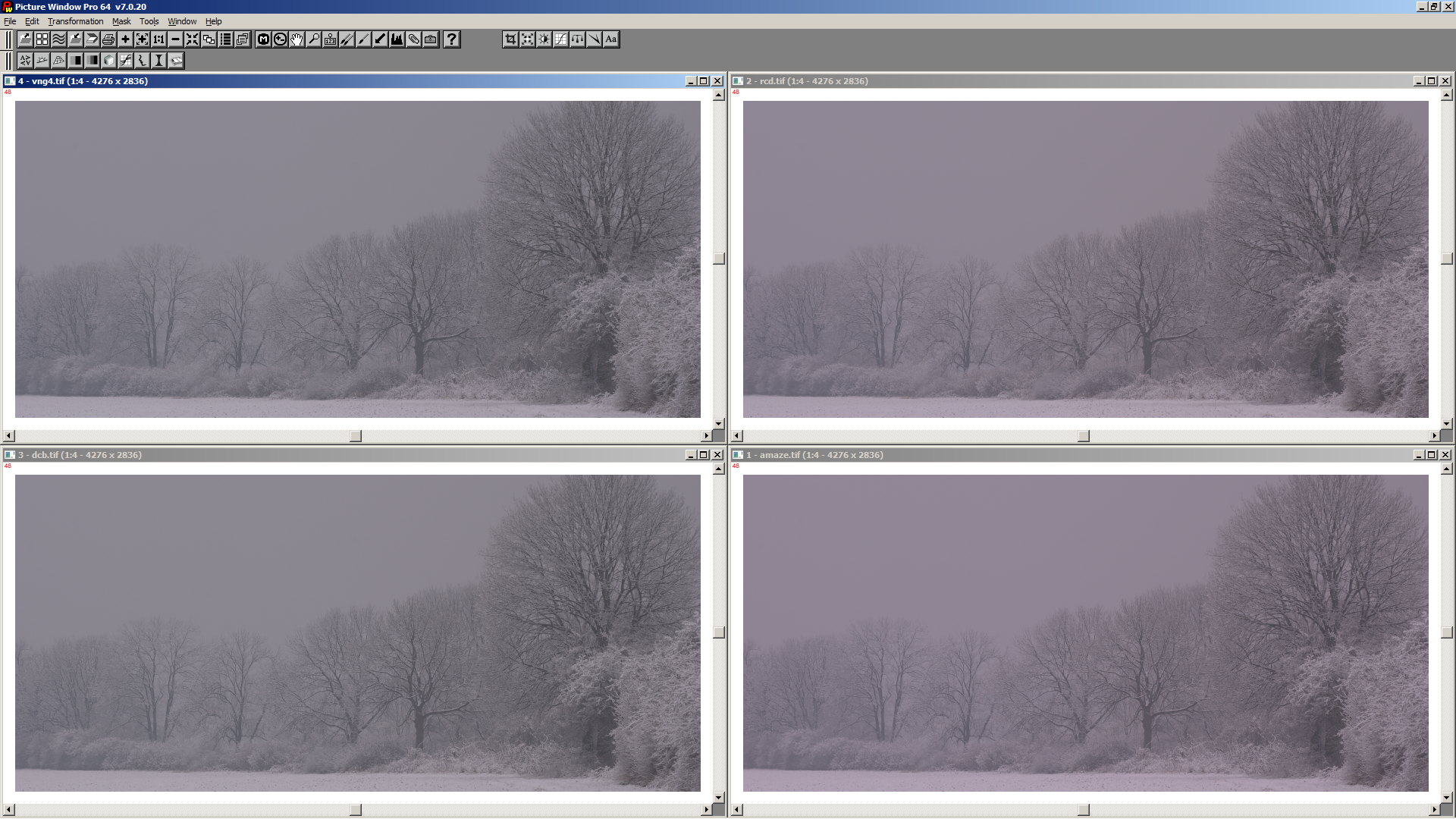
Could you in the "same" fix, make all this possible changes
I will fix that
heckflosse
on 5 Mar 2020
@heckflosse
Thank you very much :)
jacques
Desmis
on 5 Mar 2020
@heckflosse
confirmed : The difference between VNG4 and Amaze is important... why ? Of course demoisaicing change colors but on micro-models...
Desmis
on 5 Mar 2020
it is particularly on the greens that there is a difference (tint)
With Amaze and your snow file : T=5602 tint=0.971
With VNG4 T=5502 tint=1.040
Desmis
on 5 Mar 2020
VNG4 handles two greens, while AMaZE does handle only one...
heckflosse
on 5 Mar 2020
Perhaps this is visible here because very very low chroma...on this image
Do you think there is a "solution"... (I think no :) )
I tested on others image...about 0.06 in tint between Amaze and VNG4, not or less visible because important chroma.
jacques
Desmis
on 5 Mar 2020
@Desmis I think I found the culprit. By using an offset of 10 on my D700 files we only pick demosaiced RGB values from pixels at R locations. Using an offset of 9 I get this
Left offset 9, right offset 10
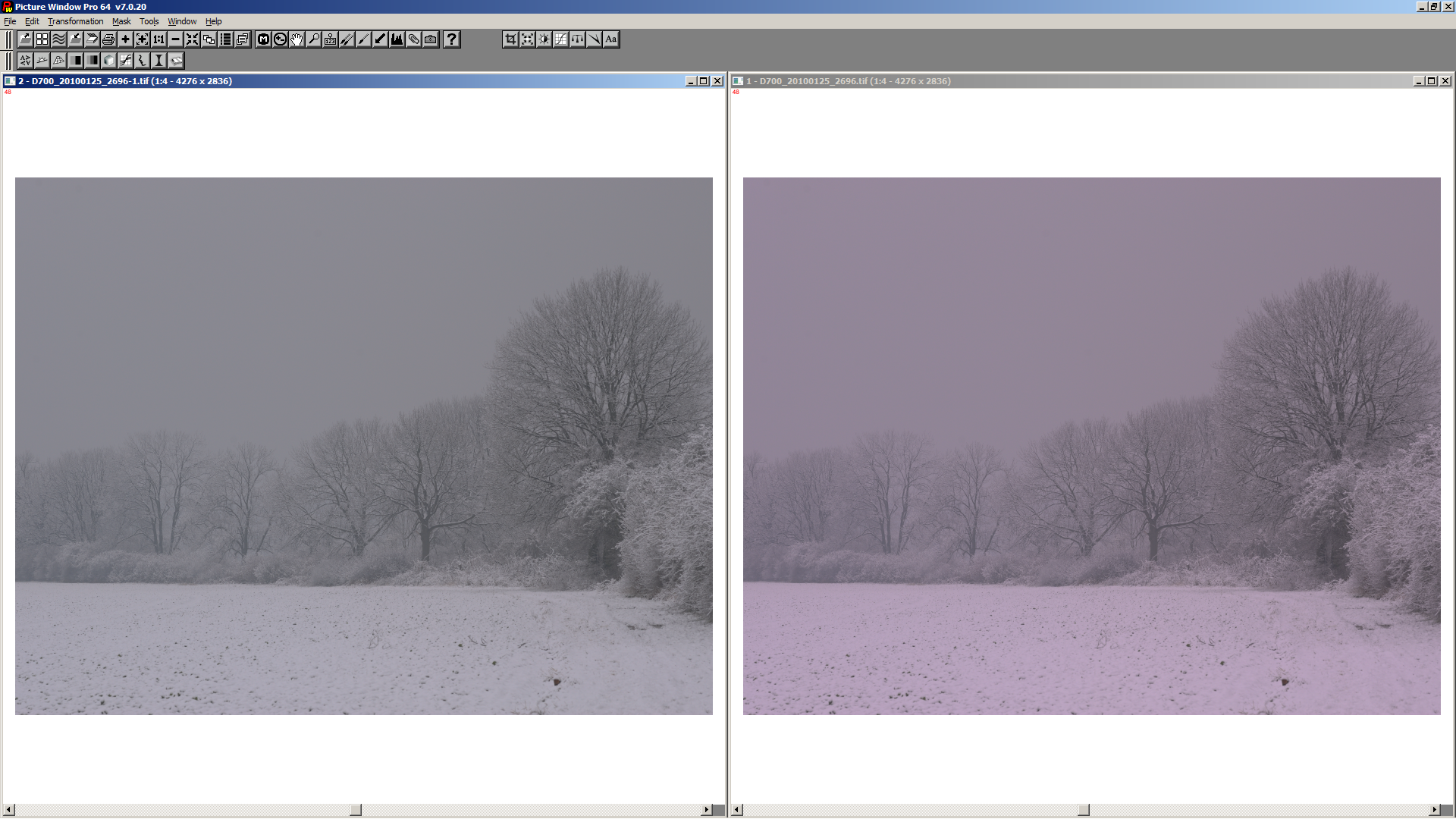
Can you try this patch, please?
diff --git a/rtengine/rawimagesource.cc b/rtengine/rawimagesource.cc
index f876b8902..867b0a0a9 100644
--- a/rtengine/rawimagesource.cc
+++ b/rtengine/rawimagesource.cc
@@ -5299,8 +5299,8 @@ void RawImageSource::getrgbloc(int begx, int begy, int yEn, int xEn, int cx, int
 {
 //    BENCHFUN
     //used by auto WB local to calculate red, green, blue in local region
-    const int bfw = W / 10 + ((W % 10) > 0 ? 1 : 0);//10 arbitrary value  ; perhaps 4 or 5 or 20
-    const int bfh = H / 10 + ((H % 10) > 0 ? 1 : 0);
+    const int bfw = W / 9 + ((W % 9) > 0 ? 1 : 0);//10 arbitrary value  ; perhaps 4 or 5 or 20
+    const int bfh = H / 9 + ((H % 9) > 0 ? 1 : 0);

     if (! greenloc) {
         greenloc(bfw, bfh);
@@ -5350,9 +5350,9 @@ void RawImageSource::getrgbloc(int begx, int begy, int yEn, int xEn, int cx, int
     #pragma omp parallel for
 #endif
     for (int i = 0; i < bfh; ++i) {
-        const int ii = i * 10;
+        const int ii = i * 9;
         if (ii < H) {
-            for (int j = 0, jj = 0; jj < W; ++j, jj += 10) {
+            for (int j = 0, jj = 0; jj < W; ++j, jj += 9) {
                 redloc[i][j] = red[ii][jj] * multip;
                 greenloc[i][j] = green[ii][jj] * multip;
                 blueloc[i][j] = blue[ii][jj] * multip;
hmmm, now AMaZE is better but the others are worse
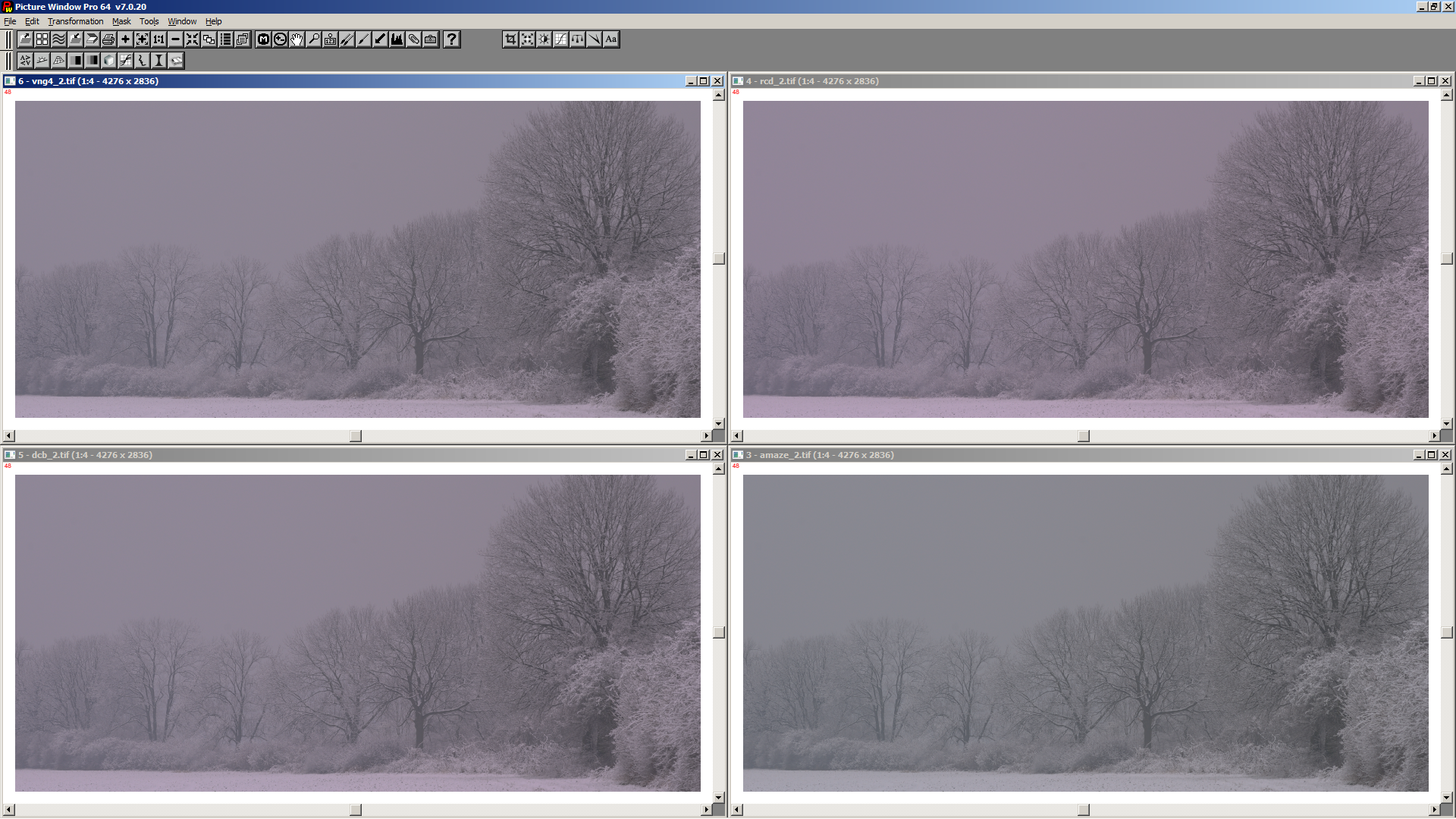
heckflosse
on 5 Mar 2020
There is perhaps a solution...to verify with many files
When I calculate "green" in Itcwb, if demoisaicing is not VNG4 (and ??) I add 0.06 (to verify) to green
Desmis
on 5 Mar 2020
@Desmis Jacques, there is some random behaviour which should be fixed before we continue as it does not allow conclusions. Searching...
heckflosse
on 5 Mar 2020
I tested your modification... I add also, I think necessary
"bool twotimes = false;
const int bfw = W / 9 + ((W % 9) > 0 ? 1 : 0);// 10 arbitrary value ; perhaps 4 or 5 or 20
const int bfh = H / 9 + ((H % 9) > 0 ? 1 : 0);
WBauto(tempref, greenref, redloc, greenloc, blueloc, bfw, bfh, avg_rm, avg_gm, avg_bm, tempitc, greenitc, studgood, twotimes, wbpar, begx, begy, yEn, xEn, cx, cy, cmp, raw);"
There is changes, but they are "versatile"... When you recalculated Itwb, the results are not always the same..perhaps there is somewhere another change to 10-->9
I retested on the new branch (wbimprov whitout patch), and now it is VNG4 who have less green...
Curious :)
Desmis
on 5 Mar 2020
I re re tested... with no-patch 10->9
No versatile or random behavior (to verify)
jacques
Desmis
on 5 Mar 2020
perhaps there is somewhere another change to 10-->9
Yes, I forgot one. Searching...
heckflosse
on 5 Mar 2020
This fixes the random behaviour
diff --git a/rtengine/rawimagesource.cc b/rtengine/rawimagesource.cc
index f876b8902..32428706c 100644
--- a/rtengine/rawimagesource.cc
+++ b/rtengine/rawimagesource.cc
@@ -5299,8 +5299,8 @@ void RawImageSource::getrgbloc(int begx, int begy, int yEn, int xEn, int cx, int
 {
 //    BENCHFUN
     //used by auto WB local to calculate red, green, blue in local region
-    const int bfw = W / 10 + ((W % 10) > 0 ? 1 : 0);//10 arbitrary value  ; perhaps 4 or 5 or 20
-    const int bfh = H / 10 + ((H % 10) > 0 ? 1 : 0);
+    const int bfw = W / 9 + ((W % 9) > 0 ? 1 : 0);//10 arbitrary value  ; perhaps 4 or 5 or 20
+    const int bfh = H / 9 + ((H % 9) > 0 ? 1 : 0);

     if (! greenloc) {
         greenloc(bfw, bfh);
@@ -5350,9 +5350,9 @@ void RawImageSource::getrgbloc(int begx, int begy, int yEn, int xEn, int cx, int
     #pragma omp parallel for
 #endif
     for (int i = 0; i < bfh; ++i) {
-        const int ii = i * 10;
+        const int ii = i * 9;
         if (ii < H) {
-            for (int j = 0, jj = 0; jj < W; ++j, jj += 10) {
+            for (int j = 0, jj = 0; j < bfw; ++j, jj += 9) {
                 redloc[i][j] = red[ii][jj] * multip;
                 greenloc[i][j] = green[ii][jj] * multip;
                 blueloc[i][j] = blue[ii][jj] * multip;
@@ -5552,8 +5552,8 @@ void RawImageSource::getAutoWBMultipliersitc(double & tempref, double & greenref

     if (wbpar.method == "autitcgreen") {
         bool twotimes = false;
-        const int bfw = W / 10 + ((W % 10) > 0 ? 1 : 0);// 10 arbitrary value  ; perhaps 4 or 5 or 20
-        const int bfh = H / 10 + ((H % 10) > 0 ? 1 : 0);
+        const int bfw = W / 9 + ((W % 9) > 0 ? 1 : 0);// 10 arbitrary value  ; perhaps 4 or 5 or 20
+        const int bfh = H / 9 + ((H % 9) > 0 ? 1 : 0);
         WBauto(tempref, greenref, redloc, greenloc, blueloc, bfw, bfh, avg_rm, avg_gm, avg_bm, tempitc, greenitc, studgood, twotimes, wbpar, begx, begy, yEn,  xEn,  cx,  cy, cmp, raw);
     }
OK, I will try tomorrow morning :)
Thank you
jacques
Desmis
on 5 Mar 2020
@heckflosse
I compile branch "wbimprov" with your changes.
Compile fine, no problem :)
Now with 9 instead of 10, no random behavior
But there is always differences betwwen demoisaicer
I tested "tint" with your snow file
fast, VNG4, EAHD, DCB tint=1.0
DCB+VNG4 tint = 1.02
IGV tint = 0.952
LMMSE tint = 0.943
Amaze, Amaze+VNG4, RCD+VNG4 tint =0.971
I made another change
I keep the change to histxyY (158 to 192 values)
I suppress the 3 new spectral datas, who seem to unbalance the calculations. I have spent most time (with 200 colors) to equilibrate the datas between red, orange, yellow, green, cyan, blue, magenta and all greys. Because as I use a delatE to find this "good" values it seems important to have an equilibration.
I will look to add (to verify) some datas to equilibrate better with your snow image, so that the color drift is attenuated (I hope)
In fact thie image, with its very low chroma, is a very good learning object :)
jacques
Desmis
on 6 Mar 2020
I'm trying to add spectral data to try to better balance the neutrals
I think 2 to 4 new datas
jacques
Desmis
on 6 Mar 2020
@heckflosse
Hello Ingo
I made 2 changes
1) add one data spectral neutral
2) suppress a work around I have put 2 years ago when chroma is low (that's what brought the color drift), and replace by another at the end....(small correction)
I think now it's work well, with small differences between demoisaicing method.... but that shows a) there is differences in color between Amaze, VNG4, etc; ; b) Itcwb take these small differences into account
And I say again "In fact this image, with its very low chroma, is a very good learning object" . Thank you :)
jacques
Desmis
on 6 Mar 2020
@Desmis Jacques, I tested your changes. Now it looks godd :+1:
I just pushed a fix to your branch
Ingo
heckflosse
on 6 Mar 2020
@Desmis Jacques
maybe we should change the offset from 9 to 7
9 does not work really well for xtrans (never picks from G locations)
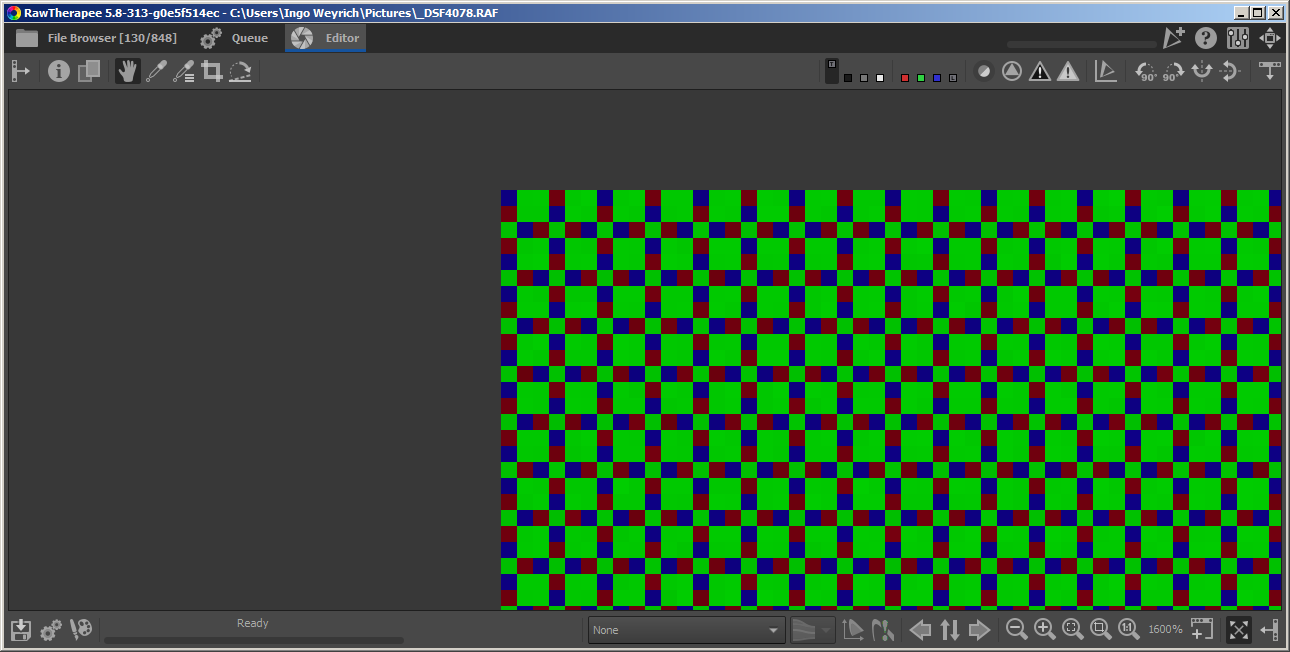
heckflosse
on 6 Mar 2020
@heckflosse
I will test :)
No problem.
The more we are near of 1, the more it's best
9 is better than 10
7 is better than 9
Jacques
Desmis
on 6 Mar 2020
@heckflosse
I just tested your change for demosaic, works well :)
Desmis
on 6 Mar 2020
@Desmis Jacques, Here an xtrans example
left camera wb, middle itcwb offset 9, right itcwb offset 7
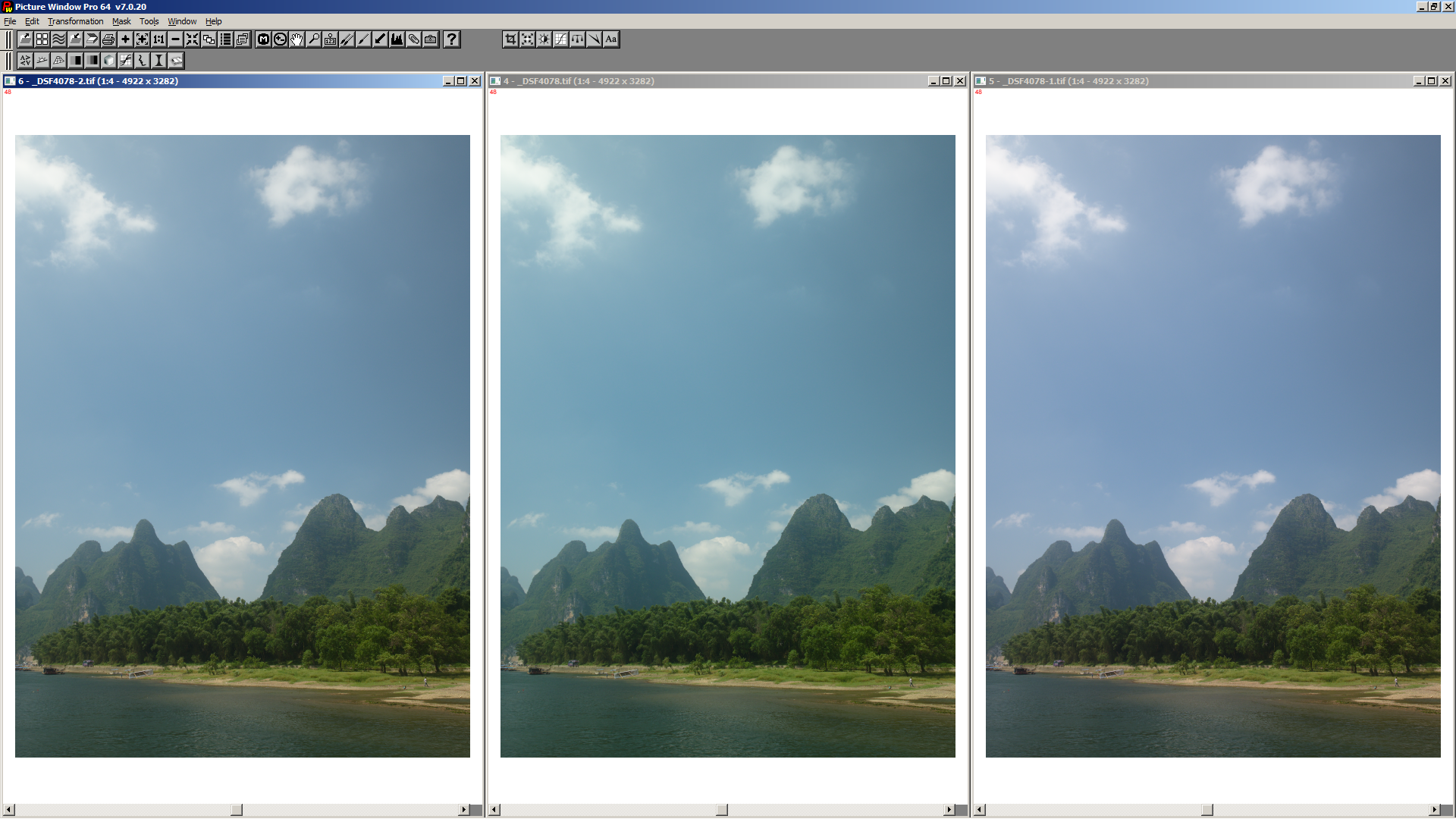
heckflosse
on 6 Mar 2020
Ok, clearly , Offset 7
Desmis
on 6 Mar 2020
@Desmis Jacques, for RAF from Fuji XT-3 itcwb always failes (does not matter whether I use 7 or 9). Can you confirm?
heckflosse
on 6 Mar 2020
I get a green cast for all X-T3 files. Files from other xtrans cameras work well. Strange...
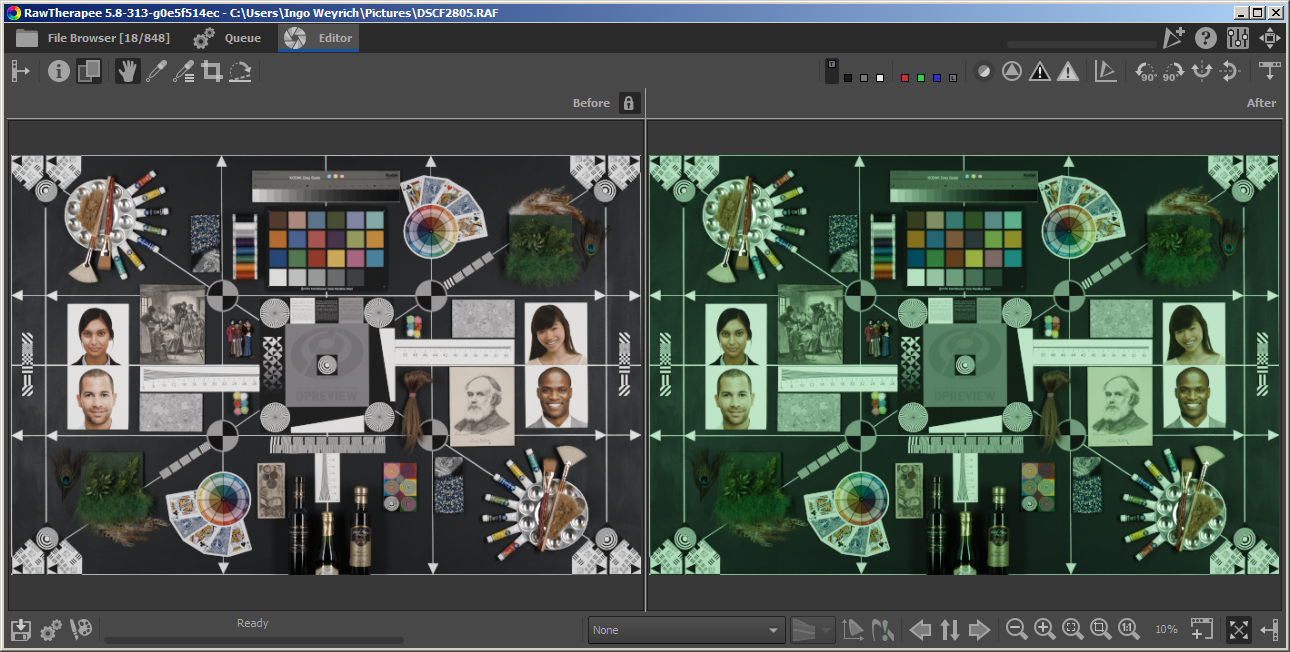
heckflosse
on 6 Mar 2020
Could be caused by 2.16M phase detection pixels on X-T3?
heckflosse
on 6 Mar 2020
@heckflosse
I don't have file X-T3, only X-T1 and X-T2
Can you provide one ?
jacques
Desmis
on 6 Mar 2020
@Desmis Unfortunately raw.pixls.us is down at the moment :frowning_face:
heckflosse
on 6 Mar 2020
@Desmis At the bottom of this page there are a lot
https://www.photographyblog.com/reviews/fujifilm_x_t3_review/sample_images
heckflosse
on 6 Mar 2020
@heckflosse
I think I have found why !
There is 2 reasons
First in Rawimagesource "Wbauto", I have arbitrary set a limit to green, now I have set this limite to 0.5
Second, for green there is a variable in options "Itcwb_greenrange" by default it's 0, I have put 2
With this 2 changes 2 images I have downlod works well
I will commit the first change, for the second what we do ?
Desmis
on 6 Mar 2020
Perhaps to avoid always big calculation ! we can add in Rawimagesource;cc
RangeGreen Rangegreenused;
if (settings->itcwb_greenrange == 0) {
    Rangegreenused = Rangestandard;
} else if (settings->itcwb_greenrange == 1) {
    Rangegreenused = Rangeextended;
} else {
    Rangegreenused = Rangemax;
}
a condition If raw file RAF Xt-3 etc...
Jacques
Desmis
on 6 Mar 2020
But the good question is why Fuji, set its camera with this settings
All raw files NEF, CR2, RAF (1 2), etc. have green about 1 (generally in daylight about 0.9 to 1.1)
Here we are near of 0.6... curious
We can also improve "green" : now there is 118 values with large intervals below 0.8... we can if need chnage that....As it is quasi only used by this RAF Files no importance for the others...
Desmis
on 6 Mar 2020
I will soon push a chnage for green, but excuse my bad knowledge in camera, how can we tell to rawimagesource a file is RAF x-T3 ?
Or could you make this change ?
Jacques
Desmis
on 6 Mar 2020
Push the change for green :)
jacques
Desmis
on 6 Mar 2020
@Desmis Jacques, sorry, was out with the dogs.
how can we tell to rawimagesource a file is RAF x-T3
Before we hardcode this stuff, let's think about a better way. Maybe we can add it to camconst.json?
heckflosse
on 6 Mar 2020
@heckflosse
how is Felix ?
For X-T3 fileand this code, you are decision maker :)
jacques
Desmis
on 6 Mar 2020
@Desmis Felix and Héloise are fine :smiley:
For X-T3 fileand this code
It's the same for X-T30. I have to think about that...
heckflosse
on 6 Mar 2020
@Desmis With your latest changes I don't get differences between offset 7 and 9 :tada:
So we can keep offset 9
heckflosse
on 6 Mar 2020
@heckflosse
OK, but for me the choice by Fuji to set green about 0.6 is curious....
Desmis
on 6 Mar 2020
@Desmis
OK, but for me the choice by Fuji to set green about 0.6 is curious....
isn't green calculated by RT in line 114 of colortemp.cc ?
heckflosse
on 6 Mar 2020
@heckflosse
Yes, but it's the result (I think) of choice made by Fuji....
finally it doesn't matter what is important is that it works :)
Desmis
on 6 Mar 2020
finally it doesn't matter what is important is that it works :)
:+1:
heckflosse
on 6 Mar 2020
@Desmis Jacques, no objections from me to merge your branch. Though X-T3(0) users need to change the options file, maybe a better solution is possible...
heckflosse
on 6 Mar 2020
OK, I merge now
Desmis
on 6 Mar 2020
@Desmis Jacques, this one still does not work well
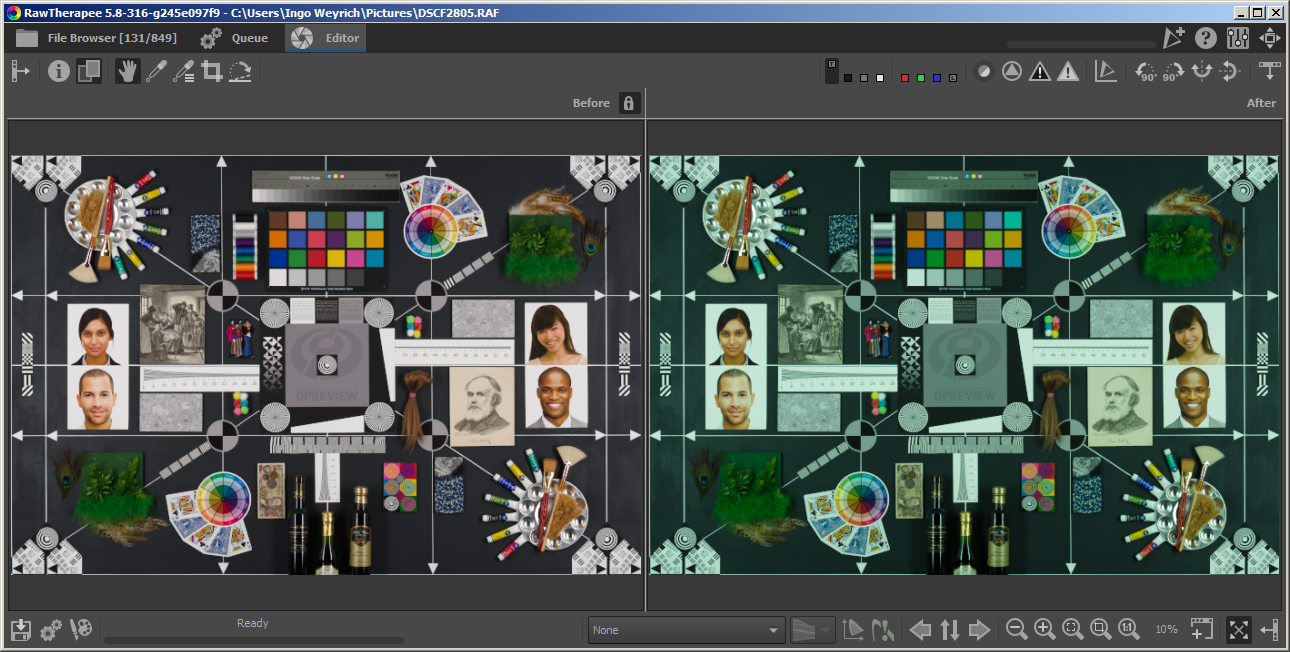
I'm looking for the link...
heckflosse
on 6 Mar 2020
@Desmis Jacques
https://www.dpreview.com/reviews/image-comparison
Then select the X-T3 and switch to raw and download
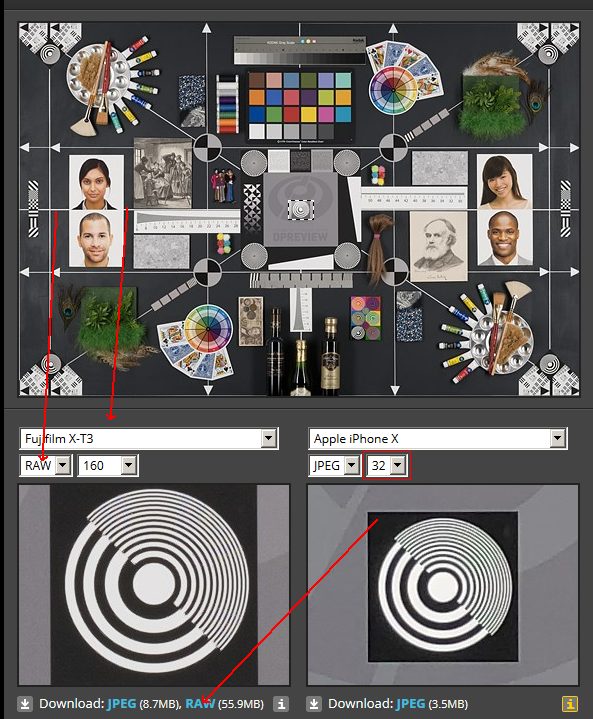
It's not the same file, but also shows the issue
heckflosse
on 6 Mar 2020
@heckflosse
Ingo
I dowload the file
It has a green very high. But why ? I don't know? Green is in the "range" but very low, Temp is very high about 9000K (camera and autowb)
I will look tomorrow
But what's the illuminant ? Solux ? other ? What CRI ?
jacques
Desmis
on 6 Mar 2020
But what's the illuminant ? Solux ? other ? What CRI ?
Daylight simulation, whatever that means...
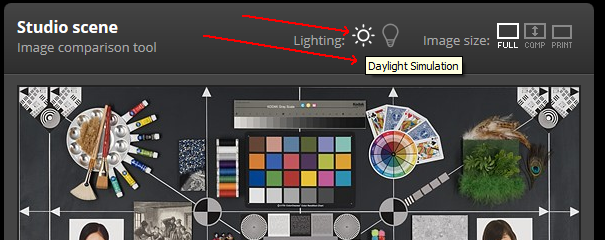
heckflosse
on 6 Mar 2020
@heckflosse
Strange daylight simulation !
When I read PhotoME (exif)
- light source : unknown
- white balance : manual
I think, curiously with these values it's not "Solux" (about 4700K - with green near of 1 and CRI about 95)....
I will see the code tomorrow, but here I think "Illuminant"
jacques
Desmis
on 6 Mar 2020
how is Felix ?
to clarify. 13 years old Felix is still alive :+1:
But P and I decided to bring some more live to his age. So we also have Héloise now:
https://discuss.pixls.us/t/16-weeks-old-heloise/15926
heckflosse
on 6 Mar 2020
@heckflosse @Desmis
I think the problem with X-T3 is the missing color matrix in camconst.cc
BTW there are two different adobestandard dcp profiles .. one gives stronger tint on neutral shots .. so I prefer V2
"dcraw_matrix": [ 13426,-6334,-1177,-4244,12136,2371,-580,1303,5980 ], // DNG_v11, standard_v2 d65
 iliasg
on 7 Mar 2020
iliasg
on 7 Mar 2020
@iliasg
Good analyze.
This explain why "Temperature" and "Tint" were curious
I tested with the matrix you give and the results are now standard . Now Tint is about 1
But the advantage now, it is that Algorithm is refine in cas of very low green :)
For the file "test" in dpreview, the result is less bad. I don't think Itcwb works well in this cases.
That's why I added a few years ago in WB choice "Lamp" currently with choices HMI, GTI, Judgell, Solux 3500K, 4100K, 4700K
For Dpreview, it will be nice to have the type of lamp and the spectral datas.
Ilias, can you make this change ? or do you want I make it:)
Desmis
on 7 Mar 2020
@heckflosse
Héloise is very nice :)
Desmis
on 7 Mar 2020
@Desmis Jacques, make it .. I have no commit rights.
iliasg
on 7 Mar 2020
@iliasg
Push change camsconst.json now :)
Desmis
on 7 Mar 2020
@iliasg @Desmis @heckflosse
I still have this greenlook in current dev with my RAW files (e.g. this Pentax and Sony sample file - they're under copyright).
Both files were working fine few weeks ago, so I guess it can't be camconst.
 Hombre57
on 18 May 2020
Hombre57
on 18 May 2020
@Hombre57 Confirmed with your files. Looking. Though not a bug related to this issue imho
heckflosse
on 19 May 2020
Bisecting now...
heckflosse
on 19 May 2020
It's caused by d4fc4dc083b59165f5ae731099472406dc734105
@rom9 any idea? I will have a llok as well
heckflosse
on 19 May 2020
It's very weird, i can only get it to balance properly if i restore the call to get_colorsCoeff in RawImageSource::load _and_ comment out the new one in ::preprocess ... but i get the same numbers out in both calls...
edit: i got it, c_black[3] is zero! I've lost it somehow while moving the code block. Sorry guys, fixing it ASAP
 rom9
on 19 May 2020
rom9
on 19 May 2020
Have no idea how this is possible, i've added a printf here and i see the first call from ::load sets the 4th elem to 1024, while the later call from ::preprocess sets it to 0.
I guess the underlying DCraw::cblack array gets mutated at some point in time between the two calls. I'll just avoid re-reading the c_black array from inside ::preprocess, it's not useful anyway.
rom9
on 19 May 2020
This might even be linked to the weird Heisenbug for GCC10 compilation...
 Thanatomanic
on 19 May 2020
Thanatomanic
on 19 May 2020
(sorry, i'm super-ignorant about C++ ...) currently i have:
gcc (GCC) 9.3.1 20200408 (Red Hat 9.3.1-2)
rom9
on 19 May 2020
@rom9 Please take a look here if you want to know more https://github.com/Beep6581/RawTherapee/issues/5749
It's just a wild guess that these are related. The bug in the link only shows up when compiling with GCC10, this bug shows up when compiling with GCC9.3 which is otherwise fine.
Thanatomanic
on 19 May 2020
@heckflosse Sorry, I though it was.
Hombre57
on 19 May 2020
Not too elegant, but it seems to do the job... :-D
rom9
on 19 May 2020
@rom9 Works fine here. :+1:
Hombre57
on 19 May 2020
Fix committed, but @heckflosse there is still a separate bug report here, right?
Thanatomanic
on 20 May 2020
Related issues
Thanatomanic
·
3Comments
 jade-nl
·
4Comments
heckflosse
·
4Comments
jade-nl
·
4Comments
heckflosse
·
4Comments
 LordPhoenixfr
·
4Comments
Hombre57
·
3Comments
LordPhoenixfr
·
4Comments
Hombre57
·
3Comments
Most helpful comment
@iliasg
Push change camsconst.json now :)