Rawtherapee: Make histogram lines thicker and blue histogram lighter
http://rawpedia.rawtherapee.com/Editor#Main_Histogram
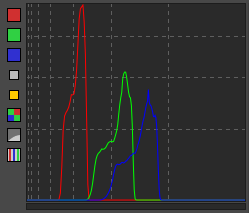
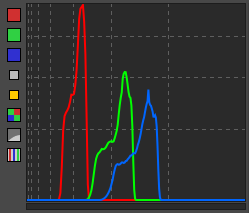
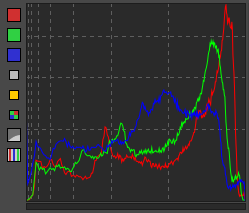
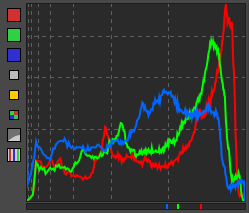
When making screenshots for RawPedia, I had to make small changes to the main histogram:
- I changed the blue histogram from
0.0, 0.0, 1.0to0.0, 0.4, 1.0as the pure-blue is difficult to see. - I changed the line thickness to 2px.
I made these changes because the vanilla histogram, especially the blue one, is difficult to see in anything but a dark environment (I'm writing this from the patio, calibrated screen on max brightness), even more so when printed on paper from RawPedia.
diff --git a/rtgui/histogrampanel.cc b/rtgui/histogrampanel.cc
index 12da0cc0d..d733e333f 100644
--- a/rtgui/histogrampanel.cc
+++ b/rtgui/histogrampanel.cc
@@ -142,7 +142,7 @@ HistogramPanel::HistogramPanel ()
     showGreen->set_image (showGreen->get_active() ? *greenImage : *greenImage_g);
     showBlue->set_image  (showBlue->get_active()  ? *blueImage  : *blueImage_g);
     showValue->set_image (showValue->get_active() ? *valueImage : *valueImage_g);
-    showChro->set_image  (showChro->get_active()   ? *chroImage : *chroImage_g);
+    showChro->set_image  (showChro->get_active()  ? *chroImage  : *chroImage_g);
     showRAW->set_image   (showRAW->get_active()   ? *rawImage   : *rawImage_g);
     if (options.histogramDrawMode == 0)
         showMode->set_image(*mode0Image);
@@ -471,7 +471,7 @@ void HistogramRGBArea::updateBackBuffer (int r, int g, int b, const Glib::ustrin
         cc->set_operator (Cairo::OPERATOR_OVER);

         cc->set_antialias(Cairo::ANTIALIAS_NONE);
-        cc->set_line_width (1.0 * s);
+        cc->set_line_width (2.0 * s);

         if ( r != -1 && g != -1 && b != -1 ) {
             if (needRed) {
@@ -502,7 +502,7 @@ void HistogramRGBArea::updateBackBuffer (int r, int g, int b, const Glib::ustrin

             if (needBlue) {
                 // Blue
-                cc->set_source_rgb(0.0, 0.0, 1.0);
+                cc->set_source_rgb(0.0, 0.4, 1.0);
                 if (options.histogramDrawMode < 2) {
                     cc->move_to(b * (winw - 1.) / 255.0 + 0.5*s, 0);
                     cc->line_to(b * (winw - 1.) / 255.0 + 0.5*s, winh - 0);
@@ -962,7 +962,7 @@ void HistogramArea::updateBackBuffer ()

         if (needBlue) {
             drawCurve(cr, bhchanged, realhistheight, w, h);
-            cr->set_source_rgb (0.0, 0.0, 1.0);
+            cr->set_source_rgb (0.0, 0.4, 1.0);
             cr->stroke ();
             drawMarks(cr, bhchanged, realhistheight, w, ui, oi);
         }
@@ -990,7 +990,7 @@ void HistogramArea::drawCurve(Cairo::RefPtr<Cairo::Context> &cr,
 {
     double s = RTScalable::getScale();

-    cr->set_line_width(s);
+    cr->set_line_width(2.0 * s);
     cr->move_to (0, vsize - 1);
     scale = scale <= 0.f ? 0.001f : scale; // avoid division by zero and negative values
- Before
- After
- Before
- After
Onions?
 Beep6581
All 4 comments
Garlic
 heckflosse
on 4 Sep 2019
heckflosse
on 4 Sep 2019
😄2
I like the thinner lines better, but the lighter blue is a winner.
 Floessie
on 4 Sep 2019
Floessie
on 4 Sep 2019
👍1
I agree with @Floessie, the blue is great, but the thicker lines make the whole thing look a little cramped when you minimize the size of the histogram.
 Thanatomanic
on 4 Sep 2019
Thanatomanic
on 4 Sep 2019
I personally liked the thicker lines, at least in the screenshots.
But additional enhancements can wait for 5.8 - I might also fiddle with that a bit when I get back. Maybe having the thickness depend on the histogram size would solve the issue of it being cramped when the histogram is small?
 Entropy512
on 5 Sep 2019
Entropy512
on 5 Sep 2019
Was this page helpful?
0 / 5 - 0 ratings
Related issues
heckflosse
·
4Comments
 LordPhoenixfr
·
4Comments
heckflosse
·
3Comments
heckflosse
·
4Comments
LordPhoenixfr
·
4Comments
heckflosse
·
3Comments
heckflosse
·
4Comments
 agriggio
·
4Comments
agriggio
·
4Comments
Most helpful comment
Garlic