Radarr Version: 3.0.0.3966
There is a problem with "Status Column" as it is not sortable. If "Status" is clicked to sort, nothing actually happens.
Being sorted according to status is very essential here, as there are hundreds of missing items, which some of them are currently being downloaded. I want to only perform actions on missing items which are not being downloaded at the moment. If the column is not sorted according to status, there is no way to achieve this.
Since sorting column doesn't work, I tried to exclude "Downloading" items through custom filter. Unfortunately, "Status Filter" has other values, which actually demonstrate the "Release Status", not the status of the item in Radarr database.
I have shown the issue in the following image:

I believe, "Availability Status" should also be included in the custom filters.
 dramirvf
All 18 comments
Sorting by Status works fine for me.
The custom filter does indeed show Release Status values, rather than Radarr status.
Also on Radarr Version: 3.0.0.3966
 dako98
on 23 Oct 2020
dako98
on 23 Oct 2020
Sorting by Status works fine for me.
The custom filter does indeed show Release Status values, rather than Radarr status.Also on Radarr Version: 3.0.0.3966
When the movie is downloaded, "Sorting by Status" works fine. When the movie is missing, "Sorting by Status" does not work as expected. In fact, it does not sort the following value properly: "Missing", "Downloading", "Error", "Paused", etc.
To reproduce, just change your filter to missing and make sure some of the missing videos are being downloaded in the download client.
dramirvf
on 24 Oct 2020
Sorting by Status works fine for me.
The custom filter does indeed show Release Status values, rather than Radarr status.Also on Radarr Version: 3.0.0.3966
I know that the custom filter does indeed show "Release Status" values, but it is much better to have another custom filter to show the current availability status or as you say "Radarr Status". Additionally, using the word "Status" is confusing for the user. Because there are two distinct applications of this word in the current UI; so it is better to use unique words for each across different sections of UI.
dramirvf
on 24 Oct 2020
The confusion regarding custom filters of status and release status is fixed in https://github.com/Radarr/Radarr/pull/4924
Since that issue is fixed - lets keep this issue focused on the problems sorting the "Status" column with values, "Missing", "Downloading", "Error", "Paused" --> I have not tried to reproduce it yet but it sounds like a legitimate issue.
 geogolem
on 8 Nov 2020
geogolem
on 8 Nov 2020
@geogolem As you mentioned, I copied the same post here:
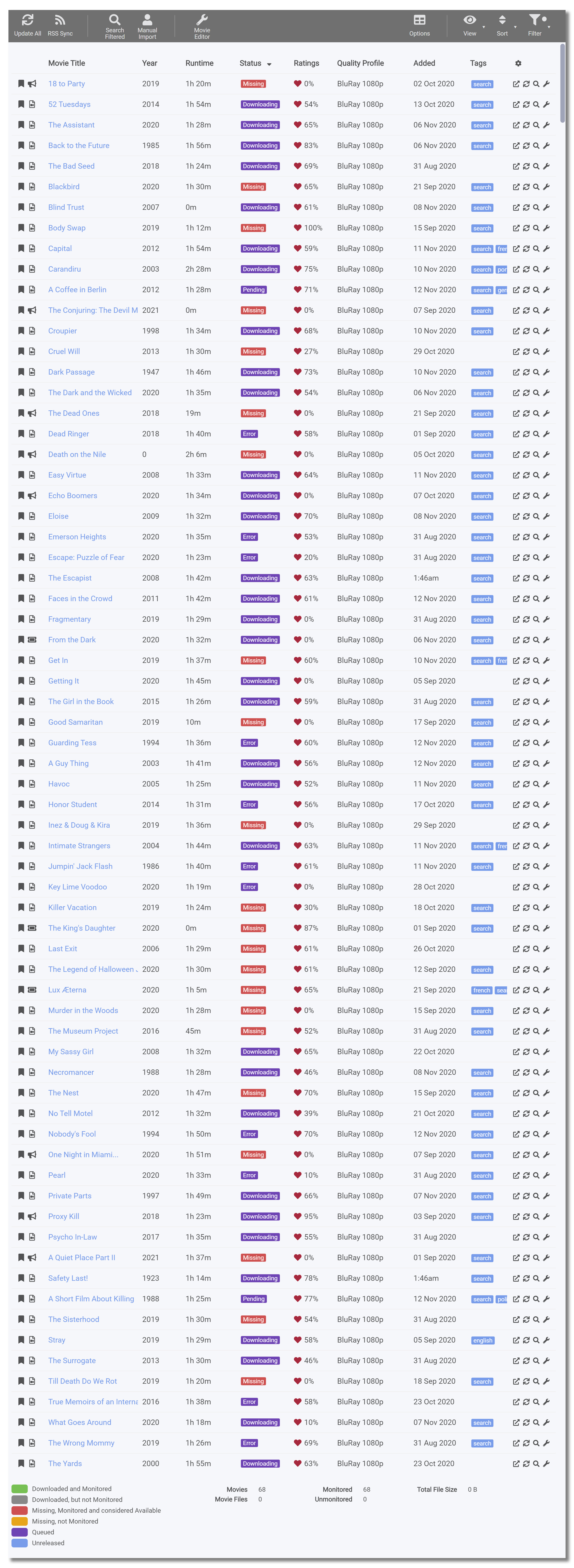
Thanks for the fix regarding "Status Filter", but all the issues regarding "Status" has not been resolved yet. For example, in the following image which shows "Missing Items", the "Status Column" still cannot be filtered in anyway. It is not even sortable by column.
So, there is no way to filter items which are "Missing", but "Not Being Downloaded".
dramirvf
on 13 Nov 2020
@dramirvf : lets bring that discussion here so that we can better keep track of it..
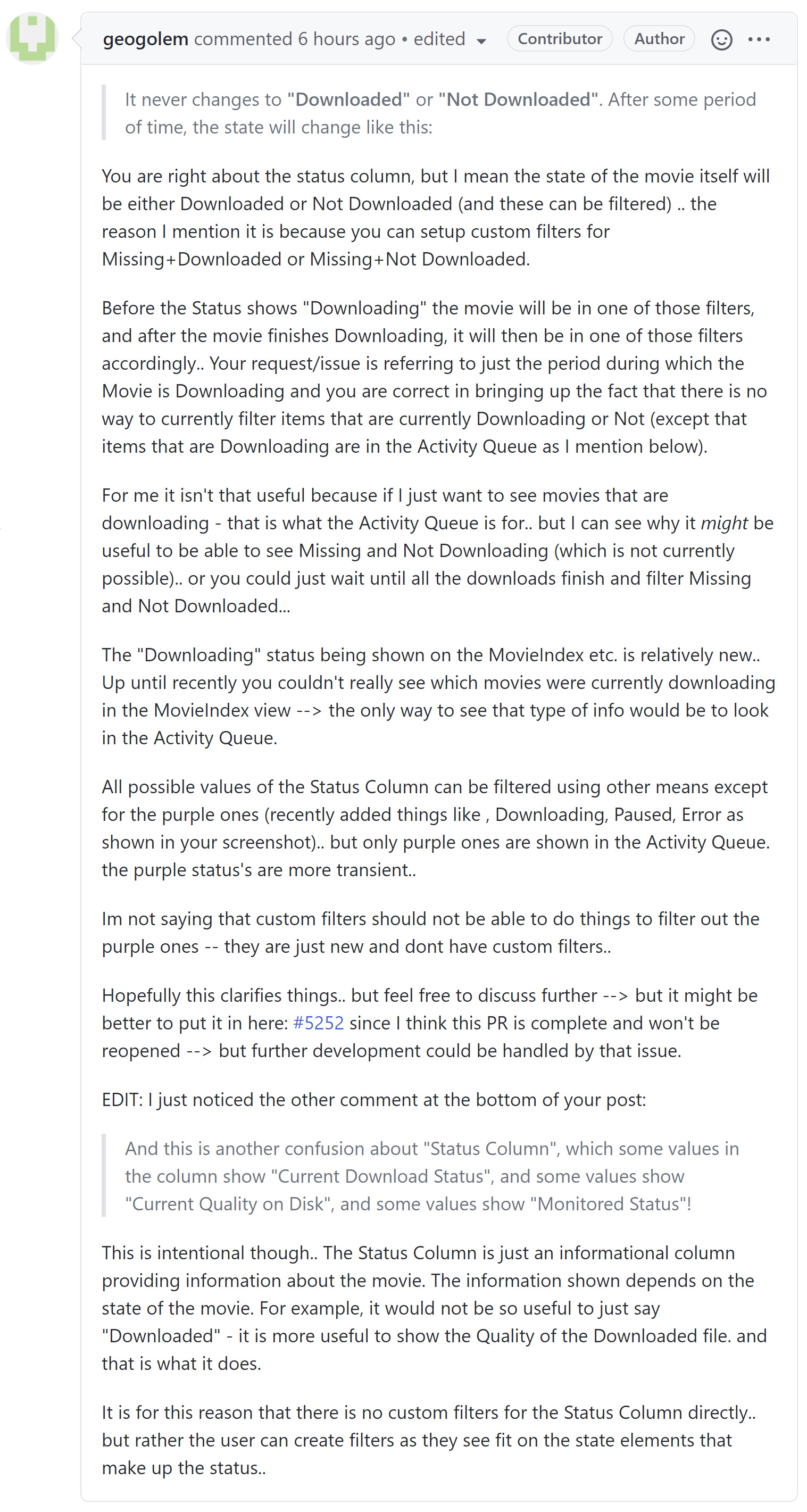
I am just pasting @austinwbest comment here because i think it does clarify things.
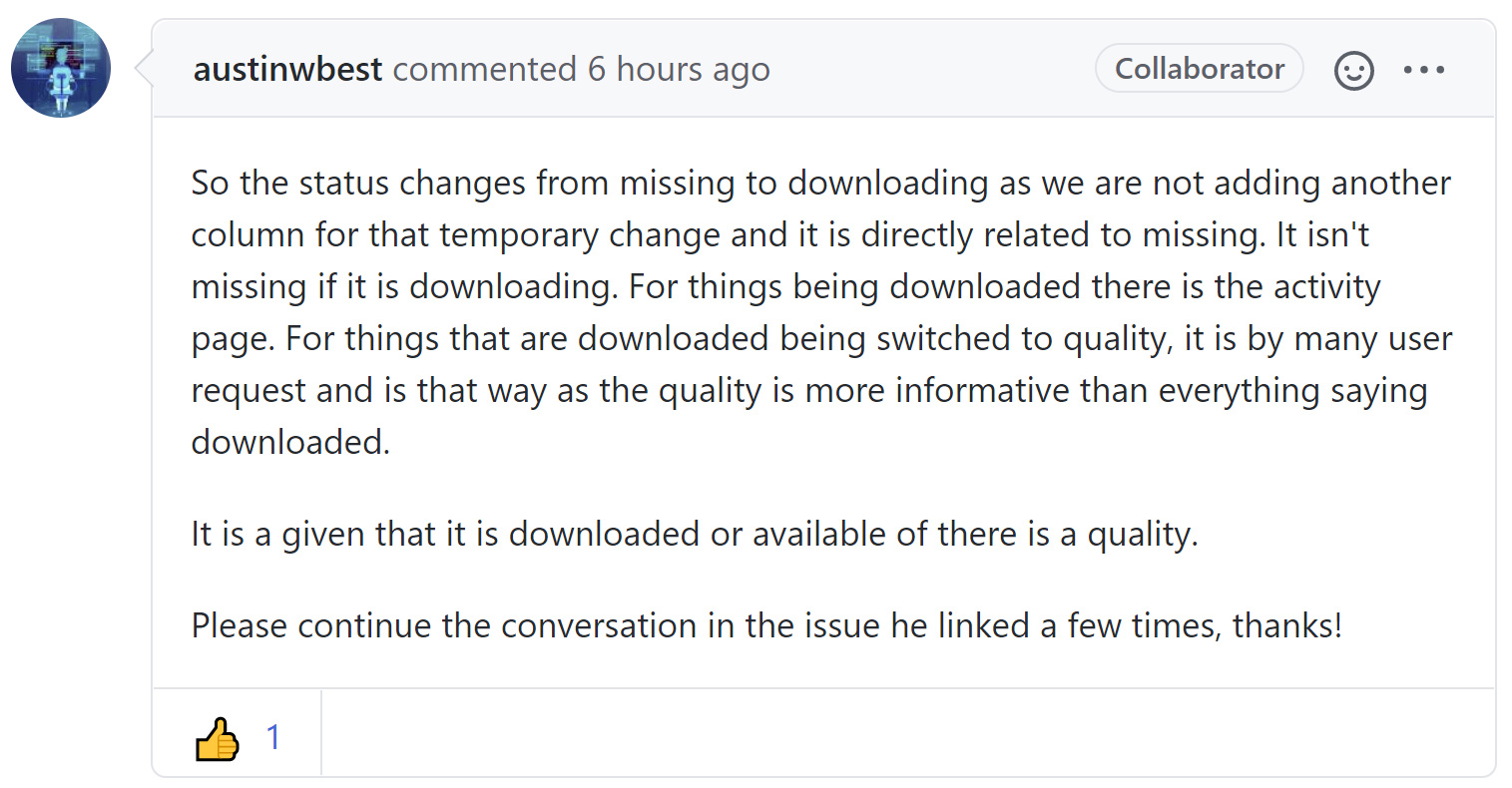
So the status changes from missing to downloading as we are not adding another column for that temporary change and it is directly related to missing. It isn't missing if it is downloading. For things being downloaded there is the activity page. For things that are downloaded being switched to quality, it is by many user request and is that way as the quality is more informative than everything saying downloaded.
It is a given that it is downloaded or available of there is a quality.
This makes sense. I need to test it out, but if that is the case, then this issue is really a non issue - with the exception of Status column sorting....
regarding AvailabilityStatus in custom filters -that is being handled by another issue: https://github.com/Radarr/Radarr/issues/2074 which has a PR and is almost complete but still a WIP - anythnig regarding availablitystatus custom filters should be discussed at https://github.com/Radarr/Radarr/issues/2074
Lets keep this issue focused strictly on Status Column Sorting (but feel free to further discuss the Missing+Downloading issue here if you still think it is an issue but based on @austinwbest comment I think it is a non issue)
geogolem
on 13 Nov 2020
@geogolem I just put a screenshot of our latest conversations here. We'll continue the discussion here.

dramirvf
on 14 Nov 2020
@dramirvf : lets bring that discussion here so that we can better keep track of it..
I am just pasting @austinwbest comment here because i think it does clarify things.
So the status changes from missing to downloading as we are not adding another column for that temporary change and it is directly related to missing. It isn't missing if it is downloading. For things being downloaded there is the activity page. For things that are downloaded being switched to quality, it is by many user request and is that way as the quality is more informative than everything saying downloaded.
It is a given that it is downloaded or available of there is a quality.
This makes sense. I need to test it out, but if that is the case, then this issue is really a non issue - with the exception of Status column sorting....
regarding AvailabilityStatus in custom filters -that is being handled by another issue: #2074 which has a PR and is almost complete but still a WIP - anythnig regarding availablitystatus custom filters should be discussed at #2074
Lets keep this issue focused strictly on Status Column Sorting (but feel free to further discuss the Missing+Downloading issue here if you still think it is an issue but based on @austinwbest comment I think it is a non issue)

I couldn't find a custom filter to show whether a movie itself is either "Downloaded" or "Not Downloaded".
Do you mean the following filter?

dramirvf
on 14 Nov 2020
I couldn't find a custom filter to show whether a movie itself is either "Downloaded" or "Not Downloaded".
Do you mean the following filter?
No - for downloaded or not use a filter like in the image below.
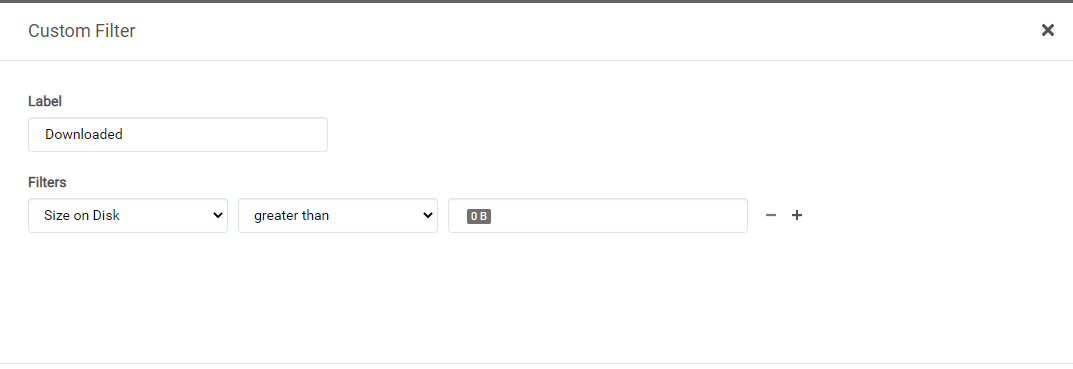
The ConsideredAvailable is whether or not Radarr considers the movie available based on it's MinimumAvailability Specification and the delay. For example, if ConsideredAvailable is true, Radarr will try to download the movie during its automatic searches.
If it is false, Radarr won't bother searching for it...
geogolem
on 14 Nov 2020
@geogolem

This part is the main concern. It's very useful to filter "Missing" items which are not currently being downloaded. For example, we may want to do a manual search for those items. Or trigger a search on "Missing" items which are not currently being downloaded (to avoid duplicate downloads), etc.
dramirvf
on 14 Nov 2020
@geogolem
This part is the main concern. It's very useful to filter "Missing" items which are not currently being downloaded. For example, we may want to do a manual search for those items. Or trigger a search on "Missing" items which are not currently being downloaded (to avoid duplicate downloads), etc.
I understand - but for me personally.. if I want to operate on stuff that is currently Downloading, I use the Activity Queue.
and stuff that is Downloading is generally only in that state for a relatively short period of time... so its usually either manageable just by inspection or 1 by 1.. or I can wait until stuff finishes downloading and carry on etc.
Having said all that I just tried to filter, Missing and it does show the Downloading.. and i think this is right as it is.. so I do see the issue.. I understand @austinwbest comment regarding if it is Downloading it isn't really Missing anymore, but that is not how Missing works..
I do think there should be a way to filter based on QueueState (I think that is what its called internally)...
geogolem
on 14 Nov 2020
I couldn't find a custom filter to show whether a movie itself is either "Downloaded" or "Not Downloaded".
Do you mean the following filter?No - for downloaded or not use a filter like in the image below.
The ConsideredAvailable is whether or not Radarr considers the movie available based on it's MinimumAvailability Specification and the delay. For example, if ConsideredAvailable is true, Radarr will try to download the movie during its automatic searches.
If it is false, Radarr won't bother searching for it...
Ok. In that case the following statement does not make sense:

Because if an item is "Missing" it is definitely "Not Downloaded". And if an item is already "Downloaded", it is definitely "Not Missing" anymore.
So what is the advantage of such filter as : "Missing+Downloaded" or "Missing+Not Downloaded" ?
dramirvf
on 14 Nov 2020
Lets just clarify the default filters:
All -- self explanatory
Monitored Only ( self explanatory)
Unmonitored (self explanatory)
Missing --> Monitored + Not Downloaded
Wanted --> Missing (Monitored + Not Downloaded) + ConsideredAvailable
Those are the default premade filters...
Ya you are right about the Missing+Downloaded thing (I was just confused) , lol.. ya the Missing +Downloaded thing isnt what I was thinking when I originally was typing..
i dont use any of these filters anyway.. I typically just try to download Movies that are "Wanted" and thats usually good enough for me..
You are correct, in that perhaps having a Queustate custom filter may be beneficial.. so you could then create a Custom filter of form
Monitored+Not Downloaded + QueueState=Not Downloading
Sorry for the confusion: Here is a screenshot of my personal filter setup:
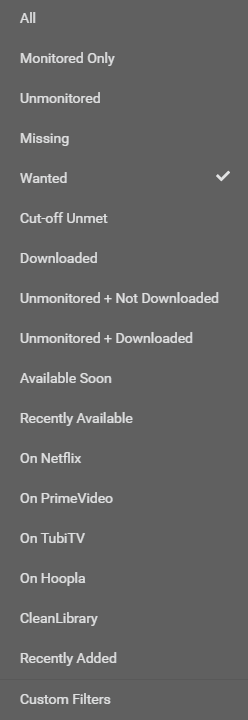
Some of those are not possible in official Radarr.. yet.. but the Recently Available, Soon Available, CleanLibrary ones all have PR's.. that make them possible.. the streaming platform ones might have PR's someday.
Having said all that I am looking into the code to see exactly how to describe what you want..
here is the code snippet that seems to handle the "Downloading, Error, Paused" stuff
  if (queueStatus) {
    const queueStatusText = getQueueStatusText(queueStatus, queueState);

    return (
      <div className={styles.center}>
        <Label
          title={queueStatusText}
          kind={kinds.QUEUE}
        >
          {queueStatusText}
        </Label>
      </div>
    );
  }
so we need to filter based on queueStatusText (but probably just call it QueueStatus in the custom filters layout. (Im posting the code more for my reference, if I need to come back to this later.
geogolem
on 14 Nov 2020
@geogolem
This part is the main concern. It's very useful to filter "Missing" items which are not currently being downloaded. For example, we may want to do a manual search for those items. Or trigger a search on "Missing" items which are not currently being downloaded (to avoid duplicate downloads), etc.I understand - but for me personally.. if I want to operate on stuff that is currently Downloading, I use the Activity Queue.
and stuff that is Downloading is generally only in that state for a relatively short period of time... so its usually either manageable just by inspection or 1 by 1.. or I can wait until stuff finishes downloading and carry on etc.
Having said all that I just tried to filter, Missing and it does show the Downloading.. and i think this is right as it is.. so I do see the issue.. I understand @austinwbest comment regarding if it is Downloading it isn't really Missing anymore, but that is not how Missing works..
I do think there should be a way to filter based on QueueState (I think that is what its called internally)...
The main issue is that the "Transient Downloading Status" is not necessarily "A Short Time". For example, I have 100+ simultaneous downloads through different download clients. Many of the torrents have few seeds and take a long time to finish. Furthermore, my download clients work only 5 hours per day. On top of that, I have a bandwidth limit of "10 Mbps" for download clients.
In such scenario (which is not uncommon among users), most of the items with few seeds take 2-3 week before either:
- The download is complete
- You come to conclusion that the torrent is fake/useless.
dramirvf
on 14 Nov 2020
@geogolem
This part is the main concern. It's very useful to filter "Missing" items which are not currently being downloaded. For example, we may want to do a manual search for those items. Or trigger a search on "Missing" items which are not currently being downloaded (to avoid duplicate downloads), etc.I understand - but for me personally.. if I want to operate on stuff that is currently Downloading, I use the Activity Queue.
and stuff that is Downloading is generally only in that state for a relatively short period of time... so its usually either manageable just by inspection or 1 by 1.. or I can wait until stuff finishes downloading and carry on etc.
Having said all that I just tried to filter, Missing and it does show the Downloading.. and i think this is right as it is.. so I do see the issue.. I understand @austinwbest comment regarding if it is Downloading it isn't really Missing anymore, but that is not how Missing works..
I do think there should be a way to filter based on QueueState (I think that is what its called internally)...The main issue is that the "Transient Downloading Status" is not necessarily "A Short Time". For example, I have 100+ simultaneous downloads through different download clients. Many of the torrents have few seeds and take a long time to finish. Furthermore, my download clients work only 5 hours per day. On top of that, I have a bandwidth limit of "10 Mbps" for download clients.
In such scenario (which is not uncommon among users), most of the items with few seeds take 2-3 week before either:
- The download is complete
- You come to conclusion that the torrent is fake/useless.
Ya ya, I know . Im never really said its useless - i just said not useful for me.. I do see how it might be useful to some people though, which is why I have been discussing it...
Its my bad that I thought it was a non-issue in response to austins comment.. I misunderstood.. i realized (kind of stupidly afterwards because it was obvious, since you were talking about the Missing filter)
So basically after all this discussion we seem to have boiled this issue into 2 distinct problems:
1) Status column is not properly sorting
2) no ability to create custom filters based on QueueState...
I'm quickly looking through the code now to see how feasible it is to add (2) (it might be a quick change - but either way, we can do it, its just a matter of when -- im looking now) .. I haven't even looked into reproducing (1).
Sorry for the confusion/ long discussion but its good that we have it to sort it out properly..
geogolem
on 14 Nov 2020
@geogolem
This part is the main concern. It's very useful to filter "Missing" items which are not currently being downloaded. For example, we may want to do a manual search for those items. Or trigger a search on "Missing" items which are not currently being downloaded (to avoid duplicate downloads), etc.I understand - but for me personally.. if I want to operate on stuff that is currently Downloading, I use the Activity Queue.
and stuff that is Downloading is generally only in that state for a relatively short period of time... so its usually either manageable just by inspection or 1 by 1.. or I can wait until stuff finishes downloading and carry on etc.
Having said all that I just tried to filter, Missing and it does show the Downloading.. and i think this is right as it is.. so I do see the issue.. I understand @austinwbest comment regarding if it is Downloading it isn't really Missing anymore, but that is not how Missing works..
I do think there should be a way to filter based on QueueState (I think that is what its called internally)...The main issue is that the "Transient Downloading Status" is not necessarily "A Short Time". For example, I have 100+ simultaneous downloads through different download clients. Many of the torrents have few seeds and take a long time to finish. Furthermore, my download clients work only 5 hours per day. On top of that, I have a bandwidth limit of "10 Mbps" for download clients.
In such scenario (which is not uncommon among users), most of the items with few seeds take 2-3 week before either:
- The download is complete
- You come to conclusion that the torrent is fake/useless.
Ya ya, I know . Im never really said its useless - i just said not useful for me.. I do see how it _might_ be useful to some people though, which is why I have been discussing it...
Its my bad that I thought it was a non-issue in response to austins comment.. I misunderstood.. i realized (kind of stupidly afterwards because it was obvious, since you were talking about the Missing filter)
So basically after all this discussion I have boiled this issue into 2 distinct problems:
- Status column is not properly sorting
- no ability to create custom filters based on QueueState...
I'm quickly looking through the code now to see how feasible it is to add (2) (it might be a quick change - but either way, we can do it, its just a matter of when -- im looking now) .. I haven't even looked into reproducing (1).
Sorry for the confusion/ long discussion but its good that we have it to sort it out properly..
That was exactly the point. Thanks.
dramirvf
on 14 Nov 2020
ya, the confusion arises because, when it is finally implemented, the custom filter will really have nothing to do with the Status column..
We realize the Status column can be kind of confusing.. because there is Release Status, .. I thought about renaming the Status column to StatusSummary or something.. but I dont know..
There was discussion about literally just having a Status custom filter, but almost everything related to it can be filtered by other means in the custom filters (with a few exceptions like the purple things etc.), and the Status that is in that column doesn't really directly correspond to anything in radarr, it is constructed by various other properties... which makes it not really fit the way custom filters work..
Either way, I seem to understand what you want, and possibly how to go about doing it. Stay tuned..
geogolem
on 14 Nov 2020
I started some work on this: https://github.com/geogolem/Radarr/commit/7d033c76bf416add271757a7af5799787114f206
still a WIP.
geogolem
on 14 Nov 2020
Related issues
 joelstitch
·
98Comments
joelstitch
·
98Comments
 gold007eye
·
67Comments
gold007eye
·
67Comments
 dejected1
·
52Comments
dejected1
·
52Comments
 ghost
·
36Comments
ghost
·
36Comments
 english06
·
38Comments
english06
·
38Comments