Radarr: Manual Search taking long to load.
Manual search not displaying results:
When i do a manual search for movies it never completes. I just get the dots bouncing back and forth forever. When checking the log it says it finished and parsed the results but it never displays them. This happens on multiple moves. The movie i searched for was Brain on Fire. The log says 98 results parsed but again, my display doesn't update, just bouncing dots. Windows 10 x64. Automatic search seems to work thou. It also doesn't seem to happen on all searches. None of the old james bond movies from the 60's and 70's worked, but all of the new james bond movies from 2000's worked. Weird.
0.2.0.778
Logs:
https://drive.google.com/file/d/0B1ENPF4iwjssQW9CeUZpUW5OdTA/view?usp=sharing
 dejected1
All 52 comments
Can you try a different browser, incognito window? Try opening the chrome dev console and see if there are any errors there.
 galli-leo
on 21 Jul 2017
galli-leo
on 21 Jul 2017
i just tried again and everything seems to be working as it should. Im not sure whats changed. It was happening for a good solid week before i made the post and persisted through server reboots and service restarts. Hmmm. well never mind than.
dejected1
on 21 Jul 2017
Let us know if it comes up again!
galli-leo
on 21 Jul 2017
It happening to me intermittently. After I restart the service, it's ok and then for no reason it happens again.
 sohlican
on 23 Jul 2017
sohlican
on 23 Jul 2017
it happened to me again too. it seems to work in incognito mode with chrome. Once i leave incognito mode, normal browsing mode seems to work too. I have six errors in the dev console: all the same thing
"Error in event handler for (unknown): TypeError: Cannot read property 'state' of undefined
at chrome-extension://enmgcoifcfalfohmfibbhiaojhafpehm/content.js:10:23" it works for a bit in normal browsing mode then stops displaying results again.
dejected1
on 23 Jul 2017
Can you clear cache and cookies?
galli-leo
on 23 Jul 2017
Cleared. Tried in normal mode on chrome. Took a long time, maybe twice as long as usual, but it worked. So what does that mean? Do i have a rogue cookie or file hanging out? I'd hate to have to clear my cache every time i want to manually search for a movie.
Same error in the dev console:
"brain-on-fire-340027:1 Error in event handler for (unknown): TypeError: Cannot read property 'state' of undefined
at chrome-extension://enmgcoifcfalfohmfibbhiaojhafpehm/content.js:10:23"
dejected1
on 23 Jul 2017
so right after i clear the cookies and cache the one test movie i was using worked: "brain on fire". I then tried searching for "Rio" and the same thing happened again. Bouncing dots, never displays search results. I let it set for about 5 minutes, never displayed. As before the log reports Processing 471 releases for the search but never displays.
dejected1
on 23 Jul 2017
@dejected1 Does the chrome dev console say anything?
galli-leo
on 25 Jul 2017
I'm having the same issue.
My Chrome console outputs this:
"Failed to load resource: the server responded with a status of 504 ()" to this address:
radarr.domain/api/release?movieId=id&sort_by=releaseWeight&order=asc, and logs are stuck at "processing 280 releases"
And this line appears on the console during the search:
sync received, re-fetching collection
Other releases work fine though.
I've tried on incognito tabs at Chrome and Opera. Same.
Using Radarr 0.2.0.778.
Any help would be appreciated.
 lattedesu
on 7 Aug 2017
lattedesu
on 7 Aug 2017
@lattedesu Can you click on network and then on that request? It should then tell you what went wrong.
galli-leo
on 7 Aug 2017
@galli-leo This is what happens after a minute:

Response is this:
<html>
<head><title>504 Gateway Time-out</title></head>
<body bgcolor="white">
<center><h1>504 Gateway Time-out</h1></center>
<hr><center>nginx/1.13.3</center>
</body>
</html>
<!-- a padding to disable MSIE and Chrome friendly error page -->
<!-- a padding to disable MSIE and Chrome friendly error page -->
<!-- a padding to disable MSIE and Chrome friendly error page -->
<!-- a padding to disable MSIE and Chrome friendly error page -->
<!-- a padding to disable MSIE and Chrome friendly error page -->
<!-- a padding to disable MSIE and Chrome friendly error page -->
It's behind an nginx reverse proxy, so this time I tried directly (without nginx), and it responded after a whole 1.2 minutes!
I wasn't expecting a search taking that long to be honest, it usually takes seconds. Server is a dedicated machine on a datacenter, running almost no processes and has a i5 cpu.
As a solution for nginx reverse proxy, I simply added these lines below proxy_pass parameter at my nginx config:
proxy_connect_timeout       300;
proxy_send_timeout          300;
proxy_read_timeout          300;
send_timeout                300;
It became something like this:
location / {
    proxy_pass         http://127.0.0.1:1234;
    proxy_set_header Host $host;
    proxy_set_header X-Real-IP $remote_addr;
    proxy_set_header X-Forwarded-For $proxy_add_x_forwarded_for;

    proxy_connect_timeout       300;
    proxy_send_timeout          300;
    proxy_read_timeout          300;
    send_timeout                300;

}
And voila! It works! 🎉
Thank you for directing me into the right direction.
@dejected1 if you're on a nginx reverse proxy like me, this may be the reason for your case, too.
lattedesu
on 7 Aug 2017
IAM behind ngnix proxy. I'll try your code let you know
dejected1
on 7 Aug 2017
@lattedesu How many indexers do you have added? Also how many releases did Radarr display after that long wait?
galli-leo
on 8 Aug 2017
@lattedesu i added your code to my nginx and so far so good. The issue was intermittent to begin with so hopefully it doesn't pop up again.
@galli-leo i have 15 indexers. when it works it takes less then 30 seconds. When it does take a long time it displayed less than 10 releases.
dejected1
on 8 Aug 2017
@galli-leo Only 4 indexers. 3 are actually private trackers from jackett, other one is a Usenet indexer added as newnzab. Radarr found 280 releases, and 278 of them are shown at the table (searched for the word "days", 278 results). Some of them are unrelated to the official movie, but I guess it's Jackett's or tracker's fault (movie name contains the words "of" and "the" which may give false positive results I guess).
To check, I re-did the search, it took whole 1.8 minutes!
I first thought one of the trackers or the newnzab source is laggy, however, if I search for another movie, it works just fine and fast.
To confirm; I did the exact search at Jackett interface, the search took 20 secs for 7 trackers (some of them are not in Radarr), and the my manual check of newnzab usenet indexer is fast, so I believe something else is happening here.
lattedesu
on 8 Aug 2017
@lattedesu Probably our parsing. Are you using ParsingLeniency?
galli-leo
on 8 Aug 2017
@galli-leo Parser Leniency is set as "strict". I didn't alter that setting at all.
lattedesu
on 8 Aug 2017
@lattedesu What system are you running radarr on?
galli-leo
on 8 Aug 2017
@galli-leo Debian stretch x64 on Mono 5:
➜ ~ cat /etc/debian_version
9.1
➜ ~ mono --version
Mono JIT compiler version 5.0.1.1 (2017-02/5077205 Thu May 25 09:19:47 UTC 2017)
Copyright (C) 2002-2014 Novell, Inc, Xamarin Inc and Contributors. www.mono-project.com
TLS: __thread
SIGSEGV: altstack
Notifications: epoll
Architecture: amd64
Disabled: none
Misc: softdebug
LLVM: supported, not enabled.
GC: sgen (concurrent by default)
➜ ~ cat /etc/apt/sources.list.d/mono-xamarin.list
deb http://download.mono-project.com/repo/debian stretch main
deb http://download.mono-project.com/repo/debian wheezy-libjpeg62-compat main
➜ ~ uname -a
Linux hostname.ipaddress.ext 3.14.32-xxxx-grs-ipv6-64 #9 SMP Thu Oct 20 14:53:52 CEST 2016 x86_64 GNU/Linux
➜ ~ lsb_release -a
No LSB modules are available.
Distributor ID: Debian
Description: Debian GNU/Linux 9.1 (stretch)
Release: 8
Codename: stretch
➜ ~
@lattedesu Ah I meant more like, cpu & ram.
galli-leo
on 12 Aug 2017
@galli-leo
CPU:
Intel(R) Core(TM) i5-2400 CPU @ 3.10GHz
https://www.cpubenchmark.net/cpu.php?cpu=Intel+Core+i5-2400+%40+3.10GHz
Memory: 16GB
➜ ~ free -mh
total used free shared buff/cache available
Mem: 15G 2.3G 98M 77M 13G 13G
@lattedesu That should be fine.
galli-leo
on 13 Aug 2017
Can you guys report back if loading search results is going better on the latest develop release? I have made some changes that should speed it up a lot.
galli-leo
on 30 Jan 2018
@galli-leo I can't see it in the releases. Maybe possible caching is happening. I'll try and let you know.
lattedesu
on 30 Jan 2018
@lattedesu The changes were made some time ago (IIRC 2 months back)
galli-leo
on 30 Jan 2018
@galli-leo I tried searching for a certain movie which has a ring, dragons, elves, orcs and dwarves, containing words "of" and "the" in the movie title, assuming various releases will be found :)
And it only took 56 secs, finding 139 results (I have removed some indexers from Radarr and Jackett).
Jackett found them in about ~12 secs.
I can say it's better, but I assume not quite there yet.
My current Radarr version: 0.2.0.910 - 2017-12-15 develop
lattedesu
on 30 Jan 2018
Hmm how many movies do you have? And, could you post a trace log of the search (btw. no need to hide release names or movies names as long as you don’t post direct links to torrents ;)
galli-leo
on 30 Jan 2018
@galli-leo , 39 movies total in Radarr.
How do I post that log, if you'd assist me I'd gladly post
Also, I try to avoid any unwanted attention, that's why I masked :)
lattedesu
on 30 Jan 2018
By the way, these are at the logs, if that would help:
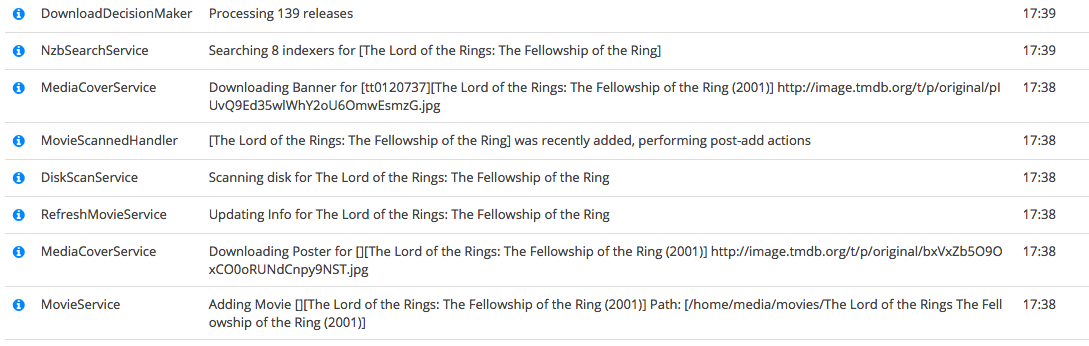
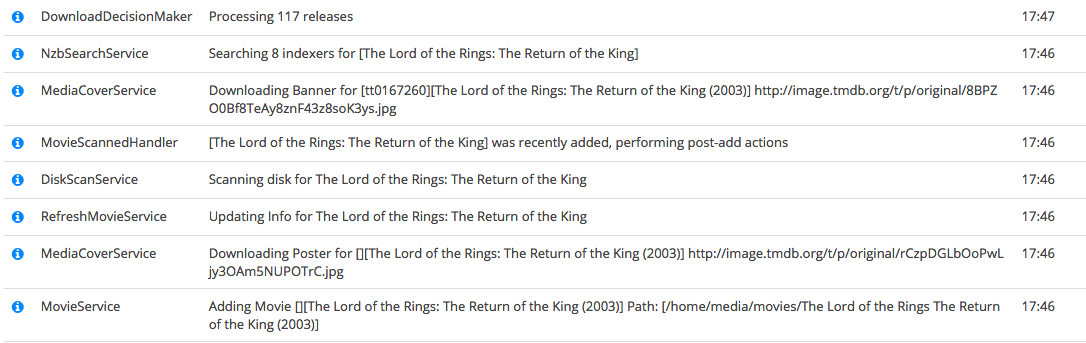
(not masking the movie name in images hehe)
lattedesu
on 30 Jan 2018
@lattedesu First you have to set the log level to trace (Settings -> General -> Log Level). Then the trace log will be generated and can be found under System -> Logs -> Files.
galli-leo
on 30 Jan 2018
This issue has been automatically marked as stale because it has not had recent activity. Please verify that this is still an issue with the latest version of Radarr and report back. Otherwise this issue will be closed.
![stale[bot] picture](https://avatars3.githubusercontent.com/in/1724?v=4&s=40) stale[bot]
on 31 Mar 2018
stale[bot]
on 31 Mar 2018
I get this same error currently in Radarr version 0.2.0.1120. I am using nginx/1.12.2 as my reverse proxy (RHEL 7.5 Maipo on m2.micro instance). I have 12 torrent indexers set up (via Jackett) and I got 311 reports, but they didn't show due to the 504 response from nginx. The solution to extend the timeout duration resolved the problem, however I did also receive a 504 for the /api/diskspace request. I have the timeout set to 120 seconds and that wasn't enough.
If there is any more information I can provide that will assist in developing a solution, I'm happy to help. I am commenting to announce that this issue is still outstanding.
 cybersteel8
on 13 Aug 2018
cybersteel8
on 13 Aug 2018
@cybersteel8 From my extensive profiling, debug logging seems to be the biggest culprit. I achieved a 10x speedup when setting the log level to info. The rest of the stuff, is mostly impossible to optimize.
galli-leo
on 26 Aug 2018
This is happening to me all of the sudden. I get 504. Nginx on Windows 10host with reverse proxy. Auto sear he's go through without issue.
 goldenpipes
on 1 Nov 2018
goldenpipes
on 1 Nov 2018
This is happening to me as well on synology using the latest synocommunity package with reverse proxy set up
 a575606
on 23 Jan 2019
a575606
on 23 Jan 2019
In your nginx.conf what values did you set for the following directives?
proxy_connect_timeout
proxy_send_timeout
proxy_read_timeout
send_timeout
I suggest setting them to 300 to see if it takes longer than 5 minutes. Also, what logging level is Radarr set to?
cybersteel8
on 24 Jan 2019
I'm running radarr on synology via the syno community package. I haven't looked at the nginx timeout settings, but I'm assuming it's set to 600ms based on the browser console. I don't have a custom profile set up for radarr and both sonarr and lidarr are running in a similar manner without problems, so I don't think the issue is coming from nginx unless I'm missing something.
Looking through the debug logs while running a manual search, for 326 releases DownloadDecisionMaker seems to go through them in about 2 seconds. I'm not seeing any errors if I'm interpreting the logs correctly.
In the browser, however, I'm getting tons of 504 errors on this URL: /signalr/connect?transport=longPolling&connectionToken=xxx
This is what I see in the console, repeated over and over again every 60s when the script times out:
jquery.js:9664 **GET** _https://MY_RADAR_URL/signalr/reconnect?transport=longPolling&connectionToken=CONNECTION_TOKEN **504**
send @ jquery.js:9664
ajax @ jquery.js:9215
$.ajax @ jquery.ajax.js:21
poll @ jquery.signalR.js:1666
(anonymous) @ jquery.signalR.js:1745
fire @ jquery.js:3148
fireWith @ jquery.js:3260
deferred.(anonymous function) @ jquery.js:3350
success @ jquery.signalR.js:769
fire @ jquery.js:3148
fireWith @ jquery.js:3260
done @ jquery.js:9314
callback @ jquery.js:9718
XMLHttpRequest.send (async)
# << line above repeat about 100 times >>
SignalRBroadcaster.js:32 SignalR: [reconnecting]
SignalRBroadcaster.js:32 SignalR: [connected]
SignalRBroadcaster.js:32 SignalR: [reconnecting]
SignalRBroadcaster.js:32 SignalR: [connected]
backbone.signalr.mixin.js:15 sync received, re-fetching collection
SignalRBroadcaster.js:32 SignalR: [reconnecting]
SignalRBroadcaster.js:32 SignalR: [connected]
SignalRBroadcaster.js:32 SignalR: [reconnecting]
SignalRBroadcaster.js:32 SignalR: [connected]
Any ideas of anything to check? I'm thinking of migrating to a docker container instead of using the synology package, perhaps that might help?
On a separate note, I recently started getting this notice in the log regularly:
File /volume1/@appstore/radarr/share/Radarr/UI/Content/Images/favicon/manifest
Checking the path via ssh, manifest.json is there and I don't see any issues with the permissions. Not sure what else to check.
Thanks for your help
a575606
on 24 Jan 2019
Hm, the signalr functions seem to be some kind of asynchronous communication between Radarr and your browser to update you with those notifications that pop up in the corner about events occurring (like, tasks triggering). My initial /connect worked, and each poll takes at most 1.5 minutes to get a response. Never goes above 1.5 minutes.
I performed a manual search and signalr was continuing to poll in parallel, the search being at the url /radarr/api/release - so look for this path in the Network tab (I'm referring to Chrome's DevTools) and see if this gets a 200 response (and note how long it takes).
I think these are two distinct requests, and not dependent on each other to function. I don't think the signalr requests must receive a 200 response for the release requests to be fulfilled. See how it works on the home page of Radarr, or any page - I believe these signalr requests are occurring everywhere, all the time. Are they receiving a 504 site-wide? How long does it take for the request to 504? You may need to raise a separate issue about signalr. Unfortunately I'm not having these issues with my 300-second timeout, so your 600 second timeout should be more than enough.
If you want to get some more idea about how your nginx timeouts are set, try doing a manual search for Avengers: Infinity War. I have 12 indexers, and it takes about 3.4 minutes to get a response (612 releases). Give that a try too.
I hope this information is useful to you. Unfortunately I don't have experience with the Synology or Docker packages to provide any advice about those :(
cybersteel8
on 24 Jan 2019
Thanks for the response. So, I performed a manual search in both radarr and sonarr side by side to compare. Sonarr completed the search and Radarr never did. In both cases, the /signalr url times out from time to time, but that doesn't seem to be an issue in terms of displaying results.
The difference is radarr produces a 504 error on /api/release, so the list of releases never appears. I think my timeout is actually set to 60s. Maybe I'll research a bit more on changing to 300. 3.4 minutes seems a long time though to display the list of releases.
Thanks for your help anyway.
a575606
on 24 Jan 2019
@cybersteel8 @a575606 Signalr definitely has nothing to do with this. Are you using a reverse proxy? If so, the 504 comes from the reverse proxy. Try setting logging to info. I noticed a 10x speedup on my install with this! Also what is the number of releases you see with Sonarr vs Radarr? Radarr will probably take longer per release anyways, since it does some more matching for movies / you probably have more movies than series.
galli-leo
on 29 Jan 2019
@galli-leo thx for the reply. Yes, i'm using reverse proxy for both. I set logging to info for both already. This isn't really a situation where it's just slow.. the search never finishes, or at least never shows the results in browser. I've left one going for 15 min before and it was still thinking.
But settings between radarr and sonarr are identical. Not sure why one has the problem and not the other since they share a lot of code if I understand correctly. If it was a network issue I would think it would hit both. So, yes, if it was just a greater number of releases taking a bit longer I would understand, but it goes a bit beyond that.
Another thing is auto search works fine. Movies get searched and added and downloaded. It's only an issue with the manual search view.
But I will try and find some releases with less results and do some side by side testing when I get a chance. Thanks for the tip
a575606
on 31 Jan 2019
@a575606 Did you increase the reverse proxy timeout? If yes, by how much? Also how many movies have you stored in Radarr and how many releases are you expecting to show up?
galli-leo
on 31 Jan 2019
Hi, I was running apache and was previously had to tweak the timeouts to 300s I think it was. I tried tweaking the settings again but it wasn't having much effect. Then I switched to nginx and the behavior is the same. I'm a bit new to nginx so I haven't yet found the conf files on my nas. Is that the issue, you think? The 504 keeps hitting at the exact same time... 60,000 ms in the browser console. What value should I change it to once I can find the conf?
a575606
on 2 Feb 2019
Normally the configurations are in /etc/nginx/nginx.conf but that may not be the case for synology setups, I've never used them. Once you find it, make it 300 (the default is 60 seconds as you're getting now).
cybersteel8
on 3 Feb 2019
I suddenly started experiencing this same issue last night after I removed a bunch of movies and had Radarr start searching for them automatically.
All of a sudden when doing a manual search I get results similar to the screenshot posted above
https://domain.com/radarr/signalr/reconnect?transport=longPolling&connectionToken=AQAAANCMnd8BFdERjHoAwE/Cl+sBAAAAdiX7fWdG10CBHu34UYPjoAAAAAACAAAAAAAQZgAAAAEAACAAAACKQPRztvMdSmgivvF9PYpbhK/XaAGg/+4/VQACx2fjvgAAAAAOgAAAAAIAACAAAADgWM/vQ21bzSRy/KSWsOHjYagVtGMKOpOjfujquKvxUDAAAAD30X59pH5I+lRcuQCr5SWgWKFMyp1LN5D8s/WLjMlebo74ld34uIgT3D6+mHiBhUpAAAAA4E6OqL8WqpL6U
 angrycuban13
on 8 Feb 2019
angrycuban13
on 8 Feb 2019
So I've been experiencing this with Radarr for quite some time but not for Lidarr/Sonarr, and was curious why. I came across this thread and saw at the top the suggestion to add thes lines to the Nginx config
proxy_connect_timeout       300;
proxy_send_timeout          300;
proxy_read_timeout          300;
send_timeout                300;
and then realized while adding it that Sonarr and Lidarr already had a couple of lines that explain why I've never seen the error with them before:
# To fix timeouts below ---
proxy_http_version 1.1;
proxy_set_header Connection "";
In total, I've got all of the lines just for the sake of ruling it out, and this has now resolved it:
# To fix timeouts below ---
proxy_http_version 1.1;
proxy_set_header Connection "";
        proxy_connect_timeout       300;
        proxy_send_timeout          300;
        proxy_read_timeout          300;
        send_timeout                300;
I appear to now be getting random errors in the console:
XML Parsing Error: no root element found
Location: https://radarr.[website].com/signalr/poll?transport=longPolling&
[...]
Line Number 1, Column 1:
but those could be completely unrelated. Regardless, this solves the manual search problem as even with the errors, results show up within seconds 😄
 Kyrluckechuck
on 18 Mar 2019
Kyrluckechuck
on 18 Mar 2019
Same problem here. I can confirm that @Kyrluckechuck's solution works fine.
 SBado
on 2 Apr 2019
SBado
on 2 Apr 2019
@Kyrluckechuck How would I do this if I'm running Radarr through docker on a Synology NAS?
 bisteclol
on 7 Apr 2019
bisteclol
on 7 Apr 2019
Are you able to edit the docker image at all? Because if so, i would add the settings to the docker image for nginx
Kyrluckechuck
on 7 Apr 2019
I get this same issue in a FreeNAS jail. I am also running through a reverse-proxy except I'm using haproxy as a package in PFSense so I'm not sure where to make these changes.
When I manual search via the direct LAN address inside my network the manual search works fine. When browsing to my domain name through my reverse proxy the search never completes.
Regardless, I realise this isn't a thread for haproxy help so that's not the point of this comment, I just ran into this issue thread after doing a bit more troubleshooting and I ascertained that I don't get this problem with Sonarr through the reverse proxy. Now, I'm not here to throw shade at Radarr, I just want to provide more information if possible. While a workaround in my reverse proxy configuration might be a valid workaround, it seems there's some sort of configuration issue that causes the request to take so long to begin with.
Is it possible to get this issue re-opened since it's not quite fixed? A workaround for those who can implement it is great, but there's still an issue to be resolved I feel.
 2fst4u
on 1 May 2019
2fst4u
on 1 May 2019
@bisteclol
@Kyrluckechuck How would I do this if I'm running Radarr through docker on a Synology NAS?
Just landed in this thread because I experienced the same problem with my Synology (specifically a Xpenology setup) and I'm running both Sonarr & Radarr through Docker containers. I was having 504 gateway errors with several movies, specifically with those with alphanumerics symbols in titles. eg: "John Wick: Chapter 2". I don't really know why this behaviour but I tried running through local network and all the problems seems to be gone so I realized it was something wrong with proxy-reverse.
I was surfing the Internet and taking a look to this thread: https://community.home-assistant.io/t/reverse-proxy-http-https/55501 There specify to make a minor change in /usr/syno/share/nginx/Portal.mustache so I add the follow rules specified by @Kyrluckechuck inside the locale section:
        # To fix timeouts below ---
        proxy_http_version 1.1;
        proxy_set_header Connection "";
proxy_connect_timeout 300;
proxy_send_timeout 300;
proxy_read_timeout 300;
send_timeout 300;
And rebooting seems the magic to be happen so if that's your case I'd encourage you to do the same. I'm running several days with this configuration and never see again a 504 error and not seeing "dots loading backward-forward" anymore. Try this and let me know.
Regards :)
 Tonetete
on 28 May 2019
Tonetete
on 28 May 2019
Related issues
 silentw
·
3Comments
silentw
·
3Comments
 Rouzax
·
3Comments
Rouzax
·
3Comments
 Silent-Remux
·
4Comments
Silent-Remux
·
4Comments
 onedr0p
·
3Comments
onedr0p
·
3Comments
 HitsvilleUK
·
3Comments
HitsvilleUK
·
3Comments
Most helpful comment
@galli-leo This is what happens after a minute:
Response is this:
It's behind an nginx reverse proxy, so this time I tried directly (without nginx), and it responded after a whole 1.2 minutes!
I wasn't expecting a search taking that long to be honest, it usually takes seconds. Server is a dedicated machine on a datacenter, running almost no processes and has a i5 cpu.
As a solution for nginx reverse proxy, I simply added these lines below
proxy_passparameter at my nginx config:It became something like this:
And voila! It works! 🎉
Thank you for directing me into the right direction.
@dejected1 if you're on a nginx reverse proxy like me, this may be the reason for your case, too.