Radarr replaces movies with worse copies of the same movie.
In media management, have a setting when cutoff quality is downloaded set movie to unmonitored.
 onedr0p
All 43 comments
Is this really necessary?
 galli-leo
on 12 Feb 2017
galli-leo
on 12 Feb 2017
Once cutoff has been met, it won't be downloaded anyways
galli-leo
on 12 Feb 2017
Actually what would be neat is to archive movies in radarr, meaning when the CutOff is met, you can exclude it form the list, or they go to a archived page. I guess this is more inline with the UI update.
onedr0p
on 12 Feb 2017
Why was this closed? I'd love this. I have over 3000 movies, and the first page is so sluggish that the application is barely useable... so I thought I could just unmonitor the movies that have met their cutoff already, and then sort by only showing monitored movies.
 mescon
on 25 Feb 2017
mescon
on 25 Feb 2017
@mescon Regarding the sluggishness. We have enabled paging for the movie page in the latest nightly. That should solve your issue.
galli-leo
on 26 Feb 2017
Awesome, thanks!
mescon
on 26 Feb 2017
I'm finding that movies keep downloading even when the cutoff is met. The only way around this is to manually unmonitor each movie after it is downloaded.
 deecypher
on 16 Mar 2017
deecypher
on 16 Mar 2017
As far as we know That is a problem with lists. Can you delete your lists and see if the problem still occurs?
onedr0p
on 16 Mar 2017
As far as we know That is a problem with lists. Can you delete your lists and see if the problem still occurs?
I haven't been using lists

deecypher
on 17 Mar 2017
Please post a screenshot of the profile setting
onedr0p
on 17 Mar 2017

deecypher
on 17 Mar 2017
You need to make changes to your profile. Why do you have 1080p above your cutoff profile in the list. Don't be afraid to change the order of items in the list, and/or uncheck them.
onedr0p
on 17 Mar 2017
Same problem here - and a similar setup to the previous poster - I have a cutoff defined as WEBDL-720p, but the 1080p etc ones checked as well. My understanding being that Radarr will start at the top and work it's way down finding the best quality it can. However once it's downloaded a version, it'll then continue to monitor to see if a better version is available that is higher in the list that the current format as long as the cut-off quality hasn't been reached. Practical example being as above and requesting 'MovieA'
Radarr finds the best quality it can which happens to be SDTV - so it downloads that, it continues to monitor for better versions, and eventually a WEBDL-720p version arrives, so it grabs that (as it's better). However at that point since that quality is better than the cut-off it SHOULD stop monitoring.. what happens however is that it continues to grab HDTV-1080p, WEBDL-1080p etc.. We are setting a cut-off to define the minimum level that we are happy with. What you are suggesting is that there would be no point in having anything selected above the cut-off and means you would never get version better than the cut-off if that was all that was available. If the 'cut-off' is HDTV-720p are you suggesting that if only HDTV-1080p is available then Radarr should never download it?
 stourwalk
on 21 Jun 2017
stourwalk
on 21 Jun 2017
@stourwalk What you describe at the beginning is exactly what Radarr does. Not sure why it downloaded copies after cutoff unmet. Are you by chance searching for your movie actively? So via the wanted tab or the magnifying glass?
galli-leo
on 21 Jun 2017
I'm not actively searching for the movies. I moved over from CP and added all my movies en masse. Before I imported the movies I configured all the options / profiles, so it's also not like the profile changed subsequently to the movie being added. They all had the 'Any' profile that has a cut-off of WEBDL-720p but higher options selected.
Radarr is still grabbing movies that I already have and getting higher resolution versions. It's not grabbing every movie, but I can't see any reason why it's going near the ones that it is grabbing either.
That Radarr should be working the way I described gives me hope that it's just a little glitch somewhere - just would be nice to find out where so either you or I can fix it :)
(ps I have no intention of going back - I love what Radarr is doing even if it is a little unstable at times :-) )
stourwalk
on 21 Jun 2017
@stourwalk Are those by any chance propers it downloaded? IIRC when a proper is found cutoff is ignored.
galli-leo
on 21 Jun 2017
@galli-leo No - what's more intriguing is it's downloading Bluray-1080p versions.. And Bluray-1080p isn't even selected in my list of wanted qualities..
The only thing I'm wondering is is if you update the Profile after a movie was added, does that movie get the new version of the quality profile, or does it keep the existing one (and how would you tell?) I thought I set the profiles first - but maybe I didn't.
stourwalk
on 25 Jun 2017
@stourwalk As far as I know, it should use the updated version. Something seems really off here, can you try "resetting" the quality profile for that movie? Maybe you deleted the quality profile?
galli-leo
on 25 Jun 2017
If it was just one movie that would be fine - but it's downloaded quite a few over the last week.. it does seem to have tailed off now - but I will definitely keep an eye on it. Now that I know it's supposed to work the way that I thought I'm happy - and if it continues to happen I'll try and work out a pattern and let you know.
I did try and reset the profile on all movies - thought I would use the Movie editor... took me a little while to realize that it won't select any film that hasn't been downloaded (throws an js error in console), but I've now at least reset all the ones that I do have (as far as Radarr is concerned)
stourwalk
on 25 Jun 2017
If the cutoff is met but the movie is still monitored, does that mean it still goes and searches for all the movies even though it'd not going to download anything it finds anyway? I was looking for this exact setting/feature so that it only goes online and searches for the movies that have not met the cutoff. Would save a lot on the overhead if it only goes and searches for the small percentage of movies that haven't hit the cutoff yet. Also, I could then very easily click to only view the Monitored movies from the main screen to see the ones that were still actively being searched for instead of having to go to the Wanted section.
However, I'm brand new to Radarr so don't really know how it works behind the scenes yet so I might be totally wrong.
 kelemvor33
on 13 Jul 2017
kelemvor33
on 13 Jul 2017
@kelemvor33 Not really how radarr currently works. See here for an explanation (https://github.com/Radarr/Radarr/wiki/Common-Problems#movie-added-but-not-searched)
galli-leo
on 16 Jul 2017
Oh, I see. So, if I added a bunch of movies manually by just pointing Radarr at my existing movie collection, is there a way to tell it to go check them all to see if there are any better versions out there? Not sure what to do for a first time install after using the Bulk movie import feature.
I know I have a lot of old XVid movies that aren't very good quality and I want Radarr to go see if there is anything better for all of them. Can I do that somehow?
kelemvor33
on 17 Jul 2017
@kelemvor33 Wanted -> Cutoff unmet is your friend here. (Search selected if you don't want your dl client to crash :) or search all if you don't care)
galli-leo
on 25 Jul 2017
Something is off.
Simple 4K profile, just Bluray-2160p with Remux-2160p. Cut-off is set to Remux-2160p and listed at the top. Three months ago the REMUX downloaded, cutoff reached, movie remained monitored, everything great.
Last night a non-proper 2160p was about to replace it, and thankfully I caught it in time.
Nothing in logs gives me insight into why. Just shows report found on indexer, send to SAB, and that's it.
I'll do more investigating, because I'm still dealing with a ton of log entries from the DownloadedMovieImportService that keeps looking to import movies that SAB removed and fails due to path not existing.
 RoChess
on 10 May 2018
RoChess
on 10 May 2018
As RoChess said, the same thing is happening for me aswell...even tho cutoff has been met, radarr will still continue to download all other 4k versions, even tho they are not propers...it downloaded 4x versions for me, and i didnt understand whats going on.
This need a specific option to stop monitoring a movie once cutoff has been reach or archive that movie
 jinxy88
on 15 May 2018
jinxy88
on 15 May 2018
This need a specific option to stop monitoring a movie once cutoff has been reach or archive that movie
I have the same problem. Radarr keeps downloading the same movie in the same quality. In fact it downloaded the exame same file from the same source multiple times.
This need a specific option to stop monitoring a movie once cutoff has been reach or archive that movie
+1
 bernardgut
on 16 Sep 2018
bernardgut
on 16 Sep 2018
It is upsetting that someone asked for a feature and instead of saying no you try and tell them they are wrong or you need to do this. I would prefer to have to open to to stop monitoring a movie once it is downloaded. I know you can set up the cutoff and all that but I want to be sure that once I download a specific version it isn't erased due to someone posting something that fools my cutoff into downloading it. Once I have a version I want to stop monitoring.
If you do not want to offer that feature just say you don't want to do that and be done with it.
 blindguy
on 1 Dec 2018
blindguy
on 1 Dec 2018
Will probably pay for it, but was able to talk somebody into looking at the issue. Already fixed, and they are working on creating a pull request with it fully working. Tested it on 2 movies working that automatically went unmonitored because cutoff was reached, and one movie remaining monitored as cutoff wasn't reached.
No idea if that can make it into the official branch, or if I have to keep running my own fork build, but I finally can stop marking them manually (yay!)
RoChess
on 2 Dec 2018
@blindguy, got somebody to write an elegant solution, got pull request created, but it was shot down. I'll probably just run my own fork with the PR merged, because I'm tired of manually fixing the broken cuttoff-met system.
Wrote one final plea to have the pull request reconsidered, but it's now a week later without a response so I guess it is not going to happen unless enough users vote/complain.
RoChess
on 13 Dec 2018
@RoChess Thanks for your efforts. My box just replaced a 16GB Blueray with a 1.2GB 2.0 audio webrip.
If I figure something out I will let you know.
I'm not sure how to run my own fork, I'm using docker and I think it tied to a specific image.
blindguy
on 13 Dec 2018
@RoChess Sorry I took longer than expected to respond, but I currently have a lot going on. If I ever don't respond to a message here in a reasonable timeframe, just ping me again until I do :)
@blindguy That should never happen. Can you (and anyone else in this thread) send me your log files (preferably debug) as well as screenshots of that movies history page? Without something to work with, I unfortunately cannot try to fix this issue :/.
galli-leo
on 14 Dec 2018
Digging through history of all the times this happened to me, it might relate to having "Download Propers" turned 'on'.
That is still a feature I'd like to keep 'on, but then I do not want Group.B-PROPER to replace the preferred Group-A download that already reached the cutoff.
Same for REPACK, MULTI, etc.
@blindguy can you verify if you also have "Download Propers" active and that the 16GB BR that got replaced was done so by a 1.2GB webrip that would fit the same moniker of being seen as a proper/repack/etc? That would help narrow things down a lot I reckon.
RoChess
on 14 Dec 2018
@RoChess sorry for the delay.
@galli-leo Im trrying ti figure out how to email you screenshots I don't want to just post them in public.
This just happened again over the weekend, had a 24GB fantastic version of a movie that was overwritten by a subquality 11gb version.
Old file was MOVIE..1080p.BluRay.REMUX.AVC.DTS-HD.MA.5.1-EPSiLON-Obfuscated new file was MOVIE..1982.iNTERNAL.1080p.BluRay.x264-MOOVEE nothing about proper.
second one original was 16gb and new version is now 14GB, not a big loss but I wanted to keep the original.
Originakl MOVIE..2010.INTERNAL.1080p.Rerip.BluRay.x264-MOOVEE new one MOVIE..2010.iNTERNAL.1080p.BluRay.x264-MOOVEE
Maybe the word INTERNAL is tricking it ?
Whatever, too bad I can't just stop monitoring as soon as I get the first file.
We are hunting down a bug that causes redownload instead of addeding a new feature?
blindguy
on 24 Dec 2018
@blindguy You can send me screenshots and full release names to leonardo.[email protected]. Please do not censor anything or replace the movie name with a place holder, as that might be important.
This just happened again over the weekend, had a 24GB fantastic version of a movie that was overwritten by a subquality 11gb version.
Can you check the history page and hover over the detected quality of the file Radarr imported? Might be that either the old file was incorrectly recognized or the new one was incorrectly recognized as a Proper when downloading. Screenshots of those should definitely help.
We are hunting down a bug that causes redownload instead of addeding a new feature?
Yes. As explained in the PR, the feature could also cause more problems in the same way. Hence fixing the underlying issue should be much better.
galli-leo
on 24 Dec 2018
@blindguy So from the screenshots it seems like Radarr detected the movie was deleted for some reason and then downloaded a new release, because you did not have it anymore. Do you know why Radarr detected the movie as deleted? I think that should fix your problems.
galli-leo
on 30 Dec 2018
@galli-leo Nope, I have no idea what is going on.
However now that you have had a chance to investigate, would it be possible to go back to the original request to add a feature that flags the movie as unmonitored once it is downloaded the first time?
How about a simple curl command I can run manually? that would be fine, anythign to stop the double downloads and overwriting is apprecaited.
blindguy
on 30 Dec 2018
I am in agreement with the need to automatically set movie to un-monitored once the top of the list is met. I have my profiles set similar to deecypher - first copy I might fine was a 1080p which I was satisfied with, but because i set my cutoff to the lowest in the profile it would downgrade the file. Who wants to go from 2160 or 1080 down to 720? I originally misunderstood how the cutoff feature was used - I have since changed it to the highest in my profile. So now it of course has to go find the file again. - This causes more bandwidth - which comes at a premium with my ISP. I would like to see a setting where I can say to un-monitor a movie once a set value is reached. I personally see no reason that it should continue to search if it finds what I have defined.
 wredwards
on 4 Jan 2019
wredwards
on 4 Jan 2019
@blindguy > However now that you have had a chance to investigate, would it be possible to go back to the original request to add a feature that flags the movie as unmonitored once it is downloaded the first time?
I have explained why this won't happen in the linked pr.
How about a simple curl command I can run manually? that would be fine, anythign to stop the double downloads and overwriting is apprecaited.
This is already easily doable, just use the /movie endpoint: https://github.com/Radarr/Radarr/wiki/API:Movie#put
Just put, with monitored : false
However, I strongly recommend you try to find out why Radarr thinks your files are missing. Are you using any other software that might be moving files? For example, are you uploading your files to the cloud?
I am in agreement with the need to automatically set movie to un-monitored once the top of the list is met. I have my profiles set similar to deecypher - first copy I might fine was a 1080p which I was satisfied with, but because i set my cutoff to the lowest in the profile it would downgrade the file. Who wants to go from 2160 or 1080 down to 720? I originally misunderstood how the cutoff feature was used - I have since changed it to the highest in my profile. So now it of course has to go find the file again. - This causes more bandwidth - which comes at a premium with my ISP. I would like to see a setting where I can say to un-monitor a movie once a set value is reached. I personally see no reason that it should continue to search if it finds what I have defined.
See linked pr. However, the cutoff feature does not work like you think it does. The cutoff just tells Radarr when to stop downloading files, not in what order, etc. What you are describing is the quality ordering. You do that by dragging around the qualities in your profile. If you have a quality at the bottom, it will be considered the "worst" quality by Radarr and Radarr will try to upgrade it to everything above it. If you have a quality at the top, Radarr will try to upgrade everything to that quality, but Radarr will not upgrade to another quality, since it's the best quality according to your profile.
galli-leo
on 4 Jan 2019
Maybe easy doable for you - I'm not much of a coder. If I'm reading the Wiki correctly this is something I would setup with Connections?
wredwards
on 4 Jan 2019
What you described is exactly what I believe Radarr to behave. I stated that originally I misunderstood that but changed it a while back.
My profile:
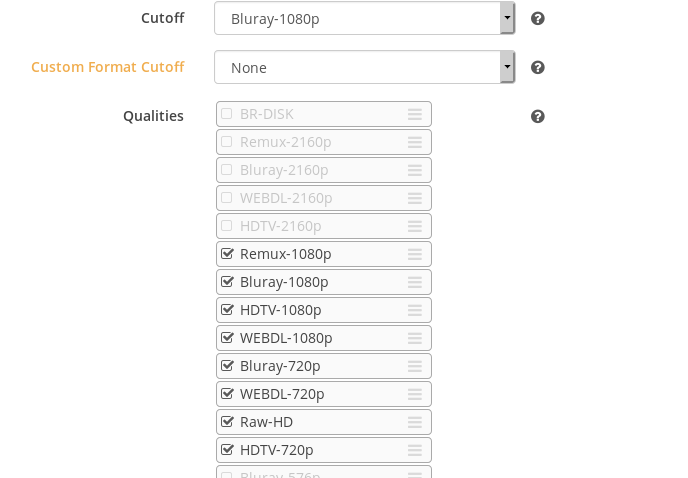
So I'm ok with it getting a 720p so I can at least watch it, but prefer 1080 - and Cutoff when you get Bluray-1080p . I just had a movie that was at 720p - attempt to be replaced by another 720p.

The delete 10 days ago was when I moved the files to a different folder structure
Logs
multiple of these - nothing else.
| DownloadedMovieImportService | Import failed, path does not exist or is not accessible by Radarr: /mnt/WorkerBee/complete/Bad.Lieutenant.Port.of.Call.New.Orleans.2009.720p.BluRay.x264-x0r/
-- | -- | --
Path where the movie resides: /mnt/PlexM_03/Media/Movies/movie_folder
drwxrwxr-x 3 wayne wayne 4096 Jan 4 17:55 'The Bad Lieutenant Port of Call - New Orleans (2009)'
This is the initial folder movies come into before they are cleaned up and moved to the listed path in the profile.
:/mnt/WorkerBee$ ls -l
drwxrwxr-x 3 wayne wayne 45056 Jan 4 18:04 complete
Why would it not select the higher qualities when they are available? I've tried several times to add a screen shot of the search window off the movie and it won't allow it. So I'll explain what it shows - 1 Remux-1080p - 4 Bluray-1080p - 1 Webdl-1080p then 2 Bluray-720p. The one in the above screen shot it grabbed at 2.8gb and another for 7.5gb.
wredwards
on 5 Jan 2019
@wredwards Yeah so that‘s your issue. After you have moved to the different folder structure, you have to update your paths in Radarr, else Radarr won‘t know where your files are. Therefore, Radarr presumes they are missing and will download the next best release that‘s available.
It won‘t select the higher qualities, since Radarr doesn‘t actively search for your movies every day. It watches your indexer for new releases and downloads them accordingly. So it didn‘t know your indexers had better qualities.
Yeah, you would have to create a custom script that executes on import.
The import failed error, is something I would look at as well, is the torrent still there? Are you or Radarr moving the files, when you say they are cleaned up?
I strongly recommend you hop on over to our Discord or Subreddit, as there are far more people there to help you and can quickly diagnose issues. (Also this issue has enough comments already).
galli-leo
on 5 Jan 2019
Sorry I left that part out - that is not my issue - as I do update the path the movie resides in each and every time I make a change to the folder at all. - So no that is not my issue.
wredwards
on 5 Jan 2019
@galli-leo trying to write a sql to do what I want and had a questions. in the movie table what are the vales for status and monitoried?
I think I can write a query to update monitoried to no where status = downloaded but I'm not sure what the values in those fields are.
blindguy
on 13 Jan 2019
Related issues
 woble
·
41Comments
woble
·
41Comments
 dawtmaytrikx
·
47Comments
dawtmaytrikx
·
47Comments
 savaloi
·
56Comments
savaloi
·
56Comments
 dejected1
·
52Comments
dejected1
·
52Comments
 kmlucy
·
220Comments
kmlucy
·
220Comments
Most helpful comment
As RoChess said, the same thing is happening for me aswell...even tho cutoff has been met, radarr will still continue to download all other 4k versions, even tho they are not propers...it downloaded 4x versions for me, and i didnt understand whats going on.
This need a specific option to stop monitoring a movie once cutoff has been reach or archive that movie