Radarr: Unable to retrieve queue and history items from NZBGet
I've just installed Radarr on my Ubuntu machine last night. I was previously using couchpotato, but I've since disabled the service from starting, so it's not running anymore. I've got plenty of other services running on this box, like Sonarr and Plex etc, which are all working fine.
My setup is:
Ubuntu 15.10
Radarr 0.2.0.654 (develop branch)
NZBGet 18.1
mono 4.8.1
I followed this guide to setup Radarr.
Radarr will find an NZB and send it to NZBGet quite fine. The download appears listed in the Activity -> Queue list, but is always listed as paused, even when it's currently downloading in NZBGet.
NZBGet will successfully download the file, but Radarr will not post process it (no notifications, no renaming, no file moves etc).
If a download fails in NZBGet, Radarr will mark it as failed, then find another NZB to download and push that successfully to NZBGet.
Help??
It's like Radarr thinks the nzb is still downloading with NZBGet even when it's successfully finished.. Or NZBGet doesn't notify Radarr correctly that the files are finished downloading.. Or perhaps a permissions issue or the like??
I get these errors in my logs:
Unable to retrieve queue and history items from NZBGet: Cannot access a disposed object.
Object name: 'System.Net.Sockets.NetworkStream'.

System.ObjectDisposedException: Cannot access a disposed object.
Object name: 'System.Net.Sockets.NetworkStream'.
  at System.Net.WebConnectionStream.EndWrite (System.IAsyncResult r) [0x000af] in <5641e4edad4f4464ba58c620a7b8ea48>:0
  at System.Net.WebConnectionStream.Write (System.Byte[] buffer, System.Int32 offset, System.Int32 size) [0x00059] in <5641e4edad4f4464ba58c620a7b8ea48>:0
  at NzbDrone.Common.Http.Dispatchers.ManagedHttpDispatcher.GetResponse (NzbDrone.Common.Http.HttpRequest request, System.Net.CookieContainer cookies) [0x000d9] in C:\projects\radarr-usby1\src\NzbDrone.Common\Http\Dispatchers\ManagedHttpDispatcher.cs:53
  at NzbDrone.Common.Http.Dispatchers.FallbackHttpDispatcher.GetResponse (NzbDrone.Common.Http.HttpRequest request, System.Net.CookieContainer cookies) [0x000cc] in C:\projects\radarr-usby1\src\NzbDrone.Common\Http\Dispatchers\FallbackHttpDispatcher.cs:58
  at NzbDrone.Common.Http.HttpClient.Execute (NzbDrone.Common.Http.HttpRequest request) [0x0007e] in C:\projects\radarr-usby1\src\NzbDrone.Common\Http\HttpClient.cs:63
  at NzbDrone.Core.Download.Clients.Nzbget.NzbgetProxy.ProcessRequest[T] (NzbDrone.Core.Download.Clients.Nzbget.NzbgetSettings settings, System.String method, System.Object[] parameters) [0x00047] in C:\projects\radarr-usby1\src\NzbDrone.Core\Download\Clients\Nzbget\NzbgetProxy.cs:232
  at NzbDrone.Core.Download.Clients.Nzbget.NzbgetProxy.GetQueue (NzbDrone.Core.Download.Clients.Nzbget.NzbgetSettings settings) [0x00000] in C:\projects\radarr-usby1\src\NzbDrone.Core\Download\Clients\Nzbget\NzbgetProxy.cs:130
  at NzbDrone.Core.Download.Clients.Nzbget.Nzbget.GetQueue () [0x00012] in C:\projects\radarr-usby1\src\NzbDrone.Core\Download\Clients\Nzbget\Nzbget.cs:65
  at NzbDrone.Core.Download.Clients.Nzbget.Nzbget.GetItems () [0x00000] in C:\projects\radarr-usby1\src\NzbDrone.Core\Download\Clients\Nzbget\Nzbget.cs:207
  at NzbDrone.Core.Download.TrackedDownloads.DownloadMonitoringService.ProcessClientDownloads (NzbDrone.Core.Download.IDownloadClient downloadClient) [0x0000c] in C:\projects\radarr-usby1\src\NzbDrone.Core\Download\TrackedDownloads\DownloadMonitoringService.cs:86
SignalR exception thrown by Task: System.AggregateException: One or more errors occurred. ---> System.ObjectDisposedException: Cannot access a disposed object.
Object name: 'Microsoft.Owin.Host.HttpListener.RequestProcessing.OwinHttpListenerResponse'.
  at Microsoft.Owin.Host.HttpListener.RequestProcessing.OwinHttpListenerResponse.ResponseBodyStarted () [0x0001a] in <208c8ef8a4ba4b878f0e4420d5960bea>:0
  at Microsoft.Owin.Host.HttpListener.RequestProcessing.OwinHttpListenerResponse.OnResponseBodyStarted (System.Object state) [0x00007] in <208c8ef8a4ba4b878f0e4420d5960bea>:0
  at Microsoft.Owin.Host.HttpListener.RequestProcessing.ExceptionFilterStream+OneTimeCallback.TryInvoke () [0x00019] in <208c8ef8a4ba4b878f0e4420d5960bea>:0
  at Microsoft.Owin.Host.HttpListener.RequestProcessing.ExceptionFilterStream.FirstWrite () [0x00000] in <208c8ef8a4ba4b878f0e4420d5960bea>:0
  at Microsoft.Owin.Host.HttpListener.RequestProcessing.ExceptionFilterStream.Write (System.Byte[] buffer, System.Int32 offset, System.Int32 count) [0x00000] in <208c8ef8a4ba4b878f0e4420d5960bea>:0
   --- End of inner exception stack trace ---

---> (Inner Exception #0) System.ObjectDisposedException: Cannot access a disposed object.
Object name: 'Microsoft.Owin.Host.HttpListener.RequestProcessing.OwinHttpListenerResponse'.
  at Microsoft.Owin.Host.HttpListener.RequestProcessing.OwinHttpListenerResponse.ResponseBodyStarted () [0x0001a] in <208c8ef8a4ba4b878f0e4420d5960bea>:0
  at Microsoft.Owin.Host.HttpListener.RequestProcessing.OwinHttpListenerResponse.OnResponseBodyStarted (System.Object state) [0x00007] in <208c8ef8a4ba4b878f0e4420d5960bea>:0
  at Microsoft.Owin.Host.HttpListener.RequestProcessing.ExceptionFilterStream+OneTimeCallback.TryInvoke () [0x00019] in <208c8ef8a4ba4b878f0e4420d5960bea>:0
  at Microsoft.Owin.Host.HttpListener.RequestProcessing.ExceptionFilterStream.FirstWrite () [0x00000] in <208c8ef8a4ba4b878f0e4420d5960bea>:0
  at Microsoft.Owin.Host.HttpListener.RequestProcessing.ExceptionFilterStream.Write (System.Byte[] buffer, System.Int32 offset, System.Int32 count) [0x00000] in <208c8ef8a4ba4b878f0e4420d5960bea>:0 <---
Any help is appreciated :)
Thanks!
 savaloi
All 56 comments
Seems like some kind of networking issue. Did you try restarting Radarr, NzbGet or your computer?
 galli-leo
on 19 Apr 2017
galli-leo
on 19 Apr 2017
Can you screen shot your NZBGet settings (leaving out any sensitive information)? Is NZBGet running locally on the same computer or a different one?
FWIW, I use NZBGet natively on Arch Linux on the same system and have no issues.
 fryfrog
on 19 Apr 2017
fryfrog
on 19 Apr 2017
I agree it sounds like some kind of weird network issue, but all of these apps are running on the one Ubuntu (Lubuntu actually) machine, so I'm not sure how that could be the case..
I've attached a couple of screenshots here to hopefully give more info.
On the plus side, my movies have now magically downloaded and been processed correctly.. So this is now more of a why am i getting this annoying error.. But what worries me is that I haven't changed anything to make it start working....?????
I'm not getting the SignalR error anymore, as of today.
Not sure exactly what NZBGet details you want, if you want something else, let me know
Radarr log:

NZBGet Settings:


savaloi
on 21 Apr 2017
Maybe an issue with AutorizedIp? Just from glancing over it. Can you try setting that to all ips or something and try again?
galli-leo
on 21 Apr 2017
I've set AuthorizedIP in NZBGet to all the appropriate IP addresses on my network (about 10) and then restarted services manually, then a couple hours later, the whole machine.
It doesn't appear to have changed anything :(
Still getting these errors every 2-10 minutes:
Unable to retrieve queue and history items from NZBGet: Cannot access a disposed object.
Object name: 'System.Net.Sockets.NetworkStream'.
I just noticed that I'm getting the same errors in Sonarr too.. So i guess that means it's either some conflict in Sonarr/Radarr, or my upgrade to NZBGet 18.1 is causing the issue?
Looks like Sonarr started having this error around the same time Radarr was installed..
I upgraded NZBGet to v18.1 and installed Radarr on the same night, so I've got no idea which is causing the issue..
Thoughts?
savaloi
on 23 Apr 2017
@savaloi I would wager to say it's the updated NZBGet. Since a lot of users have used Radarr & Sonarr & NZBGet without issues before. Is there a way to downgrade NZBGet?
galli-leo
on 23 Apr 2017
I don't think / can't see that there's an easy way to downgrade NZBGet. I think I can only uninstall it and reinstall an older version. But I'll raise an issue on their github and see how it goes..
savaloi
on 24 Apr 2017
Can you still see your queue in Radarr?
galli-leo
on 24 Apr 2017
I'm using 18.1 on Arch Linux w/ Radarr right now and don't seem to be having any issues. :/
fryfrog
on 24 Apr 2017
Yes I can still see the queue and everything appears to be working in Radarr, just get a tonne of these errors..
savaloi
on 25 Apr 2017
@savaloi I'm experiencing the same problem. Were you ever able to resolve it?
 mihalski
on 30 May 2017
mihalski
on 30 May 2017
@mihalski Nope.. Sorry.
I posted this on the NZBGet Github also, and they suggested to downgrade NZBGet to 18.0 (from 18.1), however that made no difference for me. They then suggested it was a Radarr issue, as Radarr suggested it might be an NZBGet issue.. :( I guess it's uncommon..?
I will admit that it comes across as a network issue, but it cannot be for me, as both apps run on the same machine in my setup.
I'm going to try to backup my settings and rebuild my setup from the ground up and see if that resolves the issue, however I've not had a chance to do it yet.
Perhaps we are both using some common version(s) of particular software/hardware which is unknowingly causing the issue? What relevant software/hardware are you running on?
I've also noticed that I receive a similar issue with Sonarr, as with Radarr, do you get the same? Or just with Radarr?
savaloi
on 30 May 2017
Can you guys try upgrading you mono versions?
galli-leo
on 15 Jun 2017
In my case I can't as I don't have control over it. It's a docker container. I might try building a non-docker install to see if it makes a difference.
mihalski
on 15 Jun 2017
What version of mono should we be running? I'm currently running 4.8.1
Do you have a preferred method of upgrading mono?
savaloi
on 15 Jun 2017
The version I'm running is 5.0.1.1
mihalski
on 15 Jun 2017
Well I've just upgraded mono with:
sudo apt-get install libmono-cil-dev
and then rebooted.
Now I too am running 5.0.1.1

I'll test it out and see if the errors contine
savaloi
on 15 Jun 2017
This hasn't fixed the issue for me :(
It has however reduced the number of entries in my Radarr logs, as seen below (compared to my original post).
I'm still getting the errors, but nowhere near as frequently:

I do still get this "Download Client Check" error on occasion as well:

savaloi
on 18 Jun 2017
At least the error does not appear that frequently anymore. Could it be that the connection somehow times out? Maybe some hosts file stuff is causing a loop. I don't really know though. Can you try pinging the nzbget host for a few minutes?
galli-leo
on 18 Jun 2017
I have the same problem. Didn't report it yet because I thought this was only a problem with my network configuration or something and it is still working, since this problem only happens from time to time.
Concerning my setup: Both radarr and nzbget are on the same server. I'm using vpn to access them, so they are both bound to the IP 10.8.0.1 with the ports 7878 and 6789. I use the latest Radarr nightly and nzbget 18.0 but I also had these problems with the default Ubuntu nzbget version (I think 16.x, but I'm not quite sure).
Anyway, this also happens when using Sonarr, so it may be better to report this bug there and port the upstream fix to Radarr (if such a fix was to be found). I can take care of reporting it there, if this is the way to go.
And as always, if I can help with more information, I'd be happy to answer any questions.
 d4re
on 18 Jun 2017
d4re
on 18 Jun 2017
1500 pings had 0% loss... Tried pinging from my Win10 PC to the Lubuntu machine and from the Lubuntu machine to itself..
savaloi
on 18 Jun 2017
@d4re, I've got the same issue on Sonarr as well. I tried reporting this to NZBGet's github issue #306, but they suggested it was to do with Sonarr/Radarr, not NZBGet. It'd be interesting to see what the Sonarr guys have to say
savaloi
on 18 Jun 2017
@savaloi You could also try pinging with a bigger packet size. Though I suppose it won't make a difference.
galli-leo
on 18 Jun 2017
I tried a ping with 12288 bytes (12KB) - as opposed to the default 32 bytes - and didn't drop a packet for hours...

savaloi
on 19 Jun 2017
Then it seems to be something related to Radarr.
galli-leo
on 19 Jun 2017
I'm going to have to chime in on this issue. I'm having this exact issue with Radarr. I do NOT have this issue with Sonarr! (edited, I have found that I do indeed have this issue with Sonarr as well, just less frequently).
Radarr Info:
Version 0.2.0.696
Mono Version 5.0.1.1 (2017-02/5077205 Thu May 25 09:16:53 UTC 2017)
Sonarr Info:
Version 2.0.0.4753
Mono Version 5.0.1.1
NZBGet Info:
Version 19.0-testing-r2021
I run all three on the same system, Ubuntu 17.04 using localhost as the host name for the download client in the config of Sonarr and Radarr. Let me know if there is any other information I can provide.
 nemchik
on 20 Jun 2017
nemchik
on 20 Jun 2017
I should correct my former comment, NOT the exact issue, but I'm getting the same warning in my logs.
Message
Unable to retrieve queue and history items from NZBGet: Cannot access a disposed object.
Object name: 'System.Net.Sockets.NetworkStream'.
Exception
System.ObjectDisposedException: Cannot access a disposed object.
Object name: 'System.Net.Sockets.NetworkStream'.
  at System.Net.WebConnection.BeginWrite (System.Net.HttpWebRequest request, System.Byte[] buffer, System.Int32 offset, System.Int32 size, System.AsyncCallback cb, System.Object state) [0x0002b] in <2b0d86369d72459baed0cee98a8e578a>:0
  at System.Net.WebConnectionStream.BeginWrite (System.Byte[] buffer, System.Int32 offset, System.Int32 size, System.AsyncCallback cb, System.Object state) [0x00270] in <2b0d86369d72459baed0cee98a8e578a>:0
  at System.Net.WebConnectionStream.Write (System.Byte[] buffer, System.Int32 offset, System.Int32 size) [0x00007] in <2b0d86369d72459baed0cee98a8e578a>:0
  at NzbDrone.Common.Http.Dispatchers.ManagedHttpDispatcher.GetResponse (NzbDrone.Common.Http.HttpRequest request, System.Net.CookieContainer cookies) [0x000e8] in <4f8318ff9b5c4c9aab52ab1079386ac7>:0
  at NzbDrone.Common.Http.Dispatchers.FallbackHttpDispatcher.GetResponse (NzbDrone.Common.Http.HttpRequest request, System.Net.CookieContainer cookies) [0x000cc] in <4f8318ff9b5c4c9aab52ab1079386ac7>:0
  at NzbDrone.Common.Http.HttpClient.Execute (NzbDrone.Common.Http.HttpRequest request) [0x0007e] in <4f8318ff9b5c4c9aab52ab1079386ac7>:0
  at NzbDrone.Core.Download.Clients.Nzbget.NzbgetProxy.ProcessRequest[T] (NzbDrone.Core.Download.Clients.Nzbget.NzbgetSettings settings, System.String method, System.Object[] parameters) [0x00047] in <55466a6b750c451c899f3839c742290b>:0
  at NzbDrone.Core.Download.Clients.Nzbget.NzbgetProxy.GetHistory (NzbDrone.Core.Download.Clients.Nzbget.NzbgetSettings settings) [0x00000] in <55466a6b750c451c899f3839c742290b>:0
  at NzbDrone.Core.Download.Clients.Nzbget.Nzbget.GetHistory () [0x0000c] in <55466a6b750c451c899f3839c742290b>:0
  at NzbDrone.Core.Download.Clients.Nzbget.Nzbget.GetItems () [0x00006] in <55466a6b750c451c899f3839c742290b>:0
  at NzbDrone.Core.Download.TrackedDownloads.DownloadMonitoringService.ProcessClientDownloads (NzbDrone.Core.Download.IDownloadClient downloadClient) [0x0000c] in <55466a6b750c451c899f3839c742290b>:0
However in my case movies are correctly imported, but my logs are littered with that warning, which is what brought me here.
I can see progress in my activity, no problem.
Here is another error I see A LOT of in Radarr but not at all in Sonarr:
Message
Unable to connect to NzbGet. Error getting response stream (ReadDone1): ReceiveFailure: Unable to connect to NzbGet. Error getting response stream (ReadDone1): ReceiveFailure

Exception
NzbDrone.Core.Download.Clients.DownloadClientException: Unable to connect to NzbGet. Error getting response stream (ReadDone1): ReceiveFailure ---> System.Net.WebException: Error getting response stream (ReadDone1): ReceiveFailure ---> System.IO.IOException: Unable to read data from the transport connection: interrupted. ---> System.Net.Sockets.SocketException: interrupted
  at System.Net.Sockets.Socket.EndReceive (System.IAsyncResult asyncResult) [0x00012] in <2b0d86369d72459baed0cee98a8e578a>:0
  at System.Net.Sockets.NetworkStream.EndRead (System.IAsyncResult asyncResult) [0x00057] in <2b0d86369d72459baed0cee98a8e578a>:0
   --- End of inner exception stack trace ---
  at System.Net.Sockets.NetworkStream.EndRead (System.IAsyncResult asyncResult) [0x0009b] in <2b0d86369d72459baed0cee98a8e578a>:0
  at System.Net.WebConnection.ReadDone (System.IAsyncResult result) [0x00027] in <2b0d86369d72459baed0cee98a8e578a>:0
   --- End of inner exception stack trace ---
  at System.Net.HttpWebRequest.EndGetResponse (System.IAsyncResult asyncResult) [0x00058] in <2b0d86369d72459baed0cee98a8e578a>:0
  at System.Net.HttpWebRequest.GetResponse () [0x0000e] in <2b0d86369d72459baed0cee98a8e578a>:0
  at NzbDrone.Common.Http.Dispatchers.ManagedHttpDispatcher.GetResponse (NzbDrone.Common.Http.HttpRequest request, System.Net.CookieContainer cookies) [0x00130] in <4f8318ff9b5c4c9aab52ab1079386ac7>:0
  at NzbDrone.Common.Http.Dispatchers.FallbackHttpDispatcher.GetResponse (NzbDrone.Common.Http.HttpRequest request, System.Net.CookieContainer cookies) [0x000cc] in <4f8318ff9b5c4c9aab52ab1079386ac7>:0
  at NzbDrone.Common.Http.HttpClient.Execute (NzbDrone.Common.Http.HttpRequest request) [0x0007e] in <4f8318ff9b5c4c9aab52ab1079386ac7>:0
  at NzbDrone.Core.Download.Clients.Nzbget.NzbgetProxy.ProcessRequest[T] (NzbDrone.Core.Download.Clients.Nzbget.NzbgetSettings settings, System.String method, System.Object[] parameters) [0x00047] in <55466a6b750c451c899f3839c742290b>:0
   --- End of inner exception stack trace ---
  at NzbDrone.Core.Download.Clients.Nzbget.NzbgetProxy.ProcessRequest[T] (NzbDrone.Core.Download.Clients.Nzbget.NzbgetSettings settings, System.String method, System.Object[] parameters) [0x000a6] in <55466a6b750c451c899f3839c742290b>:0
  at NzbDrone.Core.Download.Clients.Nzbget.NzbgetProxy.GetHistory (NzbDrone.Core.Download.Clients.Nzbget.NzbgetSettings settings) [0x00000] in <55466a6b750c451c899f3839c742290b>:0
  at NzbDrone.Core.Download.Clients.Nzbget.Nzbget.GetHistory () [0x0000c] in <55466a6b750c451c899f3839c742290b>:0
If this sounds like a separate issue I can open a new one.
nemchik
on 20 Jun 2017
Also fwiw I'm using Ubuntu server 17.04 (I mentioned version above but forgot to mention server) and I installed everything (Radarr, Sonarr, NZBGet, etc) using https://github.com/htpcBeginner/AtoMiC-ToolKit/
nemchik
on 20 Jun 2017
@savaloi @nemchik Can you guys try upgrading your version of libcurl? Also can you post your dl client's settings?
galli-leo
on 20 Jun 2017
Here is an export of my NZBGet config
MainDir=/mnt/raid10store1/downloads/nzbget
DestDir=${MainDir}/completed
InterDir=${MainDir}/intermediate
NzbDir=${MainDir}/nzb
QueueDir=${MainDir}/queue
TempDir=${MainDir}/tmp
WebDir=${AppDir}/webui
ScriptDir=${AppDir}/scripts
LockFile=${MainDir}/nzbget.lock
LogFile=/var/log/nzbget/nzbget.log
ConfigTemplate=${AppDir}/webui/nzbget.conf.template
RequiredDir=
Server1.Active=yes
Server1.Name=
Server1.Level=0
Server1.Optional=no
Server1.Group=0
Server1.Host=
Server1.Port=563
Server1.Username=
Server1.Password=
Server1.JoinGroup=no
Server1.Encryption=yes
Server1.Cipher=
Server1.Connections=50
Server1.Retention=600
ControlIP=0.0.0.0
ControlPort=6789
ControlUsername=nzbget
ControlPassword=
RestrictedUsername=
RestrictedPassword=
AddUsername=
AddPassword=
SecureControl=no
SecurePort=6791
SecureCert=
SecureKey=
AuthorizedIP=127.0.0.1
DaemonUsername=root
UMask=1000
Category1.Name=Sonarr
Category1.DestDir=
Category1.Unpack=yes
Category1.Extensions=
Category1.Aliases=TV*,Series
Category2.Name=Radarr
AppendCategoryDir=yes
NzbDirInterval=5
NzbDirFileAge=60
DupeCheck=yes
SaveQueue=yes
FlushQueue=yes
ReloadQueue=yes
ContinuePartial=yes
PropagationDelay=0
Decode=yes
ArticleCache=500
DirectWrite=yes
WriteBuffer=1024
CrcCheck=yes
PostStrategy=balanced
DiskSpace=250
NzbCleanupDisk=yes
KeepHistory=30
FeedHistory=7
ArticleRetries=3
ArticleInterval=10
ArticleTimeout=60
UrlRetries=3
UrlInterval=10
UrlTimeout=60
TerminateTimeout=600
DownloadRate=0
AccurateRate=no
UrlConnections=4
UrlForce=yes
MonthlyQuota=0
QuotaStartDay=1
DailyQuota=0
WriteLog=append
RotateLog=3
ErrorTarget=both
WarningTarget=both
InfoTarget=both
DetailTarget=log
DebugTarget=log
LogBufferSize=1000
NzbLog=yes
BrokenLog=yes
CrashDump=no
TimeCorrection=0
OutputMode=curses
CursesNzbName=yes
CursesGroup=no
CursesTime=no
UpdateInterval=200
ParCheck=auto
ParRepair=yes
ParScan=extended
ParQuick=yes
ParBuffer=100
ParThreads=0
ParIgnoreExt=.sfv, .nzb, .nfo
ParRename=yes
RarRename=yes
HealthCheck=delete
ParTimeLimit=0
ParPauseQueue=no
Unpack=yes
UnpackPauseQueue=no
UnpackCleanupDisk=yes
UnrarCmd=${AppDir}/unrar
SevenZipCmd=${AppDir}/7za
ExtCleanupDisk=.par2, .sfv, _brokenlog.txt
UnpackIgnoreExt=.cbr
UnpackPassFile=
Extensions=
ScriptOrder=
ScriptPauseQueue=no
ShellOverride=
EventInterval=0
Category2.DestDir=
Category2.Unpack=yes
Category2.Extensions=
Category2.Aliases=Movies*
EMail.py:SendMail=Always
EMail.py:From="NZBGet" <[email protected]>
EMail.py:[email protected]
EMail.py:Server=smtp.gmail.com
EMail.py:Port=25
EMail.py:Encryption=yes
EMail.py:Username=myaccount
EMail.py:Password=mypass
EMail.py:Statistics=yes
EMail.py:FileList=yes
EMail.py:BrokenLog=yes
EMail.py:NzbLog=OnFailure
Server2.Active=no
Server2.Name=
Server2.Level=99
Server2.Optional=no
Server2.Group=0
Server2.Host=
Server2.Port=563
Server2.Username=
Server2.Password=
Server2.JoinGroup=no
Server2.Encryption=yes
Server2.Cipher=
Server2.Connections=4
Server2.Retention=0
CertStore=${AppDir}/cacert.pem
Server1.IpVersion=auto
Server1.Notes=
Server2.IpVersion=auto
Server2.Notes=
FormAuth=no
CertCheck=yes
FileNaming=auto
ReorderFiles=yes
DirectRename=no
DirectUnpack=no
CrashTrace=yes
Hopefully I removed anything really private (so usernames and passwords and server info above has been left blank)
Running curl -V gives me this:
curl 7.52.1 (x86_64-pc-linux-gnu) libcurl/7.52.1 OpenSSL/1.0.2g zlib/1.2.11 libidn2/0.16 libpsl/0.17.0 (+libidn2/0.16) librtmp/2.3
Protocols: dict file ftp ftps gopher http https imap imaps ldap ldaps pop3 pop3s rtmp rtsp smb smbs smtp smtps telnet tftp
Features: AsynchDNS IDN IPv6 Largefile GSS-API Kerberos SPNEGO NTLM NTLM_WB SSL libz TLS-SRP UnixSockets HTTPS-proxy PSL
I usually run apt update/upgrade pretty frequently, so the version I've got is the latest available from the Ubuntu repos. I know there might be a newer version out there than what Ubuntu offers in their repos.
I have found a similar error in my Sonarr logs, although it is much less frequent than the error I previously posted that I am seeing in Radarr;
Message
NzbDrone.Core.Download.Clients.DownloadClientException: Unable to connect to NzbGet. The request timed out ---> System.Net.WebException: The request timed out
  at System.Net.HttpWebRequest.EndGetResponse (System.IAsyncResult asyncResult) [0x00049] in <2b0d86369d72459baed0cee98a8e578a>:0
  at System.Net.HttpWebRequest.GetResponse () [0x0000e] in <2b0d86369d72459baed0cee98a8e578a>:0
  at NzbDrone.Common.Http.Dispatchers.ManagedHttpDispatcher.GetResponse (NzbDrone.Common.Http.HttpRequest request, System.Net.CookieContainer cookies) [0x0012d] in <d1810f3a0e9846e3acb4cd1cb9652384>:0
  at NzbDrone.Common.Http.Dispatchers.FallbackHttpDispatcher.GetResponse (NzbDrone.Common.Http.HttpRequest request, System.Net.CookieContainer cookies) [0x000cc] in <d1810f3a0e9846e3acb4cd1cb9652384>:0
  at NzbDrone.Common.Http.HttpClient.Execute (NzbDrone.Common.Http.HttpRequest request) [0x0007e] in <d1810f3a0e9846e3acb4cd1cb9652384>:0
  at NzbDrone.Core.Download.Clients.Nzbget.NzbgetProxy.ProcessRequest[T] (NzbDrone.Core.Download.Clients.Nzbget.NzbgetSettings settings, System.String method, System.Object[] parameters) [0x00047] in <e875ff1e5e15495891c97fce19751838>:0
   --- End of inner exception stack trace ---
  at NzbDrone.Core.Download.Clients.Nzbget.NzbgetProxy.ProcessRequest[T] (NzbDrone.Core.Download.Clients.Nzbget.NzbgetSettings settings, System.String method, System.Object[] parameters) [0x000a6] in <e875ff1e5e15495891c97fce19751838>:0
  at NzbDrone.Core.Download.Clients.Nzbget.NzbgetProxy.GetGlobalStatus (NzbDrone.Core.Download.Clients.Nzbget.NzbgetSettings settings) [0x00000] in <e875ff1e5e15495891c97fce19751838>:0
  at NzbDrone.Core.Download.Clients.Nzbget.Nzbget.GetQueue () [0x0000c] in <e875ff1e5e15495891c97fce19751838>:0 : Unable to connect to NzbGet. The request timed out

Exception
NzbDrone.Core.Download.Clients.DownloadClientException: Unable to connect to NzbGet. The request timed out ---> System.Net.WebException: The request timed out
  at System.Net.HttpWebRequest.EndGetResponse (System.IAsyncResult asyncResult) [0x00049] in <2b0d86369d72459baed0cee98a8e578a>:0
  at System.Net.HttpWebRequest.GetResponse () [0x0000e] in <2b0d86369d72459baed0cee98a8e578a>:0
  at NzbDrone.Common.Http.Dispatchers.ManagedHttpDispatcher.GetResponse (NzbDrone.Common.Http.HttpRequest request, System.Net.CookieContainer cookies) [0x0012d] in <d1810f3a0e9846e3acb4cd1cb9652384>:0
  at NzbDrone.Common.Http.Dispatchers.FallbackHttpDispatcher.GetResponse (NzbDrone.Common.Http.HttpRequest request, System.Net.CookieContainer cookies) [0x000cc] in <d1810f3a0e9846e3acb4cd1cb9652384>:0
  at NzbDrone.Common.Http.HttpClient.Execute (NzbDrone.Common.Http.HttpRequest request) [0x0007e] in <d1810f3a0e9846e3acb4cd1cb9652384>:0
  at NzbDrone.Core.Download.Clients.Nzbget.NzbgetProxy.ProcessRequest[T] (NzbDrone.Core.Download.Clients.Nzbget.NzbgetSettings settings, System.String method, System.Object[] parameters) [0x00047] in <e875ff1e5e15495891c97fce19751838>:0
   --- End of inner exception stack trace ---
  at NzbDrone.Core.Download.Clients.Nzbget.NzbgetProxy.ProcessRequest[T] (NzbDrone.Core.Download.Clients.Nzbget.NzbgetSettings settings, System.String method, System.Object[] parameters) [0x000a6] in <e875ff1e5e15495891c97fce19751838>:0
  at NzbDrone.Core.Download.Clients.Nzbget.NzbgetProxy.GetGlobalStatus (NzbDrone.Core.Download.Clients.Nzbget.NzbgetSettings settings) [0x00000] in <e875ff1e5e15495891c97fce19751838>:0
  at NzbDrone.Core.Download.Clients.Nzbget.Nzbget.GetQueue () [0x0000c] in <e875ff1e5e15495891c97fce19751838>:0
Not sure if that helps much?
nemchik
on 21 Jun 2017
@nemchik Ah sorry, I meant the nzb settings inside Radarr.
galli-leo
on 21 Jun 2017
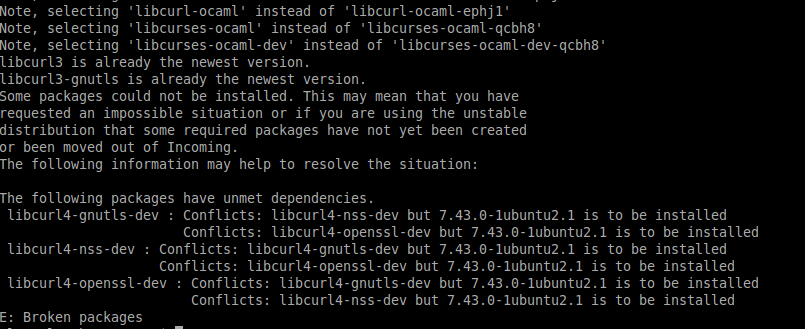
Here's my existing curl version (7.43.0):

I then tried to upgrade with sudo apt-get upgrade libcurl*, but apparently I have some conflicts to deal with 👎 Anyone know how to fix those?
It seems that libcurl3 is up to date, but not libcurl4...
savaloi
on 21 Jun 2017
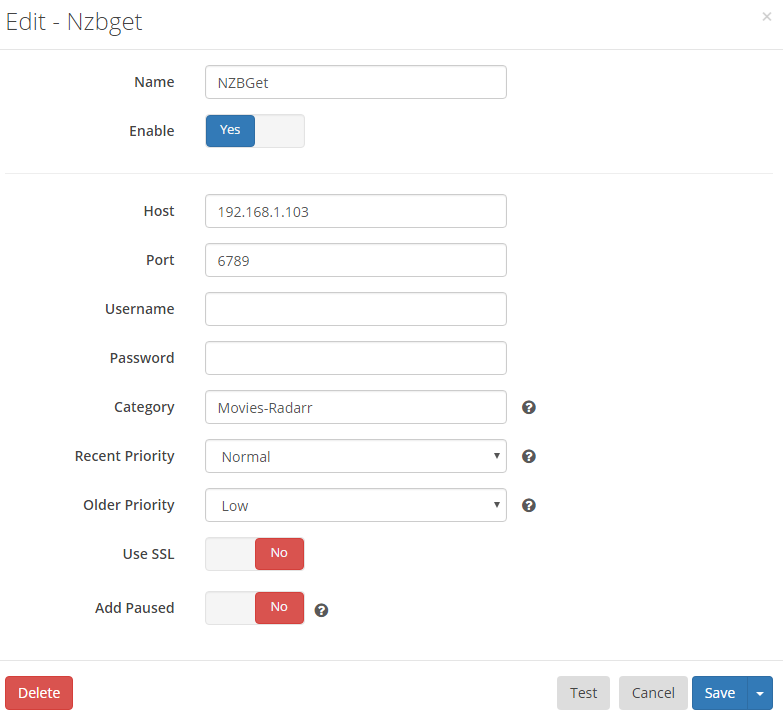
Also, here's my Radarr setup for NZBGet - is that what you're looking for @galli-leo?:
savaloi
on 21 Jun 2017
@savaloi Yes exactly.
galli-leo
on 21 Jun 2017
Name: NZBGet
Enable: Yes
Host: localhost
Port: 6789
Username: nzbget
Password: filled in
Category: Radarr
Recent Priority: Very High
Older Priority: Normal
Use SSL: No
Add Paused: No
nemchik
on 21 Jun 2017
Checking back in on this. It's still happening for me. Is there any more information I can provide?
nemchik
on 18 Jul 2017
I just setup a pi box this weekend, with NZBGet 19.1, Radarr 0.2.0.778, Sonarr 2.0.0.4855, and Mono 5.0.1.1; I noticed that I'm getting this error as well for both Sonarr and Radarr. I've been scouring teh webz for a fix or something, and the only thing that I've found that may solve it is to downgrade Mono... maybe to something before 4.6. I really have no idea what to do, nor what the error means for Radarr/Sonarr. I'm a total newb to this stuff. It does bother me to see an error being logged every so often, especially being a software developer.
 myfrontpocket
on 24 Jul 2017
myfrontpocket
on 24 Jul 2017
Found this:
https://github.com/Sonarr/Sonarr/issues/1928
Maybe the work around posted here will work. I'm trying it now.
myfrontpocket
on 24 Jul 2017
I ended up building a new machine to host my various Linux apps. I used the Atomic Toolkit to install everything and manually migrated all my settings (cos AT wouldn't import anything..). This issue has not appeared on my new machine.
For reference (as someone mentioned it might be performance or network related), here's what I moved from and to:
    OLD     NEW
OS: Lubuntu 16  Ubuntu 17.04
OSArch: 32-bit      64-bit
CPU:    Atom N280   i5 4200U
RAM:    4GB     4GB
Disk:   Laptop HDD  SSD
Network:    ?   Realtek RTL8111/8168/8411

All versions of NZBGet/Sonarr/Radarr/Mono stayed identical from my knowledge
The only thing I can think that was missing, is nginx.. Do you guys use nginx with your setups as well?
savaloi
on 24 Jul 2017
I do run nginx on my system, but I've had this issue seemingly disappear for the moment. I'm really thinking it is a performance issue on my end. I looked into a different issue I was having (also related to performance) and ended up noticing a lot of info messages on my vm console and looked into them and it lead me to this article https://www.blackmoreops.com/2014/09/22/linux-kernel-panic-issue-fix-hung_task_timeout_secs-blocked-120-seconds-problem/ I tweaked the settings as recommended in the article and have not seen the console messages since (Jul 18) and it seems that this issue has disappeared since then as well. I had the message appear once over the weekend but I restarted Radarr from the System tab in the web interface and it's been gone since. I'll report back if it happens again.
nemchik
on 24 Jul 2017
I added the MONO_TLS_PROVIDER=legacy to the intit.d script for start and restart, and it seems as though this warning shows up a lot less frequently. That's something at least.
myfrontpocket
on 26 Jul 2017
This is a massively annoying and persistent mono bug that's existed for quite some time. Some versions of mono seem to be immune, so I recommend in pinning that version in your package manager. Also I recommend getting mono directly from Xamarin since that repo hosts every single release, allowing downgrades.
Unfortunately I disabled the xamarin repo during the Fedora 25->27 upgrade, so I'm in the same boat as everyone else.
 orbisvicis
on 23 Feb 2018
orbisvicis
on 23 Feb 2018
I'm encountering this error as well. Radarr and Sonarr aren't picking up failed downloads. Everything else seems to be working though (renaming, moving, etc.). I'm using Ubuntu 16.04.4, with atomic toolkit. Everything has been updated to the latest version as of today.
@orbisvicis So the fix is to pin mono? To which version?
 ismay
on 11 Mar 2018
ismay
on 11 Mar 2018
Same issue.
Mono version: 5.10.0.160
Radarr version: 0.2.0.995
Testing my download client (nzbget) in Radarr says it's fine. When I try to download something though, I just get an error (same one people are reporting). Nzbget doesn't start a download or anything.
Side question... what language is Radarr/Sonarr written in? What was the motivation behind creating OSS centered around a Microsoft technology?
 cjbottaro
on 14 Mar 2018
cjbottaro
on 14 Mar 2018
@ismay, @cjbottaro: anything in your logs? Maybe turn up to trace and have a look?
For mono version, I'd suggest 5.10 or 5.8.
fryfrog
on 14 Mar 2018
Same issue here. Newest versions of everything. If I manually import files they all move over, I still have to delete them manually. So are has no issues at all and has performed the same (I've seen some mention this as an issue there too).
Short of nuking the install and starting from scratch I have no ideas.
 edru
on 15 Mar 2018
edru
on 15 Mar 2018
Spoke too soon. Sonarr has the same error, but still functions and moves files without issue.
edru
on 15 Mar 2018
Sorry to comment bomb (mobile ui seems to be missing edit?) , but I just fixed this issue for myself after months of it being an issue, things I did to correct it:
A) my category setting in radarr was Movies where as in NZBget it was movies. Dunno why it changed, if it changed, or if an update on one end or another made it care about case all of a sudden, if it didn't before. (testing previously said it was all good, now it was saying the category couldn't be found. After correcting the case, it found it.)
B) I disabled NZBget as a Downloader in radarr, and using terminal stopped the service, then started, the radarr service.
C) enabled NZBget as a download client in radarr.
After doing these 3 things, downloads are sorting as expected again.
edru
on 15 Mar 2018
For posterity, my issue was because Nzbget is behind Nginx and the client_max_body_size (for Nginx) was too small to upload nzb files.
So not an issue with Radarr, but it would be nice if Radarr logged an error or something, rather than give zero output at all.
Cheers.
cjbottaro
on 16 Mar 2018
@cjbottaro Not sure we get something to report. IIRC nginx just drops the connection
galli-leo
on 16 Mar 2018
@ismay According to my DNF logs, to 4.2.4.4-0:
mono-core-4.2.4.4-0.xamarin.1.x86_64
This issue has been automatically marked as stale because it has not had recent activity. Please verify that this is still an issue with the latest version of Radarr and report back. Otherwise this issue will be closed.
![stale[bot] picture](https://avatars3.githubusercontent.com/in/1724?v=4&s=40) stale[bot]
on 17 May 2018
stale[bot]
on 17 May 2018
Still happens with Radarr 0.2.0.1067 and NZBGet 20.0-testing-r2181
nemchik
on 17 May 2018
My radarr hasn't been working for months or longer. I am mainly a sonarr user and just didn't troubleshoot. I had a few movies been trying to get, so decided to google after looking at the logs. I found this thread and the comment "edru commented on Mar 15" above.
I have screenshots of all my settings from 6-2017 or so. I've always had lower case 'movies' as my category in both nzbget and radarr. My category within Radarr for nzbget indeed magically changed to have an uppercase M in movies. I changed it back to movies with lowercase m and now appears everything may be working. Ill report back if still not working correctly.
 Prodeje
on 28 May 2018
Prodeje
on 28 May 2018
This issue has been automatically marked as stale because it has not had recent activity. Please verify that this is still an issue with the latest version of Radarr and report back. Otherwise this issue will be closed.
stale[bot]
on 27 Jul 2018
Not sure if you're running a reverse proxy like nginx but I had this exact same issue and was recently resolved from some advice here on adjusting an nginx setting.
 maximussmurf
on 15 Aug 2018
maximussmurf
on 15 Aug 2018
Related issues
 welle
·
32Comments
welle
·
32Comments
 joelstitch
·
98Comments
joelstitch
·
98Comments
 ptr727
·
35Comments
ptr727
·
35Comments
 gilbN
·
33Comments
gilbN
·
33Comments
 dawtmaytrikx
·
47Comments
dawtmaytrikx
·
47Comments