Radarr: Organise renames image files called disc.png
I decided to add mediainfo and release groups etc to all my movie file names. Previously they had all been named: MovieName (yyyy).ext
In reddit, I was advised to set up the desired "Standard Movie Format" setting in the Media Management tab, then go to the "Movie Editor", select the required movies and click the "Organise" button.
"What I Did":
Firstly, I updated the "Standard Movie Format" setting. Then, as a test , I selected 1 movie, The movie had the following files in it's folder (supplied by Emby - my media server).
_The following image shows a sample of the original Movie Folder Content_
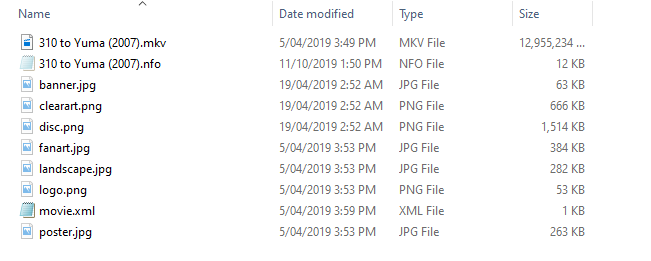
I checked the movie in Movie Editor, selected the Organise button and observed the following:
1 Radarr correctly updated the Movie file name according to my new format settings
2 Radarr renamed the existing .nfo file according to my new format settings
3 Radarr renamed the existing movie.xml file according to my new format settings
4 Radarr also renamed the "disc.png" image file with the same format. This caused emby to use this file, resulting in a very ugly squashed disc image being used in the display.

_The following image shows a sample of the changes made by Radarr after "Organise" is executed._

I repeated this test with another movie and got the same result.
I repeated the test on another movie but removed the existing disc.png file beforehand. This time Radarr DID NOT change any image file names, NOR did it create a new image file.
Upon refreshing Metadata from within Emby, an additional .nfo file was created using the Movie name only - "Movie (yyyy).nfo" as per normal behaviour for this software.
"What I expected:
I expected Radarr to simply rename the Movie File according to my new format settings, nothing more. I can accept renaming of the existing nfo file and even the renamed .xml file, BUT NOT the
renamimg of any image files. This is, IMO, completely unnecessary as an image file does not/should not form any part of a movies metadata and obviously cause issues with Media Servers - Emby in particular.
Systems:
Windows 10 Pro (1903)
Radarr Version 0.2.0.1358
Debug Log
Movie edited: 27 Dresses
Check Timestamp: 19-10-14 13:28:46.3
radarr.debug.txt
Thanks
Jordy
 jordy1955
All 14 comments
Issue-Label Bot is automatically applying the label bug to this issue, with a confidence of 0.66. Please mark this comment with :thumbsup: or :thumbsdown: to give our bot feedback!
Links: app homepage, dashboard and code for this bot.
![issue-label-bot[bot] picture](https://avatars2.githubusercontent.com/in/27079?v=4&s=40) issue-label-bot[bot]
on 14 Oct 2019
issue-label-bot[bot]
on 14 Oct 2019
What if someone puts .jpg or .png in their extra files to import section? I don't think this is as clear as you think it is. I would maybe say it more clearly that it should rename only the files that track its own naming pattern, perhaps. Or maybe only extensions tracked by the extra files field.
 fryfrog
on 15 Oct 2019
fryfrog
on 15 Oct 2019
@fryfrog, different issues IMO.
This is about updating an EXISTING movie FILENAME to include metadata not previously present. NO updating/changing of the PHYSICAL movie file occurs in any way shape or form. Changing image names is totally unnecessary as they have no relation whatsoever to metadata - they don't know or care if the movie is 576/720/1080 or 2160p or what the name of the movie is/was or has become due to the change.
On the other hand, Media Server software most definitely does know if an image file has had a name change and will act accordingly - to the detriment of the visual display as show in my first post. Could you imagine the result if I had chosen to use "Organise" on my entire library...
Your "What if" situation is related to a new or updated actual, physical, movie FILE - where the user has deliberately chosen to include images in the import. By deliberately choosing this (not a default setting), they also accept the consequences and at least the result is confined to the individual movie in process. On transferring said movie to the designated Library, the media centre or whatever will decide, according to it's user defined settings what it needs to do with the new or changed movie and images.
All that needs to be done is to change the code for the "Organise" function to EXCLUDE/IGNORE all jpg, png and maybe xml files in the movie folder. I can't see how this change will affect new or updated movie files - different pieces of code surely... :)
EDIT: OR maybe provide an option to include/exclude certain types files when using the "Organise" function
cheers
jordy1955
on 16 Oct 2019
I'm just telling you how it works currently and probably why. There is no differentiation between files. There are just files in the folder and Radarr assumes it manages them. They're tossed when movies are upgraded too. It just be how it is.
If you feel strongly about this, I'd suggest learning .NET and contributing this to Sonarr and then porting it to Radarr. Talk to the developers to work out how a feature like this should work and then implement it. They may be totally happy w/ a simple exclude/ignore or it might need to be more useful.
Another route might be to create or modify the metadata system to popular those files itself.
But I suspect this feature request / issue will not garner a whole lot of interest, most people don't store many sidecar files w/ movies since tools like Plex and Emby keep all that locally.
Good luck! :)
fryfrog
on 16 Oct 2019
I thought that opening this issue as a "bug" was in effect, "talking to the Developers". If that's not the case, then what is the point? Who am I talking to? Or, who do I need to talk to?
In my opinion, This is most definitely a BUG in the code. It only renames image files called "disc.png", not poster, landscape, banner, clearart, fanart etc or whatever other image files there are in the folder, just "disc.png" files. If "disc.png" is not present, no image files are renamed during the "Organise" process - That is a BUG in anyones language and should be corrected.
jordy1955
on 16 Oct 2019
Oh, that that I totally missed. It leaves all those other types alone? If that is the case, there is probably somewhere that just needs disc added to it.
But are you sure it doesn't touch those other files? Could they maybe just not have permissions that allow Radarr to move/rename them? Maybe turn logging up to trace and capture the chunk of context around a rename.
Thanks for clarifying too!
fryfrog
on 16 Oct 2019
I also see discart in the code when I search github for fanart, maybe try renaming disc to discart? Might be a quick fix to your issue.
fryfrog
on 16 Oct 2019
If you look at the images above, the 1st file list image shows a folder with all of the possible images present. In the 2nd image, you can see that Radarr only renamed the "disc" image (different movie I know but the example is still valid). All other images are left untouched.
I could rename them but then Emby would probably add a new "disc" image on subsequent Library refreshes. And so it goes on ad-infinitum...
jordy1955
on 16 Oct 2019
In that case, disc probably just needs to be added to some of the places you can find fanart. You can wait for someone to fix it or be the change you want to see in the world and have a go at it yourself. :)
fryfrog
on 16 Oct 2019
I would love to, but i'm way to old to start learning the art of writing .net code.
Maybe, If I got my hands on the actual code I could have a play and see what I can do so to speak. I do have some extremely basic knowledge of Visual Basic - al la MS Access/Excel but that's probably not going to cut it :).
I'll wait until someone with the necessary skills can fix it.
cheers
jordy1955
on 16 Oct 2019
Just as a point, wouldn't it be better to exclude all image types, instead of trying to be specific on image Names?. Sounds like a recipe for continued issue to me...
jordy1955
on 16 Oct 2019
I don't think that'd safely drop into the existing system, it'd break most existing behavior and could catch more people unaware than it fixes. Right now, the best fix is to just make disc behave like discart. If someone wants to revamp the sidecar files system, it could be addressed then.
fryfrog
on 16 Oct 2019
yeah, you're prob right there. :)
Question now is, How do I keep this alive so that someone will eventually "get around to it"?
jordy1955
on 16 Oct 2019
This issue has been automatically marked as stale because it has not had recent activity. Please verify that this is still an issue with the latest version of Radarr and report back. Otherwise this issue will be closed.
![stale[bot] picture](https://avatars3.githubusercontent.com/in/1724?v=4&s=40) stale[bot]
on 15 Dec 2019
stale[bot]
on 15 Dec 2019
Related issues
 joelstitch
·
98Comments
joelstitch
·
98Comments
 english06
·
38Comments
english06
·
38Comments
 aporzio1
·
39Comments
aporzio1
·
39Comments
 dawtmaytrikx
·
47Comments
dawtmaytrikx
·
47Comments
 deathbybandaid
·
273Comments
deathbybandaid
·
273Comments
Most helpful comment
Issue-Label Bot is automatically applying the label
bugto this issue, with a confidence of 0.66. Please mark this comment with :thumbsup: or :thumbsdown: to give our bot feedback!Links: app homepage, dashboard and code for this bot.