Description: When trying to add my IMDB watchlist I get the following error when I hit test.
"Unable to connect to indexer. Indexer responded with html content. Site is likely blocked or unavailable"
I am using http://rss.imdb.com/user/ur50198383/watchlist as my RSS link. I get the same error if I try to use a IMDB list also
Radarr Version: 0.2.0.870
Please use the search bar and make sure you are not submitting an already submitted issue.
Visit our Discord server for support or longer discussions.
 aporzio1
All 39 comments
Did you try using the Radarr lists? Also an exact log would be helpful here.
 galli-leo
on 10 Dec 2017
galli-leo
on 10 Dec 2017
The log entry is just the same error and it does work if I do it as a Radarr List

aporzio1
on 10 Dec 2017
Are you sure you are using the Radarr List correctly? This works for me: /imdb/list?listId=ur50198383
galli-leo
on 10 Dec 2017
Same issue here. Noticed some movies I added to my 'want to see' list weren't added to Radarr. "Unable to connect to indexer. Indexer responded with html content. Site is likely blocked or unavailable."
Changed the URL to different formats, without resolve. Might this be due to a change at IMDB side?
Log entry:
RSSImport | An error occurred while processing feed. http://rss.imdb.com/list/ls003457489: Indexer responded with html content. Site is likely blocked or unavailable. | 07:48
-- | -- | --
  | NzbDroneErrorPipeline | Invalid request Validation failed:   -- Unable to connect to indexer. Indexer responded with html content. Site is likely blocked or unavailable. | 07:26
  | RSSImport | Unable to connect to list: Indexer responded with html content. Site is likely blocked or unavailable. | 07:26
Exception:
NzbDrone.Core.NetImport.Exceptions.NetImportException: Indexer responded with html content. Site is likely blocked or unavailable.
  at NzbDrone.Core.NetImport.RSSImport.RSSImportParser.PreProcess (NzbDrone.Core.NetImport.NetImportResponse indexerResponse) [0x0009f] in C:\projects\radarr-usby1\src\NzbDrone.Core\NetImport\RSSImport\RSSImportParser.cs:119
  at NzbDrone.Core.NetImport.RSSImport.RSSImportParser.ParseResponse (NzbDrone.Core.NetImport.NetImportResponse importResponse) [0x0000d] in C:\projects\radarr-usby1\src\NzbDrone.Core\NetImport\RSSImport\RSSImportParser.cs:38
  at NzbDrone.Core.NetImport.HttpNetImportBase`1[TSettings].FetchPage (NzbDrone.Core.NetImport.NetImportRequest request, NzbDrone.Core.NetImport.IParseNetImportResponse parser) [0x00008] in C:\projects\radarr-usby1\src\NzbDrone.Core\NetImport\HttpNetImportBase.cs:110
  at NzbDrone.Core.NetImport.HttpNetImportBase`1[TSettings].FetchMovies (NzbDrone.Core.NetImport.NetImportPageableRequestChain pageableRequestChain, System.Boolean isRecent) [0x00057] in C:\projects\radarr-usby1\src\NzbDrone.Core\NetImport\HttpNetImportBase.cs:61
 roma0803
on 11 Dec 2017
roma0803
on 11 Dec 2017
Can you post the logs for the radarr list? I tried the radarr list and it worked.
galli-leo
on 11 Dec 2017
How do I create that specific log? Just for the Radarr list?
roma0803
on 11 Dec 2017
RSS domain now redirects to the normal watch list overview, so it's no longer returning the usual rss / xml contents which results in this error.
If this is an intended change by IMDB might need to switch to their .csv export file url which can be found at the bottom of your watch list ("Export this list"), of course that also requires code changes to parsing.
 RickDB
on 11 Dec 2017
RickDB
on 11 Dec 2017
The Radarr list works, but the RSS option does not. What @RickDB said makes sense, if you put the RSS url in a browser it takes you to the webpage
aporzio1
on 11 Dec 2017
Just add the Radarr list, search it and the post the log here.
galli-leo
on 11 Dec 2017
Well radarr lists replace the rss list, so parsing the csv won’t be necessary.
galli-leo
on 11 Dec 2017
I've also noticed this issue recently. Tried to add the Radarr list (assuming I choose the preset IMDb list option?) but it still won't connect to my watch list. When I test it states failed.
Any ideas?
 uncleiven
on 13 Dec 2017
uncleiven
on 13 Dec 2017
Can you post your settings as well as logs?
galli-leo
on 13 Dec 2017
Removing the IMDB Watchlist and switching to Radarr custom list solved it here.
Thanks @galli-leo 👍
RickDB
on 13 Dec 2017
@galli-leo - my settings are as follows;
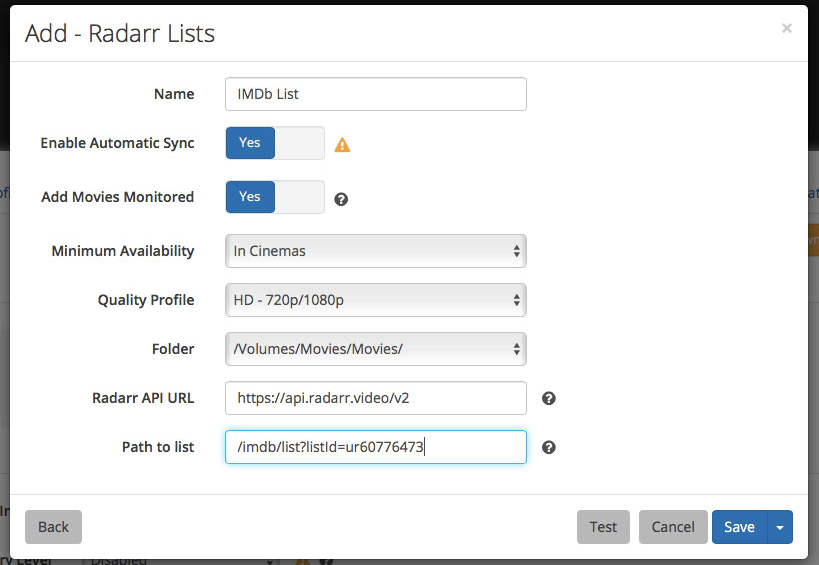
Will attach logs shortly
uncleiven
on 13 Dec 2017
Iv got the same issue. It just sits there testing and will not let me save. I must have tried about 30 times and i got it to add a list once. I then tried to add another and got the same issue. I removed the list that did add eventually and I'm now back to square one. Here are my settings and logs
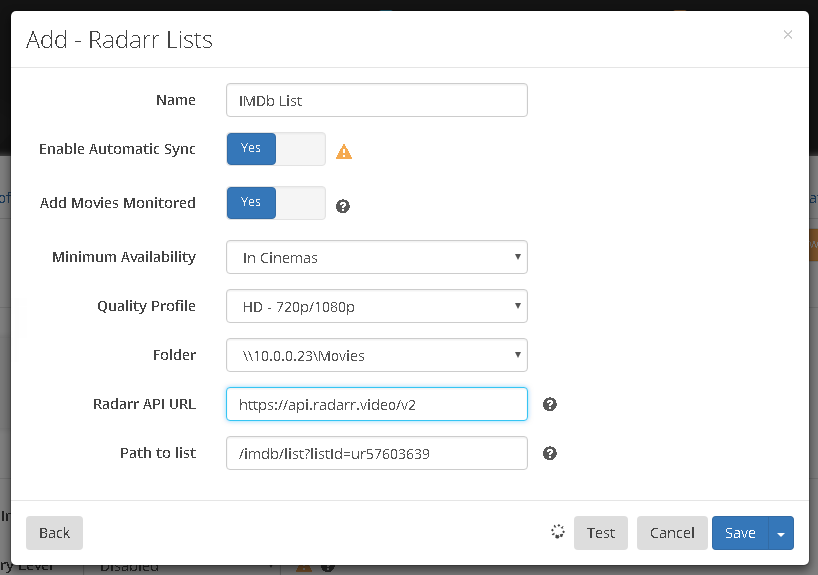
17-12-14 08:16:07.8|Warn|RadarrLists|Unable to connect to list
[v0.2.0.870] System.Net.WebException: The operation has timed out
at System.Net.HttpWebRequest.GetResponse()
at NzbDrone.Common.Http.Dispatchers.ManagedHttpDispatcher.GetResponse(HttpRequest request, CookieContainer cookies) in C:\projects\radarr-usby1\src\NzbDrone.Common\Http\Dispatchers\ManagedHttpDispatcher.cs:line 74
at NzbDrone.Common.Http.Dispatchers.FallbackHttpDispatcher.GetResponse(HttpRequest request, CookieContainer cookies) in C:\projects\radarr-usby1\src\NzbDrone.Common\Http\Dispatchers\FallbackHttpDispatcher.cs:line 58
at NzbDrone.Common.Http.HttpClient.Execute(HttpRequest request) in C:\projects\radarr-usby1\src\NzbDrone.Common\Http\HttpClient.cs:line 63
at NzbDrone.Core.NetImport.HttpNetImportBase1.FetchNetImportResponse(NetImportRequest request) in C:\projects\radarr-usby1\src\NzbDrone.Core\NetImport\HttpNetImportBase.cs:line 131
at NzbDrone.Core.NetImport.HttpNetImportBase1.FetchPage(NetImportRequest request, IParseNetImportResponse parser) in C:\projects\radarr-usby1\src\NzbDrone.Core\NetImport\HttpNetImportBase.cs:line 108
at NzbDrone.Core.NetImport.HttpNetImportBase`1.TestConnection() in C:\projects\radarr-usby1\src\NzbDrone.Core\NetImport\HttpNetImportBase.cs:line 144
17-12-14 08:16:07.8|Warn|NzbDroneErrorPipeline|Invalid request Validation failed:
-- Unable to connect to list, check the log for more details
17-12-14 08:18:21.3|Warn|RadarrLists|Unable to connect to list
[v0.2.0.870] System.Net.WebException: The operation has timed out
at System.Net.HttpWebRequest.GetResponse()
at NzbDrone.Common.Http.Dispatchers.ManagedHttpDispatcher.GetResponse(HttpRequest request, CookieContainer cookies) in C:\projects\radarr-usby1\src\NzbDrone.Common\Http\Dispatchers\ManagedHttpDispatcher.cs:line 74
at NzbDrone.Common.Http.Dispatchers.FallbackHttpDispatcher.GetResponse(HttpRequest request, CookieContainer cookies) in C:\projects\radarr-usby1\src\NzbDrone.Common\Http\Dispatchers\FallbackHttpDispatcher.cs:line 58
at NzbDrone.Common.Http.HttpClient.Execute(HttpRequest request) in C:\projects\radarr-usby1\src\NzbDrone.Common\Http\HttpClient.cs:line 63
at NzbDrone.Core.NetImport.HttpNetImportBase1.FetchNetImportResponse(NetImportRequest request) in C:\projects\radarr-usby1\src\NzbDrone.Core\NetImport\HttpNetImportBase.cs:line 131
at NzbDrone.Core.NetImport.HttpNetImportBase1.FetchPage(NetImportRequest request, IParseNetImportResponse parser) in C:\projects\radarr-usby1\src\NzbDrone.Core\NetImport\HttpNetImportBase.cs:line 108
at NzbDrone.Core.NetImport.HttpNetImportBase`1.TestConnection() in C:\projects\radarr-usby1\src\NzbDrone.Core\NetImport\HttpNetImportBase.cs:line 144
17-12-14 08:18:21.3|Warn|NzbDroneErrorPipeline|Invalid request Validation failed:
-- Unable to connect to list, check the log for more details
 CurtisFeatures
on 14 Dec 2017
CurtisFeatures
on 14 Dec 2017
I've looked into this issue, and apparently IMDB has officially discontinued RSS feed support. You can read an official statement here.
Hopefully Radarr can incorporate an HTML parser for these lists, but until then, we're all out of luck.
 bwareca
on 15 Dec 2017
bwareca
on 15 Dec 2017
@bwareca We don’t need an html crawler. Just use the Radarr lists, they use an unofficial API.
galli-leo
on 15 Dec 2017
I also cannot get it to work, even when using Radarr lists
 fafoulon
on 17 Dec 2017
fafoulon
on 17 Dec 2017
@fafoulon Please post the exact error, else we cannot help you.
galli-leo
on 17 Dec 2017
@CurtisFeatures Your list works fine for me. Please double check your internet connection / ability to ping api.radarr.video.
galli-leo
on 17 Dec 2017
Is someone able to share settings that do work? I've followed the multiple ideas on here and cannot get it back working. Thanks all
 lemohol
on 17 Dec 2017
lemohol
on 17 Dec 2017
Settings seen above work for me. Maybe you can post your settings as well as some logs of the failure?
galli-leo
on 17 Dec 2017
Invalid request Validation failed:
-- Unable to connect to list, check the log for more details
v0.2.0.910] NzbDrone.Core.MetadataSource.RadarrAPI.RadarrAPIException: Error while calling api: Unprocessable Entity! Parameter listId has one or more errors.
Full error(s): Unprocessable Entity! Parameter listId has one or more errors. (422), Details: The following errors happened while processing the request parameter listId: The format of the listId given is invalid!
at NzbDrone.Core.NetImport.Radarr.RadarrParser.PreProcess(NetImportResponse indexerResponse) in C:\projects\radarr-usby1\src\NzbDrone.Core\NetImport\Radarr\RadarrParser.cs:line 60
at NzbDrone.Core.NetImport.Radarr.RadarrParser.ParseResponse(NetImportResponse importResponse) in C:\projects\radarr-usby1\src\NzbDrone.Core\NetImport\Radarr\RadarrParser.cs:line 34
at NzbDrone.Core.NetImport.HttpNetImportBase1.FetchPage(NetImportRequest request, IParseNetImportResponse parser) in C:\projects\radarr-usby1\src\NzbDrone.Core\NetImport\HttpNetImportBase.cs:line 110
at NzbDrone.Core.NetImport.HttpNetImportBase1.TestConnection() in C:\projects\radarr-usby1\src\NzbDrone.Core\NetImport\HttpNetImportBase.cs:line 144
This is the log file details when using the Radarr IMDB list
lemohol
on 17 Dec 2017
Hi, I'm trying with the path to list /imdb/list?listId=ur5726204 I get this error "Unable to connect to list, check the log for more details"
Unable to connect to list: Error while calling api: Unprocessable Entity! Parameter listId has one or more errors.
Full error(s): Unprocessable Entity! Parameter listId has one or more errors. (422, RayId: 29713327-dabf-4718-9865-bdcaf51bea88), Details: The following errors happened while processing the request parameter listId: The format of the listId given is invalid!
fafoulon
on 17 Dec 2017
@fafoulon and @lemohol See #2338
galli-leo
on 17 Dec 2017
So i retried this morning and i think i have found my issue. My using IP vanish on the system its installed on and when that is active it doesn't work. Looks like i will have to split my setup into multiple VMs unless anyone else has any other ideas?
CurtisFeatures
on 18 Dec 2017
Ok so I can't ping https://api.radarr.video/v2 from my machine, guessing that has something to do with it. Unlike @CurtisFeatures I don't have a VPN running, and I have checked my OpenDNS logs and that domain isn't being blocked
uncleiven
on 21 Dec 2017
Ok, so managed to get mine working by adding a / to the end of the API URL...
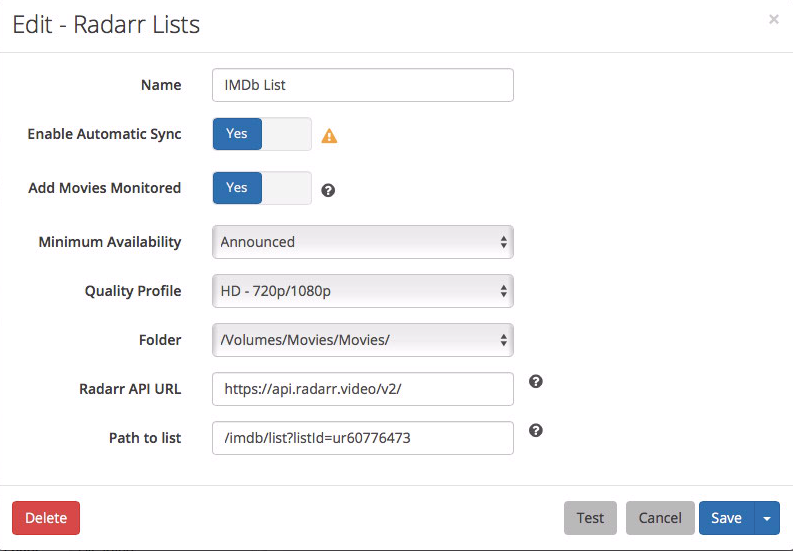
uncleiven
on 21 Dec 2017
I tried everything in this thread and still could not get my Watchlist to work using these settings. What seems to have worked is not using the urNUMBER format. What I did to get it to save was to click 'Edit' on my watch list on IMDB. In the URL, you'll see it gives an actual list id of lsNUMBER.
Using this number instead of UR seemed to work.
Now I need to test if Radarr will actually bring in a new item when I add it to my watch list.
- Edit - Confirmed this does work and import.
 Elfman72
on 29 Dec 2017
Elfman72
on 29 Dec 2017
Done what Elfman72 did, and that actually works, must be because the "hidden" ls ID is more than 8 characters as commented in issue #2338 by galli-leo
 SFolkmann
on 29 Dec 2017
SFolkmann
on 29 Dec 2017
Not to be all "me too" but what Elfman72 suggests is what fixed things for me. Since I'd had automatic sync enabled, using the ur ID resulted in over 50k movies being added to my list (similar to what is mentioned in this Reddit thread.
 ddysart
on 5 Jan 2018
ddysart
on 5 Jan 2018
Can you share your ur id?
galli-leo
on 6 Jan 2018
The URL to the watchlist is http://www.imdb.com/user/ur46022785/watchlist?ref_=wt_nv_wl_all_0 but when I click edit it is http://www.imdb.com/list/ls074073377/edit?ref_=wl_edt_pwr.
Using the ls074073377 works fine, but ur46022785 resulted in about 50k movies getting added (since I had auto import enabled).
ddysart
on 6 Jan 2018
I got this working using the ls tag - it worked perfectly until a few days ago. Nothing changed on the server; Radarr didnt update, no changes what so ever, but now the lists don't work again. I can only assume it's at the IDMB end. Does anyone still have theirs working?
lemohol
on 3 Feb 2018
@lemohol Actually, seems like my api is kinda borked atm :(
galli-leo
on 3 Feb 2018
Has API been fixed?
 rickyagrawal
on 2 Mar 2018
rickyagrawal
on 2 Mar 2018
@rickyagrawal Yeah should be fine now. (Still unstable a few times a month, but that's kinda impossible to fix, without redoing the whole architecture. We are currently being hit by about 2 million requests a day).
galli-leo
on 3 Mar 2018
Changing my watchlist to public on IMDB fixed the issue for me. Its on private by default
 DutchmanSA
on 4 Jul 2018
DutchmanSA
on 4 Jul 2018
I'm just trying Radarr for the first time and am struggling to add my list here, too.
Message from logs:
Unable to connect to list: Error while calling api: Not Found
Full error(s): Not Found (404, RayId: 87c961bd-26ab-4ed1-b084-e4045af6c0ae), Details: not found
Error:
NzbDrone.Core.MetadataSource.RadarrAPI.RadarrAPIException: Error while calling api: Not Found
Full error(s): Not Found (404, RayId: 87c961bd-26ab-4ed1-b084-e4045af6c0ae), Details: not found
  at NzbDrone.Core.NetImport.Radarr.RadarrParser.PreProcess (NzbDrone.Core.NetImport.NetImportResponse indexerResponse) [0x00029] in C:\projects\radarr-usby1\src\NzbDrone.Core\NetImport\Radarr\RadarrParser.cs:60
  at NzbDrone.Core.NetImport.Radarr.RadarrParser.ParseResponse (NzbDrone.Core.NetImport.NetImportResponse importResponse) [0x0000d] in C:\projects\radarr-usby1\src\NzbDrone.Core\NetImport\Radarr\RadarrParser.cs:34
  at NzbDrone.Core.NetImport.HttpNetImportBase`1[TSettings].FetchPage (NzbDrone.Core.NetImport.NetImportRequest request, NzbDrone.Core.NetImport.IParseNetImportResponse parser) [0x00008] in C:\projects\radarr-usby1\src\NzbDrone.Core\NetImport\HttpNetImportBase.cs:115
  at NzbDrone.Core.NetImport.HttpNetImportBase`1[TSettings].TestConnection () [0x00
Not sure how to proceed here, given the Not Found error.
 jandreaucodes
on 15 Oct 2019
jandreaucodes
on 15 Oct 2019
Related issues
 HitsvilleUK
·
3Comments
HitsvilleUK
·
3Comments
 scope999
·
3Comments
scope999
·
3Comments
 alpinewinter
·
3Comments
alpinewinter
·
3Comments
 plexecutor
·
3Comments
plexecutor
·
3Comments
 DaveidWeba
·
3Comments
DaveidWeba
·
3Comments
Most helpful comment
Changing my watchlist to public on IMDB fixed the issue for me. Its on private by default