Pyvista: Support casting shadows of actors
Hi, dear pyvista team,
Of cuourse, now pyvista can visualize 3D models as usual as other tools, like cloudcompare/meshlab, just like this,

However, can it support to show the shadow of 3D model, like this?
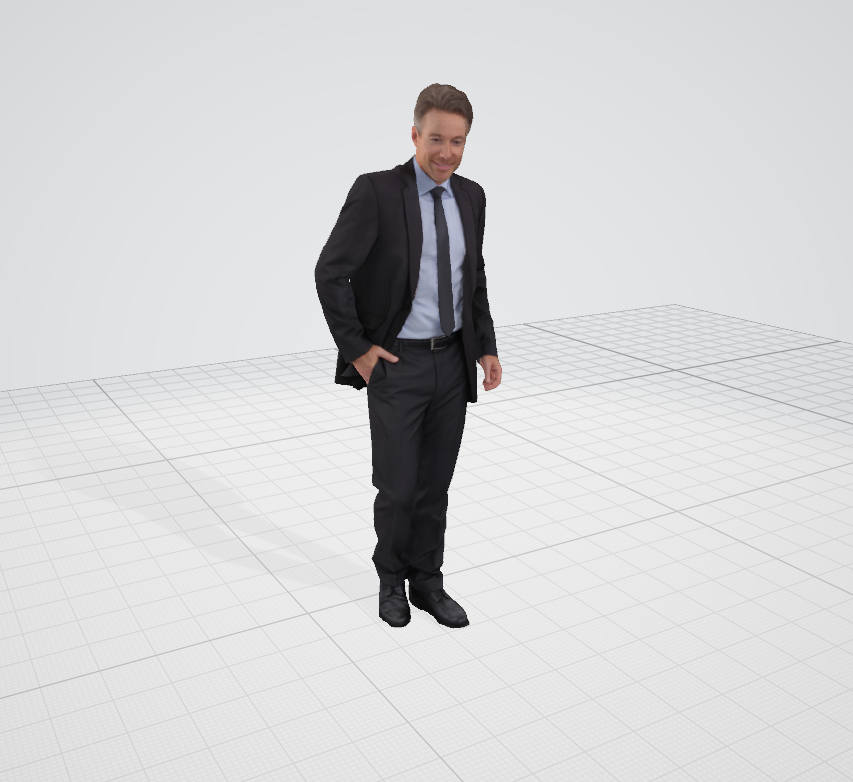
Or, can I specify the background/window/camera settings to achieve this?
Thanks~
 wangfudong
All 3 comments
At present, this capability is not exposed in PyVista tyhough I am fairly certain VTK (the underlying lib to PyVista) can handle this. It's just a matter of adding it into the rendering pipeline, likely.
I will transfer this to PyVista as a feature request
 banesullivan
on 16 Oct 2020
banesullivan
on 16 Oct 2020
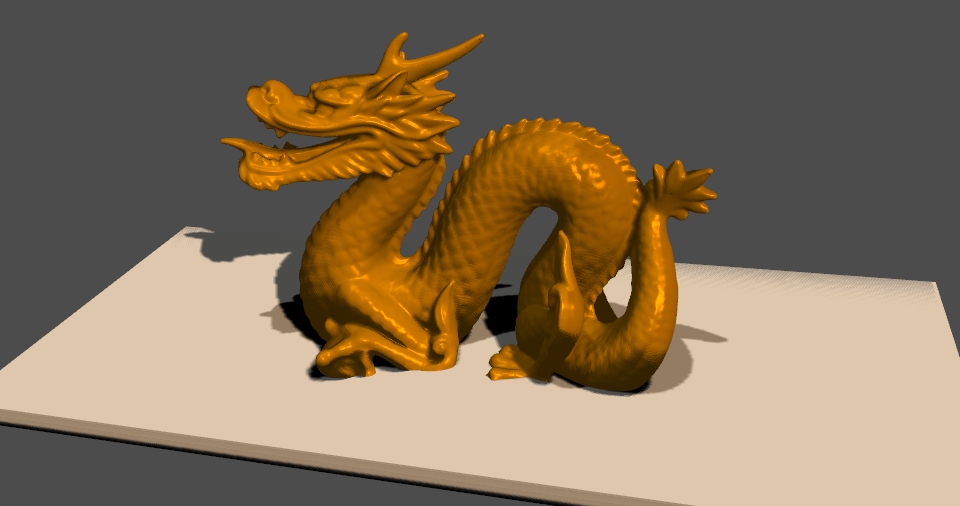
There's a fairly good example from vtk at https://lorensen.github.io/VTKExamples/site/Python/Rendering/Shadows/
I've partially modified it here to work with our plotter:
import vtk

# Use a sphere
import pyvista
from pyvista import examples

mesh = examples.download_dragon()

colors = vtk.vtkNamedColors()
colors.SetColor('HighNoonSun', [255, 255, 251, 255])  # Color temp. 5400°K
colors.SetColor('100W Tungsten', [255, 214, 170, 255])  # Color temp. 2850°K

light1 = vtk.vtkLight()
light1.SetFocalPoint(0, 0, 0)
light1.SetPosition(0, 1, 0.2)
light1.SetColor(colors.GetColor3d('HighNoonSun'))
light1.SetIntensity(0.3)
renderer.AddLight(light1)

light2 = vtk.vtkLight()
light2.SetFocalPoint(0, 0, 0)
light2.SetPosition(1.0, 1.0, 1.0)
light2.SetColor(colors.GetColor3d('100W Tungsten'))
light2.SetIntensity(1.0)
renderer.AddLight(light2)

# Add a box on the bottom
bounds = mesh.GetBounds()
rnge = (bounds[1] - bounds[0], bounds[3] - bounds[2], bounds[5] - bounds[4])
expand = 1.0
THICKNESS = rnge[2] * 0.1
center = ((bounds[1] + bounds[0]) / 2.0, bounds[2] + THICKNESS / 2.0, (bounds[5] + bounds[4]) / 2.0)
xlen = bounds[1] - bounds[0] + (rnge[0] * expand)
ylen = THICKNESS
zlen = bounds[5] - bounds[4] + (rnge[2] * expand)
plane_mesh = pyvista.Cube(center, xlen, ylen, zlen)

# create the plotter
pl = pyvista.Plotter()
pl.renderer.RemoveAllLights()
pl.renderer.AddLight(light1)
pl.renderer.AddLight(light2)
pl.add_mesh(mesh, ambient=0.2, diffuse=0.5, specular=0.51, specular_power=30,
            smooth_shading=True, color='orange')
pl.add_mesh(plane_mesh)

shadows = vtk.vtkShadowMapPass()
seq = vtk.vtkSequencePass()

passes = vtk.vtkRenderPassCollection()
passes.AddItem(shadows.GetShadowMapBakerPass())
passes.AddItem(shadows)
seq.SetPasses(passes)

# Tell the renderer to use our render pass pipeline
cameraP = vtk.vtkCameraPass()
cameraP.SetDelegatePass(seq)
pl.renderer.SetPass(cameraP)

# nice camera position
cpos = [(0.10533537264201895, 0.28584795035272126, 0.3472861003034224),
        (-0.028657675440026627, 0.060039973117803645, -0.094230396877531),
        (-0.07280203079138521, 0.8967386829419564, -0.4365313262850401)]

pl.camera_position = cpos
pl.show()
print(pl.camera_position)
There would be a bit of work to do to make the lighting and shadows more pythonic and to get this to be a solid example within pyvista, but I think it's a good start.
 akaszynski
on 16 Oct 2020
akaszynski
on 16 Oct 2020
We're going to add this as a demo and clean up the interface for this in a PR. We'll need a lighting PR as well.
akaszynski
on 10 Nov 2020
Related issues
 zhaofenqiang
·
5Comments
zhaofenqiang
·
5Comments
 JiaweiZhuang
·
6Comments
JiaweiZhuang
·
6Comments
 dcbr
·
4Comments
dcbr
·
4Comments
 flothesof
·
4Comments
flothesof
·
4Comments
 cweickhmann
·
5Comments
cweickhmann
·
5Comments
Most helpful comment
There's a fairly good example from
vtkat https://lorensen.github.io/VTKExamples/site/Python/Rendering/Shadows/I've partially modified it here to work with our plotter:

There would be a bit of work to do to make the lighting and shadows more pythonic and to get this to be a solid example within
pyvista, but I think it's a good start.