Pyvista: Is it possible to warp by vector?
I'm working on mechanics and trying to visualize a simulated displacement field. In other words, I have a mesh and a transformed version of that mesh obtained by adding a vector field to each node.
In Paraview, I use a filter that is called warp-by-vector to do the vector addition. I have looked for this filter in pyvista but have been unable to find it, although I found warp by scalar.
Is it possible to warp by vector ? Is this part of the roadmap? Or should I do it manually by adding a vector to each point of my mesh?
Thank you for your very useful package.
Best regards,
Florian
 flothesof
All 4 comments
Hi and welcome! Thanks for posting your first issue in the PyVista project! Someone from @pyvista/developers will chime in before too long. If your question is support related, it may be automatically transferred to https://github.com/pyvista/pyvista-support
![github-actions[bot] picture](https://avatars.githubusercontent.com/in/15368?v=4&s=40) github-actions[bot]
on 23 Mar 2020
github-actions[bot]
on 23 Mar 2020
So it turns out that following the implementation logic of warp_by_scalar has worked for me.
I wrote the following function:
def warp_by_vector(dataset, scalars=None, factor=1.0):
    if scalars is None:
        field, scalars = dataset.active_scalars_info
    arr, field = get_array(dataset, scalars, preference='point', info=True)
    alg = vtk.vtkWarpVector()
    alg.SetInputDataObject(dataset)
    alg.SetInputArrayToProcess(0, 0, 0, field, scalars)
    alg.SetScaleFactor(factor)
    alg.Update()
    output = _get_output(alg)
    return output
Which allowed to get this:
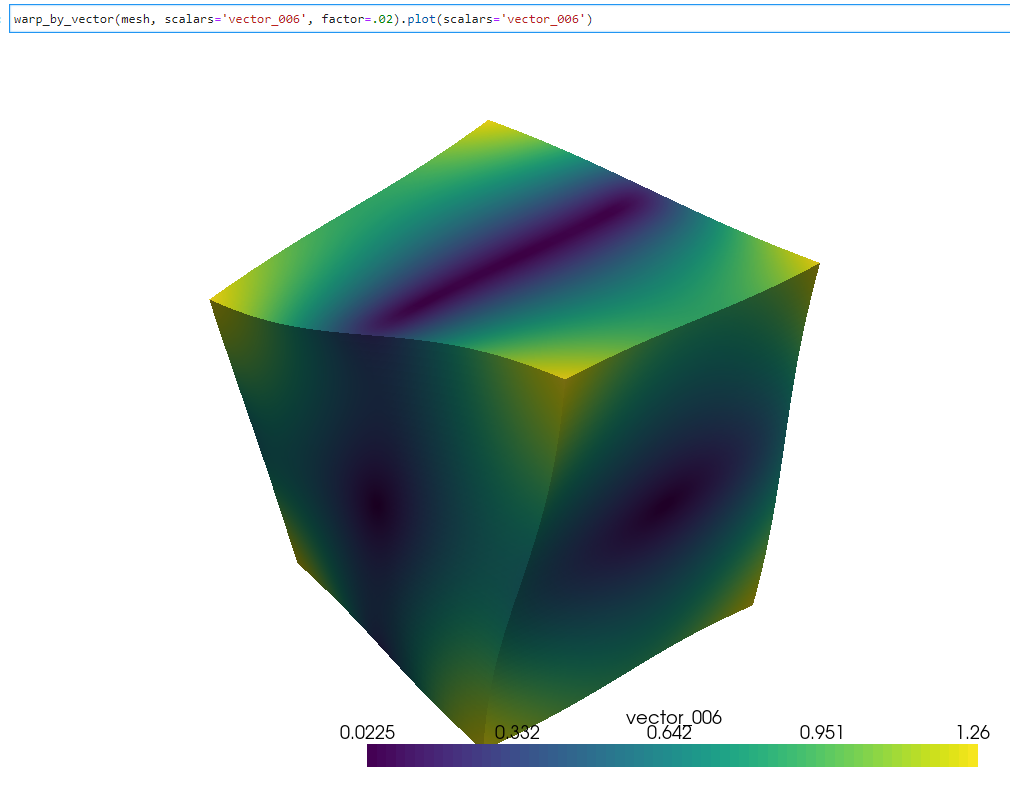
This could be worthwhile to be part of pyvista, but I sortof got lucky with the call to vtkWarpVector since I don't have the right background...
Thanks for this amazing library!
Florian
flothesof
on 24 Mar 2020
Please open a PR - contributions like this are very worthwhile. The next user that would like to warp will certainly come along at some point (user demand is kind of how filters are added :) ). Don't worry about your background, if you managed to throw this together you will manage to get it into contribution shape (potentially with a bit of guidance/review) for sure. And even if you don't want to go through that, please still open the PR with the code you have so far so someone else could finalize it for merging.
 imsodin
on 24 Mar 2020
imsodin
on 24 Mar 2020
Closing now that https://github.com/pyvista/pyvista/pull/651 is merged. Feel free to re-open if I missed something.
 GuillaumeFavelier
on 13 Apr 2020
GuillaumeFavelier
on 13 Apr 2020
Related issues
 banesullivan
·
3Comments
banesullivan
·
3Comments
 JiaweiZhuang
·
6Comments
JiaweiZhuang
·
6Comments
 rodrigomologni
·
4Comments
GuillaumeFavelier
·
5Comments
rodrigomologni
·
4Comments
GuillaumeFavelier
·
5Comments
 KeunwooPark
·
4Comments
KeunwooPark
·
4Comments
Most helpful comment
So it turns out that following the implementation logic of warp_by_scalar has worked for me.
I wrote the following function:
Which allowed to get this:

This could be worthwhile to be part of pyvista, but I sortof got lucky with the call to vtkWarpVector since I don't have the right background...
Thanks for this amazing library!
Florian