Pyvista: eye dome lighting white out in subplots
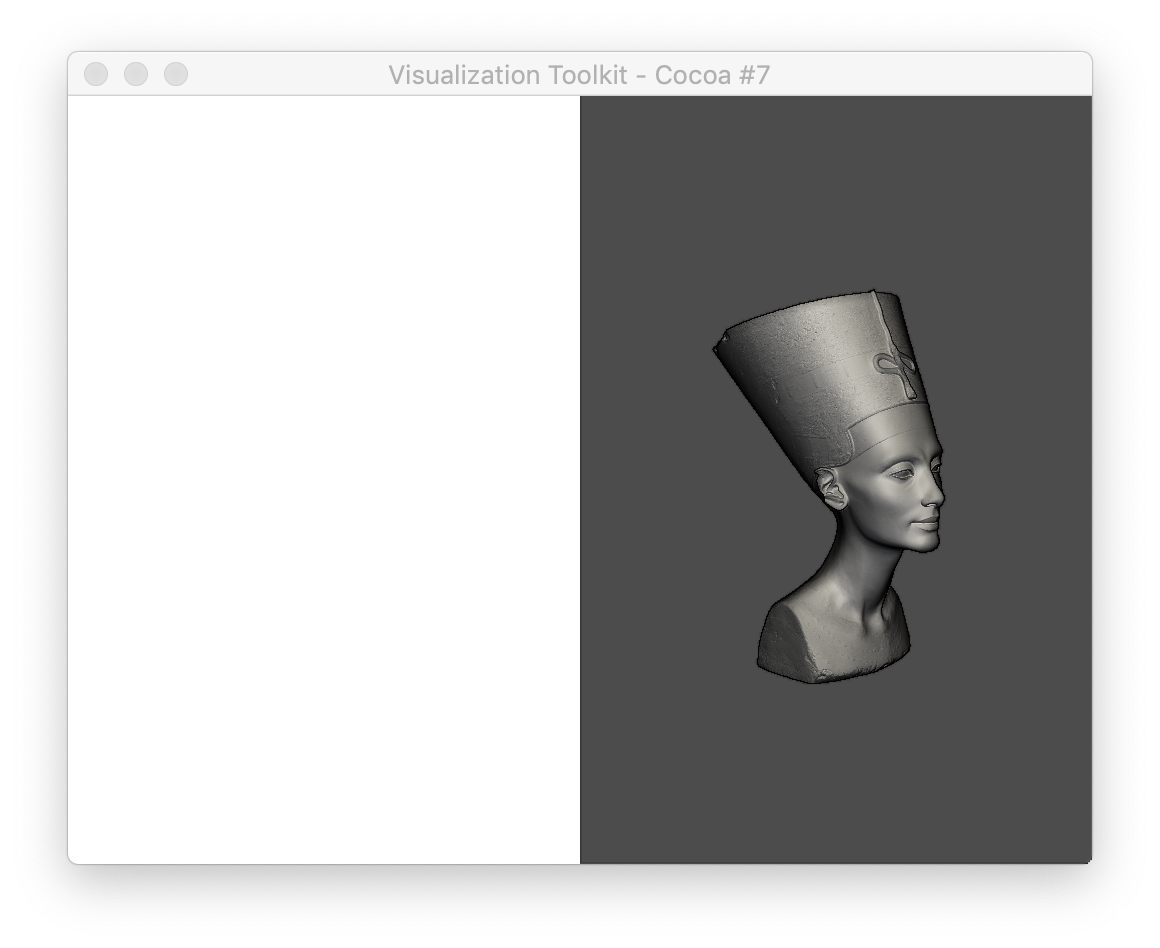
The eye dome lighting code is giving white out views when plotting in any subplot other than the (0,0) index.
import pyvista as pv
from pyvista import examples

mesh = examples.download_nefertiti()

p = pv.Plotter(notebook=False, shape=(1, 2))

# No eye-dome lighting
p.subplot(0,0)
p.add_mesh(mesh, color=True)
p.camera_position = [-1,-1,0.2]

# With eye-dome lighting
p.subplot(0,1)
p.add_mesh(mesh, color=True)
p.enable_eye_dome_lighting()
p.camera_position = [-1,-1,0.2]

p.show()
 banesullivan
All 3 comments
All indices before the one with eye dome lighting enabled get whited-out
banesullivan
on 13 Jun 2019
We did a minimum working example reproducing the issue with @massich's help in Python and C++ VTK in this repository. Then I opened a new discussion on the topic in the VTK discourse. Hopefully we'll get some insights or new perspectives on it.
 GuillaumeFavelier
on 2 Jul 2019
GuillaumeFavelier
on 2 Jul 2019
👍2
Thanks, @GuillaumeFavelier!! There are a few issues like this where's it has been tough for me to make a minimal, pure-VTK example to post on the VTK discourse. Hopefully that thread gets some attention!
banesullivan
on 2 Jul 2019
Was this page helpful?
0 / 5 - 0 ratings
Related issues
 JiaweiZhuang
·
6Comments
JiaweiZhuang
·
6Comments
 rodrigomologni
·
3Comments
banesullivan
·
6Comments
banesullivan
·
4Comments
rodrigomologni
·
3Comments
banesullivan
·
6Comments
banesullivan
·
4Comments
 tkoyama010
·
3Comments
tkoyama010
·
3Comments
Most helpful comment
We did a minimum working example reproducing the issue with @massich's help in Python and C++ VTK in this repository. Then I opened a new discussion on the topic in the VTK discourse. Hopefully we'll get some insights or new perspectives on it.