Pyvista: Inconsistent behaviour of `Plotter.add_text`
Today, I came across an inconsistend behaviour: depending on the keyword argument position, Plotter.add_text returns different object types.
MWE:
import pyvista as pv
plotter = pv.Plotter()
text1 = plotter.add_text("Test1", position="upper_left")
text2 = plotter.add_text("Test2", position=(200, 200))
print(type(text1), type(text2))
<class 'vtkRenderingAnnotationPython.vtkCornerAnnotation'> <class 'vtkRenderingOpenGL2Python.vtkOpenGLTextActor'>
This is okay in principle, but the two types have entirely different calls. For updating, in case 1, I can use text1.SetText("New Text"). For case 2 it is text2.SetInput("New Text").
Is this behaviour intended? To me it is at least very unintuitive.
 cweickhmann
All 5 comments
This isn't intended and is due to the way the position args are implemented behind the scenes. For the text to be displayed in one of the corners and to remain there, it needs to use the vtkRenderingAnnotationPython.vtkCornerAnnotation class. It would be better to put a wrapper on this class to make it easier and more pythonic to set the text.
 akaszynski
on 17 Jul 2019
akaszynski
on 17 Jul 2019
As a quick "fix", it could be explained in the docstring.
E.g.: Lines 2151 in pyvista/plotting/plotting.py
        position : str, tuple(float)
            String name of the position or length 2 tuple of the pixelwise
            position to place the bottom left corner of the text box.
>>          If string name is used, returns a `vtkCornerAnnotation` object
>>          normally used for fixed labels (like title or xlabel).
>>          If tuple is used, returns a more general `vtkOpenGLTextActor`.
            Default is to find the top left corner of the renderering window
            and place text box up there. Available position: ``'lower_left'``,
            ``'lower_right'``, ``'upper_left'``, ``'upper_right'``,
            ``'lower_edge'``, ``'upper_edge'``, ``'right_edge'``, and
            ``'left_edge'``
Thanks for bringing this to our attention, @cweickhmann. This is definitely something I overlooked in #275 and it should at the least be documented.
I've never been a fan of the vtkOpenGLTextActor because the position doesn't stay at it's relative position if the window is resized:
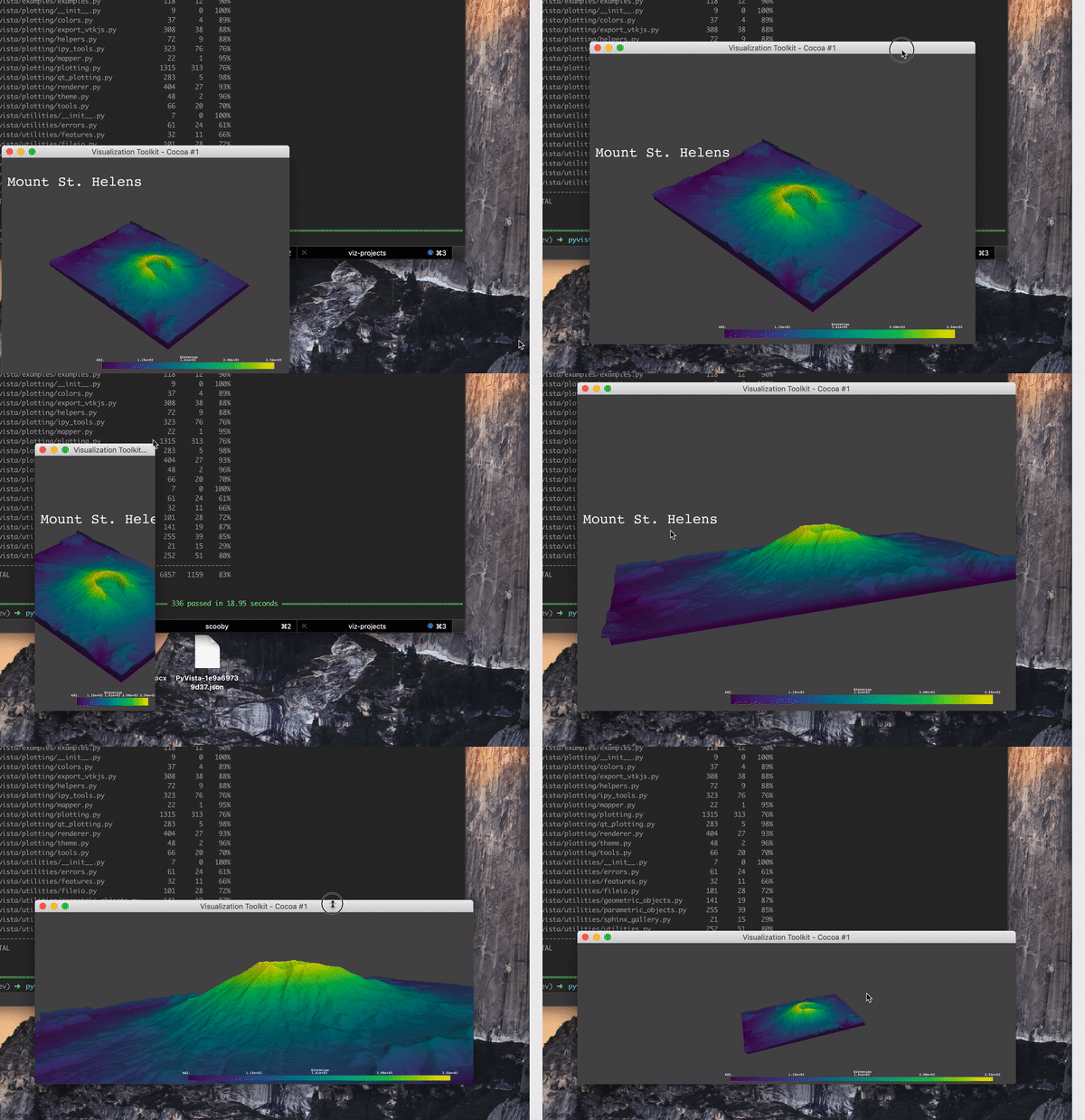
I'm wondering if we could:
- [x] documents this issue per @cweickhmann's comment above
- [x] adds an event listener that updates the
vtkOpenGLTextActor's position (if that one is used) anytime the window is resized.
 banesullivan
on 18 Jul 2019
banesullivan
on 18 Jul 2019
Ah, your animation finally shows the "rationale" (? ;-) ) behind the position. I was completely puzzled. Thanks!
cweickhmann
on 3 Oct 2019
The issue where the vtkOpenGLTextActor's position wouldn't be updated upon window resizing was resolved in #390 by using the viewport=True argument to add_text()
banesullivan
on 31 Oct 2019
Related issues
banesullivan
·
4Comments
banesullivan
·
3Comments
 wangfudong
·
3Comments
wangfudong
·
3Comments
 KeunwooPark
·
4Comments
KeunwooPark
·
4Comments
 tinebryder
·
4Comments
tinebryder
·
4Comments