First of all, thank you for the awesome work!
Describe the bug, what's wrong, and what you expect:
I have some pre-existing code generating a rather complicated vtkAssemby and would like to show it using the pyvista Plotter, but there doesn’t seem to be a method for this (or at least, I haven’t been able to find it).
However, if I use add_actor and modify the source code slightly it seems to be working. The only alternation needed is replacing the return statement of the add_actor method of Renderer with something like
        if hasattr(actor, 'GetProperty'):
            prop = actor.GetProperty()
        else:
            prop = None

        return actor, prop
To Reproduce
The following toy example fails:
import vtk
import pyvista as pv

# Create assembly
actor = vtk.vtkActor()
sphere = vtk.vtkSphereSource()
sphere.Update()
mapper = vtk.vtkPolyDataMapper()
mapper.SetInputData(sphere.GetOutput())
actor.SetMapper(mapper)

vtkAssembly = vtk.vtkAssembly()
vtkAssembly.AddPart(actor)

# Add assembly to Plotter
plotter = pv.Plotter()
plotter.add_actor(vtkAssembly)
plotter.show()
System Information:
Please run the following code wherever you are experiencing the bug and paste the output below. This report helps us track down bugs and it is critical to addressing your bug:
# Get system info
import pyvista as pv
print(pv.Report())
--------------------------------------------------------------------------------
  Date: Sat Jun 13 11:52:38 2020 Romance Daylight Time
                OS : Windows
            CPU(s) : 8
           Machine : AMD64
      Architecture : 64bit
               RAM : 31.8 GB
       Environment : Python
        GPU Vendor : Intel
      GPU Renderer : Intel(R) UHD Graphics 620
       GPU Version : 4.5.0 - Build 26.20.100.7756
  Python 3.6.10 (default, Mar  5 2020, 10:17:47) [MSC v.1900 64 bit (AMD64)]
           pyvista : 0.25.1
               vtk : 8.2.0
             numpy : 1.18.4
           imageio : 2.8.0
           appdirs : 1.4.3
            scooby : 0.5.4
            meshio : 4.0.13
        matplotlib : 3.0.3
         pyvistaqt : 0.1.0
             PyQt5 : 5.12.3
             scipy : 1.3.1
  Intel(R) Math Kernel Library Version 2019.0.4 Product Build 20190411 for
  Intel(R) 64 architecture applications
--------------------------------------------------------------------------------
 tinebryder
All 4 comments
Hi and welcome! Thanks for posting your first issue in the PyVista project! Someone from @pyvista/developers will chime in before too long. If your question is support related, it may be automatically transferred to https://github.com/pyvista/pyvista-support
![github-actions[bot] picture](https://avatars.githubusercontent.com/in/15368?v=4&s=40) github-actions[bot]
on 13 Jun 2020
github-actions[bot]
on 13 Jun 2020
Hi @tinebryder, thanks for requesting this. A long time ago I thought about adding support for vtkAssemblys as I saw some really cool stuff done with them in vtkplotter but I've never had a use case/motivation (I believe the same can be said for the other PyVsita developers).
I am hesitant to include your change as a patch because many other parts of PyVista rely on add_actor also returning that property and the possibility of prop being None could lead to issues.
I think it may be worth adding an add_assembly method to the Renderer class and perhaps providing some other helper methods for working with vtkAssemebly objects. We may have to put some real thought into this as it doesn't make sense to treat vtkAssemebly as actors because they actually subclass vtkProp3D and not vtkActor
Can you explain your motivation for using vtkAssembly? I've never really understood the point of them and it would help us know why and how you want to use them in order to best implement this in PyVista
 banesullivan
on 13 Jun 2020
banesullivan
on 13 Jun 2020
vtkplotter has now become vedo :)
I guess the main purpose of this assembly class is to manage groups of objects as single one wrt transformations, while keeping mappers and stuff as they where distinct.. i've been playing with pyvista a bit, and related to this issue is the axes representation which needs the vtkAssembly to work. It actually works out of the box in pyvista too!
import pyvista as pv
from pyvista import examples
from vedo.addons import buildAxes

# Load St Helens DEM and warp the topography
mesh = examples.download_st_helens().warp_by_scalar()

ax = buildAxes(mesh, # vedo likes pyvista :)
               xtitle="A new x_0  axis",
               xTitleItalic=1,
               # digits=3, # default is None (needs git master version)
               c='white',
              )
#for a in ax.unpack(): print(a.name)
ax.unpack(8).color('y').scale([1,1.8,1])

p = pv.Plotter()
p.add_mesh(mesh, opacity=0.5)
#p.add_assembly(ax)
p.renderers[0].AddActor(ax)
p.show()

If you're interested this shouldn't be too difficult to transplant/translate from vedo to pyvista and may justify adding an add_assembly() method .
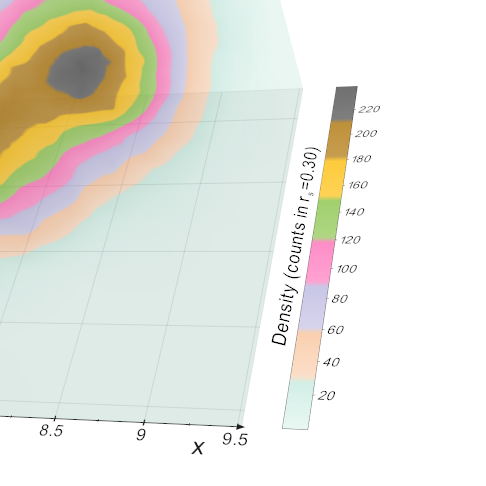
Another possible application is to build 3d scalarbars (with the better numeric tick format taken from buildAxes):
 marcomusy
on 22 Jul 2020
marcomusy
on 22 Jul 2020
That grid axes looks mighty nice!! This might compel me to work on this and port some of the axes code in vedo here
banesullivan
on 23 Jul 2020
Related issues
 JiaweiZhuang
·
6Comments
JiaweiZhuang
·
6Comments
 dcbr
·
4Comments
dcbr
·
4Comments
 deyanimay
·
5Comments
banesullivan
·
4Comments
deyanimay
·
5Comments
banesullivan
·
4Comments
 ljc19800331
·
3Comments
ljc19800331
·
3Comments
Most helpful comment
vtkplotterhas now becomevedo:)I guess the main purpose of this assembly class is to manage groups of objects as single one wrt transformations, while keeping mappers and stuff as they where distinct.. i've been playing with
pyvistaa bit, and related to this issue is the axes representation which needs the vtkAssembly to work. It actually works out of the box in pyvista too!If you're interested this shouldn't be too difficult to transplant/translate from vedo to pyvista and may justify adding an
add_assembly()method .Another possible application is to build 3d scalarbars (with the better numeric tick format taken from buildAxes):