Ptvs: Editing code leads to unexpected token '<newline>' errors in error list
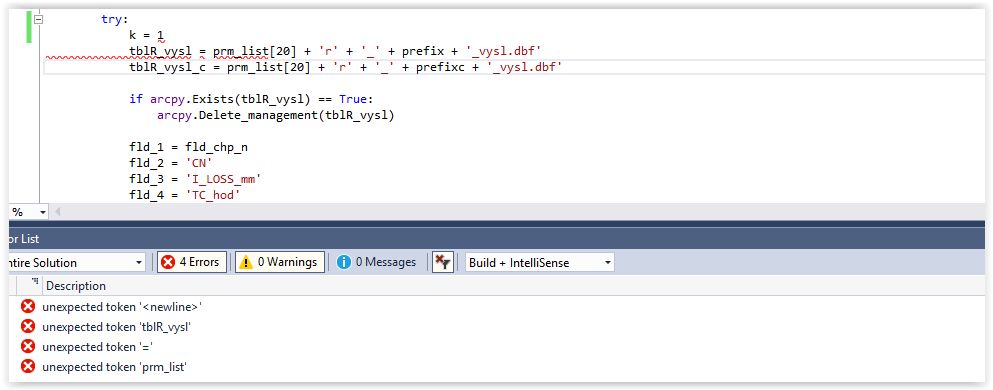
PYVS editor is not usable in Visual Studio 2017 (15.8.9 and several previous versions). If I try to add a new code to existing code, it always throws syntax error (unexpected token).
 petrsercl
All 21 comments
It would be helpful if you could answer a few questions:
- Have you checked the spacing and tabs to ensure they are the correct?
- Can you run a simple hello world program?
- Would it be possible for you to send me that portion of the code or file?
 RaymonGulati1
on 5 Nov 2018
RaymonGulati1
on 5 Nov 2018
Also reported at https://developercommunity.visualstudio.com/content/problem/374322/phantom-python-errors-in-vs-community-1588.html
 huguesv
on 5 Nov 2018
huguesv
on 5 Nov 2018
Also reported at https://developercommunity.visualstudio.com/content/problem/366916/python-intellisense-lint-inexistent-errors.html
huguesv
on 5 Nov 2018
And here: https://developercommunity.visualstudio.com/content/problem/351823/python-36-linter-stuck.html
huguesv
on 5 Nov 2018
huguesv
on 5 Nov 2018
I have the same issue, each time that I create a new line appears the error. If I close the file and reopen the error dissapear.
The version is:
Visual Studio Enterprise 2017 - 15.8.9
Python - 15.8.18241.1
 TheNextLVL
on 6 Nov 2018
TheNextLVL
on 6 Nov 2018
Same problem here, if I restart VS2017, these are gone but appear once I start working in the document:

VS2017 v15.9.3
 Helmur100
on 18 Dec 2018
Helmur100
on 18 Dec 2018
I have this problem as well
VS2017 v15.9.4
There is a workaround as stated here: https://developercommunity.visualstudio.com/content/problem/374322/phantom-python-errors-in-vs-community-1588.html
I replaced all occurrences of "TODO"with "TO DO".
 rafeek
on 8 Jan 2019
rafeek
on 8 Jan 2019
Now when a workaround has been identified, could this finally be fixed please?
 JenusL
on 28 Mar 2019
JenusL
on 28 Mar 2019
I couldn't reproduce the issue with TODO in VS 2019.
huguesv
on 3 Apr 2019
Still an issue in 15.9.12 on Win7 64-bit with Python 2.7.14. How many months more before we get some kind of fix? VS2013 is a better editing environment at the moment....!
 aw2003
on 22 May 2019
aw2003
on 22 May 2019
How can this issue be closed with so many people reporting it?
I replaced all occurrences of "TODO" with "TO DO" and so far so good.
 davidalbertonogueira
on 3 Jun 2019
davidalbertonogueira
on 3 Jun 2019
For me too working with replacing TODO with "TO DO".
This very simple but extremly annoying issue is now well known over a year and MS can't fix it?
 MacMarde
on 27 Jun 2019
MacMarde
on 27 Jun 2019
There seems to be a lot of punting this issue around and trying to close it without actually fixing it. Is this going to be fixed ever?
rafeek
on 24 Jul 2019
I'm on VS Code and had a similar issue. Just spent half an hour commenting out lines to locate what I expected to be a missing parentheses. At the end, only four lines and imports where left. I could not for the life of me figure out why I was getting unexpected token newline. Running the flask app worked fine, after finding this tread I closed and reopened VS code. No more errors.
If there is shared code between the Python VS Code Extension and PTVS it might be related?
Version: 1.37.1
 haugstve
on 21 Aug 2019
haugstve
on 21 Aug 2019
This is exactly the kind of problem which makes working in an IDE very annoying on a daily basis - if it doesn't get fixed, people will start to look at alternatives as continually being reminded of having to add workarounds to your comments just to avoid the IDE telling you about non-existent syntax errors is a "grinding" bug in the UI - the kind which saps your enthusiasm for the whole product.
aw2003
on 21 Aug 2019
I am facing the problem, while I want to do loads of caching data then the error getting....json.decoder.JSONDecodeError: Expecting value: line 1 column 1 (char 0)
so can anyone explain to me why the error coming?
 nilam1996
on 22 Aug 2019
nilam1996
on 22 Aug 2019
Still very much facing this in the latest VS Code and after deleting and re-downloading the latest language server. On random but frequent (hourly or so) occassions during the day I get all kinds of phantom errors where a file just trips up as soon as I edit a single character after opening.
languageServer
languageServer.0.4.71
Python Extension
Name: Python
Id: ms-python.python
Description: Linting, Debugging (multi-threaded, remote), Intellisense, code formatting, refactoring, unit tests, snippets, and more.
Version: 2019.10.44104
Publisher: Microsoft
VS Marketplace Link: https://marketplace.visualstudio.com/items?itemName=ms-python.python
VS Code
Version: 1.39.2 (user setup)
Commit: 6ab598523be7a800d7f3eb4d92d7ab9a66069390
Date: 2019-10-15T15:35:18.241Z
Electron: 4.2.10
Chrome: 69.0.3497.128
Node.js: 10.11.0
V8: 6.9.427.31-electron.0
OS: Windows_NT x64 10.0.18362
 TiemenSch
on 5 Nov 2019
TiemenSch
on 5 Nov 2019
Thanks to everyone for these reports.
@TiemenSch, could you please report your issue against the language server here: https://github.com/microsoft/python-language-server. PTVS is using an old language server (~2 years since the fork) so this is not the place to report issues with the new language server in VS Code. I'd move the issue over but want to keep the original issue open against PTVS.
For those experiencing the original issue in Visual Studio, we are working on moving VS to use the new language server early in 2020, which should provide a considerably better experience. We are not fixing bugs in the old language server which is why there has been no movement on this. As a small team we have to decide where to focus our limited resources and we'd rather keep that focus on getting PTVS moved over to the LSP (language server protocol) and the new language server. We thank you for your patience.
 gramster
on 6 Nov 2019
gramster
on 6 Nov 2019
My apologies! I came here after multiple referencing issues and thought this was the one. Completely overlooked the switch in tooling. Thanks for the clear explanation and I'll head over straight away!
TiemenSch
on 6 Nov 2019
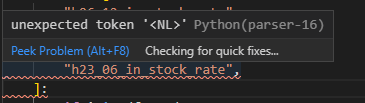
Similar error:

 eromoe
on 25 Sep 2020
eromoe
on 25 Sep 2020
Related issues
 Crucial1
·
4Comments
Crucial1
·
4Comments
 JVanloofsvelt
·
5Comments
JVanloofsvelt
·
5Comments
 xiaofeng0123
·
6Comments
huguesv
·
3Comments
xiaofeng0123
·
6Comments
huguesv
·
3Comments
 sajeebchandan
·
4Comments
sajeebchandan
·
4Comments
Most helpful comment
This is exactly the kind of problem which makes working in an IDE very annoying on a daily basis - if it doesn't get fixed, people will start to look at alternatives as continually being reminded of having to add workarounds to your comments just to avoid the IDE telling you about non-existent syntax errors is a "grinding" bug in the UI - the kind which saps your enthusiasm for the whole product.