Ptvs: Import warning "File is saved in encoding 'Western European(Windows)'…" appears when import folder under workspace if add .py file with "New File" menu
VS Version: 16.0.0 RC.3[28714.193.d16.0]
Python Tool Version: 16.0.19066.1
Repro step:
- Open a folder as workspace in SE
- Use "Right-click the folder ->Add->New File" to add a .py file named "module.py"
- Add a folder named "testfolder" under current workspace
- Use "New File" menu to add __init__.py file in "testfolder" folder
- Type code in __init__.py
def FOLDER1_MSG():
print("hello world!") - Type code in module1.py
import testfolder
testfolder.FOLDER1_MSG()
Actual Result:
Import warning "File is saved in encoding 'Western European(Window)' which does not match default UTF-8 encoding" appear after typing code "testfolder.FOLDER1_MSG()"
Note: The waring will disappear when close and reopen "module.py" file

Expect Result:
It should no warning
 xiaofeng0123
All 6 comments
I have the same issue. Did you find the result good sir??
 haseebuchiha
on 5 Jun 2019
haseebuchiha
on 5 Jun 2019
@haseebuchiha, the temporary workaround is to close and reopen the file.
 RaymonGulati1
on 8 Jun 2019
RaymonGulati1
on 8 Jun 2019
I did try that and I failed. Currently there's just this line that's annoying. Otherwise everything is working fine
haseebuchiha
on 8 Jun 2019
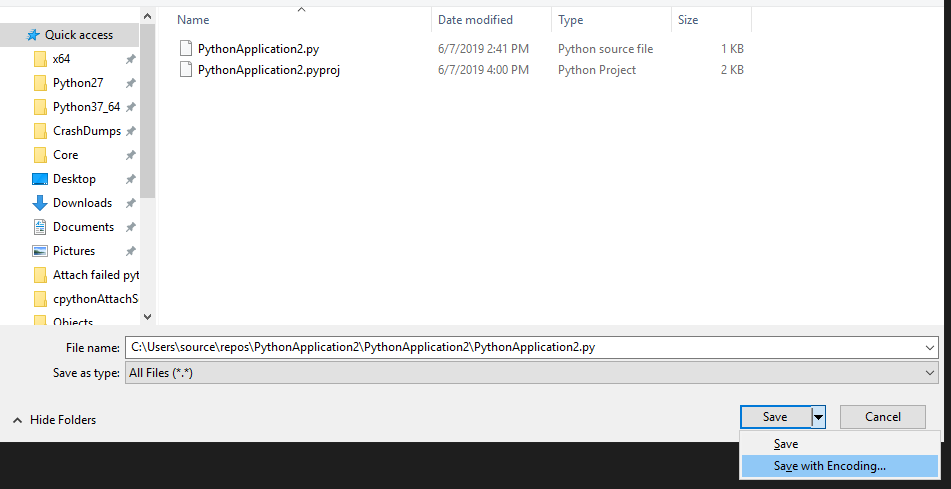
@haseebuchiha, can you try to save the file as a UTF-8 encoding?
Steps:


RaymonGulati1
on 8 Jun 2019
Oooooooo now that's a solution. Thanks mate
haseebuchiha
on 8 Jun 2019
If the solution does not work, please reopen
 judej
on 21 Nov 2019
judej
on 21 Nov 2019
Related issues
 zooba
·
6Comments
zooba
·
6Comments
 huguesv
·
4Comments
huguesv
·
3Comments
huguesv
·
4Comments
huguesv
·
3Comments
 Crucial1
·
4Comments
Crucial1
·
4Comments
 cpoyraz
·
3Comments
cpoyraz
·
3Comments
Most helpful comment
@haseebuchiha, can you try to save the file as a UTF-8 encoding?
Steps:
