Prusaslicer: Physical printer cog icon is disabled
Version
2.3.0-alpha1+win64
Operating system type + version
Windows 10
10.0.19041 Build 19041
3D printer brand / version + firmware version (if known)
Prusa MK3S
Behavior
The "Physical Printer" cog icon is disabled/unclickable initially. I was not able to click it in any of the 3 profiles I have (The built in MK3s profile, my user preset version of that, and the new physical version of that). I have found that I can enable the icon by first choosing the built in profile, then choosing the physical profile. Any other profile selection sequence disables the icon. This does not seem like intended behavior
 ahdchild
All 9 comments
+1 on this.
I have not been able to enable to modify the physical printer profile by _clicking on the "cog" icon right to the Printer profiles combo box_ - which I truly want to be able to do to setup upload to my Octoprint. Without that - it sure makes a hassle since I have my printer out in the garage and normally I start printing and monitor on a specific screen in the office. Have not needed to physically downloaded a print on a SD-card to insert into the printer in years due to the "blessings" of Octoprint. ;)
But, I know, I know... I installed the Alpha over my final release PrusaSlicer... so mea culpa. I´ll "bite the pillow" and hope you fix this soon. :)
 Idus
on 18 Oct 2020
Idus
on 18 Oct 2020
I am also having the same problem. The 'physical printer cog' is disabled, regardless of which printer profile is selected, both built-in and custom.
 SpectreGadget
on 18 Oct 2020
SpectreGadget
on 18 Oct 2020
The cog is only enabled if a Physical Printer is selected. This creates a whole chicken egg problem where you can't create one without one existing already:
https://github.com/prusa3d/PrusaSlicer/blob/bc2088eb78a5285dbfbb8c9ff895c484233d5a98/src/slic3r/GUI/Tab.cpp#L2939
I created a default.ini in my profile's physical_printer directory with just this in it
preset_name=Unified-klipper
Where Unified-klipper is the name of one of my Printer profiles. I closed PrusaSlicer and reopened it, then selected that Physical Printer. Closed PrusaSlicer again (the cog wasn't enabled just by selecting the Physical Printer from the dropdown), reopened it and the cog was active. I should note the cog is only active if a Physical Printer is selected when the PrusaSlicer is started-- selecting a Printer profile grays it out again, and switching back to the Physical Printer does not re-enable it.
A heck of a workaround but it works for now until someone can change the enable criteria in the code.
 CapnBry
on 18 Oct 2020
CapnBry
on 18 Oct 2020
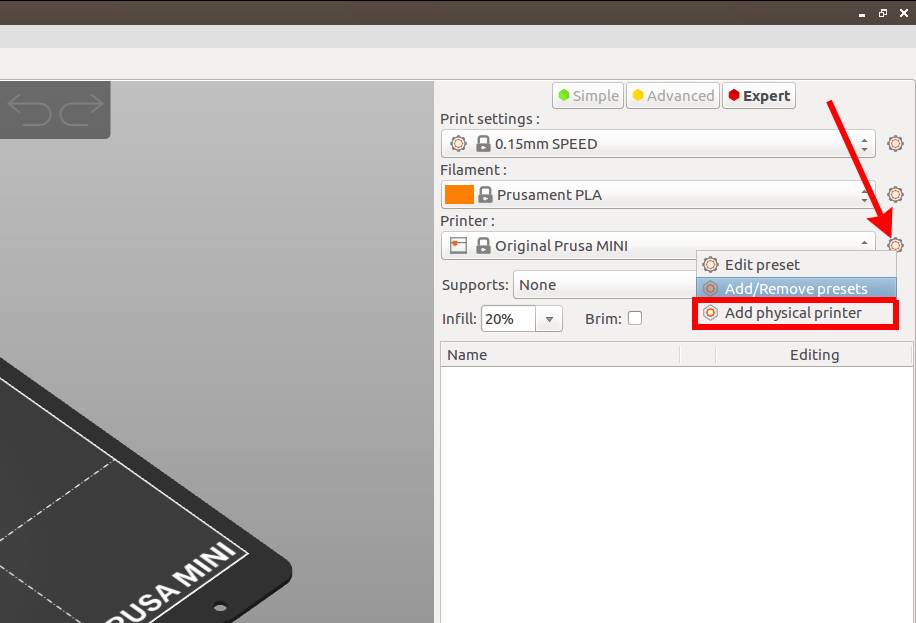
This is where you add a new physical printer. I agree that the cog button in Printer Settings could trigger the same action, but maybe there is a reason it does not. @YuSanka could probably tell.
 lukasmatena
on 18 Oct 2020
lukasmatena
on 18 Oct 2020
I can confirm what lukasmatena said. I can add a physical printer there, as well as edit an existing one.
The cog on the Printer Profile dialog only enables if a Physical Printer is selected when PrusaSlicer is launched or if the Physical Printer is selected from the Printer dropdown on the main window, not if one is selected from the Printer Profile tab.
CapnBry
on 18 Oct 2020
After clicking the wrong "cog" item, I could select and edit it without problem, thks to @lukasmatena for pointing it out. The concept of "physical printer" is somewhat ill-represented. To me, whether I use my MK3S/MMU2S in single extruder mode versus in color mode, with all channels selectable, doesn't make it a different "physical printer". The same is true when I use a different nozzle. I could not associate the "same" physical printer with its different printer settings, even while these settings themselves are the same for all these different settings.
What would make more sense is a manage one-to-many relationship between "physical printer" and "printer settings" (or better put: "printer modes"). Very much similar like a different loaded filament, doesn't make it a different printer. The simplest/cleanest solution would be a separate tab after the current "Printer settings" called "Printer Machine" (or differently, just clear that it indicates the hardware).
It could then allow the connection settings, but also other hardware properties unlikely to change, like:
- the geometry->"size and coordinates"
- general->"machine limits"
- general->"firmware"
- general->"notes"
- "dependencies" of the current printer settings.
Only these would remain under printer settings:
- "general->capabilities"
- "custom gcode"
- "extruder n" (as many as needed for the selected printer settings mode mode above)
 ruedli
on 20 Oct 2020
ruedli
on 20 Oct 2020
It also appears you can not delete a physical printer once you have created one. You can add several of them and then delete them but as soon as you reach the last one in the list the option to delete it is removed. Similar to the way you can not delete a filament or Print Settings preset if its one of the built in ones.
Mmm I edit that to you cant delete the last one from the list using the X icon in the Printer Settings tab but you have to use the cog on the Plater to remove the last one. That's incredibly inconsistent and confusing. Same icons that can do many of the same functions but in other ways you cant depending on where you happen to select the cog.
 neophyl
on 20 Oct 2020
neophyl
on 20 Oct 2020
Hello! I am seeing intermittent cog availability too. Here's my theory:
- When switching between the "User preset" and auto-created "Physical printer" preset for the same printer, the cog status is not updated.
Here's a visual example on my system--sorry for roughness, it's hard to screenshot open menus with GNOME.
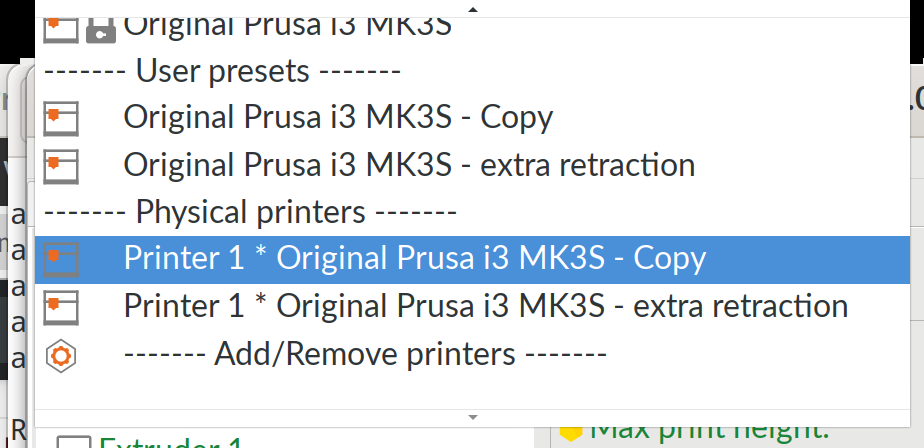
If I select User Preset "copy" and then Physical Printer "copy", cog stays disabled.
If I select User Preset "copy" and then Physical Printer "extra retraction," cog is enabled.
If I select User Preset "extra retraction" and then Physical Printer "extra retraction," cog stays disabled.
If I select Physical Printer "copy" and then Physical Printer "extra retraction," cog is enabled.
It feels like some internal ID or identifier is shared between the user presets and auto-created physical printer presets, so some kind of "on change" handler isn't firing. That's totally my end-user guess without looking at the code at all.
 combs
on 20 Oct 2020
combs
on 20 Oct 2020
Improved in prusaSlicer-2.3.0-alpha2. Closing.
 bubnikv
on 24 Oct 2020
bubnikv
on 24 Oct 2020
Related issues
 alexiri
·
4Comments
alexiri
·
4Comments
 TimothyGold
·
4Comments
TimothyGold
·
4Comments
 Foxtrek64
·
4Comments
Foxtrek64
·
4Comments
 rackley096794
·
3Comments
rackley096794
·
3Comments
 yschroeder
·
3Comments
yschroeder
·
3Comments
Most helpful comment
This is where you add a new physical printer. I agree that the cog button in Printer Settings could trigger the same action, but maybe there is a reason it does not. @YuSanka could probably tell.