Prusaslicer: [FEATURE REQUEST]<embed image in GCODE for all target machines - not just for MINI
version
2.2
target
All
firmware 3D printer brand / version + firmware version (if known)
All
Behavior
In 2.2 alpha there is support for an embedded thumbnail picturing the printed object. This is only supported for the MINI.
It would be great to also have that (configurable output) feature for other slicer variants, then it e.g. could be made visible in an octoprint plugin, or even with the (windows) browser as thumbnails and in preview with a suitable configured GCODE editor / viewer.
Project File (.3MF) where problem occurs
not applicable
 ruedli
All 31 comments
It is supported through a configuration value of a Printer profile. The mini defines
thumbnails = 16x16,220x124
So you can set it and test it for your printer, though not from the UI, but by editing the printer profile with a text editor.
We will do more once you point us to other machines or octoprint implementation that reads the images from the G-code.
 bubnikv
on 9 Jan 2020
bubnikv
on 9 Jan 2020
TronXY X5sa does that. It uses "own" slicer which is basically a fork of Cura
 RomanTheLegend
on 29 Mar 2020
RomanTheLegend
on 29 Mar 2020
@bubnikv, I'm working on an OctoPrint plugin that will extract this thumbnail from the GCODE and I have it working, but need to know better how this is implemented currently in PrusaSlicer. Best I can tell the thumbnails=16x16,220x124 is a hard-coded configuration for the mini? Outside of manually updating the printer profile's ini file, is there anywhere in the current application UI that allows you to set those sizes? It seems the implementation within the ini file doesn't really care about the dimensions and using and viable options work. I just tested 300x300 to match what Cura does with their ufp export and it appears to be functional.

The plugin is still in very early stages of development and needs to be redone before release to the OctoPrint community, but any feedback you can provide would be greatly appreciated.
 jneilliii
on 21 Apr 2020
jneilliii
on 21 Apr 2020
I've got the plugin in a state that I'm comfortable enough to release to the OctoPrint Community and have submitted it to the Plugin Repository for acceptance. If you'd like to test it out, you can install using the url below in Plugin Manager of OctoPrint.
https://github.com/jneilliii/OctoPrint-PrusaSlicerThumbnails/archive/master.zip
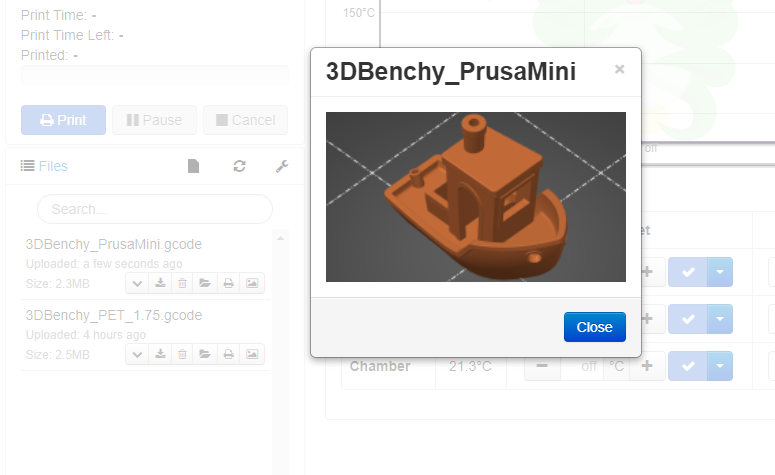
It will automatically extract the last thumbnail specified in the PrusaSlicer printer's profile thumbnail setting. In the case of the Mini the image will be 220x124.
Default Option - Modal Pop-Up opened by pressing image button in file list.
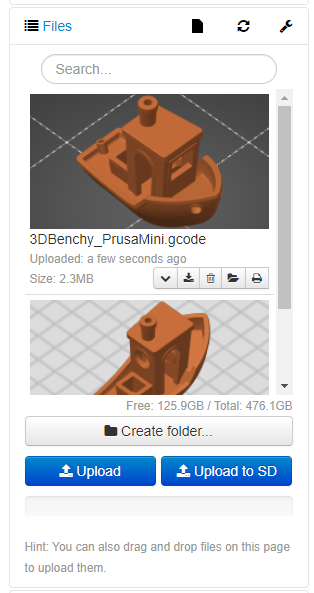
Inline Option Enabled - Images show in file list, modal pop-up opened when clicked.
jneilliii
on 22 Apr 2020
Plugin has been officially accepted into the plugin repository and users are now wanting this feature enabled. Non-Mini printer users are probably going to start asking for this to be added/configurable via the application instead of fiddling with ini files.
jneilliii
on 22 Apr 2020
yeah would be a great (and simple for prusa) addition
 TinyWorkshopDesign
on 23 Apr 2020
TinyWorkshopDesign
on 23 Apr 2020
Looks like I am one of those that was predicted would "start asking." :^)
It would be great to have a Prusa Slicer setting to embed thumbnails for my MK3s.
 brad-stone
on 23 Apr 2020
brad-stone
on 23 Apr 2020
@jneilliii I already got requests to support your plugin in OctoPod app. This means that many more people will be asking how to enable this feature in PrusaSlicer. Is there a ticket for adding the setting for other printers? I can create one if not.
 gdombiak
on 24 Apr 2020
gdombiak
on 24 Apr 2020
@bubnikv I cannot find a commit that solved this request. Was this issue solved or should we open a new one? Thanks.
Gaston
gdombiak
on 24 Apr 2020
I already got requests to support your plugin in OctoPod app.
@gdombiak that was fast. I'm not aware of an issue created for enabling this for all printers except for this one, but haven't really looked.
jneilliii
on 24 Apr 2020
We will do more once you point us to other machines or octoprint implementation that reads the images from the G-code.
@bubnikv since there is an option now available, in lieu of opening a new issue, maybe you could just reopen this one?
jneilliii
on 24 Apr 2020
@jneilliii talking about fast. Just out of the oven ... compiled for the first time. :)

gdombiak
on 24 Apr 2020
Nice, I hope it was easy enough for you to implement. Quick question, if I used the same meta tag for the ufp plugin would that also work with your change or are you creating the path programmaticaly?
jneilliii
on 24 Apr 2020
@jneilliii the code is not specific to your new plugin. I read the JSON that comes back when I request all files (using REST API). There is a new field called thumbsnail (added by your plugin I guess). If you set that same field then the image will appear in your other plugin. BTW, which plugin is ufp?
It was literally minutes to get this implemented. And Swift is not my main programming language .... or maybe it is by now. :)
gdombiak
on 24 Apr 2020
Cool. UFP = Ultimaker Format Package plugin. It does the same thing as this prusa thumbnails one, but for cura and ufp packages. The prusa plugin spawned from a feature request on the UFP plugin.
jneilliii
on 24 Apr 2020
Oh, that's awesome! If that plugin includes the same extra field thumbnail then it will work automagically. Let me know and I will add both plugins to the list of supported plugins. This will help spread the word and awareness about these plugins. I already support many more that you also created. :)
gdombiak
on 24 Apr 2020
@bubnikv On January 9, when the issue was closed, you mentioned to revisit it, when shown evidence for implementation. This evidence is in this thread now, see comments.
Can you comment on feasibility of configuring embedding of thumbnails + their size of in the PrusaSlicer settings rather than the profile?
Or is this already implemented?
Should this request be reopened, or should a new issue be opened?
ruedli
on 25 Apr 2020
Sharing some more context: Printoid and OctoPod apps have added support for @jneilliii plugins. Facebook posts about these thumbnails are getting a lot of traction. Feedback is heating up. Lots of questions about how to enable things. Once we release the new version of the apps I expect a bigger spike of demand.
gdombiak
on 25 Apr 2020
And... indeed, the new release of Printoid also supports @jneilliii 's plugin, also from those users there is a lot of attention for enabling this easily. Apperently _many_ people appreciate to see a picture of the GCODE file they select for printing. Since all the coding / processing for embedding the image is obviously allready there, and it just requires enabling selection, it looks like a quick win.
ruedli
on 25 Apr 2020
This is quite a useful feature. I updated my custom profiles. It makes it infinitely easier for my wife and kids to pick the correct print.
 mvasilakis
on 27 Apr 2020
mvasilakis
on 27 Apr 2020
@bubnikv not sure you had a chance to catch up with this thread. Please let us know if you want us to open a new ticket for what is being discussed? Since this is a closed ticket there is a chance you are not following this conversation. I will wait a couple of days and open a new ticket (that we can close if you prefer to use this one).
Thanks,
Gaston
gdombiak
on 27 Apr 2020
If you want to see this feature (thumbnails available for any printer) please vote (thumbs up) #4112
gdombiak
on 5 May 2020
@bubnikv Why not reopening it, given ALL the discussion here and your comment when closing to reopen it under conditions like fulfilled now???
ruedli
on 7 May 2020
@jneilliii Everyone in this thread, and also the people discussing in #4112
seem aligned in "expressing the need" for this update. What I do not understand is how people of Prusa are interacting though this channel. If this is the accepted normal way, that is fine, no hard feelings ;-) !
Right now I cannot see the difference between: "rejecting", "low prioritization (which is strange considering the wide spread support for this in apps around Prusa Slicer), "failing to see it" or anything else. This is my last attempt to reach @bubnikv . Any reaction is OK, but I will leave it alone after this if I hear nothing, since I interpret that as "no communication possible" through this channel".
ruedli
on 15 May 2020
bump.
 IARI
on 28 Jul 2020
IARI
on 28 Jul 2020
+1
 nordurljosahvida
on 24 Aug 2020
nordurljosahvida
on 24 Aug 2020
+1
 lseg74
on 15 Oct 2020
lseg74
on 15 Oct 2020
Right now I cannot see the difference between: "rejecting", "low prioritization (which is strange considering the wide spread support for this in apps around Prusa Slicer), "failing to see it" or anything else. This is my last attempt to reach @bubnikv . Any reaction is OK, but I will leave it alone after this if I hear nothing, since I interpret that as "no communication possible" through this channel".
There are 3488 issues open and each and every issue is important to somebody. I am sorry, but I am not that good to take care of the flood of issues and ideas continuously while being productive as a software architect and product manager. I can only look into these issues in waves, ideally somewhere after the first public alpha and before the final release.
bubnikv
on 15 Oct 2020
@bubnikv
"There are 3488 issues open and each and every issue is important to somebody. "
That is Ok, I know that kind of difficulties, having supported software for banks myself. I will live with the current way of doing it in the .ini file and will see something coming if/when it comes.
ruedli
on 15 Oct 2020
If it makes it any easier @bubnikv SuperSlicer has already implemented the change, so maybe you could pull those back from their fork.
jneilliii
on 15 Oct 2020
If it makes it any easier @bubnikv SuperSlicer has already implemented the change, so maybe you could pull those back from their fork.
Adding such a configuration field for an existing config value is quite trivial. It is only a matter of a bit of development time. We know that @supermerill added a plenty of parameters into the parameter pages, that PrusaSlicer keeps hard coded. However, we at Prusa Research are responsible to our customers to make the software easy to use and navigate, thus we
haggle over each new parameter to be presented to the user. I suppose that we will add the thumbnail parameter to the UI after all in this version as there is a large demand for it and the parameter is easy to understand. However we know that some firmwares (for example our MK2, MK3 Marlin) will crash if presented with the long comment section that the thumbnail represent. You see, adding the parameter to the UI is really just the tiny fraction of work.
bubnikv
on 16 Oct 2020
Related issues
 chron0
·
31Comments
chron0
·
31Comments
 m-Th
·
141Comments
m-Th
·
141Comments
 kortschak
·
31Comments
kortschak
·
31Comments
 RosieTheRabbit
·
60Comments
RosieTheRabbit
·
60Comments
 nebbian
·
41Comments
nebbian
·
41Comments
Most helpful comment
I've got the plugin in a state that I'm comfortable enough to release to the OctoPrint Community and have submitted it to the Plugin Repository for acceptance. If you'd like to test it out, you can install using the url below in Plugin Manager of OctoPrint.
https://github.com/jneilliii/OctoPrint-PrusaSlicerThumbnails/archive/master.zip
It will automatically extract the last thumbnail specified in the PrusaSlicer printer's profile thumbnail setting. In the case of the Mini the image will be 220x124.
Default Option - Modal Pop-Up opened by pressing image button in file list.

Inline Option Enabled - Images show in file list, modal pop-up opened when clicked.
