Prusaslicer: /* Feature request */ Meshmixer like tree support for FDM printing
_Is this a new feature request?_
Yes
You have showed you can do it with the new Alpha SLA support. So make something like it for FDM ;)
 martinowren
All 44 comments
I would like that too...
Also would like to see "Optimize Orientation" on the i3 side too not just SL1
 OopAck
on 27 Dec 2018
OopAck
on 27 Dec 2018
+1 to both although tree support is more important.
 cnlson
on 29 Dec 2018
cnlson
on 29 Dec 2018
+1
 zheffie
on 2 Jan 2019
zheffie
on 2 Jan 2019
+1 for both
 Patrik-svobodik
on 18 Jan 2019
Patrik-svobodik
on 18 Jan 2019
And maybe make them like cura so they are more stable, they can be “like trees”
Patrik-svobodik
on 18 Jan 2019
I would also like to see an added feature for Tree Supports.
 kjgipp
on 23 Jan 2019
kjgipp
on 23 Jan 2019
+1 Tree supports for FDM would be fantastic.
Code is already there for SLA, so how hard can it be?
Also, "painting" an area on an object that needs support, with supports being auto-generated to target that specific area. That would be really useful.
 kmshort
on 15 May 2019
kmshort
on 15 May 2019
Tree supports for FDM would be fantastic.
Code is already there for SLA, so how hard can it be?
The SLA tree supports will certainly not work for FDM without major changes.
Also, "painting" an area on an object that needs support, with supports
being auto-generated to target that specific area. That would be really
useful.
We were thinking about that as well.
On Wed, May 15, 2019 at 2:48 AM kmshort notifications@github.com wrote:
Tree supports for FDM would be fantastic.
Code is already there for SLA, so how hard can it be?Also, "painting" an area on an object that needs support, with supports
being auto-generated to target that specific area. That would be really
useful.—
You are receiving this because you are subscribed to this thread.
Reply to this email directly, view it on GitHub
https://github.com/prusa3d/PrusaSlicer/issues/1514?email_source=notifications&email_token=ABMPSIZ6JJRRWNHC6V3Y7NTPVNMU7A5CNFSM4GMEFGVKYY3PNVWWK3TUL52HS4DFVREXG43VMVBW63LNMVXHJKTDN5WW2ZLOORPWSZGODVNGCWY#issuecomment-492462427,
or mute the thread
https://github.com/notifications/unsubscribe-auth/ABMPSI2TEK5TCORWWDE4DWDPVNMU7ANCNFSM4GMEFGVA
.
 bubnikv
on 15 May 2019
bubnikv
on 15 May 2019
I really hope the PrusaSlicer team can get back to working on FDM features soon. Would really love to see some improvements with FDM supports and this is not limited to tree supports.
 vertigo235
on 16 Jun 2019
vertigo235
on 16 Jun 2019
I also would love to see tree supports on an upcoming release. I also use Cura and tree supports work quite well. I have contacted Prusa support requesting them and I sent Josef a message via reddit hope Prusa responds
 3dprintingnewb
on 14 Jul 2019
3dprintingnewb
on 14 Jul 2019
This is possible to hack with extra steps in the latest release if you use an SL1 profile to generate the supports on the base plate, then export as STL with Supports. You can then import that into an FDM project. There is extra support material on the bed, but it works. (And, because Prusa cleverly saved the STL into a part-based format, you can separate by parts and remove the extra bed layers as one big piece)
All that to say, Prusa has all the code it needs in place on the current alpha, just a bit of tweaking is required. :)
 WarrenSchultz
on 9 Aug 2019
WarrenSchultz
on 9 Aug 2019
I played with this a bit ... when I add tree supports to a model with the SL1 profile, save it with tree supports and bring it back in with it set to the FDM printer ... I can see the trees, but when I go to slice it the tops of the trees do not appear to touch/or come very close to the object.
I have not tried printing it yet, but has anyone else seen what I am referencing?
Mr Warren Schultz (and even others) has this been an issue for you?
Thanks!!!
 dennyrgood
on 21 Aug 2019
dennyrgood
on 21 Aug 2019
+1 please!
 tonypartridge
on 30 Sep 2019
tonypartridge
on 30 Sep 2019
+1
 gbomacfly
on 8 Dec 2019
gbomacfly
on 8 Dec 2019
+1
 kris2340k
on 18 Dec 2019
kris2340k
on 18 Dec 2019
+1
 rveda
on 16 Jan 2020
rveda
on 16 Jan 2020
The SLA tree supports will certainly not work for FDM without major changes.
What major changes would those be?
 stuartpb
on 31 Jan 2020
stuartpb
on 31 Jan 2020
+1
 janrg
on 13 Feb 2020
janrg
on 13 Feb 2020
+1
 ephramcohen
on 15 Feb 2020
ephramcohen
on 15 Feb 2020
+10
 Kiron21
on 19 Feb 2020
Kiron21
on 19 Feb 2020
+1
Tree support is my only reason for using Cura.
 Ugars
on 20 Mar 2020
Ugars
on 20 Mar 2020
And ironing.
Kiron21
on 20 Mar 2020
Oh yes please!!
 lars-sorensen
on 23 Mar 2020
lars-sorensen
on 23 Mar 2020
+1 Tree supports for FDM would be fantastic.
Code is already there for SLA, so how hard can it be?Also, "painting" an area on an object that needs support, with supports being auto-generated to target that specific area. That would be really useful.
Maybe create a second FR for that.
That one of feature I miss form cura, where it highlights the overhang areas and we can go around "clicking" on the ones we want support (or the reverse, where you don't want)
On more complex parts it make the work of adding soo much easier and fast compared to creating one support enforcer for every single detail.
 Nandox7
on 24 Mar 2020
Nandox7
on 24 Mar 2020
+1
 valterfc
on 27 Mar 2020
valterfc
on 27 Mar 2020
+1
 thorkseng
on 11 Apr 2020
thorkseng
on 11 Apr 2020
+1
 alienboyxp
on 25 Apr 2020
alienboyxp
on 25 Apr 2020
+1
 lemon65
on 2 Jul 2020
lemon65
on 2 Jul 2020
+1
 viestursr
on 9 Jul 2020
viestursr
on 9 Jul 2020
+1 Would love some tree support, I fall back to Cura atm for that, but I like slic3r better overall.
 Bytewaste
on 30 Aug 2020
Bytewaste
on 30 Aug 2020
+1 Please add tree support! One of the few reasons I still go back to Cura is for their tree support. It's second to none.
 jup2000
on 10 Sep 2020
jup2000
on 10 Sep 2020
+1
 SLITH3RIN
on 30 Sep 2020
SLITH3RIN
on 30 Sep 2020
+1
 delboy2028
on 11 Oct 2020
delboy2028
on 11 Oct 2020
+1000
I been using the SL1 profile to then exporting the file with supports and reloading it to prusa under mk3 just to print wish we could just do it the support option
 trollhunterD
on 24 Oct 2020
trollhunterD
on 24 Oct 2020
@bubnikv please tell me which looks better?
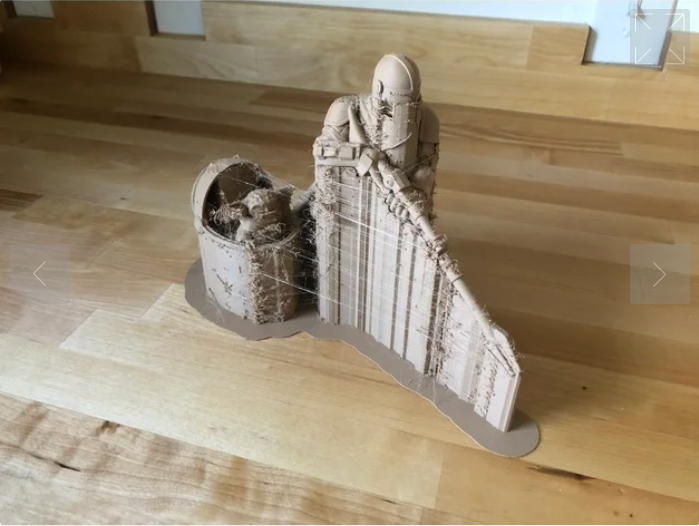
or
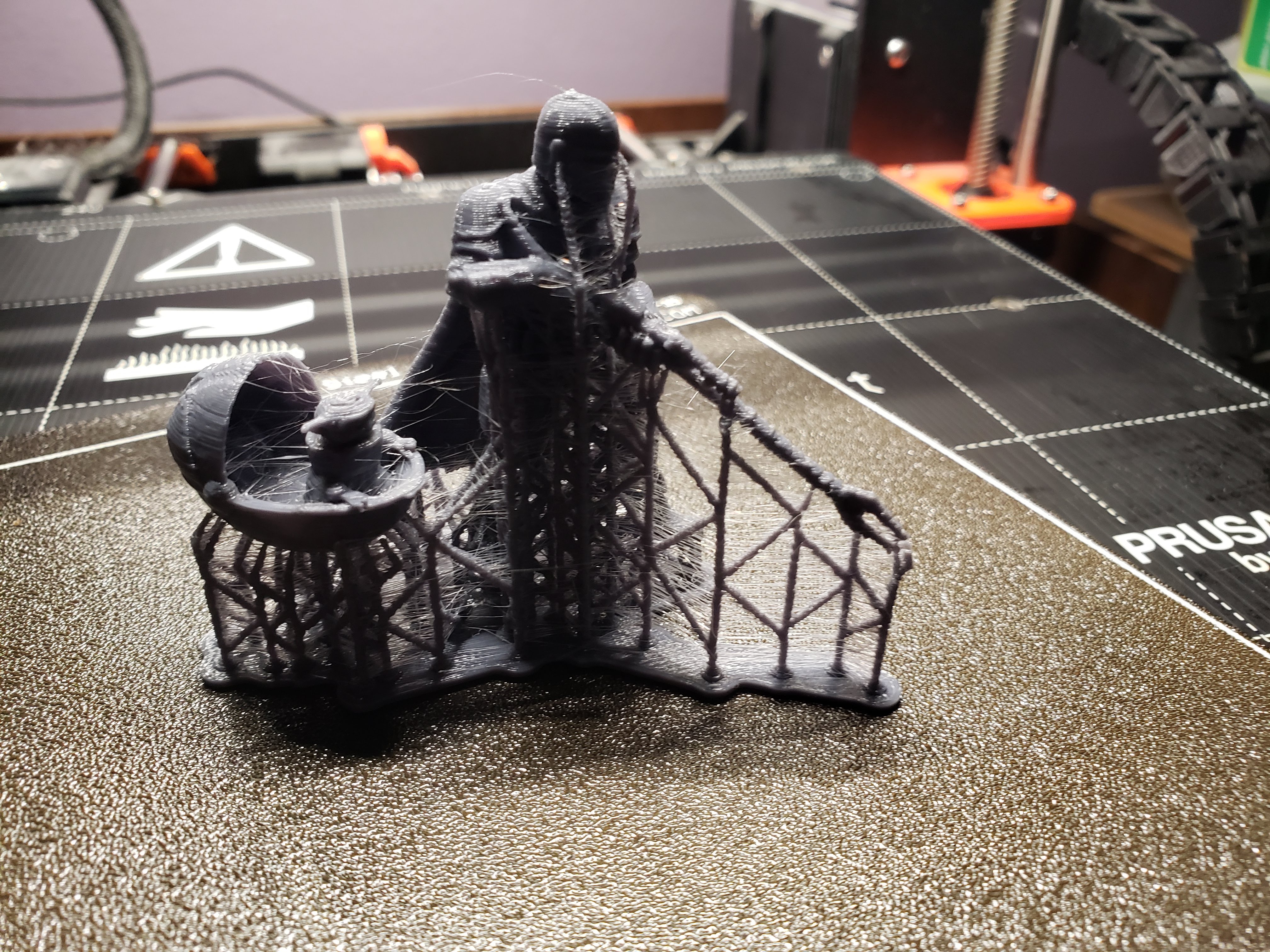
especially when the supports come off so much easier
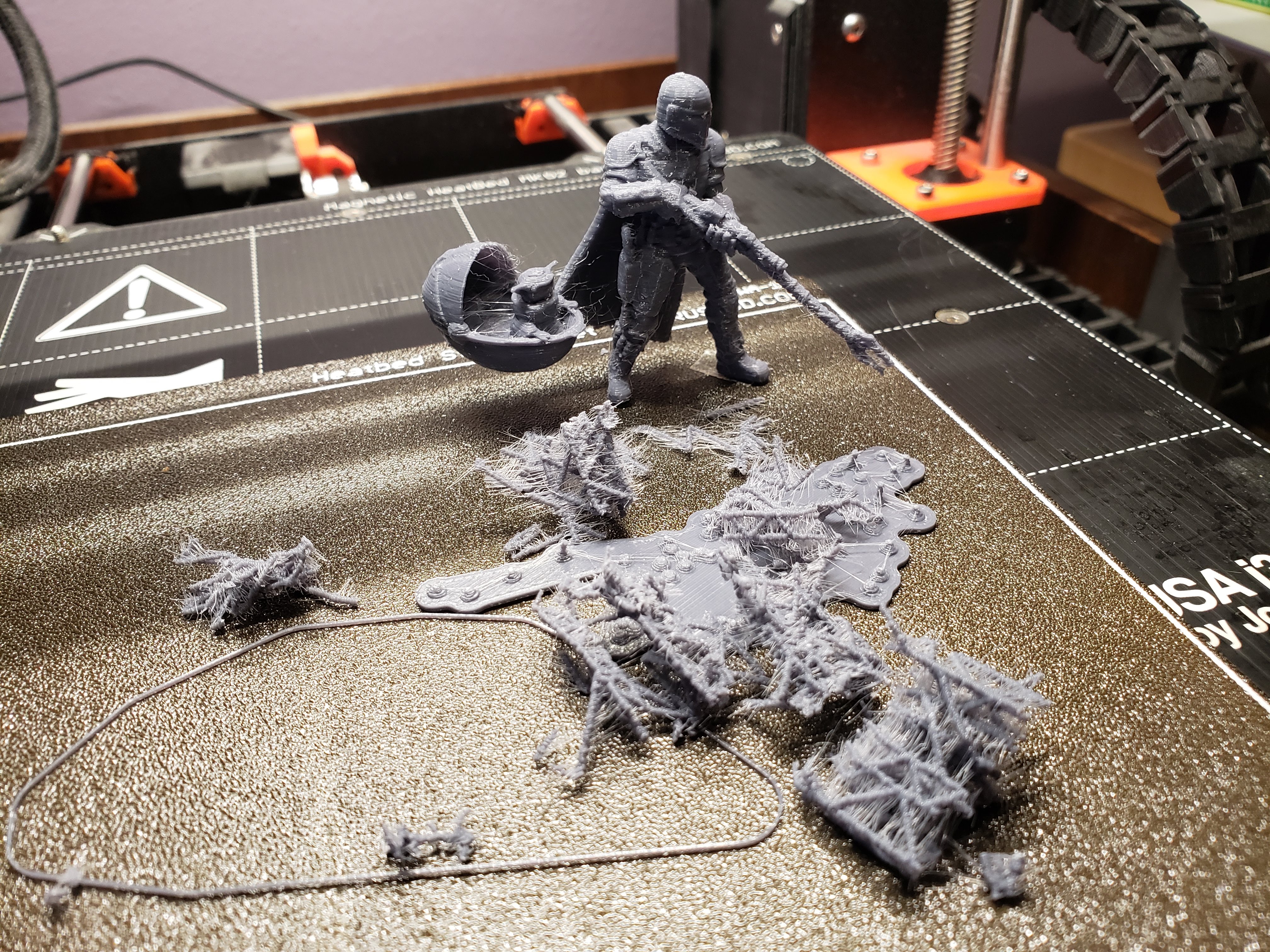
people are already using sl1 supports. why not make it easier for them if they want it? no broken gun, this is exactly what this model needs!
cnlson
on 2 Nov 2020
gonna have to also +1 this one
 Kampe
on 8 Nov 2020
Kampe
on 8 Nov 2020
+1 just for the heck of it... the painted supports are awesome and I am sure the staff all know we all want tree supports.
You can always add them using meshmixer until Prusa implement it though ;)
 MikeRatcliffe
on 9 Nov 2020
MikeRatcliffe
on 9 Nov 2020
Waiting for this as others
 karambolis8
on 17 Nov 2020
karambolis8
on 17 Nov 2020
just tried 2.3.0 alpha3 and was surprised to find no conical/treelike supports or fuzzy skin, we do seem to have ironing though
 sej7278
on 19 Nov 2020
sej7278
on 19 Nov 2020
+1
 Tzabari
on 23 Nov 2020
Tzabari
on 23 Nov 2020
+1
 SuperScratchy
on 29 Nov 2020
SuperScratchy
on 29 Nov 2020
Let's face it, linear supports are unusable, most of the time they either snap the very model you're trying to support during removal or use too much filament and need too much cleanup.
Treelike supports in other slicers aren't great either as they can be too fragile, so what's the middle ground - or is there another option?
sej7278
on 29 Nov 2020
@sej7278 if you look at the pictures from my post, that is using the resin printer supports, exported with supports, Then reimported as fdm and sliced. It works, just not totally optimized for FDM. They could do it, but in the meantime you can try it easily. the other option is meshmixer, but prusaslicer's print turned out much better than meshmixers version.
cnlson
on 29 Nov 2020
+1. I like the PrusaSlicer tree supports better than MeshMixer because they place tree tips in between (i.e. at top and bottom surfaces of) the model instead of just the overhangs (image attached). Also stems are straight vertical with connections and it's much simpler to apply with just a couple clicks. However the lack of options is a double-edged sword. I would like to be able to adjust some settings directly from the dialog such as stem diameter. And printing directly on the print-bed (0 z height) would be useful even for SLA prints.
EDIT: apparently you can do this by setting a pad around object.
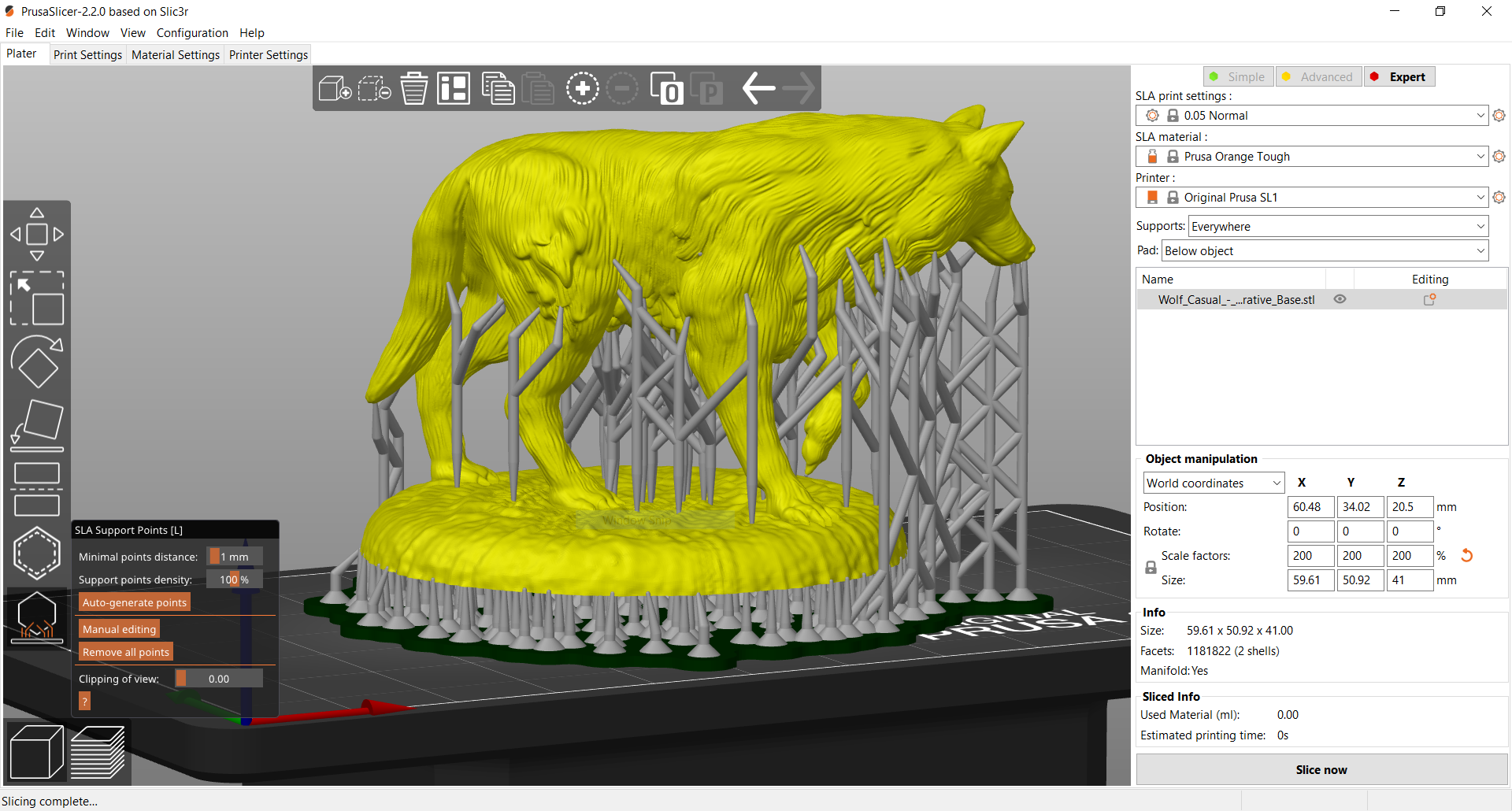
EDIT2: I also have begun generating these supports on an "SLS" printer (such as the SL1) then selecting "Export plate as STL including supports" from the Export menu, then importing again. But it seems like this step should be unnecessary. Also you can't view overhangs or set the critical angle.
 dryphi
on 1 Dec 2020
dryphi
on 1 Dec 2020
Related issues
 m-Th
·
141Comments
m-Th
·
141Comments
 nebbian
·
41Comments
nebbian
·
41Comments
 ruedli
·
31Comments
ruedli
·
31Comments
 GreatGrizzly
·
38Comments
GreatGrizzly
·
38Comments
 domesticatedviking
·
43Comments
domesticatedviking
·
43Comments
Most helpful comment
And maybe make them like cura so they are more stable, they can be “like trees”