Prusa-firmware: PREHEAT ERROR after printing is started.
I am running latest 3.5.0-1749 firmware.
Seems I can only replicate this issue after the printing is started. If I change the temperature, like to increase the temperature by 5C. The print would stop after 2-3 layers with PREHEAT ERROR message displayed on the screen.
I am using stock 'Vase' print GCODE as an example.
The printer seems working ok when I use the default temperature settings from GCODE.
My earlier post in Facebook with photos:
https://www.facebook.com/groups/PrusaOfficial/permalink/1943614079027781/
The bottom line is, the printer should report thermal runaway error instead of preheat issue in the first place.
In temperature.cpp:
`if (isPreheat)
{
Stop();
isBed ? LCD_ALERTMESSAGEPGM("BED PREHEAT ERROR") : LCD_ALERTMESSAGEPGM("PREHEAT ERROR");
SERIAL_ERROR_START;
isBed ? SERIAL_ERRORLNPGM(" THERMAL RUNAWAY ( PREHEAT HEATBED)") : SERIAL_ERRORLNPGM(" THERMAL RUNAWAY ( PREHEAT HOTEND)");
SET_OUTPUT(EXTRUDER_0_AUTO_FAN_PIN);
SET_OUTPUT(FAN_PIN);
WRITE(EXTRUDER_0_AUTO_FAN_PIN, 1);
analogWrite(FAN_PIN, 255);
fanSpeed = 255;
delayMicroseconds(2000);
}
else
{
isBed ? LCD_ALERTMESSAGEPGM("BED THERMAL RUNAWAY") : LCD_ALERTMESSAGEPGM("THERMAL RUNAWAY");
SERIAL_ERROR_START;
isBed ? SERIAL_ERRORLNPGM(" HEATBED THERMAL RUNAWAY") : SERIAL_ERRORLNPGM(" HOTEND THERMAL RUNAWAY");
}
}
endif`
Would this be a bug as everything seems working and the hotend still get heated up fairy quickly?
 bjdchwr
All 100 comments
Hi,
I also get a bed preheat error with 3.5.0 on my two MK2.5 after about 6 layers printed. I reflashed FW 3.4.1 and everything is back to normal. There has to be something wrong with 3.5.0 on that regard.
 jolab14
on 27 Nov 2018
jolab14
on 27 Nov 2018
Hi,
I also get a bed preheat error with 3.5.0 on my two MK2.5 after about 6 layers printed. I reflashed FW 3.4.1 and everything is back to normal. There has to be something wrong with 3.5.0 on that regard.
Good to hear that you can replicate the issue. I think this failsafe mechanism might be a bit aggressive.
I had ZERO print failure since I reported this issue - I just leave all stock temp settings as is. Unfortunately, I cannot tweak the temperature settings manually ATM.
bjdchwr
on 27 Nov 2018
I am having the same issue with 3.5.0 on my MK3. I never had this issue with my previous firmware.
Printing PETG using the default profile in Slic3r PE. The print fails a few layers after the first layer when the bed temperature is raised.
I'm working around this by sticking to a consistent bed temperature throughout the print.
 JeffWDH
on 27 Nov 2018
JeffWDH
on 27 Nov 2018
Hi, thank you for report.
Could you please provide some more observations how to replicate this issue? Under what kind of circumstanes this occured. Maybe a video or such.
Have a nice printing day.)
 inquisitiveKangaroo
on 28 Nov 2018
inquisitiveKangaroo
on 28 Nov 2018
Hi, thank you for report.
Could you please provide some more observations how to replicate this issue? Under what kind of circumstanes this occured. Maybe a video or such.
Have a nice printing day.)
Please find the video footage above. The preheat error appeared around 2 minutes after the temperature was brought up by 5C.
The printer is working flawlessly without the nozzle temperature change over the past few days.
bjdchwr
on 28 Nov 2018
Hi, thank you for report.
Could you please provide some more observations how to replicate this issue? Under what kind of circumstanes this occured. Maybe a video or such.
Have a nice printing day.)
I was printing a small part (21mm x 21mmx x 10mm high) sliced with default SlicrPE generic PET profile. The error occurred around 2.5 mmm height (sorry I did not take note exactly). The same behaviour occurred on two different MK2.5. Going back to feel 3.4.1 solved the problem.
jolab14
on 28 Nov 2018
Please find the video footage above. The preheat error appeared around 2 minutes after the temperature was brought up by 5C.
The printer is working flawlessly without the nozzle temperature change over the past few days.
Seems like you have quite inconsistent nozzle temp. (could be related but does not have to). Did you try to run PID calibration? Could you try to connect via Pronterface, write M301 into the console and share me the result (Or M503 via Octoprint). Thank you in advance.)
inquisitiveKangaroo
on 28 Nov 2018
I can try to insert PID values from your printer, into mine in order to get as similar conditions as possible. The only another cause, which comes to my mind, that may cause this is a HW problem such as heat transfer from heatblock to the thermistor.
inquisitiveKangaroo
on 28 Nov 2018
In my case it seems my bed thermistor had pulled out of the kapton tape and was resting near the power connections... It wasn't immediately obvious until I removed the bed.
So the firmware was doing it's job in this case... Thanks!
JeffWDH
on 28 Nov 2018
Please find the video footage above. The preheat error appeared around 2 minutes after the temperature was brought up by 5C.
The printer is working flawlessly without the nozzle temperature change over the past few days.Seems like you have quite inconsistent nozzle temp. (could be related but does not have to). Did you try to run PID calibration? Could you try to connect via Pronterface, write M301 into the console and share me the result (Or M503 via Octoprint). Thank you in advance.)
Thanks for your reply.
I issued the command using Repetier Pro 0.90.7.
19:11:43.155: N352 M503
19:11:43.160: echo:Steps per unit:
19:11:43.165: echo: M92 X100.00 Y100.00 Z400.00 E280.00
19:11:43.169: echo:Maximum feedrates - normal (mm/s):
19:11:43.173: echo: M203 X200.00 Y200.00 Z12.00 E120.00
19:11:43.177: echo:Maximum feedrates - stealth (mm/s):
19:11:43.181: echo: M203 X100.00 Y100.00 Z12.00 E120.00
19:11:43.181: echo:Maximum acceleration - normal (mm/s2):
19:11:43.185: echo: M201 X1000 Y1000 Z200 E5000
19:11:43.189: echo:Maximum acceleration - stealth (mm/s2):
19:11:43.193: echo: M201 X960 Y960 Z200 E5000
19:11:43.197: echo:Acceleration: S=acceleration, T=retract acceleration
19:11:43.201: echo: M204 S1250.00 T1250.00
19:11:43.213: echo:Advanced variables: S=Min feedrate (mm/s), T=Min travel feedrate (mm/s), B=minimum segment time (ms), X=maximum XY jerk (mm/s), Z=maximum Z jerk (mm/s), E=maximum E jerk (mm/s)
19:11:43.222: echo: M205 S0.00 T0.00 B0.00 X10.00 Y10.00 Z0.40 E2.50
19:11:43.223: echo:Home offset (mm):
19:11:43.226: echo: M206 X0.00 Y0.00 Z0.00
19:11:43.226: echo:PID settings:
19:11:43.230: echo: M301 P12.89 I1.00 D41.45
19:11:43.231: echo:PID heatbed settings:
19:11:43.234: echo: M304 P126.13 I4.30 D924.76
19:11:43.238: echo:Retract: S=Length (mm) F:Speed (mm/m) Z: ZLift (mm)
19:11:43.242: echo: M207 S3.00 F2700.00 Z0.00
19:11:43.246: echo:Recover: S=Extra length (mm) F:Speed (mm/m)
19:11:43.251: echo: M208 S0.00 F480.00
19:11:43.259: echo:Auto-Retract: S=0 to disable, 1 to interpret extrude-only moves as retracts or recoveries
19:11:43.259: echo: M209 S0
19:11:43.262: echo:Filament settings: Disabled
PS: I start to realise when the fan starts on layer 2, the temperature drops quite a bit. The temperature readings are also dependent on extrusion speed.
I did a PID calibration last week I think. I can do another should you require.
I think if there is a temperature issue during printing, it should at least mention THERMAL RUNAWAY error. The preheat error is rather confusing.
bjdchwr
on 29 Nov 2018
I also have my first time ever BED PREHEAT ERROR during printing ABS. I never had that happen with older firmware versions... Downgrading now...
Stock Prusa ABS profile, 25%infill, 0.15mm layerheight. Speeds capped at 80mm/s, otherwise stock.
Printer was nearly finished at the second layer... So Z at 0.35mm
EDIT: Trying again with 3.4.1
EDIT: Heatbed needed just until the point it failed with 3.5.0 to climb from 100 to 110C. Climbing from 108 to 110 took quite long. But ANYWAY: the printer passed the point just fine. Print is now running, temperature very stable at 110+-1C If I was alone, I would call it odd and search a hardware bug. But since some people above report that and downgrade helps - it must be software (or a combination of variances in hardware and too sensible software, which changed behavior )
 stahlfabrik
on 30 Nov 2018
stahlfabrik
on 30 Nov 2018
i ll try to downgrade firmware , i ve the same problem it happends when the temperature change , so normally from first layer and the other , after the temperaturee change was triggered the temperature will goes lower and after some layer gives the error .
It start dropping down when the Fan begin to SPIN.
There must be something on thie updated feature on 3.5 :
"Pause print and Preheat error improve"
EDIT : 3.4.1 i have the same problem , the temperature after the first layer must change from 215 to 210 but goes down until 195 and slowly raise up until 201 ... but doesn t goes more
EDIT 2 : Does another PID Calibration and removed the USB attached to my DC converted and all seems to be fine .(so maybe was the DC converter and the higher sensibility on the 3.5 FW , i ll retry to UPGRADE and EDIT this post .
 bionno
on 1 Dec 2018
bionno
on 1 Dec 2018
Same Issue : Fw 3.5
Preheat Error. When the fan start the nozzle temperature down very quickly
PID calibration : ok
Reduce the fan speed to 30% : ok
 orlins92
on 2 Dec 2018
orlins92
on 2 Dec 2018
Same Issue : Fw 3.5
Preheat Error. When the fan start the nozzle temperature down very quickly
PID calibration : okReduce the fan speed to 30% : ok
YEs , it is something about the FAN , but even when the temperature is ok , sometimes the printes pause for 1 or 2 seconds sayng "Heating..." even if the temperature is over the settings( example temperature at 211 and print settings temperature 210) ...
I hope Prusa guys resolve this issue very quickly ...
bionno
on 2 Dec 2018
even with 3.4.1 i notice a drop of temperature after fan start spinning ... but the print goes until the end .
I think the problem was present even in the older firmware but the printer was able to handle it , until 3.5 .
bionno
on 2 Dec 2018
indeed, I had already reported the problem on the forum Prusa Sun Sep 09, 2018 12:29 pm
https://shop.prusa3d.com/forum/-f0/temperature-variations-t24367.html
orlins92
on 2 Dec 2018
indeed, I had already reported the problem on the forum Prusa Sun Sep 09, 2018 12:29 pm
https://shop.prusa3d.com/forum/-f0/temperature-variations-t24367.html
i've answer the tread , hope someone can confirm and put some workaround .
Maybe we must downgrade a minor version that 3.3 ...
bionno
on 3 Dec 2018
@bionno @orlins92 @stahlfabrik @jolab14
Thanks for your inputs in regard to this issue.
@inquisitiveKangaroo
I am just wondering if we can confirm if this is a bug? The label still says unable to produce...
My printer has been working 24/7 since then and I never had any issue but again I cannot change any temperature settings when it is printing - it is quite annoying.
bjdchwr
on 3 Dec 2018
@bionno @orlins92 @stahlfabrik @jolab14
Thanks for your inputs in regard to this issue.@inquisitiveKangaroo
I am just wondering if we can confirm if this is a bug? The label still says unable to produce...
My printer has been working 24/7 since then and I never had any issue but again I cannot change any temperature settings when it is printing - it is quite annoying.
Hello @bjdchwr , have you the MK2.5 upgrade ? I Don t know if it is only for our version , i have the MK2.5 , previously upgraded to MK2s .
I ve done the upgrade with the latest pieces , with 45 Degrees FAN HOLDER and the other upgraded pieces available on prusa site .
Who has the issue have the MK2.5 (and if it is so , you have the 45 Degrees fan mount?)
bionno
on 3 Dec 2018
@bionno @orlins92 @stahlfabrik @jolab14
Thanks for your inputs in regard to this issue.
@inquisitiveKangaroo
I am just wondering if we can confirm if this is a bug? The label still says unable to produce...
My printer has been working 24/7 since then and I never had any issue but again I cannot change any temperature settings when it is printing - it is quite annoying.Hello @bjdchwr , have you the MK2.5 upgrade ? I Don t know if it is only for our version , i have the MK2.5 , previously upgraded to MK2s .
I ve done the upgrade with the latest pieces , with 45 Degrees FAN HOLDER and the other upgraded pieces available on prusa site .
Who has the issue have the MK2.5 (and if it is so , you have the 45 Degrees fan mount?)
I am a rather new user in Prusa community (I previously own a DaVinci 2.0A Duo and TEVO Tarantula).
I am currently having an assembled Kit MK3 running almost 24/7 and I am sourcing parts to build another one from upgrade kit (although I don't own any previous model).
My unit has been up for about 35 days, according to the counter, and I just assembled a month back I guess :-)
bjdchwr
on 3 Dec 2018
Even with the 3.4 i have the temperature DROP , but the printing goes and finish .
I've notice that sometimes when i force a temperature change, after the temperature DROP DOWN, i could almost reach the target temperature .
I've set the fan from 20% to 80% , i ll try to go even less than 80% , maybe how someone says 30% , but i don t know if with 30% i could have some issue with stringing or other ?
bionno
on 7 Dec 2018
I too got this issue after upgrading to 3.5.0. I had been printing ABS for a few hours using 3.4.1 with no problems. With 3.5.0 I get the Bed Preheat Error once printing height reaches around 1.5mm . After downgrading to 3.4.1 things are working fine again. I note the problem seems to be related to bed temperature change - from 100 110 degrees after first layer. This takes along time and the error occurs when bed temperature has reached around 105 degrees but is still climbing..
 Dave-Watkins
on 7 Dec 2018
Dave-Watkins
on 7 Dec 2018
Hi Dave. That is exactly when I had the problem. Great to get your confirmation
stahlfabrik
on 7 Dec 2018
I have the same issue.
I have never had so many problems with my prusa except with the last two updates. Before i would get 1 failed print for every 15 to twenty prints. Now its a five failed prints for one good one.
Issues
- Hotend just stops moving in mid print for a couple of seconds and says preheating. Display shows low hotend temperature by 4 to 5 c then starts moving again when temp setpoint reached. Then it stops again and repeats again. This almost always causes the print to fail.
After having these problems with holding temp I have calibrated hotend PID loop to 245c under calibrations menu after these failures.
- Printing with first layer set to 235c. Rocks dead solid 235c. Second layer and the rest of print are set to 245c. Starting second layer the display shows xxx/245c for hotend. But the xxx still stays around 235c. 1 degree drift above or below 235c. It looks like the 245c is not the new setpoint. Then the print stops, giving a preheating error after acouple of minutes. I have to press reset button to get error to go away. But if i set temperature to 245 on settings menu it holds it just fine.
I have tried this on a couple of different prints same problem the hotend will not heat up to new second layer temp. But this is where it gets strange. If I pause the print before preheat error and then resume the hotend goes to 245c and holds correctly. There is a serious bug somewhere. But i just found this out it might help track this bug down.
I never had these issues before this update. It is truely strange behavior.
 dschiri1
on 9 Dec 2018
dschiri1
on 9 Dec 2018
Did you confirm that even with the 3.4.1 you have the issue of the
temperature dropping, but the prints at least don't fail?
With 3.4.1 I have another issue, if I leave the filament sensor active
during print randomly the print pause like a filament change, it goes away
on right corner and awaiting to press the knobs for filament unload...
Il dom 9 dic 2018, 06:58 dschiri1 notifications@github.com ha scritto:
I have the same issue.
I have never had so many problems with my prusa except with the last two
updates. Before i would get 1 failed print for every 15 to twenty prints.
Now its a five failed prints for one good one.
Issues
- Hotend just stops moving in mid print for a couple of seconds and
says preheating. Display shows low hotend temperature by 4 to 5 c then
starts moving again when temp setpoint reached. Then it stops again and
repeats again. This almost always causes the print to fail.After having these problems with holding temp I have calibrated hotend PID
loop to 245c under calibrations menu after these failures.
- Printing with first layer set to 235c. Rocks dead solid 235c.
Second layer and the rest of print are set to 245c. Starting second layer
the display shows xxx/245c for hotend. But the xxx still stays around 235c.
1 degree drift above or below 235c. It looks like the 245c is not the new
setpoint. Then the print stops, giving a preheating error after acouple of
minutes. I have to press reset button to get error to go away. But if i set
temperature to 245 on settings menu it holds it just fine.
I have tried this on a couple of different prints same problem the
hotend will not heat up to new second layer temp. But this is where it gets
strange. If I pause the print before preheat error and then resume the
hotend goes to 245c and holds correctly. There is a serious bug somewhere.
But i just found this out it might help track this bug down.I never had these issues before this update. It is truely strange behavior.
—
You are receiving this because you were mentioned.
Reply to this email directly, view it on GitHub
https://github.com/prusa3d/Prusa-Firmware/issues/1362#issuecomment-445513500,
or mute the thread
https://github.com/notifications/unsubscribe-auth/Ah7T6xbfZzClQaj-rh5mUVmLEi247x8Oks5u3KZ_gaJpZM4YxsYo
.
bionno
on 9 Dec 2018
@inquisitiveKangaroo
Can any official confirm this temperature issues?
I cannot change the nozzle temperature during printing without downgrading the firmware.
This printer is working great but this annoying issue.
bjdchwr
on 9 Dec 2018
Since FW downgraded to 3.41, no issue
orlins92
on 11 Dec 2018
I will test and let you know what I see. But I am getting good prints with 3.4.1 where they would fail with 3.5.0 final.
dschiri1
on 12 Dec 2018
Also confirming this issue when printing PETG with 3.5.0-1749. Thought it was related to cold environment temperatures but seems not to be the case. Will downgrade to 3.4.1.
(I guess the delamination issues I'm having could be related?)
 francisdb
on 16 Dec 2018
francisdb
on 16 Dec 2018
I sat down and watch my i3 print. It operated as expected when to first temperature setpoint and ramped to second setpoint after first layer. No issues. There is a serious problem with 3.5.0 it needs to be pulled.
dschiri1
on 16 Dec 2018
I agree. Printed pc max this weekend several times where bed goes from 100 to 115. would be impossible with 3.5.0.
stahlfabrik
on 16 Dec 2018
I'm having the exact same issue. I'm printing with PC-Max and it fails every time it tries to get to 115 on the second layer. Pretty much stopped my ability to print. I feel like it is not getting hot enough fast enough that triggers the error.
 mcknightly
on 18 Dec 2018
mcknightly
on 18 Dec 2018
You can try to lower the FAN MAX SPEED , to 50% at maximum and let us know .
Il giorno mar 18 dic 2018 alle ore 01:28 mcknightly <
[email protected]> ha scritto:
I'm having the exact same issue. I'm printing with PC-Max and it fails
every time it tries to get to 115 on the second layer. Pretty much stopped
my ability to print. I feel like it is not getting hot enough fast enough
that triggers the error.—
You are receiving this because you were mentioned.
Reply to this email directly, view it on GitHub
https://github.com/prusa3d/Prusa-Firmware/issues/1362#issuecomment-448050748,
or mute the thread
https://github.com/notifications/unsubscribe-auth/Ah7T6_fVPk3bDlOVm8WbnVGm3-IeOo9xks5u6DaygaJpZM4YxsYo
.
bionno
on 18 Dec 2018
Printing in abs or pc max there is no fan. Or just very little like 25%. That is what I used. So the fan is not the problem. Also keep in mind that downgrade solves the problem.
I think that the PSU of us who have the problem is too weak to deliver enough currents that the heatbed heats up fast enough on the second layer. And the software is checking it more tightly or even has a different calculation of the acceptable temperature increase rate.
Is it possible that our PSUs are too weak and will they be replaced as an attempt to resolve the issue?
stahlfabrik
on 18 Dec 2018
Ok , for me (printing in PLA 210/60 C) when the temperature was dropping
too much i turn off the FAN , make it raise and turn ON the FAN again with
less power (or i simply set the fan power to maaximum of 50%) . And this is
with the 3.4.1 , with 3.5 the printing fail at 70% of times ....
I hope they can fix this problem soon ...
Il giorno mar 18 dic 2018 alle ore 10:47 Christoph Stahl <
[email protected]> ha scritto:
Printing in abs or pc max there is no fan. Or just very little like 25%.
That is what I used.—
You are receiving this because you were mentioned.
Reply to this email directly, view it on GitHub
https://github.com/prusa3d/Prusa-Firmware/issues/1362#issuecomment-448160088,
or mute the thread
https://github.com/notifications/unsubscribe-auth/Ah7T6_CM2hF4IC6xN2QFRaDqjvzORIbTks5u6LmpgaJpZM4YxsYo
.
bionno
on 18 Dec 2018
So I looked at the commits since 3.4.1 and saw that work has been done in exactly this area: https://github.com/prusa3d/Prusa-Firmware/commit/0184f06dcf647e7dd18f6bca124a78eb8efc4767
I would start my search for a recession bug right there...
stahlfabrik
on 20 Dec 2018
Hey guys,
We found out what was the problem caused by. There was an antient bug (related to those errors) which was hot fixed by limiting the possible temp at which the error can be displayed. We removed the limitation in order to prevent dangerous behaviour and forgot it was originaly a hot fix.
It should be fixed in FW 3.5.1.
Huge thanks to all the participans for your reports and feedbacks. We appriciate it. :)
inquisitiveKangaroo
on 21 Dec 2018
Hi @inquisitiveKangaroo
Looking at the changes between 3.5.0 and 3.5.1 I cannot see a thing that seems to do with this bug. Are you sure it is fixed in 3.5.1?
https://github.com/prusa3d/Prusa-Firmware/compare/v3.5.0...MK3
Best regards
stahlfabrik
on 21 Dec 2018
Hey guys,
We found out what was the problem caused by. There was an antient bug (related to those errors) which was hot fixed by limiting the possible temp at which the error can be displayed. We removed the limitation in order to prevent dangerous behaviour and forgot it was originaly a hot fix.
It should be fixed in FW 3.5.1.
Huge thanks to all the participans for your reports and feedbacks. We appriciate it. :)
Didn't see any info about the preheat problem and the temperature dropping after FAN is started( https://github.com/prusa3d/Prusa-Firmware/issues/1368) did you resolve this problems ?
bionno
on 21 Dec 2018
Hi,
thanks for pointing out... You are right (my bad, sorry)... we are going to fix it in next release. (inside communication error.) )
However the solution is in progress and we will try to make it up and running asap.
inquisitiveKangaroo
on 21 Dec 2018
Thanks for clarification!:-)
stahlfabrik
on 21 Dec 2018
I've had the exact same issue on 3.5.1 when print ABS with the fan at 50% after layer 3. The heatbed starts to ramp up from 100C to 110C after the first layer has completed but only reaches about 109C before the fan comes on then the "BED PREHEAT ERROR" message is displayed and the print stops.
I've downgraded to 3.4.1 and that seems to have resolved the issue for the moment.
1435 and #1436 seem to be reporting this same issue.
Thanks for the investigation.
 roberthunt
on 3 Jan 2019
roberthunt
on 3 Jan 2019
Any update on when this bug will be fixed? 3.5 would rock if not for this issue
dschiri1
on 6 Jan 2019
Hi,
This issue is not as trivial as it may appear. Currently we have a beta version solving this issue. We are going to run some basic tests during this week. If everything goes well, it will probably appear on github in a week or so.
Sincererly, Kangaroo
inquisitiveKangaroo
on 9 Jan 2019
In my case, the error appeared after changing the nozzle, from the stock 0.4 nozzle to the hardened one, when the fan is started, and temperature is raised, probably around the same layer. From reading the thread, it seems that the new nozzle is cooling down quicker when the fan is started. Could be because of the different material, because it is cleaner, or if the newly threaded screw is not providing the same heat transfer speed.
 relet
on 11 Jan 2019
relet
on 11 Jan 2019
Same error printingMK3 & MK2.5 new extruder parts – R3 (August 3, 2018) (ABS)
https://www.prusa3d.com/prusa-i3-printable-parts/
PETG version printed correctly.
Using mk3 with Firmware 3.5.1
Thanks.
 druidamix
on 12 Jan 2019
druidamix
on 12 Jan 2019
Hi guys,
I've hit the same also with 3.5.0.
Before I have checked the already opened issues, I've opened new one, which is about the same.
https://github.com/prusa3d/Prusa-Firmware/issues/1457
Sorry about that.
I didn't noticed the issue earlier, because I was printing mainly PLA and PETG, but last days I have some ABS details to print - nearly impossible to get to 85 degrees and mission absolutely impossible to get 90 on the bed. I've started investigating and I noticed that if I print during the day (it gets about 20-25 degrees on my balcony) it can preheat normally, during the evening/night it is impossible (it gets about 15). The thing I've noticed is that it gets slower and slower to gain temperature when the temperature raises. And it is normal - the thermal loss is getting increased as the temperature difference between the bed and the environment increases.
So I've started digging the code and that's exactly what has appeared in the firmware - there is a requirement for 2 degrees in 64 seconds, which is okay for 60 degrees, but nearly impossible for 100-110, especially in sub 20 degree environment. I've done some changes and I have some progress. As I've stated in 1457 I've swapped the retry counter limits on the extruder and the bed (I think they are mistakenly swapped).I can get 95-98 degrees (previously 80-85 was my record).
Today I've lowered the required temperature delta to 1 degree in 5x2x16 = 160 seconds and tonight when I get home I'll try it. But I think that the required temperature raise gradient is too high for the actual bed power, especially in cold environment. If there is someone more familiar with the thermal dynamics who can estimate the heat dissipation with respect to the ambient temperature we might estimate it more precisely and I think can get it fixed.
In my understanding (with respect to the specific heat law) we need constant amount of energy to raise the bed temperature with a degree. But increasing the temperature the heat loss increases (since it depends to the delta between the bed temperature and the ambient temperature). Indirectly approximating it having 7 seconds per degree at 40 degrees and 53 seconds per degree at 100 it appears that every gained degree will slow down the next one gain by 1.15 seconds. So @15 degrees ambient, we are about to need 73.9 seconds to heat from 100 to 101, 74.8 seconds from 101 to 102, 75.7 from 102 to 103 and so on. I don't insist I am right, but that's my observation, which perfectly fits with 70 seconds for 99 to 100 degrees @20 ambient.
 angelshtilianov
on 17 Jan 2019
angelshtilianov
on 17 Jan 2019
Works flawlessly!
It's -3 degrees outside, so I've disabled the mintemp stuff too, but I'm getting to 100 degrees right away... Verified it several times. I've also modified the display do show 1 decimal of the temperatures and replaced the slashes with the extruder and bed symbols to get everything fitted (initially I've shown 2 decimals). Unfortunately I had to implement my function for printing floats, since using %f format specifier results in printing only question marks... Theoretically it had to include FP vprintf:
compiler.c.elf.flags={compiler.warning_flags} -Os -g -flto -fuse-linker-plugin -Wl,-u,vfprintf -lprintf_flt -lm -Wl,--gc-sections
but unfortunately no...
Someone ideas ?
angelshtilianov
on 17 Jan 2019
Hi all,
I've fixed it.
You can find my patches in https://github.com/prusa3d/Prusa-Firmware/issues/1457
Just have to fix my printf compilation flags, since now all floating point numbers are getting printed as question marks. I'll provide a hex as soon as I've got this fixed.
Update: Hex is now available in https://github.com/prusa3d/Prusa-Firmware/issues/1457
angelshtilianov
on 18 Jan 2019
@inquisitiveKangaroo , any update about the new firmware to resolve the
issue ?
Il giorno ven 18 gen 2019 alle ore 13:17 angelshtilianov <
[email protected]> ha scritto:
Hi all,
I've fixed it.
You can find my patches in #1457
https://github.com/prusa3d/Prusa-Firmware/issues/1457
Just have to fix my printf compilation flags, since now all floating point
numbers are getting printed as question marks. I'll provide a hex as soon
as I've got this fixed.—
You are receiving this because you were mentioned.
Reply to this email directly, view it on GitHub
https://github.com/prusa3d/Prusa-Firmware/issues/1362#issuecomment-455527686,
or mute the thread
https://github.com/notifications/unsubscribe-auth/Ah7T6yHzELP8Pb99wyrTc0AgnfM4Rdo9ks5vEbtpgaJpZM4YxsYo
.
bionno
on 30 Jan 2019
@bionno, you can try my firmware if you want.
It works fine for me. Actually there are no functional changes, just relaxed gradient requirements.
I had to fix my bed cable - it has burned because of wearing. After that the preheat time had decreased because of less power lost in the the joints. Take a look and if you find your connections oxidized from the heat or your cables melted take action.
angelshtilianov
on 30 Jan 2019
@inquisitiveKangaroo , any update about the new firmware to resolve the issue ?
Hi,
the solution has been already merged.
https://github.com/prusa3d/Prusa-Firmware/pull/1460
You can compile it by your own or the new release should be out in a week.
Have a nice printing day.)
Kangaroo
inquisitiveKangaroo
on 1 Feb 2019
@inquisitiveKangaroo https://github.com/inquisitiveKangaroo , still no
update ... any news ?
Il giorno ven 1 feb 2019 alle ore 17:43 inquisitiveKangaroo <
[email protected]> ha scritto:
Closed #1362 https://github.com/prusa3d/Prusa-Firmware/issues/1362.
—
You are receiving this because you were mentioned.
Reply to this email directly, view it on GitHub
https://github.com/prusa3d/Prusa-Firmware/issues/1362#event-2112675125,
or mute the thread
https://github.com/notifications/unsubscribe-auth/Ah7T62-1ky4P8XN68oE3hU2X1LBR1UFlks5vJG7CgaJpZM4YxsYo
.
bionno
on 9 Feb 2019
There's a RC build available with this fix - https://github.com/prusa3d/Prusa-Firmware/releases/tag/v3.5.2-RC1
 kiall
on 11 Feb 2019
kiall
on 11 Feb 2019
I am getting what appears to be the same error as reported above on my new MK3S with v3.5.3 of the software.
I am printing with:
- Material=PETG
- Hotend=240
- Bed=85.
Everything preheats nicely, then the print starts. At Z: 4.89 the print stops with a BED PREHEAT ERROR and the display shows:
Bed =* 20/0
Hotend = * 23/0
I have double checked the thermistor on the heat-bed and it is intact and in the correct location.
 timothyblue
on 18 Feb 2019
timothyblue
on 18 Feb 2019
Hi. After weeks of very consistent printing, I'm getting this error with FW v3.5.2-RC1-1993. The error happens a few minutes after finishing the 1st layer where the bed temperature is supposed to go from 85C to 90C, and it seems to be due to it taking a little longer to get there.
I think this is being triggered by a cold front moving in that had dropped my room temperature from 21C to 17C.
I don't want to compile custom firmware. Is there a parameter (or G-code) I can set (or send) to adjust the PID setting or alarm threshold so that I can print again?
 r-a-i
on 1 Mar 2019
r-a-i
on 1 Mar 2019
I don't want to compile custom firmware. Is there a parameter (or G-code) I can set (or send) to adjust the PID setting or alarm threshold so that I can print again?
You shouldn't need to compile anything. The pre-compiled .hex is available at the link @kiall provided in a prior comment.
 splaspood
on 2 Mar 2019
splaspood
on 2 Mar 2019
I wonder if it is a software problem at all.
I did some extensive testing, using stock Marlin as a comparison.
Printing ABS, the bed heats to 100C, as soon as the steppers start moving, temperature slowly falls to about 97C - even though the heatbed LED is constant on. Temperature slowly rises - but not above 98 or so degrees. Then the layer change to the second layer happens and the bed must warm up to 110C. The bad thing is, that the the bed does not get any warmer than 98ish degrees, when also the hotend is on and the steppers are all moving. So I can ONLY GUESS, that the system voltage is dropping thus the heatbed cannot be warmed enough. (The bed reaches 110C when hotend and steppers are off, and PID is tuned fine)
So Marlin does the same thing as Prusa firmware - so I would say it is not software related - but related to PSU gone bad. IMHO that might be the reason why this issue was marked as "unable to reproduce".
I would like to have my PSU exchanged to see if that resolves the issue. The new MK3S PSU seems so much more quality - especially coming from Delta.
@Prusasupport: Would you agree to send me the MK3S PSU to see if that resolves the issue?
stahlfabrik
on 9 Mar 2019
I'm having very similar issues now with my MK3S (silver PSU, fw 3.5.3).
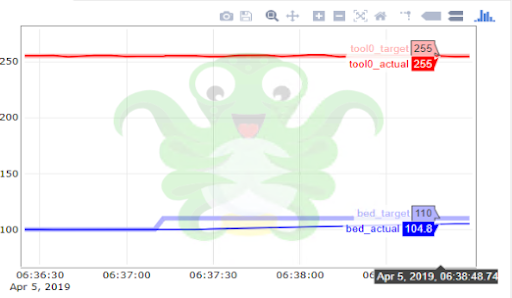
Printing ABS after the bed temp tries to go to 110C after the first layer, About 2 minutes after the first layer and during a layer change (Z stops at .75 with a .2 layer height) I get the BED PREHEAT ERROR. Room temp is 21C.
In the pic you can see that the temp isn't reaching the set-point, the end of the graph is when the error occurs.
 mrjackson
on 5 Apr 2019
mrjackson
on 5 Apr 2019
To persue what mrJackson wrote above i can reproduce the crash at will (rather not). So i added pieces of insulation on the bed after the warmup and mesh to ease the load. I was printing the upgrade fan shroud that does not require much space on the bed. ( https://photos.app.goo.gl/2xChzWtjWLja1LEV8 ) and voila the piece could print without a glitch.
Now for the root cause.
Tomorrow voltage current and temperature/time curve. I gotta a feeling those power supply are either marginal when you are pushing them a bit hard or simply getting old. I have my hands on 2 MKS2.5 having the same behaviour pattern..
Q what is the time period required for the alarm to kick in?? I got the feeling it is in the 2 min range (from the above graph, an do not feel reading code for hoursto find it)
 fbujold
on 12 Apr 2019
fbujold
on 12 Apr 2019
I am still having this same problem on my 2.5 with Firmware 3.7.0-2201. So far I have replaced the PSU with a 30amp version and I have pulled the thermistor from another bed. In one case I got the PREHEAT ERROR during a restart when the bed as at 99 and the target was 100! The error popped up almost immediately when I started the print!
 mattrcampbell
on 14 Apr 2019
mattrcampbell
on 14 Apr 2019
I am still having this same problem on my 2.5 with Firmware 3.7.0-2201. So far I have replaced the PSU with a 30amp version and I have pulled the thermistor from another bed. In one case I got the PREHEAT ERROR during a restart when the bed as at 99 and the target was 100! The error popped up almost immediately when I started the print!
Is your PSU attached to the printer? or do you have the Lack hack?
fbujold
on 14 Apr 2019
My PSU is external to my enclosure with some pretty big (10 AWG) extension conductors. When I started having this issue it was still the original PSU in the enclosure. I assumed I had cooked it, but now that appears to maybe not be true.
mattrcampbell
on 14 Apr 2019
I am at the same point as you are. keep on posting. I have a 40 amp to install and beefier cable to install
fbujold
on 14 Apr 2019
I am printing a model that triggers this error every time. Even after upgrading to firmware version 3.7.0.
The model has some long bridges (5 cm) in the 4th layer and I'm printing these very slowly (~16 mm/min) so they don't droop. I wish I could print slower but it seems if I do then the fan is in the same place too long and triggers the PREHEAT ERROR.
I seem by bed heating up from 85C to 90C after the first layer, and it does reach 90C but oscillates slightly around that setpoint and triggers the error. The threshold for the error is to tight. Is there a setting I can send in the G-Code or via a menu to relax this threshold? I do not wish to compile custom firmware.
r-a-i
on 14 Apr 2019
Hi r-a-i,
I actually have the same issue with the stock firmware. I am also in a colder environment (balcony, since printing a lot ABS). That increases the heat loss from the bed (it has huge surface to dissipate heat) because of the larger temperature difference between the bed and ambient temperature.
I had MK2, so my bed and extruder heater are 12 Volt and I have swapped to Einsy Rambo with an additional 24V PS only for the Motors and mainboard. From firmware point of view that's still MK3, but I am not completely sure about the bed power and respectively the expected time to heat from temperature to temperature, so here I can't compare to the stock MK3s.
Since my preheat troubles started I have checked the wiring, voltages and so on - they are fine (verified by scope), so I don't have a reason to blame the PSU (on the 12V rail I am using the stock MK2 PSU). There is some voltage drop - about 0.15V on the wires and some more on the FET on the RAMBO BOARD, but there still about 11.8-11.9 Volts on the bed terminals. The PSU outputs 12.4V, there is less than 50mV drop when the bed is turned on (also measured by scope), which is negligible. What I have found is that it is expected the temperature transition to happen in about 2 minutes (it is defined in number of temperature measurements) and there is expectation how fast the temperature will change during that period. In my case the temperature ramp is lower than the expected and the time needed is a way longer. So I had to modify that in firmware. Since then I have no preheating issues.
Generally speaking about issues - I have my ambient temperature measured as minus twenty something degrees. That's something I haven't figured out yet, but that's could be the key to my success, since there are several places where the ambient temperature is checked. If interested you can try out my MK3 firmware build:
https://avoton.shtilianov.com/PrusaMK3/Firmware/Angels/
If you find out it works for you, please let me know.
angelshtilianov
on 15 Apr 2019
@inquisitiveKangaroo is there any chance of re-opening this issue or should I submit a new one? I don't believe this has been fixed for all instances. The ramp time is just too aggressive in the current firmware, I never had these issue before! Even with a brand new beefy power supply I am still experiencing the issue when the bed temp changes after the first layer.
mattrcampbell
on 15 Apr 2019
I also checked with a multimeter under instructions from prusa support, according to them my PSU and bed are all fine. If I don't change the bed temperature during the print, everything is fine.
But I can't use the default profiles for various materials on my unmodded Prusa Printer - this is clearly an unresolved firmware issue.
I am running a MK2 that has been upgraded using original kits to a MK2.5s MMU2s.
 brandstaetter
on 15 Apr 2019
brandstaetter
on 15 Apr 2019
I confirm that the PSU voltage on
- startup is at 12.08 VDC PSU DC current 11.5 amp bed voltage 001 VDC
- started the print 12.08 VDC bed voltage 10.71 VDC
- After warmup and probing 12.07 VDC psu DC current went down to 4 indicating PID operation bed voltage 10.71 VDC
- start probing 12.07 VDC PSU 6.4 AMP
- start printing 12.07 VDC
- raise bed temp atfer first layer to 104 deg PSU 12.07 VDC bed voltage 10.71 VDC
Failure while system raised temp to 110 BED PREHEAT ERROR
Tech support had me change the bed thermistor: still fails after change and temperature calibration
fbujold
on 15 Apr 2019
I am having this issue on stock MK3S with Delta PSU. Latest firmware as of this writing. Print has auto cooling enabled. ABS print with bed at 100C. After the 3rd layer when the fan kicks on the bed gets set to 110C. A minute or so later the error occurs.
 HMPoweredMan
on 20 Apr 2019
HMPoweredMan
on 20 Apr 2019
same problem here with firmware 3.7.0 on stock MK2 with upgrade MK2.5; error occurs during heating over 100°C... as said before: hard- and software is original...
 chdorst
on 21 Apr 2019
chdorst
on 21 Apr 2019
Same issue here.
- First layer prints fine. Bed preheat error halfway through second layer as bed temperature is increasing (very slowly) to 110C
- MK2 upgraded to MK2.5S
- SW version 3.7.0
- Printing ABS in a warm (23.5C) room with no drafts, Bed temp 100C.
- Voltage at bed terminals 11.59V measured with Keysight U1232A
 daduca
on 22 Apr 2019
daduca
on 22 Apr 2019
I am still using v3.7.0-RC1 with custom patches addressing the issue and I am fine.
I've just rebased my custom FW to the latest 3.7.0 and built it for all hardware variants. Tonight I am about to test it. Note, that I'll be able to test only the MK3 variant (that's the only I have).
Here is a link to the HEXes if someone is interested:
https://avoton.shtilianov.com/PrusaFW/FW370-Build2201/
angelshtilianov
on 22 Apr 2019
Now I got the same (or similar) issue as well on two different scenarios (on my MK2.5S with MMU2S with latest official firmware).
First time it appeared when I wanted to make a test print with polymaker polymax pc. The issue appeared already on the second layer since bed temperature on the first layer was 100°C, on the second 115°C (as in the slic3r predefined profile). Obviously it took to long to get to the 115°C so I got the prehead error. I solved that by just setting the bed temp on 100°C for first and second layer.
Second time it appeared when I was trying the print something with Prusa PLA and Polymaker PolySupport. Here it happend after the first filament change from PLA with 215°C nozzle temp to PolySupport with 225°C nozzle temp. After PolySupport material was loaded, the nozzle temp was set to 225°C but stuck at 220°C. And after a while I got that error.
I have an idea why that happend (at least in my case). I'm using a tungsten 0.4 nozzle which is a bit longer that the standard nozzle. And the new fan-shroud of the MK2.5S is blowing directly on the tip of the nozzle, significantly stronger than the version before. Since blower was at 100% at that time and tungsten has a significantly higher thermal conductivity than the original nozzle material ( 167W/(mK) instead of 120W/(mK) ) and the PID calibration is done with blower off, the nozzle temp is just not reaching the new temp which is 10°C higher than before.
I'm not sure if that problem can be solved by changing the firmware (maybe the heating should use more power). I did a PID re-calibration with blower at 100% to see if that helps. Second idea - change the fan shroud a bit to have the airflow not hit the nozzle that hard. Or lower the blower rate. Or install a silicon sock on the hot end (which seems to me the best solution).
By the way - during cool down after the print I can use the blower to cool the hot end down within a few minutes since temperature is dropping approx. three times faster.
 Grismo
on 26 Apr 2019
Grismo
on 26 Apr 2019
I am still using v3.7.0-RC1 with custom patches addressing the issue and I am fine.
I've just rebased my custom FW to the latest 3.7.0 and built it for all hardware variants. Tonight I am about to test it. Note, that I'll be able to test only the MK3 variant (that's the only I have).
Here is a link to the HEXes if someone is interested:
https://avoton.shtilianov.com/PrusaFW/FW370-Build2201/
Hi angelshtilianov,
I will try to access your link, but i have a 404 error message. Can you please send to me the Hex file with FW 3.7.0 with your custom ?
Thank you in advance.
Best Regards
Patrick Sierro
 Marius37
on 30 Apr 2019
Marius37
on 30 Apr 2019
Hi everybody.
The link is fixed. Just try again.
MK3 is tested personally by me. MK3S also looks like Mk3S firmware.
The MK2(.5) are not yet tested.
angelshtilianov
on 30 Apr 2019
Thanks! Fixes the issue on MK3S. Took it almost to the end of print to get to 110C !
 deluded
on 9 May 2019
deluded
on 9 May 2019
Hi @deluded ,
I am glad to hear. I hope it will work for you.
@Marius37 have tried the MK2.5 and told that it shows MIN_TEMP, but continues heating. Other than that the 9-point calibration were different. Mine is also different with 3.7 and I've verified it with the stock MK3 3.7.0 - it doesn't differ (at least on MK3).
I've just (15 minutes ago) received my MK3S upgrade kit and I hope soon to be able to confirm the MK3S firmware on my own printer ;-)
@deluded I am using non original Einsy board and I have some troubles with the ambient temperature measurement (it says something like -30 degrees all the time). Could I ask you to verify it on your printer? I am pretty sure it is hardware issue on my printer, but ...
angelshtilianov
on 10 May 2019
Hi Angel,
Thank you for your email.
I also received yesterday the kit to switch my printer to MK 2.5S version.
I will perform the update soon and could test the firmware.
I had another problem, now in addition to the error "Err: MINTEMP BED",
when the temperature is reached and the printing must start, the check
points are made and then the printer is stop and do not start printing.
By downgrading the firmware to 3.4.0, it works fine ;-(
Le ven. 10 mai 2019 à 11:26, Angel Shtilianov notifications@github.com a
écrit :
Hi @deluded https://github.com/deluded ,
I am glad to hear. I hope it will work for you.
@Marius37 https://github.com/Marius37 have tried the MK2.5 and told
that it shows MIN_TEMP, but continues heating. Other than that the 9-point
calibration were different. Mine is also different with 3.7 and I've
verified it with the stock MK3 3.7.0 - it doesn't differ (at least on MK3).
I've just (15 minutes ago) received my MK3S upgrade kit and I hope soon to
be able to confirm the MK3S firmware on my own printer ;-)
@deluded https://github.com/deluded I am using non original Einsy board
and I have some troubles with the ambient temperature measurement (it says
something like -30 degrees all the time). Could I ask you to verify it on
your printer? I am pretty sure it is hardware issue on my printer, but ...—
You are receiving this because you were mentioned.
Reply to this email directly, view it on GitHub
https://github.com/prusa3d/Prusa-Firmware/issues/1362#issuecomment-491223409,
or mute the thread
https://github.com/notifications/unsubscribe-auth/ACARBYFC2C5KDCVBKOY4BC3PUU5TZANCNFSM4GGGYYUA
.
Marius37
on 10 May 2019
Hi, I just see the news below on the Link.
https://github.com/prusa3d/Prusa-Firmware/releases/tag/v3.7.1-RC1
Did you try it ?
So I am trying on my Prusa i3 MK2.5. If it's okay, I will do the upgrade to MK2.5S....
Marius37
on 11 May 2019
Hi @angelshtilianov - ambient is correctish on my Einsy - reads 38deg in a normal room when printing ABS.
deluded
on 11 May 2019
@Marius37
Thanks you,
the v3.7.1-RC1 correct my issue (whith any change [8 failure on the same gcode] except software upgrade, my print is done)
 GAUT007
on 12 May 2019
GAUT007
on 12 May 2019
3.7.1 does _not_ fix this issue for me.
HMPoweredMan
on 15 May 2019
The 3.7.1 update also does not fix the issue for me. I installed it yesterday and have had 3 prints all abort with the same issue. It always works if I immediately restart the print.
mattrcampbell
on 15 May 2019
Had a mintemp error on starting a print. Had to Heat the bed manually before i could start the print,
fbujold
on 15 May 2019
I had a similar issue. Any time I have that error I do a PID calibration with the fan on high. I think it has more to do with ambient temperature fluctuation. BUT that was my issue....I figured it was just struggling to maintain a constant temp when my heat/air would kick on.
 IAmNotReallyHere
on 16 May 2019
IAmNotReallyHere
on 16 May 2019
@IAmNotReallyHere maybe related #1746
Was the temperature like here?
 leptun
on 16 May 2019
leptun
on 16 May 2019
@leptun Using PLA I was able to duplicate the the error by setting the target temp to 230 degrees for first layer and 237 degrees after the first layer. The first layer with fan off stayed within 2-3 degrees above and below the target temp. When the fan kicked in at the second layer (100 percent fan speed ) the temp dropped to 228 degrees and struggled to climb beyond 232 degrees . The error is thrown after about a 2-3 minutes at 232-233 degrees. The lowest temp reached when the fan kicked in at 100 percent was 224 degrees but climbed to 230 degrees then slowly to a steady 232-33 degrees.
To fix this I did a PID calibration with the fan set to 100 percent and the target temp at 250 (yea I know it's high).
After calibrating - the temp for the first layer remained with 1-2 degrees of a target temp of 230 with no fan and within 2-3 degrees after the first layer with a target temp of 237 degrees. The lowest temp was 227 but quickly and easily climbed to 237 with the fan at 100 percent.
---Note---
I noticed when my air turned on about half way through the print it was struggling to reach 232 degrees. The only way I could fix this was by turning my fan speed down to 70 percent.
It seems the error is thrown after a few minutes below the threshold (whatever that may be) and there isn't enough voltage to heat to the target temp with the fan at 100% . So for me ...if the ambient temperature is too cold it struggled to reach the target temp when the fan is @ 100%
IAmNotReallyHere
on 16 May 2019
I guess the safer thing to do would be to turn the fan speed down. But I print at higher temps and shoot for speedy prints. So I tweak the flow and temp to maintain an equilibrium with quality. I got this guy down to an 2 hours and 45 mins!
IAmNotReallyHere
on 16 May 2019
3.7.1 did not fix ABS preheat error for me on mk3s.
Went back to @angelshtilianov build and works OK.
Problem occurs when going from 100 to 110C on generic ABS profile (this time using PrusaSlicer 2.0.0).
deluded
on 25 May 2019
Hi all,
Yesterday I've decided to rebase my branch to 3.7.1.
Here are some interesting observations:
in my 3.7.0 release the code is:
if (_current_temperature - __preheat_start[_heater_id] < ((_isbed) ? 1 : 2)) {
//which means we want 1 degree gain for bed and 2 degrees gain for extruder in a time period
----------------------------------------------------
currently in 3.7.1 Prusa guys have added (a bit formatted):
++                              if(_isbed) {
++                                      __delta=3.0;
++                                      if(_current_temperature > 90.0)         __delta=2.0;
++                                      if(_current_temperature > 105.0)        __delta=0.6;
++                              } else
++                                      __delta=2.0;
 +                              if (_current_temperature - __preheat_start[_heater_id] < __delta) {
That seems to be a step in the right direction. Other than 2 degrees gain at 90 degrees still seems a bit high to me 0.6 at 105 is nearly okay for 105deg if we exclude the fact how a time period is defined:
Prusa stock firmware
-                               if (__preheat_errors[_heater_id] > ((_isbed) ? 3 : 5))
-------------------------------------------------------------------------------------
Mine patch
+                               if (__preheat_errors[_heater_id] > ((_isbed) ? 10 : 2))
That means in the original firmware 1 time period is three 3 ticks for the bed and 5 ticks for the extruder. That doesn't make sense to me - bed's much more latent and needs much longer intervals than the extruder. Previously I've noted exactly that to Prusa, but they didn't picked it.
So I've taken my my previous code here. I have picked the variable temperature requirement from Prusas 3.7.1 release (I do really like that change), but I have further relaxed the current requirements, so they will match my 3.7.0-angels release and I have kept my timeslice definitions of 10 ticks for the bed and 2 ticks for the extruder:
++                              if(_isbed) {
++                                      __delta=1.5;
++                                      if(_current_temperature > 70.0)         __delta=1.0;
++                                      if(_current_temperature > 105.0)        __delta=0.6;
++                              } else
++                                      __delta=2.0;
 +                              if (_current_temperature - __preheat_start[_heater_id] < __delta) {
----------------------------------------------
+                               if (__preheat_errors[_heater_id] > ((_isbed) ? 10 : 2))
IMHO, Prusa is about to get to these patches, but unfortunately by the hard way, torturing all of us for some more time.
I hope I will be able to compile them today and I'll share as usually.
I have to note that I won't be able to test it right now, since bed belt has torn;-(.
I'll keep you posted.
angelshtilianov
on 27 May 2019
Thanks @angelshtilianov - Nice to see what the changes are - I was a little worried that you'd disabled runaway detection completely!
I'll repeat my ABS test once you've uploaded the new firmware as I need another few items printed.
deluded
on 27 May 2019
Actually in terms of 3.7.0 the stock firmware requirement is
1 degrees gain in 6 seconds for the bed and 2 degrees in 10 seconds for the extruder (which overal makes 1 degree in 5 seconds), which is completely wrong from my point of view.
What I have changed is really the gradient requirement:
1 degree in 20 seconds for the bed and 2 degrees in 4 seconds for the extruder.
Other than that I have added decimals to the display temperature, enabled only English langugage (since I could not compile multilanguge), set the repository name and disabled the mintemp (On MK3 only) since I am printing in very cold environment. I could think about just lowering the mintemp to -5 for example, insted of disabling mintemp at all.
Here are the compiled files for v3.7.1-angels:
https://avoton.shtilianov.com/PrusaFW/FW371-Build2266/
Note: I haven't tested any of them yet. Since I've ported some changes from the mainline (it doesn't looks very likely) there might be something wrong with the porting and there might be some temperature regulation issues, so be warned. Keep a look at your printer on the first print after flashing.
Also I've included all the current changes under:
https://avoton.shtilianov.com/PrusaFW/FW371-Build2266/PatchesOnTopOfTag_v3.7.1/
Feel free to reuse, redistribute and edit them as you find for appropriate. I would be glad to hear any critics, recommendations and feedback in general.
angelshtilianov
on 27 May 2019
New 3.7.1 build by @angelshtilianov works perfect on my mk3s 👍. No errors when ramping up from 100 to 110, all temperatures looked sensible.
deluded
on 27 May 2019
Hi there,
I have tested the MK3. It works for me.
angelshtilianov
on 28 May 2019
A week of printing mainly PETG and ABS. Not even a single issue with this firmware. It seems there's something related to the print quality. It is the best print quality on my MK3 I've ever had regardless that my rods started scratching and forming grooves. That's wear off and it turned out that my smooth rods are not hardened. I have rotated them several degrees, so now the balls on the bearings are not on the same groovy tracks till I am waiting for new ones. I will carefully take a look at the changes between 3.7.0 and 3.7.1. I would mark that release by the gold (so far) MK3 firmware. If there is someone else using it please let me know your feedback.
angelshtilianov
on 4 Jun 2019
the firmware from @angelshtilianov fix this issue
 xchwarze
on 19 Jun 2019
xchwarze
on 19 Jun 2019
Hi all. I am happy to hear you are happy with it.
angelshtilianov
on 19 Jun 2019
Just compiled 3.7.2.
Tonight I'll flash my MK3.
If someone is still interested:
https://avoton.shtilianov.com/PrusaFW/
FW372-Build2363
I'll rename (remove the -untested) the folder once I've some feedback.
Cheers
angelshtilianov
on 13 Aug 2019
Other than that, I've found items like that:
https://www.aliexpress.com/item/32992174615.html
Which in my opinion could help a lot with this issue and dramatically speedup the preheating time (less heat loss - only one side exposed to the ambient air).
My main concern is that 10mm is a way too much to fit between the heatbed and the carriage. Other concern is that in this case the PID may need re-tuning, but that should be minor problem.
angelshtilianov
on 13 Aug 2019
Related issues
 sarf2k4
·
3Comments
sarf2k4
·
3Comments
 gusdleon
·
5Comments
gusdleon
·
5Comments
 NoNme1
·
4Comments
NoNme1
·
4Comments
 ulab
·
3Comments
ulab
·
3Comments
 AnHardt
·
3Comments
AnHardt
·
3Comments
Most helpful comment
Hi,
thanks for pointing out... You are right (my bad, sorry)... we are going to fix it in next release. (inside communication error.) )
However the solution is in progress and we will try to make it up and running asap.