Prusa-firmware: 3.1.0-rc LinAdv with retraction causes(?) to accidental stop
Hello,
Setup:
Prusa i3 MK2 + MMU + 3.1.0-rc (linadv) + Octoprint@NanoPi-Neo.
Previously many printouts - flawless, without problems.
Started to dial-in linear advance feature on MMU and 3 consequent prints fails in the middle of process - the printer stops, still keeping the temperature. GCode sliced with Slic3r-Prusa 1.37.1-prusa3d-win64, filament PLA, gcode starts with M900 K230 (determined with test pattern prints for linadv).
Octoprint shows in terminal log:
Last lines in terminal:
| Communication timeout during an active resend, resending same line again to trigger response from printer. Configure long running commands or increase communication timeout if that happens regularly on specific commands or long moves.
| Send: N23806 G1 X173.403 Y115.801 E0.01415*98
| Recv: Error:Line Number is not Last Line Number+1, Last Line: 23806
| Recv: Resend: 23807
| Communication timeout during an active resend, resending same line again to trigger response from printer. Configure long running commands or increase communication timeout if that happens regularly on specific commands or long moves.
| Send: N23806 G1 X173.403 Y115.801 E0.01415*98
| Recv: Error:Line Number is not Last Line Number+1, Last Line: 23806
| Recv: Resend: 23807
| Communication timeout during an active resend, resending same line again to trigger response from printer. Configure long running commands or increase communication timeout if that happens regularly on specific commands or long moves.
| Send: N23806 G1 X173.403 Y115.801 E0.01415*98
| Recv: Error:Line Number is not Last Line Number+1, Last Line: 23806
| Recv: Resend: 23807
| Communication timeout during an active resend, resending same line again to trigger response from printer. Configure long running commands or increase communication timeout if that happens regularly on specific commands or long moves.
| Send: N23806 G1 X173.403 Y115.801 E0.01415*98
| Recv: Error:Line Number is not Last Line Number+1, Last Line: 23806
| Recv: Resend: 23807
| Communication timeout during an active resend, resending same line again to trigger response from printer. Configure long running commands or increase communication timeout if that happens regularly on specific commands or long moves.
| Send: N23806 G1 X173.403 Y115.801 E0.01415*98
| Recv: Error:Line Number is not Last Line Number+1, Last Line: 23806
| Recv: Resend: 23807
2017-10-13 12:25:00,044 - octoprint.util.comm - INFO - Communication timeout during an active resend, resending same line again to trigger response from printer.
2017-10-13 12:26:00,143 - octoprint.util.comm - INFO - Communication timeout during an active resend, resending same line again to trigger response from printer.
2017-10-13 12:27:00,282 - octoprint.util.comm - INFO - Communication timeout during an active resend, resending same line again to trigger response from printer.
2017-10-13 12:27:00,362 - octoprint.util.comm - INFO - Got a resend request from the printer: requested line = 23807, current line = 23809
| Last lines in terminal:
| Communication timeout during an active resend, resending same line again to trigger response from printer. Configure long running commands or increase communication timeout if that happens regularly on specific commands or long moves.
| Send: N23806 G1 X173.403 Y115.801 E0.01415*98
| Recv: Error:Line Number is not Last Line Number+1, Last Line: 23806
| Recv: Resend: 23807
This gcode prints successfully when retraction is set to <2mm. When longer - it fails.
I'll try to print from SD card to determine if octoprint fails of firmware.
 Gobol
Gobol
All 28 comments
That's a little bit strange, as retraction is completely independet from LIN_ADVANCE. An extruder-only move like a retraction is always handled without advance.
I would also suggest to test this gcode from SD card. I don't know octoprint, but this log seems to say it isn't getting a response from the printer, so it tries to send the last line over and over again. Which sounds like a very bad thing to me: If the printer is already not responding, flooding it's input buffer with the same line over and over again will not make it better - it's like double-clicking a program to start it over and over again while the system already shows you the hourglass icon :-p
If it's also crashing during the SD print, I would search an error in the MMU related LIN_ADVANCE code. The last I heared from @bubnikv was that they had problems bringing the code to work for MMU.
 Sebastianv650
on 15 Oct 2017
Sebastianv650
on 15 Oct 2017
Printed from SD card without problems. Seems to be Octoprint issue or specific hardware/octoprint issue.
PS2. It seems to be problem with 3.1.0-rc & USB feed of commands...
Gobol
on 15 Oct 2017
I can confirm so far that this only seems to happen for me with LIN_ADVANCE enabled and Octoprint. I suspect though that it may be something to do with the command speed across the USB to serial interface. Looking around online through some Octoprint forums this seems similar to an old issue over there. I'm not sure that this isn't just a new feature exposing a weakness on the USB-Serial interface. Either way, it is very scary when this happens. The hotend just halts right over the print and keeps on heating until you either send a fake ACK or emergency stop the print. I have yet to experience it on 3.0.12 official, or with M900 K0 set. If there is any additional information that could be useful I may be able to gather it.
FYI my setup is Pursa i3 MK2S + MMU + Octopi on a Raspberry Pi 3. I'm also using a K230-245 on my LA testing. I have not set my retraction to <2mm though, and this does not occur on every print. Short prints seem usually fine. The longer the print, the more likely it is to happen for me, which makes me suspect a serial interface issue somewhere.
 kefka256
on 24 Oct 2017
kefka256
on 24 Oct 2017
Ive been having tons of issues with Octoprint and now Astroprint using recent firmware post 3.0.9. been pulling my hair out. i know there were some recent fixes related to keep alive and serial comms but now im getting random disconnects in Astroprint too spoiling many prints Wish prusa and octoprint folks would compare notes I can also confirm short print jobs are usually ok but longer running jobs usually die mid print
 joeynuggetz
on 2 Nov 2017
joeynuggetz
on 2 Nov 2017
@joeynuggetz do you have the problems only with enabled LIN_ADVANCE or is it a generic problem?
On which hardware is your Octoprint/Astroprint running? I was hunting serial problems in Marlin for weeks, therefore I know serial printing has it's own challange.. But the Prusa FW seems to be fast enough, up to now I never had an issue.
Sebastianv650
on 2 Nov 2017
@Sebastianv650 : I encountered the same Problem, MK2s (no MM) with linear advanced and latest Octoprint (OctoPi image) running on a Raspberry Pi 3. Before upgrading to 3.1. RC-2, there was no problem at all.
Here's the state of the LCD Display (after I raised the Z manually):
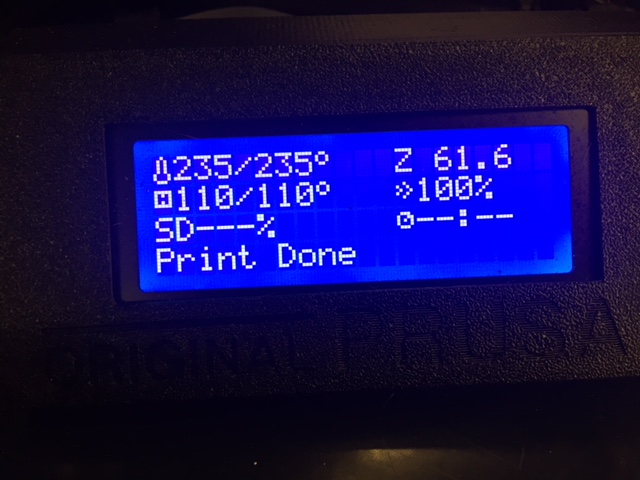
It says: „Print done“, but keeps the temps at the last active level. When I removed the failed print, a hole was burned into the place where the nozzle stayed for a few hours.
 Boby71
on 3 Nov 2017
Boby71
on 3 Nov 2017
Can you provide the last serial communication lines (with the printer answers, maybe you have to activate some debug level to see them) when the print fails?
Sebastianv650
on 3 Nov 2017
Unfortunately, currently I don't have the serial communication in the logfiles. But I find errors like these:
2017-11-02 20:23:59,954 - octoprint.printer.standard - ERROR - Exception while pushing current data
Traceback (most recent call last):
File "/home/pi/oprint/local/lib/python2.7/site-packages/OctoPrint-1.3.5-py2.7.egg/octoprint/printer/standard.py", line 155, in _sendCurrentDataCallbacks
try: callback.on_printer_send_current_data(copy.deepcopy(data))
File "/usr/lib/python2.7/copy.py", line 163, in deepcopy
y = copier(x, memo)
File "/usr/lib/python2.7/copy.py", line 257, in _deepcopy_dict
y[deepcopy(key, memo)] = deepcopy(value, memo)
File "/usr/lib/python2.7/copy.py", line 163, in deepcopy
y = copier(x, memo)
File "/usr/lib/python2.7/copy.py", line 256, in _deepcopy_dict
for key, value in x.iteritems():
RuntimeError: dictionary changed size during iteration
Could this have anything to do with it?
I'll activate the serial communication logging, but won't do it overnight anymore (because I don't want my hotend bursting into flames while I'm sleeping),
Here's the proof, that the behavior is accidental - the same STL file printed with the same settings (but different filament):
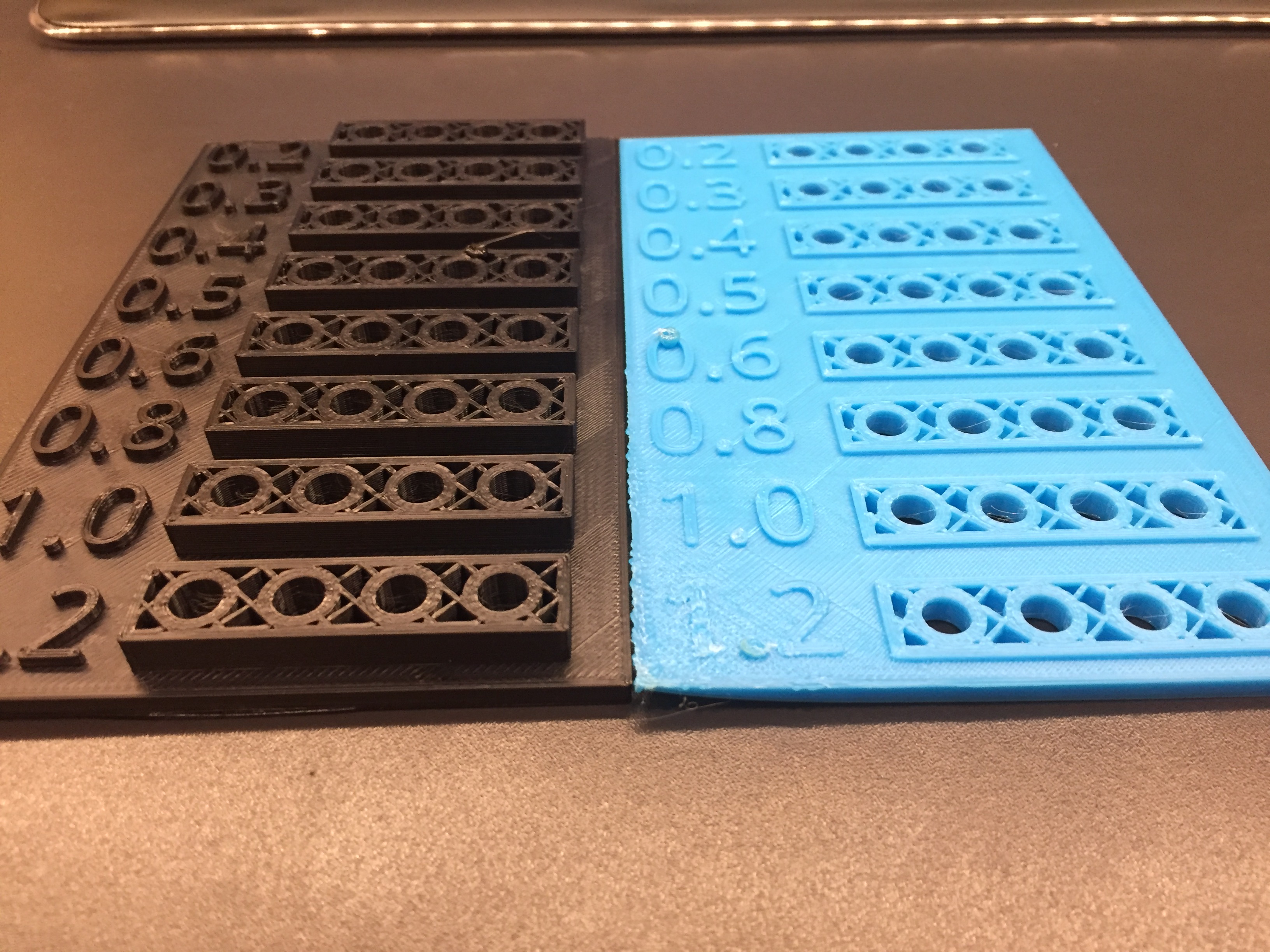
On the blue part you see at the zero of 0.6 the blob where the hotend stopped moving and stayed turned on. Luckily, also the extruding stopped otherwise this would have been a complete desaster. Same on the black part, but it's the second circle from the right at the row "0.5".
(please ignore the warping; that happened when I opened the enclosure to check the print)
I printed this part directly from SD card without any issues.
Boby71
on 3 Nov 2017
I have no doubt it's a serial printing problem, the only thing I'm unsure with is if it's a print server issue or a FW issue. I'm nearly only printing over serial on my prusa, without any issues but from my PC using Pronterface.
The only log file we have at the moment (see starting of the issue) indicates a very strange behaviour of resending lines when the printer is not answering fast enough. At least I don't get the meaning behind it.
Sebastianv650
on 4 Nov 2017
Very interesting: I just finished a 5 hrs print without any problems. But this time I printed the gcode file from the SD card via Octoprint. I'll start now another test, printing the same gcode from the RPI storage - and not from the SD card (this was the configuration where I had my problems before). Hang on, will need some additional time before I can give you another feedback. But if so, then it's a problem shoving the data from the Raspberry Pi towards the printer. Stay tuned.
Boby71
on 4 Nov 2017
@Boby71 was temperature regulation working when this issue occured? Was it possible to interact with printer (enter menus etc.) or was it totaly frozen?
@Gobol was there also message "Print done" shown on LCD as status message?
 PavelSindler
on 4 Nov 2017
PavelSindler
on 4 Nov 2017
@PavelSindler : The printer was full functional, I was able to browse the menus and to even raise the Z height manually. Just reproduced the behavior by printing via Octoprint again with taking the gcode file from the PI storage, not from SD card. Downloading the logfile now, then I'll extract the interesting part and will post it here. Even in Octoprint I was able to manually steer the printer, e.g. set the temperature to zero. It said "Ready" like the print has ended normally. Hope that my serial.log will reveal the root cause of the problem.
Boby71
on 4 Nov 2017
Wow, that's surprising....
2017-11-04 21:07:50,988 - Send: N140314 G1 X84.254 Y99.490 E0.0160*100
2017-11-04 21:07:51,002 - Recv: ok
2017-11-04 21:07:51,016 - Changing monitoring state from 'Printing' to 'Operational'
2017-11-04 21:07:51,020 - Send: M117 Print Done
2017-11-04 21:07:51,038 - Recv: ok
2017-11-04 21:07:51,233 - Send: M105
2017-11-04 21:07:51,243 - Recv: ok T:245.0 /245.0 B:110.0 /110.0 T0:245.0 /245.0 @:44 B@:74
2017-11-04 21:07:53,234 - Send: M105
2017-11-04 21:07:53,245 - Recv: ok T:245.0 /245.0 B:110.0 /110.0 T0:245.0 /245.0 @:44 B@:74
2017-11-04 21:07:55,235 - Send: M105
2017-11-04 21:07:55,247 - Recv: ok T:245.0 /245.0 B:110.0 /110.0 T0:245.0 /245.0 @:44 B@:74
2017-11-04 21:07:57,236 - Send: M105
2017-11-04 21:07:57,248 - Recv: ok T:245.0 /245.0 B:110.0 /110.0 T0:245.0 /245.0 @:44 B@:74
2017-11-04 21:07:59,237 - Send: M105
2017-11-04 21:07:59,248 - Recv: ok T:245.0 /245.0 B:110.0 /110.0 T0:245.0 /245.0 @:44 B@:74
2017-11-04 21:08:01,238 - Send: M105
2017-11-04 21:08:01,249 - Recv: ok T:245.3 /245.0 B:110.0 /110.0 T0:245.3 /245.0 @:39 B@:74
2017-11-04 21:08:03,241 - Send: M105
2017-11-04 21:08:03,253 - Recv: ok T:245.2 /245.0 B:110.0 /110.0 T0:245.2 /245.0 @:41 B@:72
2017-11-04 21:08:05,242 - Send: M105
2017-11-04 21:08:05,252 - Recv: ok T:245.7 /245.0 B:110.0 /110.0 T0:245.7 /245.0 @:32 B@:71
2017-11-04 21:08:07,243 - Send: M105
2017-11-04 21:08:07,255 - Recv: ok T:245.2 /245.0 B:110.0 /110.0 T0:245.2 /245.0 @:41 B@:72
2017-11-04 21:08:09,243 - Send: M105
2017-11-04 21:08:09,255 - Recv: ok T:245.0 /245.0 B:110.1 /110.0 T0:245.0 /245.0 @:44 B@:69
2017-11-04 21:08:11,246 - Send: M105
2017-11-04 21:08:11,257 - Recv: ok T:245.2 /245.0 B:110.1 /110.0 T0:245.2 /245.0 @:40 B@:69
2017-11-04 21:08:13,247 - Send: M105
That's it! It just said "okay, print is finished". I added a few lines of the M105 command to show, that the temperature stays at the last set temp for the print.
Boby71
on 4 Nov 2017
@Boby71 - I'm going to go out on a limb here and say the problem is not with the firmware (at least directly). I think Octoprint just stopped at what it thought was the end of data or a comms glitch (your previous comment showing a Python exception is suspicious). Here's a couple of other things to look at if you haven't done so already.
- Look back at least a dozen or more lines in the serial log before N140314 and see if everything is moving along - especially that line numbers are monotonically increasing.
- Check the system logs (dmesg) and look for any funny USB errors
- Look at your GCODE file immediately around the line with
G1 X84.254 Y99.490 E0.0160for any stray control characters.
How did you upload to your SD card - Not via Octoprint I guess? Using Octoprint to print from the SD card is not really all that different from selecting the file on the LCD. Both ways should work.
And lastly... try another USB cable.
Not to throw too much shade on the RPi, I have had many issues with USB serial communications on many versions of the Pi. The RPi3 with the BCM2837 SoC seems to be able handle serial USB comms better than the others - probably due an updated USB core from Synopsys/DesignWare. My current setup is using a short (12in) cable between the RPi3 and MK2.
 thess
on 4 Nov 2017
thess
on 4 Nov 2017
I'm with @thess , if the gcode is fine (meaning no strange signs and there is something after N140314), there are no Checksum or other errors before this log line and octoprint just thinks "oh, we are finished!" then it's a quite clear issue of octoprint.
A problem with the firmware, for example when an ISR takes too much time, is usualy indicated by communication errors like checksum errors, therefore resended lines and so on.
Sebastianv650
on 5 Nov 2017
Found now time to look into the gcode - and I'm even more puzzled: It just stops somewhere in the middle of the code. Now it's clear to me, why it just stops in the middle:
pi@octopi:~/.octoprint/uploads $ tail Nozzle20Holder.gcode -c 1500
G1 Z5.200 F600
G1 E2.0000 F2400
G1 X84.878 Y98.840 E0.0166 F4320
G1 X85.125 Y98.406 E0.0179
G1 X85.319 Y97.901 E0.0195
G1 X85.474 Y97.327 E0.0213
G1 X85.593 Y96.679 E0.0237
G1 X85.667 Y95.959 E0.0260
G1 X85.711 Y95.169 E0.0284
G1 X85.726 Y94.303 E0.0311
G1 X85.711 Y93.430 E0.0314
G1 X85.667 Y92.635 E0.0286
G1 X85.593 Y91.914 E0.0260
G1 X85.474 Y91.259 E0.0239
G1 X85.320 Y90.681 E0.0215
G1 X85.125 Y90.173 E0.0195
G1 X84.878 Y89.739 E0.0179
G1 X84.589 Y89.377 E0.0166
G1 X84.254 Y89.090 E0.0159
G1 X83.861 Y88.883 E0.0160
G1 X83.424 Y88.760 E0.0163
G1 X82.947 Y88.720 E0.0172
G1 X82.469 Y88.760 E0.0172
G1 X82.032 Y88.883 E0.0163
G1 X81.637 Y89.091 E0.0161
G1 X81.303 Y89.389 E0.0161
G1 X81.023 Y89.756 E0.0166
G1 X80.793 Y90.191 E0.0177
G1 X80.600 Y90.701 E0.0196
G1 X80.450 Y91.281 E0.0215
G1 X80.340 Y91.929 E0.0236
G1 X80.266 Y92.646 E0.0259
G1 X80.221 Y93.437 E0.0285
G1 X80.206 Y94.303 E0.0311
G1 X80.221 Y95.169 E0.0311
G1 X80.266 Y95.959 E0.0284
G1 X80.340 Y96.677 E0.0259
G1 X80.450 Y97.325 E0.0236
G1 X80.600 Y97.899 E0.0213
G1 X80.793 Y98.403 E0.0194
G1 X81.024 Y98.836 E0.0176
G1 X81.305 Y99.200 E0.0165
G1 X81.639 Y99.489 E0.0159
G1 X82.033 Y99.697 E0.0160
G1 X82.469 Y99.819 E0.0163
G1 X82.947 Y99.860 E0.0172
G1 X83.424 Y99.819 E0.0172
G1 X83.860 Y99.697 E0.0163
pi@octopi:~/.octoprint/uploads $
It's NOT clear to me, why this happens. I always write directly from Simplify 3D using Samba into the "uploads" directory of Octoprint. Seems like the save operation of the file doesn't work all the time and fails without any further error message.
But: Why in the world isn't THIS security measure of RC2 not preventing from this to happen? Does this only work if I print form SD card?
* Check if file is complete*
If file is not complete, user is informed by warning message about it and he can decide if he will continue printing anyway. If user choosed not to print incomplete file, there was bug which caused, that printer executed some movements. This has been fixed.
For this check we search for M84 (disable steppers) in last 10 000 bytes of gcode file. This works well with our print settings. If you don't use our print settings, please add M84 to end section of your gcode.
Boby71
on 5 Nov 2017
@Gobol : Have you checked your gcode files if they are complete? Has your problem the same root cause or do you have another issue? It makes sense that this happens on larger print more often, because the files to transmit are bigger...
Boby71
on 5 Nov 2017
@Boby71, My gcodes are complete. Also, I dont think its
cables/usb-serial-vhdl related issue. On 3.0.9 and below everything was
great. On and after 3.1.-rc there are problems. I was printing from
octoprints uploads/ folder. Unfortunately there was also octoprint update
coincidentally.
W dniu niedz., 5.11.2017 o 09:50 Boby71 notifications@github.com
napisał(a):
@Gobol https://github.com/gobol : Have you checked your gcode files if
they are complete? Has your problem the same root cause or do you have
another issue? It makes sense that this happens on larger print more often,
because the files to transmit are bigger...—
You are receiving this because you were mentioned.Reply to this email directly, view it on GitHub
https://github.com/prusa3d/Prusa-Firmware/issues/234#issuecomment-341957946,
or mute the thread
https://github.com/notifications/unsubscribe-auth/ADGy5SNUwq2qJmc-avVbeGQvfR8wknhKks5szXbNgaJpZM4P5UBI
.
Gobol
on 5 Nov 2017
I wish octoprint was based on some RTOS...
W dniu niedz., 5.11.2017 o 10:01 Bogusz Jagoda bogusz.jagoda@gmail.com
napisał(a):
@Boby71, My gcodes are complete. Also, I dont think its
cables/usb-serial-vhdl related issue. On 3.0.9 and below everything was
great. On and after 3.1.-rc there are problems. I was printing from
octoprints uploads/ folder. Unfortunately there was also octoprint update
coincidentally.
W dniu niedz., 5.11.2017 o 09:50 Boby71 notifications@github.com
napisał(a):@Gobol https://github.com/gobol : Have you checked your gcode files if
they are complete? Has your problem the same root cause or do you have
another issue? It makes sense that this happens on larger print more often,
because the files to transmit are bigger...—
You are receiving this because you were mentioned.Reply to this email directly, view it on GitHub
https://github.com/prusa3d/Prusa-Firmware/issues/234#issuecomment-341957946,
or mute the thread
https://github.com/notifications/unsubscribe-auth/ADGy5SNUwq2qJmc-avVbeGQvfR8wknhKks5szXbNgaJpZM4P5UBI
.
Gobol
on 5 Nov 2017
It would require octoprint to send the entire file to the printer, so it can verify that it is complete. The file is streamed while it is printed, so the printer only sees the end of the file, when it gets to it. So it would only know the file is incomplete when it is too late.
 GurliGebis
on 5 Nov 2017
GurliGebis
on 5 Nov 2017
There is nothing preventing OctoPrint from employing the same test of a local gcode file similar to what the Prusa firmware does before it is printed. However, that is up to the OctoPrint devs.
As a safety valve, you could add a custom gcode script to OctoPrint which would be executed at what it believes to be "After print job completes" (OctoPrint Settings -> GCODE Scripts) for example:
M104 S0   ; turn off hotend
M140 S0   ; turn off heatbed
M107      ; turn off fan
M84       ; disable motors
@thess , thanks - that‘s an amazing idea to address the safety issue caused by this behavior!
Boby71
on 5 Nov 2017
@thess Yes, even though it would require the different slicers that people use to ensure they have the same end-script.
Otherwise it would start creating warnings when people upload gcodes that are already complete.
GurliGebis
on 5 Nov 2017
@Gobol, was it also possible to enter menus etc. when you encounter your problem? In log you send, there are communication timeouts, so it seems that we have two issues here. Also you had complete gcodes. I think, that your issue was related to RC1 and was fixed in PR https://github.com/prusa3d/Prusa-Firmware/pull/245 .
Then we have another issue which is probably caused by incomplete file printed over serial, which is the case which was described by @Boby71 . @kefka256, how your printer behaved when you encounter the issue? Was in possible to enter menus, were there communication timeouts? Did you see it only on RC1?
PavelSindler
on 6 Nov 2017
@PavelSindler: For me it was corrupted gcode, so I cannot confirm a serial printing issue at the moment for RC2.
Boby71
on 6 Nov 2017
There is nothing preventing OctoPrint from employing the same test of a local gcode file similar to what the Prusa firmware does before it is printed. However, that is up to the OctoPrint devs.
@thess Yes, even though it would require the different slicers that people use to ensure they have the same end-script.
Otherwise it would start creating warnings when people upload gcodes that are already complete.
How so ? Any slicer that does not shut off the hot-end after printing is finished should be thrown in the trash, no ? :)
I think it's a good safety measure, one which could probably be solved by simply changing the current default script:
afterPrintDone: Sent just after a print job finished. Defaults to an empty script.
To include the safety measures. I did that on mine when first setup but it's not a bad idea to include them as default. Did anyone submit the idea to the OP issue tracker ?
 fiveangle
on 14 Nov 2017
fiveangle
on 14 Nov 2017
Anyone have serial printing issues in general? Just opened a case with Prusa as I have not experienced this in earlier versions of firmware like 3.0.9 if I recall. Nowadays even after trying neww power supplies, pi3's, SD cards, USB cables, Astroprint and Octoprint will at some point just stop during long print jobs with the following in the serial log:
This is an astroprint log as an example:
Unexpected error while reading serial port: SerialException: 'device reports readiness to read but returned no data (device disconnected or multiple access on port?)' @ comm.py:_readline:1126
Would get almost the exact same error in Octoprint. This is doing my head in and was hoping that perhaps we were onto something here. Starting to think it could just be my rambo. Not sure how to capture anything more verbose than the serial log that would pin point this issue.
joeynuggetz
on 14 Nov 2017
FWIW - The last time I looked at the Linux Astroprint, it was layered on the Octoprint engine (perhaps an older version). I'm not surprised your serial problems show up in both.
thess
on 15 Nov 2017
Related issues
 austaquio32
·
3Comments
austaquio32
·
3Comments
 sarf2k4
·
3Comments
sarf2k4
·
3Comments
 anilrobo90
·
3Comments
anilrobo90
·
3Comments
 brettvitaz
·
3Comments
brettvitaz
·
3Comments
 3d-gussner
·
4Comments
3d-gussner
·
4Comments
Most helpful comment
There is nothing preventing OctoPrint from employing the same test of a local gcode file similar to what the Prusa firmware does before it is printed. However, that is up to the OctoPrint devs.
As a safety valve, you could add a custom gcode script to OctoPrint which would be executed at what it believes to be "After print job completes" (OctoPrint Settings -> GCODE Scripts) for example: