Polaris-react: Text is not wrapping when inside a card
Issue summary

As shown in the screenshot, having the Layout/Layout.Section/Card/Stack with horizontal Stak items.
Looks like the width of inner Stack.Item is calculated too large.
Expected behavior
Text should wrap inside the card.
Actual behavior
Text overflows beyond the card boundaries.
See screenshot above.
Steps to reproduce the problem
      <Page title="Playground">
        <Layout>
          <Layout.Section>
            <Card title='How it works?'>
              <Card.Section>
                <Stack wrap={false}>
                  <img src='https://521f6e02.ngrok.io/packs/media/images/help-how-it-works-58b28c0e77ae8a18bb33467917fc082a.png'/>
                  <Stack>
                    <p>See the video and read carefully the instructions.</p>
                    <p>
                      It will take you no more than 20 minutes. That will be sufficient to put you in the best shape
                      to
                      properly gain from the Excelify capabilities to work with your data.
                    </p>
                    <Button>See - How it works!</Button>
                  </Stack>
                </Stack>
              </Card.Section>
            </Card>
          </Layout.Section>
        </Layout>
      </Page>
Reduced test case
See code above.
Specifications
- Are you using the React components? (Y/N): Y
- Polaris version number: v3.17.0
- Browser: Chrome and Safari
- Device: MacBook Pro
- Operating System: MacOS Mojave
 marisveide
All 8 comments
👋 Thanks for opening your first issue. A contributor should give feedback soon. If you haven’t already, please check out the contributing guidelines. You can also join #polaris on the Shopify Partners Slack.
![probot-shopify[bot] picture](https://avatars2.githubusercontent.com/in/10530?v=4&s=40) probot-shopify[bot]
on 18 Jun 2019
probot-shopify[bot]
on 18 Jun 2019
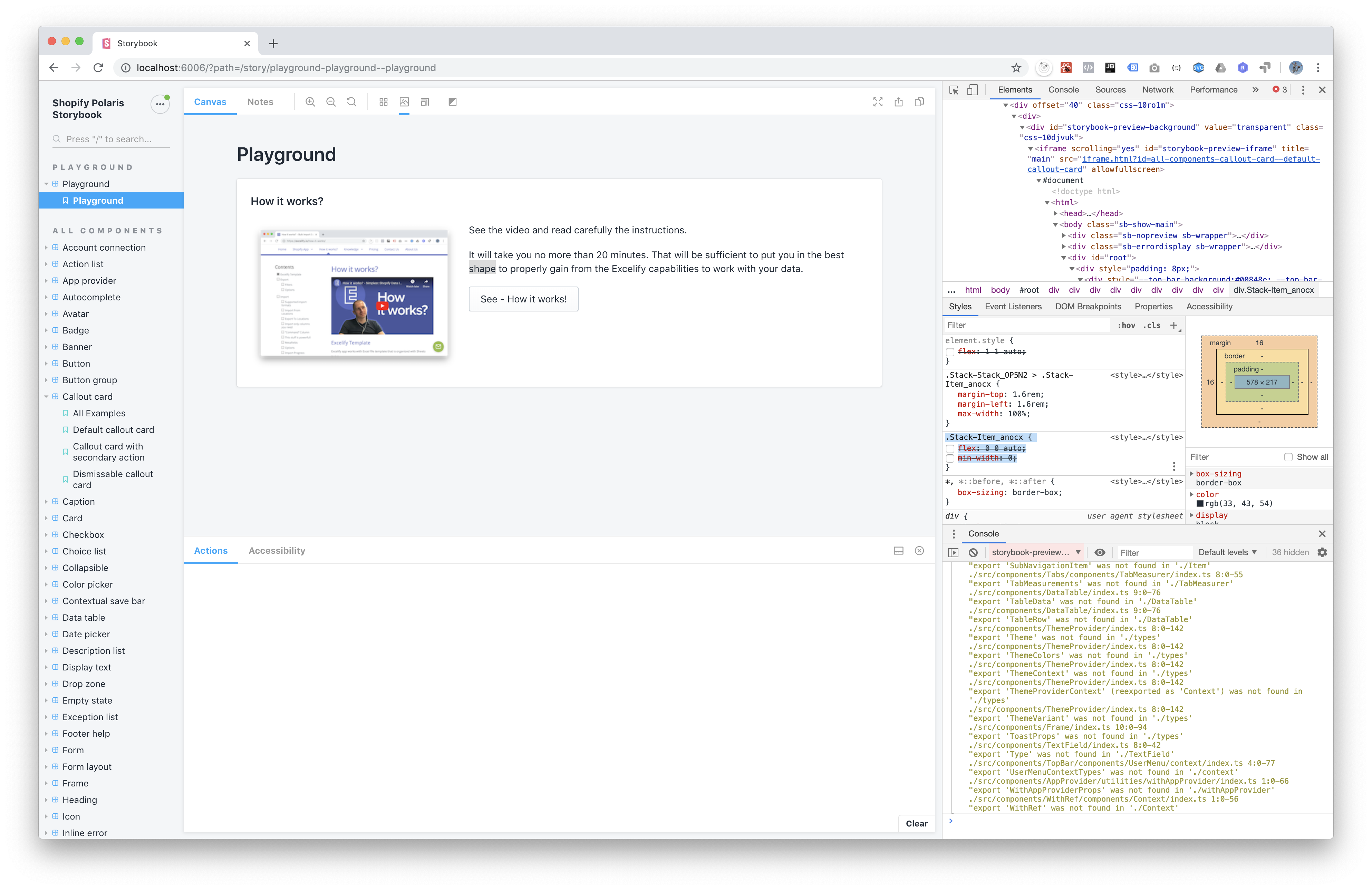
We with @theodoretan tried removing the Stack.Item style of the second item like this:
.Stack-Item_anocx {
    /* flex: 0 0 auto; */
    /* min-width: 0; */
<== removed those styles, then the text wrapping issue resolved.
But we are not sure what else would get broken because of removing those styles.
Attaching the screenshot of the removed styles and how it looks after that.
marisveide
on 18 Jun 2019
Hi @marisveide: It looks like you've got wrap={false} on the stack, which will prevent wrapping. The default is wrap={true}. Can you check and let us know if that does the trick?
 dpersing
on 19 Jun 2019
dpersing
on 19 Jun 2019
Thanks, @dpersing!
Yes, I have tried that, but realized that the wrap attribute changes whether the Stack items are wrapped, not whether the paragraph text gets wrapped.
You can try that in Playground yourself and see that is’s a different kind of wrapping here.
When you do inspect element in the browser, you will see that Stack item overflows there, with larger space than it has to.
marisveide
on 19 Jun 2019
Hi @marisveide We're actually going to revert the fix because it broke other implementations. In your case you can change your implementation to the following and it should work:
import React from 'react';
import {Page, Layout, Card, Stack, Button, TextContainer} from '../src';

export function Playground() {
  return (
    <Page title="Playground">
      <Layout>
        <Layout.Section>
          <Card title="Title">
            <Card.Section>
              <Stack wrap={false}>
                <img src="https://s3.amazonaws.com/pix.iemoji.com/images/emoji/apple/ios-12/256/snow-capped-mountain.png" />

                <Stack.Item fill>
                  <TextContainer>
                    <p>Short sentence.</p>
                    <p>
                      Long sentence 1. Long sentence 2. Long sentence 3. Long
                      sentence 4. Long sentence 5. Long sentence 6. Long
                      sentence 7. Long sentence 8.
                    </p>
                    <Button>Button</Button>
                  </TextContainer>
                </Stack.Item>
              </Stack>
            </Card.Section>
          </Card>
        </Layout.Section>
      </Layout>
    </Page>
  );
}
 dleroux
on 17 Oct 2019
dleroux
on 17 Oct 2019
This PR will revert this change https://github.com/Shopify/polaris-react/pull/2319
dleroux
on 17 Oct 2019
@dleroux - wasn’t it possible to modify my fix to still make it work, but in such a way to be more correct and don’t break that other thing?
Hard to believe that I am the only one who needs card content to wrap by itself. 🤔
marisveide
on 18 Oct 2019
I wish we did find a way but unfortunately min-width: 0 is needed. Other implementations were completely missing one column from the view. See this article: https://dfmcphee.com/flex-items-and-min-width-0/
In your above implementation simply using the fill prop on a Stack.Item produces the right css:
<Stack wrap={false}>
   <img src="https://s3.amazonaws.com/pix.iemoji.com/images/emoji/apple/ios-12/256/snow-capped-mountain.png" />
   <Stack.Item fill>
      <Stack vertical>
         <p>Short sentence.</p>
         <p>Long sentence 1. Long sentence 2. Long sentence 3. Long sentence 4. Long sentence 5. Long sentence 6. Long sentence 7. Long sentence 8.</p>
         <Button>Button</Button>
      </Stack>
   </Stack.Item>
</Stack>
Related issues
 janklimo
·
3Comments
janklimo
·
3Comments
 vilav
·
3Comments
vilav
·
3Comments
 mbaumbach
·
3Comments
mbaumbach
·
3Comments
 HYPD
·
3Comments
HYPD
·
3Comments
 alex-page
·
3Comments
alex-page
·
3Comments