Polaris-react: [RangeSlider] SingleThumb doesn't extend to the limits of the track in MSEdge
Issue summary
The single thumb element doesn't extend to the end/start when it is moved to the upper/lower limits of the track in Microsoft Edge (v18 on Win 10). This is shown below.
Note: This doesn't affect the dual thumb slider, only the single.
Expected behavior
The thumb should extend to the upper/lower limits of the track as shown here in the current version of Chrome on OSX:

Actual behavior
The single thumb only extends to a point close to the upper/lower limits of the track and as a result doesn't match up with the progress colours on the track.
This is best shown in this recording of the default slider in the Polaris storybook:

Also present in the styleguide:

Steps to reproduce the problem
- Open the Polaris Storybook in MSEdge on a machine running Windows 10
- Navigate to
Range slider->Default range slider
Reduced test case
The best way to get your bug fixed is to provide a reduced test case. This CodeSandbox template is a great starting point.
Specifications
- Are you using the React components? (Y/N): Y
- Polaris version number: v3.15.0
- Browser: Microsoft Edge v18
- Device: Windows 10 VM
- Operating System: Windows 10
 ruairiphackett
All 7 comments
Hey @ruairiphackett thanks for opening this issue.
As this is an inconsistency in a legacy browser it we will not be addressing this. If you want to take a look yourself you are always welcome to open a pull request.
Are you able to confirm some things:
- Does this issue occur in the new chromium version of edge
- Does the native slider do the same thing? I think our styles are just minor enhancements. So if this is the default we probably wouldn't be making it consistent with the other browsers.
 alex-page
on 15 May 2019
alex-page
on 15 May 2019
Does the native slider do the same thing?
@alex-page this issue is the native slider, not the custom slider which is only used for the dual range version.
 tmlayton
on 21 May 2019
tmlayton
on 21 May 2019
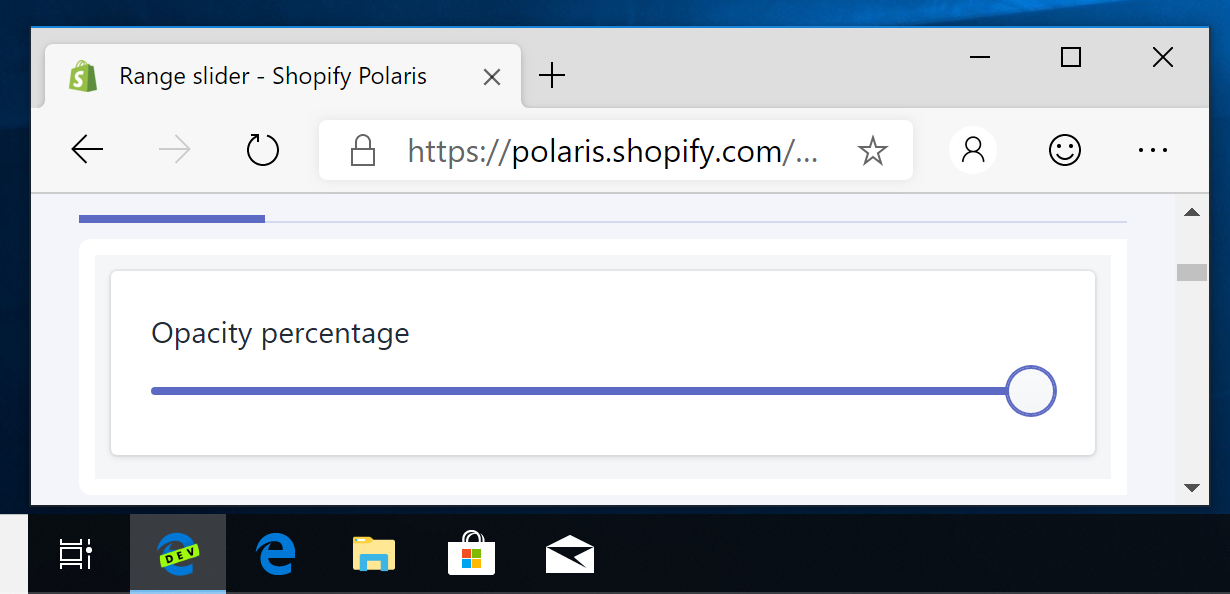
Confirmed this is no longer an issue with Chromium-based Edge:
tmlayton
on 21 May 2019
The ::-ms-thumb styles are there, too, so maybe this is a simple fix.
tmlayton
on 21 May 2019
Thanks for taking a look at Chromium-based Edge @tmlayton 👍
@alex-page Is there a list of supported browsers available for Polaris? Apologies, I didn't realise Edge v18 was legacy, can this issue be closed so?
ruairiphackett
on 22 May 2019
@ruairiphackett edge is supported by Polaris. Whatever Shopify supports we support. The problem is due to this line:
https://github.com/Shopify/polaris-react/blob/18f1a6fcd3a614bd5b64002495fafdafbe843141/src/components/RangeSlider/components/SingleThumb/SingleThumb.scss#L112
The circle is actually touching the edges however it is being scaled down. This is making it appear that there is a gap on the left and right edges. The scale has been added because the rem value is not respecting the 10px on the html as there is a shadow dom created inside the range slider.
Removing the scale and changing the height and width causes other issues with hidden overlapping parents you cannot control:
However, everything outside of the parent slider’s content-box gets cut out in Edge. This is not equivalent to having overflow set to hidden on the actual input, which would cut out everything outside the padding-box, not content-box. Therefore, it cannot be fixed by setting overflow: visible on the slider.
src: https://css-tricks.com/sliding-nightmare-understanding-range-input/
I am going to quickly take a look into adding a negative margin in edge to see if I can pull the circle back out. If this doesn't work I think it would make sense to close this issue. The effort required to fix this is not worth it.
alex-page
on 23 May 2019
This issue has been inactive for 180 days and labeled with Icebox. It will be closed in 7 days if there is no further activity.
![probot-shopify[bot] picture](https://avatars2.githubusercontent.com/in/10530?v=4&s=40) probot-shopify[bot]
on 19 Nov 2019
probot-shopify[bot]
on 19 Nov 2019
Related issues
 danrosenthal
·
3Comments
danrosenthal
·
3Comments
 janklimo
·
3Comments
janklimo
·
3Comments
 pbojinov
·
3Comments
pbojinov
·
3Comments
 greghesp
·
3Comments
greghesp
·
3Comments
 wmceff
·
3Comments
wmceff
·
3Comments