Polaris-react: Resource List does not show a header
Issue summary
The promotedBulkActions property
breadcrumbs={this.props.breadcrumbs}
title={this.props.title}
>
            <Layout>
                <Layout.Section>
                    <Card>
                        <ResourceList
                            resourceName={this.props.resourceName}
                            items={this.props.packagins}
                            renderItem={this.renderResourceItem}
                            selectedItems={this.props.selectedPackagins}
                            onSelectionChange={this.props.handleOnSelectionChange}
                            promotedBulkActions={[
                                {
                                    content: 'Remove packagings',
                                    onAction: this.props.handleOnBulkDelete
                                },
                            ]}
                            loading={true}
                        />
                    </Card>
                </Layout.Section>
            </Layout>
        </Page>
Expected behavior
Header with button for bulk actions, works fine at Polaris 2.8.0
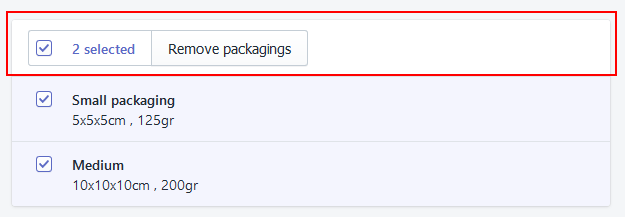
Actual behavior
It does not show a header
Specifications
- Are you using the React components? (Y/N): Y
- Polaris version number: ^2.9.0
- Browser: Firefox 62 (x64)
- Operating System: W10
 ChristianLopezGonzalez
All 11 comments
Hey @ChristianLopezGonzalez. Thanks for filing an issue. I am trying to recreate this, but not seeing the same problem. Can you try removing the loading prop? Are you seeing the same issue without it?
 dfmcphee
on 18 Sep 2018
dfmcphee
on 18 Sep 2018
@dfmcphee i tried to remove the loading prop and return only the component. You're right i have the same issue.
   return (
        <ResourceList
            resourceName={{
                singular: 'Singular',
                plural: 'Plural'
            }}
            items={this.props.addresses}
            renderItem={(item) => {
                const {id, alias} = item;
                return (
                    <ResourceList.Item id={id}>
                        {alias}
                    </ResourceList.Item>
                );
            }}
            selectedItems={[]}
            promotedBulkActions={[
                { content: 'Action' }
            ]}
            bulkActions={[
                { content: 'Action' },
                { content: 'Action' },
                { content: 'Action' },
            ]}
        />
    )
My assets file:
https://sdks.shopifycdn.com/polaris/2.9.0/polaris.min.css
My component imports:
import React, {Component} from 'react';
import {bindActionCreators} from 'redux';
import {connect} from 'react-redux';
import {createStructuredSelector} from 'reselect';
import {ResourceList} from '@shopify/polaris';
2.0.9 result:
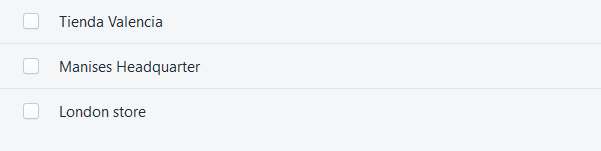
2.0.8 result:
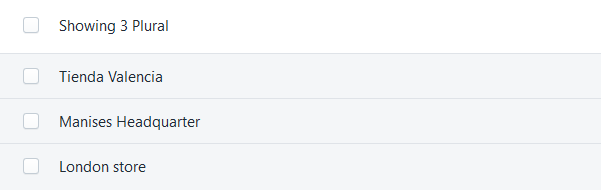
¿Any idea?
ChristianLopezGonzalez
on 18 Sep 2018
I also came across this and came up with a reproducible use case. Essentially what it comes down to is that if the items property is an empty array when the ResourceList control is mounted, the listNode state value isn't set because it's expecting the listRef reference to be available on componentDidMount. If the listNode is falsey, it doesn't create the header in the render.
Here's the reproducible case, which all I did was use a setTimeout in componentDidMount to delay when the items arrive and the header won't show up: https://codesandbox.io/s/jjwmkolklw
And just to confirm, this started with 2.9.0.
 mbaumbach
on 19 Sep 2018
mbaumbach
on 19 Sep 2018
Thanks @mbaumbach ! you're right ✌️.
ChristianLopezGonzalez
on 20 Sep 2018
@ChristianLopezGonzalez @dfmcphee This appears to be fixed in @shopify/polaris@next (3.0.0.rc7). Can be seen working in this new sandbox: https://codesandbox.io/s/p5jjq4pjnj
mbaumbach
on 8 Nov 2018
It looks like this was fixed by c6d2c35a9d7329017984a90b9607add604d9d8cd
 tmlayton
on 8 Nov 2018
tmlayton
on 8 Nov 2018
Problem seems to be re-appear from v4.0.0
 MrNghia123
on 24 Dec 2019
MrNghia123
on 24 Dec 2019
Yes, the issue is definitely present in v4.13.1.
I have personally downgraded to v3.10.0 so the header shows correctly.
 djaho
on 11 Feb 2020
djaho
on 11 Feb 2020
v4.16.0 and still the same problem.
MrNghia123
on 17 Apr 2020
Solved this issue for myself by adding the internationalization to the AppProvider
import translations from '@shopify/polaris/locales/en.json';
and on my AppProvider
<AppProvider i18n={translations}>
It also
Using v4.22.0
 DanPete
on 18 May 2020
DanPete
on 18 May 2020
@DanPete You're amazing and the solution works for @shopify/polaris - 4.27.0
 sam-cnet
on 24 Oct 2020
sam-cnet
on 24 Oct 2020
Related issues
 grandelc
·
3Comments
grandelc
·
3Comments
 alex-page
·
3Comments
alex-page
·
3Comments
 cgenevier
·
3Comments
cgenevier
·
3Comments
 wmceff
·
3Comments
wmceff
·
3Comments
 danrosenthal
·
3Comments
danrosenthal
·
3Comments
Most helpful comment
Problem seems to be re-appear from v4.0.0