Polaris-react: Popover with form components causes undesired scrolling
Issue summary
Typing in an input inside a Popover causes the browser to scroll to the bottom of the page, and therefore forcing the popover to hide.
We were only able to reproduce this in Safari, but not only in our app but also in the Polaris examples page. Here you can see a video of the issue. Safari automatically scrolls to the input you are typing if it's "out of view" but in this case it seems that the Popover position is not correctly calculated.
Expected behavior
Typing in an input inside a Popover doesn't cause any scrolling. Open popover are never "out of view" so they shouldn't trigger any scroll.
Actual behavior
Browser scrolls to the bottom of the page when you type in an input inside a Popover, forcing the Popover to hide.
Steps to reproduce the problem
(As in the example video from above)
- Navigate to Popover examples page and open
Popover with form componentsexample - Click on
Filterbutton - Click on text box next to
Tags - Type
a
Specifications
- Are you using the React components? (Y/N): Yes
- Polaris version number: 2.1.2
- Browser: Safari v11.1.1
- Device: MacBook Pro
- Operating System: OS X v10.13.5
EDIT: Added correct link to video
 E-Mud
E-Mud
All 15 comments
If you can provide us with a workaround in the meantime it would very helpful. I already tried preventDefault in the keyup/keydown/keypress event coming from the input but it didn't work.
E-Mud
on 14 Jun 2018
@E-Mud Thanks for reporting this! Can you share the correct link to the video?
 kaelig
on 14 Jun 2018
kaelig
on 14 Jun 2018
@kaelig Oops!
Sorry I forgot to add the correct link: video
E-Mud
on 14 Jun 2018
Took a looksy 👀 .
I was able to replicate this in Safari on the Polaris documentation site:
https://polaris.shopify.com/components/overlays/popover
However… I wasn't able to replicated it in the local Polaris dev Playground (also on Safari).
It works fine in Chrome and Firefox though 🤔 (both Polaris documentation + local Playground)
Hope this helps!
Device:
- Mac OS 10.12.6
 ItsJonQ
on 15 Jun 2018
ItsJonQ
on 15 Jun 2018
A couple more things that might be helpful:
- I couldn't reproduce it with
fixed={true}on version2.2.0 - We built our own popover with the same basic functionality. The key difference is that ours doesn't have any animation for opening. Could the animation be the cause?
E-Mud
on 18 Jun 2018
I can reproduce with the latest release (2.3.0) both inside and outside of the Polaris site. I’ve opened an issue in our internal tracker and we’ll look into this as soon as possible.
 ry5n
on 3 Jul 2018
ry5n
on 3 Jul 2018
This may be related, or perhaps intentional, but the popover also disappears when there's not enough space in the window:
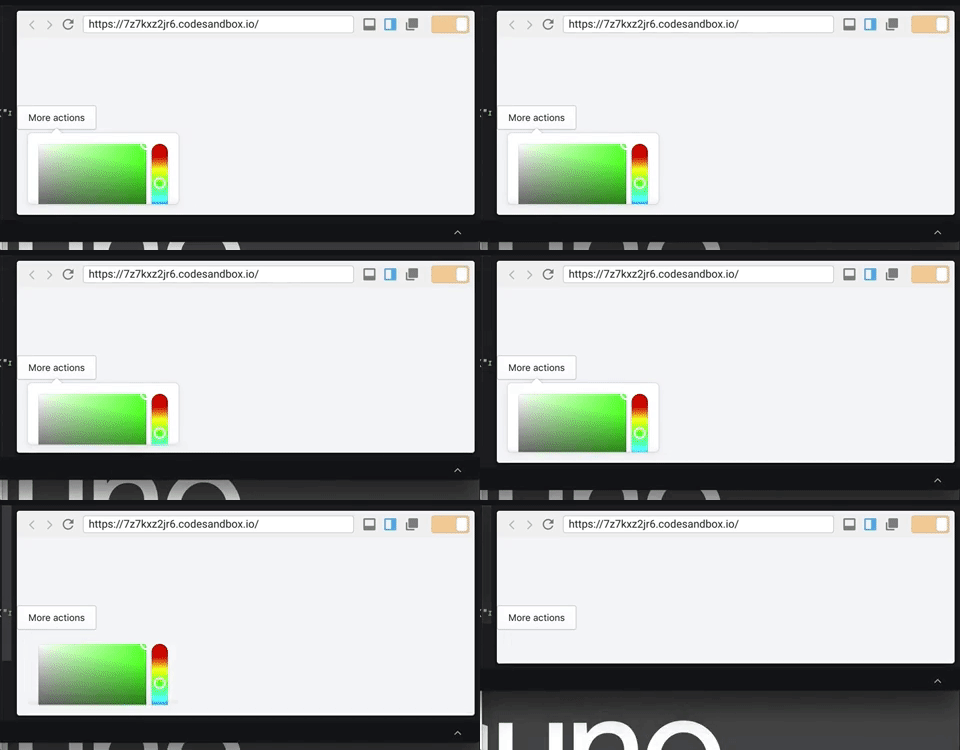
The code to reproduce that is a simple Popover with a ColorPicker in it (See sandbox) You can also get it into a state where it seems like the Popover doesn't open at all if you make the window smaller.
This all sounded similar to this bug, but if it's different, I can open a different issue.
 mbaumbach
on 19 Aug 2018
mbaumbach
on 19 Aug 2018
@mbaumbach Thank for bringing that to our attention. We're looking into it.
 solonaarmstrong-zz
on 23 Aug 2018
solonaarmstrong-zz
on 23 Aug 2018
@ItsJonQ If there is not enough content to scroll the page, the issue doesn't present itself. Popover uses portal, which is positioned as a sibling element to the rest of the content and Safari scrolls to it if you type in a text input within the popover.
Add something like this below your popover in the playground and you'll see the issue.
{Array.from({length: 40}).map(() => (
  <p>Content so the page scrolls</p>
))}
@mbaumbach I'm looking into a default behaviour for this that doesn't cause the bug. You can also use preferredPosition="above" for a popover that appears at the bottom of the page.
solonaarmstrong-zz
on 28 Aug 2018
@solonaarmstrong Thanks for looking into it. We have a somewhat tall popover in our production app with a ColorPicker in it, hex textfield, and recent color swatch (Screenshot below). We run into this issue regardless of the preferredPosition as some of our customers have some pretty small resolutions apparently! Probably could argue we find a way to make this smaller using a different design, but thought I'd share our real world example. 😀

mbaumbach
on 12 Sep 2018
Both of these bugs are no longer reproducible and may have been fixed with the latest Safari update. Closing and will reopen if it resurfaces.
solonaarmstrong-zz
on 19 Sep 2018
@solonaarmstrong The sandbox I posted in the above comment is still reproducible in Chrome, Safari, and Firefox for me. Perhaps that's a different issue though, so let me know if you'd like me to open a different issue for that!
mbaumbach
on 20 Sep 2018
Hi @mbaumbach,
Please go ahead and open a separate issue, since the original issue with typing input and Safari has been fixed by a Safari update. Thanks!
 dpersing
on 20 Sep 2018
dpersing
on 20 Sep 2018
Thanks @dpersing, I've opened #435!
mbaumbach
on 24 Sep 2018
Related issues
 MateusJabour
·
19Comments
MateusJabour
·
19Comments
 sebnun
·
19Comments
sebnun
·
19Comments
 conniecerf
·
17Comments
conniecerf
·
17Comments
 loic-d
·
17Comments
loic-d
·
17Comments
 rafaedez
·
21Comments
rafaedez
·
21Comments