Pnp-modern-search: People Directory in Modern Search v4
PnP Modern Search v4 4.2.3.0
Good Afternoon,
I am wondering if someone could help me with the Modern Search People layout. I am trying to create a People directory with filters and search verticals. I want to filter the results based on Job Title (which was quite straight forward) and Department. I also want to show the "About me" section upon search. I am not sure which properties I could use to get these information.
At the moment I have the following layout:

I want to get the information from the following page:

I have been trying to use the "AboutMe" managed property in the Search Results, and the "DepartmentId" and "Description", but they all return null.
I tried creating new slots but that hasn't worked either, still only returning "null" (since the slot fields would be the above mentioned ones).
I am hoping that once I have the correct property value, I will be able to display it via the "Manage People Fields" option.
Thank you for your help in advance.
 szyvett
All 4 comments
You can use both AboutMe and Description to get back the "ask about me" data. And ensure you add the property you use to the list of managed properties you want to have returned. If not specified, then it won't be there :)
You can pick Description in the dropdown, or manually input AboutMe as it's not listed (not something we control).
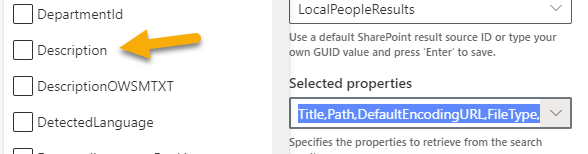
It can take hours after you update before it's available in search.
 wobba
on 9 Jul 2021
wobba
on 9 Jul 2021
Thank you @wobba ! It probably hasn't come through yet then! I updated the the information a few hours ago.
szyvett
on 9 Jul 2021
Department you have to add manually.
Type over what is in the box and hit ENTER - that will add it to the list (not ideal UX, but it's a shared PnP control, and something we want to improve on).

If it's not there after 6-24h, then you have an issue :)
wobba
on 9 Jul 2021
Thank you very much!
szyvett
on 9 Jul 2021
Related issues
 stevebeauge
·
5Comments
stevebeauge
·
5Comments
 alexabramkin
·
3Comments
alexabramkin
·
3Comments
 sympmarc
·
4Comments
sympmarc
·
5Comments
sympmarc
·
4Comments
sympmarc
·
5Comments
 RedGlow
·
5Comments
RedGlow
·
5Comments