Pnp-modern-search: Date formatting for custom Date and Time column
Version used
3.6.3.0
Describe the bug
I have a problem regarding formatting dates which I don't know if it's related to the Search Results webpart or SharePoint in general. In summary, I have a custom Date and Time column in a list whose values I'd like to show in the Search Results webpart, but I can't get to format the result in the correct timezone using Handlebars templates.
Details
More in details, I have a list with a custom Date and Time column (namely ArrivalDate). If I directly access the content of the property through REST API, I get the ISO 8601 UTC content I expect:
...
<entry m:etag="3">
...
  <content type="application/xml">
    <m:properties>
      <d:ArrivalDate m:type="Edm.DateTime">2020-02-16T23:00:00Z</d:ArrivalDate>
    </m:properties>
  </content>
</entry>
...
The column has two associated crawled properties:
Ows_ArrivalDateOws_q_DATE_ArrivalDate
From these crawled properties I have the automatically generated managed property ArrivalDateOWSDATE, and then, in order to make some extra tests, I mapped each crawled property to a RefinableString (112 and 113) and a RefinableDate (15 and 16). All five managed properties are giving me the date in the format “2/16/2020 11:00:00 PM”:
...
  {
    "Key": "ArrivalDateOWSDATE",
    "Value": "2/16/2020 11:00:00 PM",
    "ValueType": "Edm.String"
  },
  {
    "Key": "RefinableDate15",
    "Value": "2/16/2020 11:00:00 PM",
    "ValueType": "Edm.String"
  },
  {
    "Key": "RefinableDate16",
    "Value": "2/16/2020 11:00:00 PM",
    "ValueType": "Edm.String"
  },
  {
    "Key": "RefinableString112",
    "Value": "2/16/2020 11:00:00 PM",
    "ValueType": "Edm.String"
  },
  {
    "Key": "RefinableString113",
    "Value": "2/16/2020 11:00:00 PM",
    "ValueType": "Edm.String"
  },
...
This date is in the wrong format for the getDate Handlebars helper to format it as per documentation (which states it should be an ISO 8601 UTC format): it works anyway, but it obviously ignores the timezone data (I am in a timezone with +01:00, which would make the date 2/17/2020, and instead it is printed as 2/16/2020).
From ticket #28 I got the idea to make a couple more tests. I got the webTimeZoneData, which has an ID of 3, and null for userTimeZoneData. Replaying the same search query the webpart performs and adding a "TimeZoneId": 3 parameter, though, does not change the output parameter of the search, so I suppose it's only pertinent to the interpretation of the filters.
So, my conclusion right now is that the values returned by SharePoint in this configuration are always UTC, but in a format that is not recognized as such by the webpart. Maybe, in that case, the solution could be to just give an option to getDate that allows the date to be re-formatted? Using moment, I would do something like:
date = forceUTC ? moment(date).format("YYYY-MM-DD[T]HH:mm[Z]") : date;
 RedGlow
All 5 comments
Hi @RedGlow With the getDate helper you are able to pass your own format since it is based on moment.js behind the scene. Also you have the ability to set the timezone used in the last parameter. https://microsoft-search.github.io/pnp-modern-search/search-parts/templating/#handlebars-helpers
Finally, if you use only the Ows_q_DATE_ArrivalDate crawled property, are you able to get the right output?
 FranckyC
on 28 Feb 2020
FranckyC
on 28 Feb 2020
@RedGlow any update on this?
FranckyC
on 26 Mar 2020
I have the same issue.
from the debug template I see:
"contractenddateOWSDATE": "6/29/2020 10:00:00 PM" this is UTC. I'm on UTC+2 (CET)
The original date is 6/30/2020, it's a date field with no time, so probably 00:00:00. In the library I do see 30-jun-2020
I have tried various things in the handlebars template, but I'm not getting 30-jun-2020 out of it....
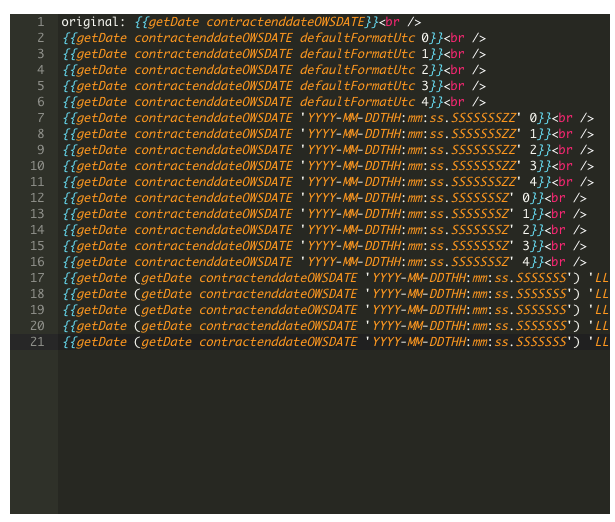
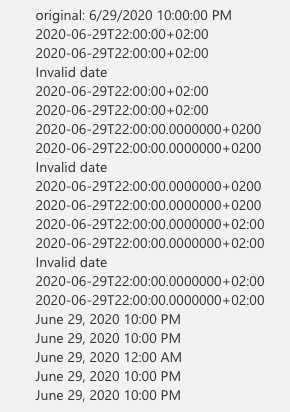
the crawled property, ows_q_DATE_contractenddate, is not available in the search results, but is mapped to contractenddateOWSDATE
I'm using version 3.14.1.0
 jaap-js4
on 1 Jul 2020
jaap-js4
on 1 Jul 2020
I have the same issue. I have a custom Date Time column that only stores the date value. The getdate handlebar expression in the search results webpart does not convert the UTC date time to the local time. After some investigation i realised this is because the value coming from the managed property StampDateOWSDATE is missing the Z at the end and this is causing the conversion from UTC to fail. I fixed this by adding the Z to my datetime string. However this is not a very elegant solution. Would appreciate if anyone else has found a better way to fix this issue.
{{ getDate (getDate StampDateOWSDATE "YYYY-MM-DDTHH:mm:ss.0000000\Z") "DD/MM/YYYY" 0 }}
 RamneetKandhola
on 17 Jul 2020
RamneetKandhola
on 17 Jul 2020
Added an extra parameter. You can now (next version) use the below format and it will append a Z to the date if it's missing.
{{getDate StampDateOWSDATE "DD/MM/YYYY" 0 true}
 wobba
on 20 Jul 2020
wobba
on 20 Jul 2020
Related issues
 fijaz
·
3Comments
fijaz
·
3Comments
 szyvett
·
4Comments
szyvett
·
4Comments
 PathToSharePoint
·
4Comments
PathToSharePoint
·
4Comments
 thebigs1992
·
4Comments
thebigs1992
·
4Comments
 sympmarc
·
4Comments
sympmarc
·
4Comments
Most helpful comment
Added an extra parameter. You can now (next version) use the below format and it will append a Z to the date if it's missing.
{{getDate StampDateOWSDATE "DD/MM/YYYY" 0 true}