Platformio-atom-ide-terminal: Uncaught Error: channel closed
[Enter steps to reproduce:]
- ...
- ...
Atom: 1.25.0 x64
Electron: 1.7.11
OS: Microsoft Windows 10 Pro
Thrown From: platformio-ide-terminal package 2.8.1
Stack Trace
Uncaught Error: channel closed
At events.js:163

Error: channel closed
    at ChildProcess.target.send (internal/child_process.js:562:16)
    at Task.module.exports.Task.send (~/AppData/Local/atom/app-1.25.0/resources/app/src/task.js:113:33)
    at PlatformIOTerminalView.module.exports.PlatformIOTerminalView.input (/packages/platformio-ide-terminal/lib/view.coffee:271:17)
    at /packages/platformio-ide-terminal/lib/view.coffee:149:8)
    at Terminal.EventEmitter.emit (/packages/platformio-ide-terminal/node_modules/term.js/src/term.js:109:12)
    at Terminal.handler (/packages/platformio-ide-terminal/node_modules/term.js/src/term.js:3493:8)
    at Terminal.keyDown (/packages/platformio-ide-terminal/node_modules/term.js/src/term.js:3196:8)
    at /packages/platformio-ide-terminal/node_modules/term.js/src/term.js:594:29)
Commands
Non-Core Packages
atom-django 0.3.2
autocomplete-python 1.10.5
platformio-ide-terminal 2.8.1
 juliocvbgomes
All 16 comments
Try to open a new terminal on package tab, and the terminal will refresh and normal again.
 Posmajan2015
on 2 May 2018
Posmajan2015
on 2 May 2018
Hello there, I used to follow previous advice that says...
"Try to open a new terminal on package tab"
...but that didn't work all the time and now it just does not seem to be working anymore. Here's more info on what I get:
Error: channel closed
    at ChildProcess.target.send (internal/child_process.js:562:16)
    at Task.module.exports.Task.send (C:\Users\Ricardo\AppData\Local\atom\app-1.27.2\resources\app\src\task.js:113:33)
    at PlatformIOTerminalView.module.exports.PlatformIOTerminalView.input (file:///C:/Users/Ricardo/.atom/packages/platformio-ide-terminal/lib/view.coffee:271:17)
    at Terminal.<anonymous> (file:///C:/Users/Ricardo/.atom/packages/platformio-ide-terminal/lib/view.coffee:149:8)
    at Terminal.EventEmitter.emit (C:\Users\Ricardo\.atom\packages\platformio-ide-terminal\node_modules\term.js\src\term.js:109:12)
    at Terminal.handler (C:\Users\Ricardo\.atom\packages\platformio-ide-terminal\node_modules\term.js\src\term.js:3493:8)
    at C:\Users\Ricardo\.atom\packages\platformio-ide-terminal\node_modules\term.js\src\term.js:3253:12
 githubrarp
on 13 Jun 2018
githubrarp
on 13 Jun 2018
I love Atom!!!!! But I am experiencing the same issue on Windows 10 Pro. When you first startup Atom, and then you click on the + button on the bottom left hand corner to launch the terminal, I receive a random number of errors indicating uncaught exception error. I have to close and reopen a new terminal anywhere up to 11 times in order for the command prompt to appear. I used to only have to do this 4 times every time I tried to launch the terminal, but now it seems to be getting worse. How can I help get this on a list to be fixed?
 dunkinman
on 27 Jun 2018
dunkinman
on 27 Jun 2018
@dunkinman @githubrarp @juliocvbgomes Hey Guys I was also facing same problem a lot of times. I installed one more package ("platformio-ide-debugger") in Atom. Now it's not giving that error. I'm using w10 pro.
 finnabc123
on 7 Jul 2018
finnabc123
on 7 Jul 2018
@ppl monitoring this.
These issues also need to be reproduced with current builds of both products and if fails still
also trying what @finnabc123 suggested.
 the-j0k3r
on 7 Jul 2018
the-j0k3r
on 7 Jul 2018
As luck would have it, my system crashed today and upon coming back up, I still had the problem even after installing the platformio-ide-debugger package. I then rebooted again, and now the problem seems to have gone away as I am no longer getting the error when I launch the terminal. Not enough data to support that it's fixed, but I'm wildly optimistic. Installing platformio-ide-debugger seems to have done the trick. Suggest leaving this open for now. I will report back in a couple of weeks or sooner if the problem reoccurs. @finnabc123 thanks for the suggestion. Was a mild annoyance, usually accompanied by panic that I'd have to switch OS or editor...wasn't thrilled about either. So far so good....Not sure if others get automatically notified of changes to this thread...@githubrarp and @juliocvbgomes the suggestion by @finnabc123 seems to have worked for me...
dunkinman
on 8 Jul 2018
Unfortunately even after installing platformio-ide-debugger, this issue continues to plague me. I had to restart Atom yesterday, and the same behavior continues. What exactly do I need to provide to help with the resolution of this issue? @githubrarp @juliocvbgomes @finnabc123 @the-j0k3r
dunkinman
on 10 Jul 2018
In one comment you say its fixed, the other its not, you talk about system crashes, who knows if the issue is even with this package or Atom.
Im not convinced it is.
the-j0k3r
on 10 Jul 2018
I used to run this same config with Windows 10, not the Pro edition. Once I switched over to the Pro version via a new laptop, the issue started. The crash was unrelated to this event. Been running this config for about a year, and have always had this error message. Maybe there's another package I'm running in atom that causing this?
dunkinman
on 10 Jul 2018
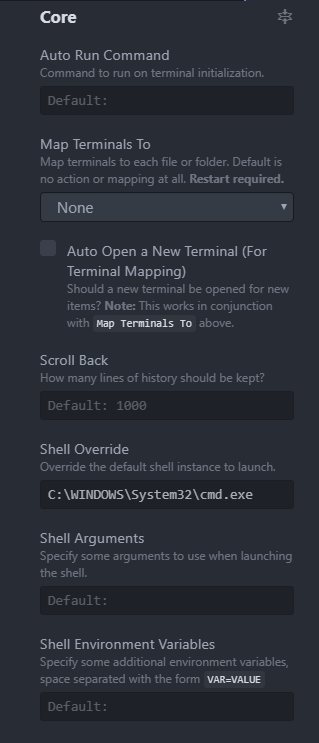
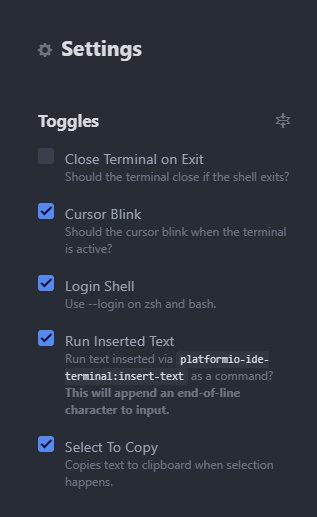
Perhaps there's a problem with my setup or my settings? It's strange to me that opening and closing the editor an undetermined amount of times resolves the issue on it's own. I would think that it would work or wouldn't. Here are my settings. Maybe something is wrong with them? I followed a tutorial a long time ago to install the terminal editor. Maybe something needs to change with the new laptop now that I'm running a 64 bit machine and Window10 Pro OS?
dunkinman
on 10 Jul 2018
I just spent the last hour getting more information about this issue. The issue only seems to occur after a reboot. Installing the platformio-ide-debugger has seemed to help, as I only seem to now get an error during my initial launch of Atom after the reboot. Once the terminal comes up, I can close it and open it as many times as I want without getting an error. Previously, before I installed the debugger this was not the case. It took several attempts to be able to successfully initially launch the platformio-ide-terminal until it actually started successfully. I took a screenshot of the error that I receive upon my initial launch of the platformio-ide-terminal as shown below. I no longer get the channel closed error message rather it is an Assertion failed! message.
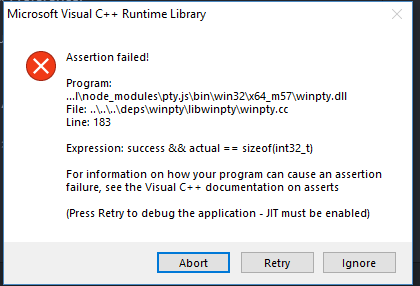
Clicking on retry and then opening and closing the terminal up to a dozen times eventually gives me a command prompt so that I can interface with the OS.
dunkinman
on 10 Jul 2018
Sorry, cant help or duplicate your issue.
the-j0k3r
on 10 Jul 2018
I've have the same error after updating Atom and can't get rid off it. Also disabling the "platformio-ide-terminal" doesn't help since it is mandatory for "Update PlatformIO Core" and Update platforms, packages and libraries" :(
 pascalsaul
on 13 Jul 2018
pascalsaul
on 13 Jul 2018
Coincidentally...an update for Atom came out today 1.28.2 x64. I updated Atom to 1.28.2 x64 and after rebooting my machine, only received the Assertion Error 1 time when I tried to launch the terminal. For fun, I rebooted my machine again and when I launched the terminal, I did NOT receive an error. For more fun, because it is Friday night...I rebooted my machine again...and did not receive the error after this reboot either. Can't say for certain it's fixed but it appears to be trending in the right direction.
dunkinman
on 14 Jul 2018
Another update. I had to reboot again to install another product, and this time, Atom did not come up at all! I ultimately had to uninstall Atom and then reinstall it cleanly. No Assertion Error after uninstall and clean install. Running 1.28.2 x64. Going to continue to monitor after system reboots until comfortable that this has been resolved.
dunkinman
on 14 Jul 2018
Duplicate of #613 @ivankravets pls close.
Everyone who experiences this should update to platformio-ide-terminal 2.9.0, if that doesnt work, reset atom to default and try reinstalling platformio-ide-terminal 2.9.0 which has the new node-pty-prebuilt and not the abandoned ancient pty.js.
@dunkinman yes, seems like you have some unstable Atom install due to these packages you installed, so I wouldn't be surprised the cause for your problems are just that, and not related to the project whatsoever. You should reset Atom to defaults and when you install something that makes atom or other addons break, you found your culprit.
the-j0k3r
on 28 Jan 2019
Related issues
 SRGDamia1
·
29Comments
SRGDamia1
·
29Comments
 drscat
·
24Comments
drscat
·
24Comments
 YangFei1990
·
39Comments
YangFei1990
·
39Comments
 Georjay
·
20Comments
Georjay
·
20Comments
 usuf1
·
19Comments
usuf1
·
19Comments
Most helpful comment
@dunkinman @githubrarp @juliocvbgomes Hey Guys I was also facing same problem a lot of times. I installed one more package ("platformio-ide-debugger") in Atom. Now it's not giving that error. I'm using w10 pro.