Platformio-atom-ide-terminal: Terminal not working in 2.9.3 -Read this thread for solutions
- [ ] I have reset Atom to defaults prior to submitting report.
- [x] I have not reset Atom to defaults prior to submitting report.
Description
I'm not able to use any terminal or serial port monitor - hangs when opening
Steps to reproduce
- Try to open a new terminal or serial port monitor
Expected behavior: Terminal works
Actual behavior: A window appears, but it's empty and won't allow any text entry
Reproduces how often: Every time
Versions
> atom --version
Atom    : 1.39.1
Electron: 3.1.10
Chrome  : 66.0.3359.181
Node    : 10.2.0
> apm --version
apm  2.2.4
npm  6.2.0
node 8.9.3 x64
atom 1.39.1
python 3.7.3
git 2.22.0.windows.1
visual studio
OS name and version:
Platformio-ide-terminal version: 2.9.3
PlatformIO-IDE: 2.4.1
PlatformIO version 4.0.0
Anaconda python - base python is 3.7.3, but pio's environment (penv) uses 2.7.16
Windows 10
 SRGDamia1
All 29 comments
Issue reports including me too report and reports saying solutions dont work.
Note DO NOT OPEN A NEW ISSUE REPORT IT WILL BE CLOSED AND MARKED AS DUPLICATE,
FILL IN ISSUE TEMPLATE and reply in this thread with that information
Yes sadly there was a hickup with node-pty-prebuilt-multiarch it didnt build electron 3.x for Windows/macOS with prebuilt binaries for 0.8.1, see https://github.com/oznu/node-pty-prebuilt-multiarch/issues/1, but theres a fix and Im waiting on macOS also before going further here.
Solution 1 Atom Stable 1.39.1 electron 3.x
Do this for now. WINDOWS ONLY (macOS is unsupported at this time. tryng to get binaries built still) Binaries have been built in test with fix but awaiting Microsoft to merge fix upstream https://github.com/microsoft/node-pty/pull/339
- Uninstall [email protected] from Atom and close Atom <- Important.
- Download -> platformio-ide-terminal.zip <- click once there to start download
- extract to folder platformio-ide-terminal on you desktop
- open a powershell inside the platformio-ide-terminal folder
- type
npm iorapm ipress Enter Wait for install to finish, any warning about vulnerabilities via npm its OK to ignore. - type
apm linkEnter You should see a confirmation of the linking. - Open Atom and should now work
Solutions 2 Atom 1.41.0-dev Electron 4.x
All platforms except 32-bit which are fully unsupported, Upgrade to nightly Atom 1.41.0-dev with electron 4.x read more here and use the platformio-ide-terminal published @2.9.3 dont use solution 1 zip.
Apologies for this. and Thank you for understanding.
 the-j0k3r
on 2 Aug 2019
the-j0k3r
on 2 Aug 2019
@ivankravets once this is solved upstream will be submitting another PR. Apologies for this.
the-j0k3r
on 2 Aug 2019
@the-j0k3r it does not work for me. I have a problem in step " type npm i"
npm notice created a lockfile as package-lock.json. You should commit this file.
added 85 packages from 49 contributors and audited 316 packages in 10.655s
found 2 vulnerabilities (1 moderate, 1 high)
  run `npm audit fix` to fix them, or `npm audit` for details

C:\Users\ademc\Downloads\platformio-ide-terminal>npm audit fix
up to date in 0.762s
fixed 0 of 2 vulnerabilities in 316 scanned packages
  2 vulnerabilities required manual review and could not be updated
apm  2.2.4
npm  6.2.0
node 8.9.3 x64
atom 1.39.1
python 2.7.15
git 2.21.0.windows.1
visual studio
Atom    : 1.39.1
Electron: 3.1.10
Chrome  : 66.0.3359.181
Node    : 10.2.0
 adam-cyln
on 3 Aug 2019
adam-cyln
on 3 Aug 2019
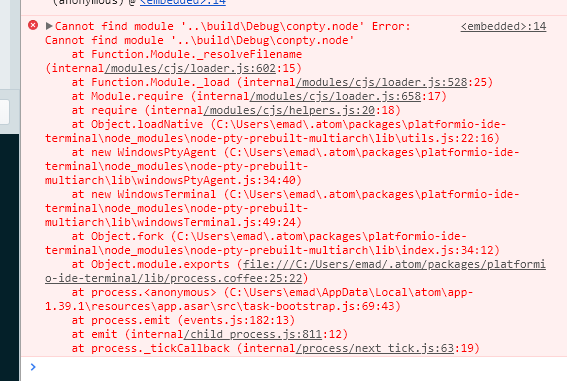
There are errors like this
 linjialiang
on 3 Aug 2019
linjialiang
on 3 Aug 2019
@anUserFr thats a warning unrelated to npm i perfectly fine to ignore
@linjialiang errors screenshot fine, but what OS, did you download the file I posted?
the-j0k3r
on 3 Aug 2019
Sorry, the published file was not downloaded
windows 10 1903
linjialiang
on 3 Aug 2019
@linjialiang I dont know what that means. See https://github.com/platformio/platformio-atom-ide-terminal/issues/760#issuecomment-517757440 It works perfectly fine.
the-j0k3r
on 3 Aug 2019
I now use the download address you posted on this page, now it can be used normally!
cd C:\Users\xxxx\.atom\packages\platformio-ide-terminal
apm i
I used
apminstead ofnpm
linjialiang
on 3 Aug 2019
macOS binaries
ATM no macOS binaries for electron 3.x exist due to an upstream node-pty bug, Ive submitted a fix,
making headway into macOS compiles of electron 3.x https://github.com/microsoft/node-pty/pull/339
Related issue upstream on prebuilt-multiarch repo we use as dep.https://github.com/oznu/node-pty-prebuilt-multiarch/pull/2
the-j0k3r
on 3 Aug 2019
@the-j0k3r , the terminal is accesible, but we can not write in the terminal ...
adam-cyln
on 3 Aug 2019
@anUserFr I direct you to read further up If youre on Windows, macOS read this
the-j0k3r
on 3 Aug 2019
@the-j0k3r, It works. thank you so much.
adam-cyln
on 3 Aug 2019
I'm on windows and the @the-j0k3r posted didn't work for me.
 masudhossain
on 4 Aug 2019
masudhossain
on 4 Aug 2019
@masudhossain Making such simple statements is 100% unhelpful.
Which Windows, 32-bit/64-bit? What version 7, 8, 10 (1709/1803/1809/1903/other), Which Atom version 1.39.1 other? More details, elaborate please.
the-j0k3r
on 4 Aug 2019
Do this for now. WINDOWS ONLY (MacOS is unsupported at this time. tryng to get binaries built still)
Thank you. It worked for me.
OS Name Microsoft Windows 10 Pro
Version 10.0.17134 Build 17134
x64
Intel(R) Core(TM) i5-4460 CPU @ 3.20GHz, 801 Mhz, 4 Core(s)
apm 2.2.4
npm 6.2.0
node 8.9.3 x64
atom: 1.39.1 (3.1.10 - 66.0.3359.181 - v10.2.0)
python 3.7.3
git 2.21.0.windows.1
visual studio 2015
 NMItools
on 4 Aug 2019
NMItools
on 4 Aug 2019
Workaround #2
The only issue is that electron 3.x binaries are not being built due to bugs, but electron 4.x binaries exist for all platforms.
Thus a temporary solution is to upgrade Atom to nighty builds (1.41.0-dev) where it uses electron 4.2.7
So that you all are informed, Electron does not support Electron 3.x the minimum version supported is 4.x
There is literally nothing else I can do.
Issue reports including me too report and reports saying solutions dont work.
DO NOT OPEN A NEW ISSUE REPORT IT WILL BE CLOSED AND MARKED AS DUPLICATE
FILL IN ISSUE TEMPLATE and reply in this thread with that information
the-j0k3r
on 4 Aug 2019
Issue reports including me too report and reports saying solutions dont work.
Note DO NOT OPEN A NEW ISSUE REPORT IT WILL BE CLOSED AND MARKED AS DUPLICATE,
FILL IN ISSUE TEMPLATE and reply in this thread with that information
Yes sadly there was a hickup with node-pty-prebuilt-multiarch and the prebuilt binaries for 0.8.1, see oznu/node-pty-prebuilt-multiarch#1, but theres a fix and Im waiting on macOS also before going further here.
Solution 1 Atom Stable 1.39.1 electron 3.x
Do this for now. WINDOWS ONLY (macOS is unsupported at this time. tryng to get binaries built still) Binaries have been built in test with fix but awaiting Microsoft to merge fix upstream microsoft/node-pty#339
- Uninstall [email protected] from Atom and close Atom <- Important.
- Download -> platformio-ide-terminal.zip <- click once there to start download
- extract to folder platformio-ide-terminal on you desktop
- open a powershell inside the platformio-ide-terminal folder
- type
npm iorapm ipress Enter Wait for install to finish, any warning about vulnerabilities via npm its OK to ignore.- type
apm linkEnter You should see a confirmation of the linking.- Open Atom and should now work
Solutions 2 Atom 1.41.0-dev Electron 4.x
All platforms except 32-bit which are fully unsupported, Upgrade to nightly Atom 1.41.0-dev with electron 4.x read more here
Apologies for this. and Thank you for understanding.
Thank you. That has fixed the issue for me.
 ms8277
on 5 Aug 2019
ms8277
on 5 Aug 2019
Hey @the-j0k3r after entering npm i in powershell i am getting following errors. Please help me to fix it.
npm : The term 'npm' is not recognized as the name of a cmdlet, function, script file, or operable program. Check the
spelling of the name, or if a path was included, verify that the path is correct and try again.
At line:1 char:1
- npm i
- ~~~
- CategoryInfo : ObjectNotFound: (npm:String) [], CommandNotFoundException
- FullyQualifiedErrorId : CommandNotFoundException
 sk-sharique
on 7 Aug 2019
sk-sharique
on 7 Aug 2019
@sk-sharique Hello.
If you read the actual message posted you see its not finding the command npm. this is pretty basic indication that something cant be found because usually.
What this means is:
- What you typed is completely wrong, its not in this case.
- you dont have npm or
<insert the command you ran here>installed in which case you should install it, https://nodejs.org/en/download/
or - you have npm or
<insert the command you ran here>installed and paths arent exported correctly for npm or or, in which case you should ensure npm or <insert the command you ran here>has exported the paths correctly or do it yourself manually by consulting its documentation on how to or read https://stackoverflow.com/questions/27864040/fixing-npm-path-in-windows-8-and-10
Thats the best way I can explain it at this time =)
also if you read the solutions it offers an alternative like apm
the-j0k3r
on 7 Aug 2019
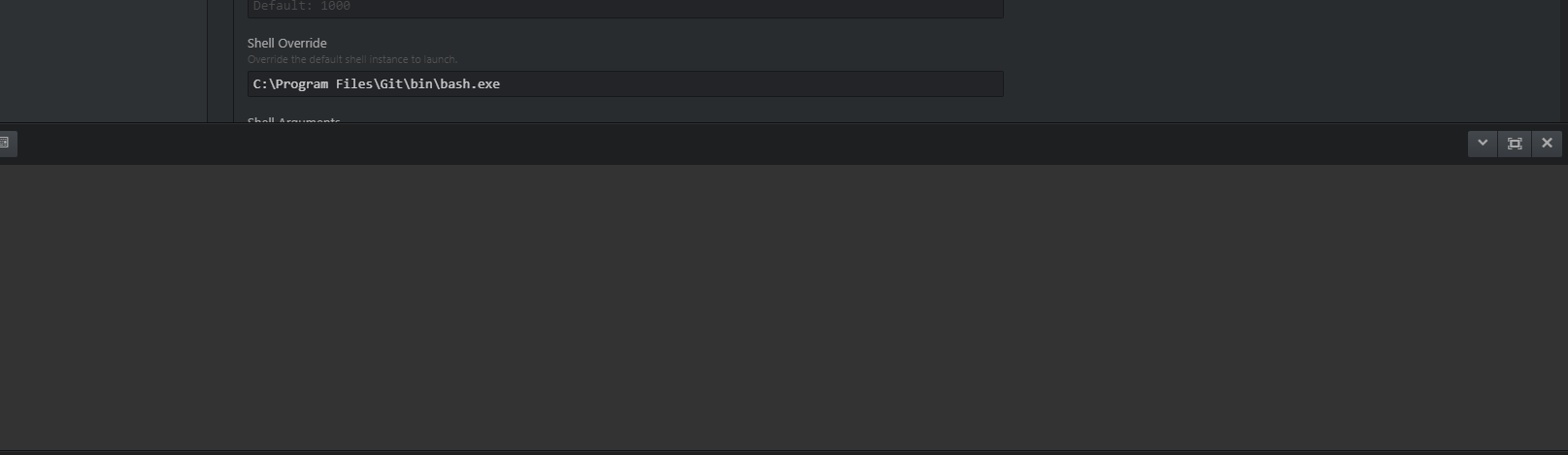
The first solution didn't work for me, when I open the terminal the cursor is blinking.
Mod edit: removed quoted post
 DavidRodarte
on 7 Aug 2019
DavidRodarte
on 7 Aug 2019
@DavidRodarte can you please do what the solutions post asks?
Issue reports including me too report and reports saying solutions dont work.
FILL IN ISSUE TEMPLATE and reply in this thread with that information
What you posted doesnt help me at all. More information pls.
the-j0k3r
on 8 Aug 2019
See https://github.com/platformio/platformio-atom-ide-terminal/pull/764 should close this up.
Thanks to @oznu and addressed builds in https://github.com/oznu/node-pty-prebuilt-multiarch/pull/4
We have a special branch until Atom decides to have Electron 4.x which is minimum supported electron version.
All previous workarounds can be dismissed. This ticket will close on PR merged and will be,locked to prevent offtopic and unrelated reports flying in.
the-j0k3r
on 9 Aug 2019
tried solution 1 but still the problem exist. kindly provide solution for the same
Mod Edit: removed quoted post.
 techie-mks
on 10 Aug 2019
techie-mks
on 10 Aug 2019
All solutions are posted, none work, fill in issue template as requested.
the-j0k3r
on 10 Aug 2019
I did this sir and it worked but when I restarted my Laptop I dunno what happened the terminal seems gone.
Mod edit. removed quoted post. Its not helpful.
 rlcayaco
on 11 Aug 2019
rlcayaco
on 11 Aug 2019
Again I repeat,
If the solutions dont work for anyone, please reply in thread with the issue template filled in.
Simply stating it doesnt work is unhelpful as it contains no actionable information.
@techie-mks @ricayaco
Issue reports including me too report and reports saying solutions dont work.
FILL IN ISSUE TEMPLATE and reply in this thread with that information
the-j0k3r
on 11 Aug 2019
Please upgrade to 2.9.4
the-j0k3r
on 11 Aug 2019
Issue reports including me too report and reports saying solutions dont work.
Note DO NOT OPEN A NEW ISSUE REPORT IT WILL BE CLOSED AND MARKED AS DUPLICATE,
FILL IN ISSUE TEMPLATE and reply in this thread with that information
Yes sadly there was a hickup with node-pty-prebuilt-multiarch it didnt build electron 3.x for Windows/macOS with prebuilt binaries for 0.8.1, see oznu/node-pty-prebuilt-multiarch#1, but theres a fix and Im waiting on macOS also before going further here.
Solution 1 Atom Stable 1.39.1 electron 3.x
Do this for now. WINDOWS ONLY (macOS is unsupported at this time. tryng to get binaries built still) Binaries have been built in test with fix but awaiting Microsoft to merge fix upstream microsoft/node-pty#339
- Uninstall [email protected] from Atom and close Atom <- Important.
- Download -> platformio-ide-terminal.zip <- click once there to start download
- extract to folder platformio-ide-terminal on you desktop
- open a powershell inside the platformio-ide-terminal folder
- type
npm iorapm ipress Enter Wait for install to finish, any warning about vulnerabilities via npm its OK to ignore.- type
apm linkEnter You should see a confirmation of the linking.- Open Atom and should now work
Solutions 2 Atom 1.41.0-dev Electron 4.x
All platforms except 32-bit which are fully unsupported, Upgrade to nightly Atom 1.41.0-dev with electron 4.x read more here and use the platformio-ide-terminal published @2.9.3 dont use solution 1 zip.
Apologies for this. and Thank you for understanding.
this worked like a charm!! Thanks so much!!
 yeamusic21
on 9 Oct 2019
yeamusic21
on 9 Oct 2019
@yeamusic21 this is outdated and no longer applies, upgrade to Atom 1.40.1 and platformio-ide-terminal 2.9.4
Im also locking topic to avoid ppl thinking this still applies.
the-j0k3r
on 9 Oct 2019
Related issues
 ianindratama
·
4Comments
ianindratama
·
4Comments
 p0slaney-19
·
4Comments
p0slaney-19
·
4Comments
 0ski
·
5Comments
0ski
·
5Comments
 QuasimodoNZ
·
4Comments
QuasimodoNZ
·
4Comments
 courthead
·
3Comments
courthead
·
3Comments
Most helpful comment
Issue reports including me too report and reports saying solutions dont work.
FILL IN ISSUE TEMPLATE and reply in this thread with that information
Yes sadly there was a hickup with node-pty-prebuilt-multiarch it didnt build electron 3.x for Windows/macOS with prebuilt binaries for 0.8.1, see https://github.com/oznu/node-pty-prebuilt-multiarch/issues/1, but theres a fix and Im waiting on macOS also before going further here.
Solution 1 Atom Stable 1.39.1 electron 3.x
Do this for now. WINDOWS ONLY (macOS is unsupported at this time.
tryng to get binaries built still)Binaries have been built in test with fix but awaiting Microsoft to merge fix upstream https://github.com/microsoft/node-pty/pull/339npm iorapm ipress Enter Wait for install to finish, any warning about vulnerabilities via npm its OK to ignore.apm linkEnter You should see a confirmation of the linking.Solutions 2 Atom 1.41.0-dev Electron 4.x
All platforms except 32-bit which are fully unsupported, Upgrade to nightly Atom 1.41.0-dev with electron 4.x read more here and use the platformio-ide-terminal published @2.9.3 dont use solution 1 zip.
Apologies for this. and Thank you for understanding.