Pi-hole: Unable to install / upgrade pi-hole on 64bit machine with a 32bit OS
Edited:
In raising this issue, I confirm the following:
[x] I have read and understood the contributors guide.
[x] The issue I am reporting can be replicated.
[x] The issue I am reporting isn't a duplicate (see FAQs, closed issues, and open issues).
How familiar are you with the source code relevant to this issue?: 1
Expected behaviour: Able to install/upgrade pi-hole without errors.
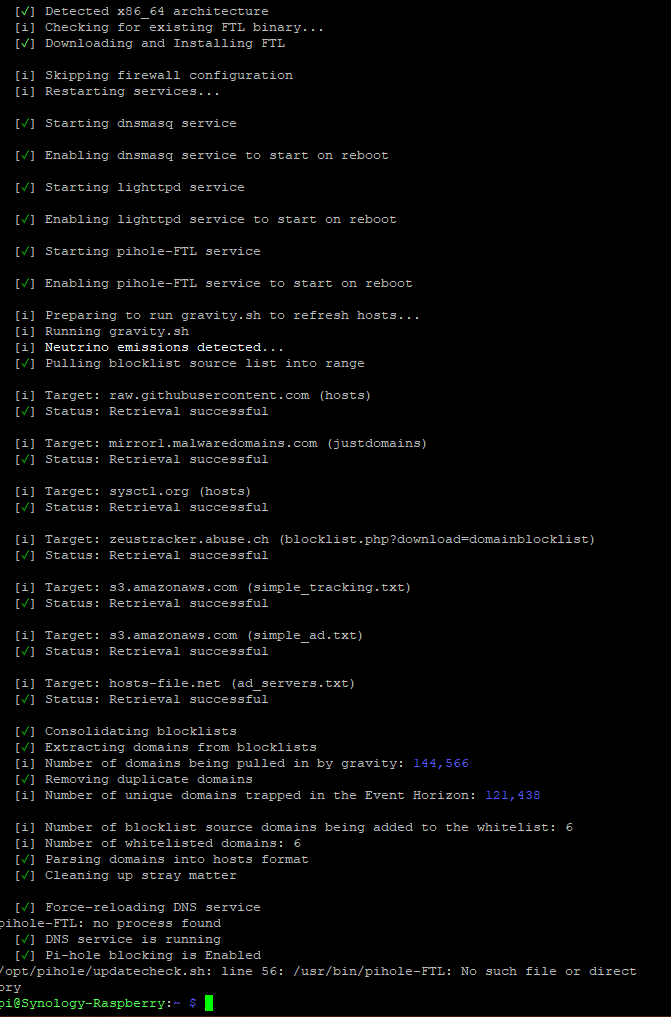
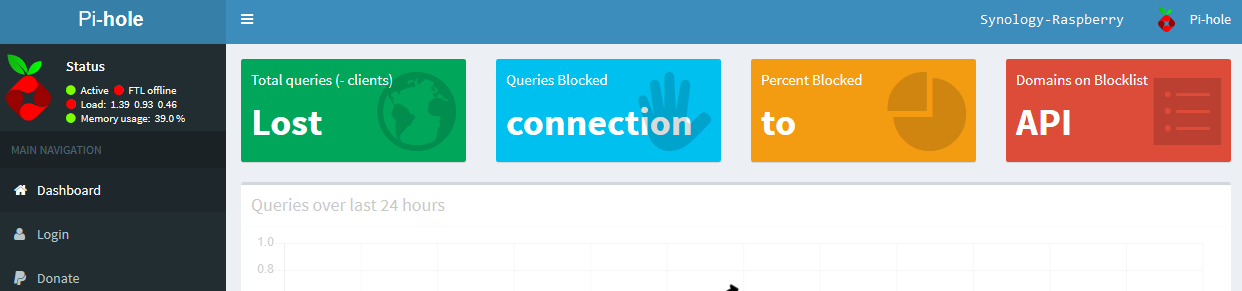
Actual behaviour: Setup terminates without fully going through the full setup. The installation then is corrupted.
Steps to reproduce:
1) Download raspberry Pi Desktop from https://www.raspberrypi.org/downloads/raspberry-pi-desktop/ and install onto PC/virtual machine
2) Run "sudo apt-get update"
3) Run "sudo apt-get upgrade"
4) Run "sudo reboot"
5) Once back online, run pi-hole installer "curl -sSL https://install.pi-hole.net | bash"
Debug token provided by uploading pihole -d log: bsglqnpute
Troubleshooting undertaken, and/or other relevant information:
I have tried reinstalling raspberry Pi Desktop a few times - same issue
I have tried both the "One-Step Automated Install" and the "Method 1: Clone our repository and run" methods but both fail
_----Previous----
Hello Pi-Hole Team,
I would like to report an issue with the installer running on raspbian OS. The setup gets as far as "Starting dnsmasq service..." then the setup terminates without further errors or warning. Pi-Hole will not load and has corrupted the install. I have restored the OS back and tried again both using the auto install (curl -sSL https://install.pi-hole.net | bash) and the "Method 1: Clone our repository and run" way but both are doing the same thing. I have run apt-get update / upgrade before the install and also tried sudo -i before running the bash install but no effect. Can you please help/update the installer? I have attached a print screen.

Kind Regards._
 Gartonious
All 58 comments
what version of raspbian are you running ?
there is a known issue with 8 (hessie)
the fix can be found here : https://discourse.pi-hole.net/t/pi-hole-v3-3-released-its-extra-special/7159
 technicalpyro
on 22 Feb 2018
technicalpyro
on 22 Feb 2018
Thank-you for your reply. I did try the fix mentioned but this also did not work. I'm using the latest version with all the latest updates (9 Stretch).
The install of dnsmasq failed to install.

Kind Regards.
Gartonious
on 22 Feb 2018
Those instructions are for raspberry pi devices (Raspbian armhf), not x86 Debian machines. You should already have an up to date dnsmasq since you're on Stretch. What is the output of sudo service dnsmasq status? Run pihole -d for a debug token.
 Mcat12
on 22 Feb 2018
Mcat12
on 22 Feb 2018
Thank-you for your reply.
So I have done a clean install of the OS and run apt-get update/update and rebooted.
dnsmasq was not already installed after the clean install and updates as "sudo service dnsmasq status" said command not found.
The auto installer (curl -sSL https://install.pi-hole.net | bash) seems to be getting further now with the installer but still stops at a new place. I have attached some printscreens of this.

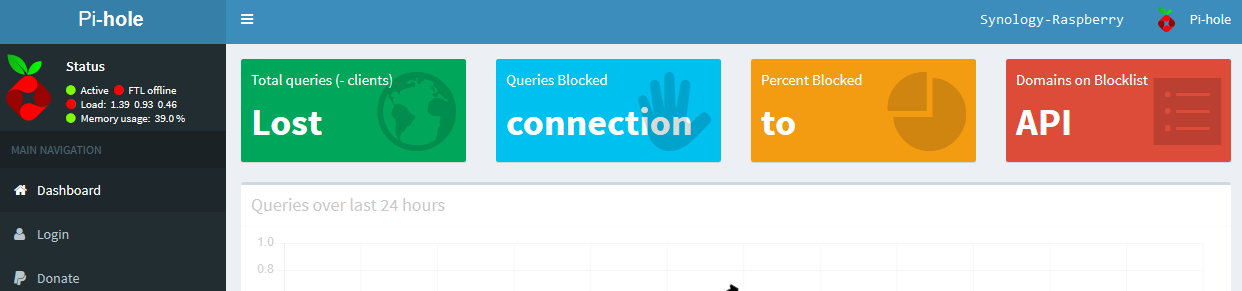
I have run "sudo service dnsmasq status" and "pihole -d" after the install and again after a reboot.
Before Reboot:

Debug token is: bsglqnpute
After Reboot:
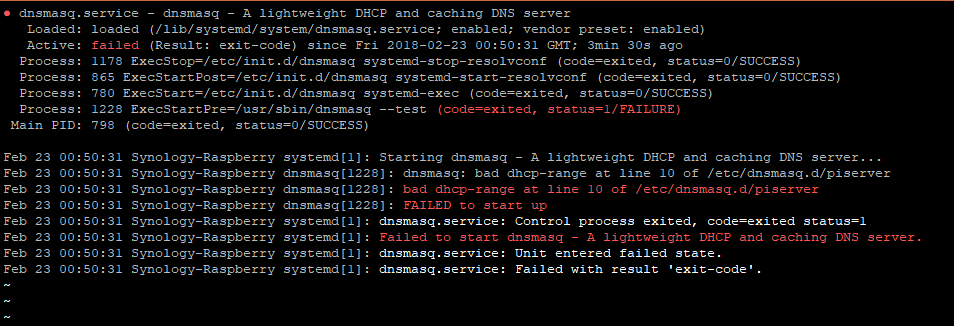

The log after the reboot was unable to upload to server and to get a key so have attached the local copy instead.
pihole_debug-sanitized.log

Kind Regards.
Gartonious
on 23 Feb 2018
/etc/dnsmasq.d/piserver is a file that conflicts with our installer. That file is typically from the Debian with Raspberry Pi Desktop image and one that we can't use. Can you install with an unmodified image or the Raspbian Stretch Lite version?
 dschaper
on 23 Feb 2018
dschaper
on 23 Feb 2018
The image I have used is from: https://www.raspberrypi.org/downloads/raspberry-pi-desktop/
Debian Stretch with Raspberry Pi Desktop
The Raspberry Pi Desktop OS for PC and Mac - based on Debian Stretch
Version: November 2017
Release date: 2017-11-16
Kernel version: 4.9
There is no lite version of this to try.
I did have this previously working not so log ago and has been fine but I never backed the server up before running the upgrades but now even with a clean install I cannot get pi-hole to install :/
Gartonious
on 23 Feb 2018
That image has a modified dnsmasq configuration that is not compatible with Pi-hole. They have it set up to be a DHCP server for other Raspberry Pi devices. Some users have found that removing the /etc/dnsmasq.d/piserver file will work, but that hasn't been tested by any of the developers.
dschaper
on 23 Feb 2018
This is interesting. Like I say I have had this working just fine without any errors or problems but on a older version - Not sure which one it would have been now but it would have been within the last month I had upgraded everything last without issues.
Gartonious
on 23 Feb 2018
https://www.raspberrypi.org/blog/piserver/ Looks like it was added in January of 2018.
dschaper
on 23 Feb 2018
I have restored the snapshot of the OS from a clean install and removed piserver from add/remove software and rebooted.
run apt-get update/upgrade again - said to run sudo apt autoremove as some files was no longer needed. I did this and rebooted again. Run the auto pi-hole installer but was faced with the same "/opt/pihole/updatecheck.sh: line 56: /usr/bin/pihole-FTL: No such file or directory" error as before.
Gartonious
on 23 Feb 2018
pihole -r > repair should attempt to download the latest FTL binary. If this doesn't work, we'll need to run the check in a more verbose mode to see exactly why it's not getting the proper files for you.
dschaper
on 23 Feb 2018
Just run "pihole -r" then repair but got the same error
Gartonious
on 23 Feb 2018
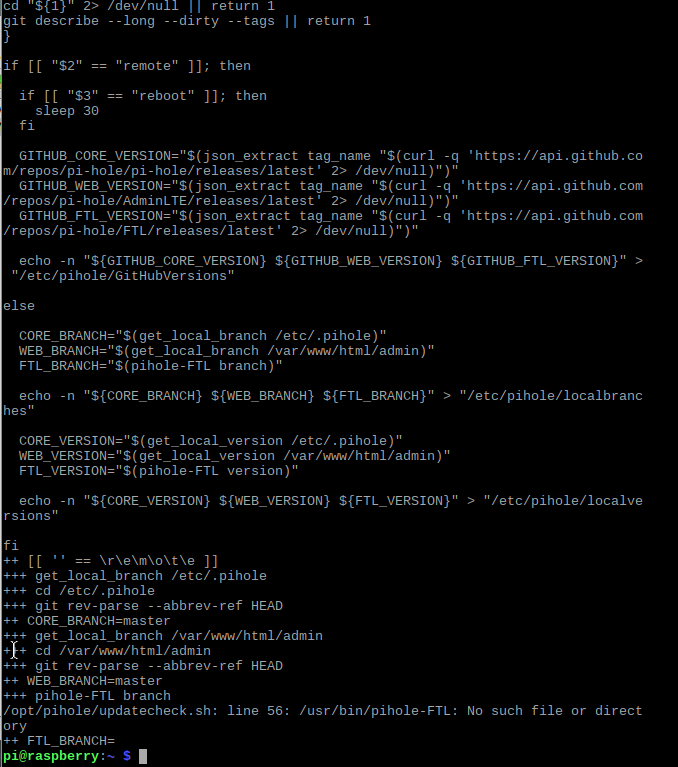
Okay, this will produce a lot of output but it should narrow down where the problem is. Try:
curl -sSL https://install.pi-hole.net | sudo bash -xv
Gartonious
on 23 Feb 2018
Can you pastebin the entire output, the portion you've provided is missing the section that should be pulling the FTL binary.
dschaper
on 23 Feb 2018
I am having problems trying to get all the data for you. Terminal/putty only shows so much of the data and unable to scroll right back up to the top. I have tried to run "curl -sSL https://install.pi-hole.net | sudo bash -xv > output.txt" but it only records so much in the txt file. Think it stops when the full screen windows comes up asking for config settings.
output.txt
Gartonious
on 23 Feb 2018
One of the other devs may be able to help, but I think there's a way to increase the scrollback buffer in Putty, and then you can select all the text in the putty window and copy/paste that to a place like hastebin. I'd suggest just piping it to the tricorder but that has a limit on the length. I'll try to see if I can come up with a way to get the parts of the dump that would be helpful.
dschaper
on 23 Feb 2018
curl -sSL https://install.pi-hole.net | sudo bash -vx | nc tricorder.pi-hole.net 9999 may work and get us most of what we are looking for.
dschaper
on 23 Feb 2018
The command seems to terminate after the dialog box come up apart of the pi-hole setup
Gartonious
on 23 Feb 2018
I have been able to get Putty to record the session to a file!
putty output.log
Gartonious
on 23 Feb 2018
Great! Thanks! I'm seeing that the proper FTL binary is indeed transferred, and it passes the hash check, so there is no problem there.
+ local FTLversion=
++ curl -sI https://github.com/pi-hole/FTL/releases/latest
++ grep Location
++ awk -F / '{print $NF}'
++ tr -d '\r\n'
+ local FTLlatesttag=v3.0
+ [[ '' != \v\3\.\0 ]]
+ FTLinstall pihole-FTL-linux-x86_64
+ local binary=pihole-FTL-linux-x86_64
+ local latesttag
+ local orig_dir
+ local 'str=Downloading and Installing FTL'
+ echo -ne ' [i] Downloading and Installing FTL...'
+ orig_dir=/etc/.pihole
[i] Downloading and Installing FTL...++ curl -sI https://github.com/pi-hole/FTL/releases/latest
++ grep Location
++ awk -F / '{print $NF}'
+ latesttag=$'v3.0\r'
+ [[ ! v3.0
== v* ]]
+ curl -sSL --fail https://github.com/pi-hole/FTL/releases/download/v3.0/pihole-FTL-linux-x86_64 -o /tmp/pihole-FTL-linux-x86_64
+ curl -sSL --fail https://github.com/pi-hole/FTL/releases/download/v3.0/pihole-FTL-linux-x86_64.sha1 -o /tmp/pihole-FTL-linux-x86_64.sha1
+ cd /tmp
+ sha1sum --status --quiet -c pihole-FTL-linux-x86_64.sha1
+ echo -n 'transferred... '
+ stop_service pihole-FTL
transferred... + install -T -m 0755 /tmp/pihole-FTL-linux-x86_64 /usr/bin/pihole-FTL
+ rm /tmp/pihole-FTL-linux-x86_64 /tmp/pihole-FTL-linux-x86_64.sha1
+ cd /etc/.pihole
+ install -T -m 0755 /etc/.pihole/advanced/pihole-FTL.service /etc/init.d/pihole-FTL
+ echo -e '\r[K [[32m✓[0m] Downloading and Installing FTL'
+ return 0
Can you do a ls -lach /usr/bin and we'll see if there are permissions problems there? And as an aside, that function could use some changes, pushd and popd directories instead of cd, but that's an internal thing we need to look at.
dschaper
on 23 Feb 2018
Gartonious
on 23 Feb 2018
According to that, you have /usr/bin/pihole-FTL, can you run sudo /usr/bin/pihole-FTL?
dschaper
on 23 Feb 2018
When running the command I get "sudo: unable to execute /usr/bin/pihole-FTL: No such file or directory". I have used WinSCP to connect to the drive and the file does exist in there.
pihole-FTL.txt (added .txt)
Gartonious
on 23 Feb 2018
Okay, how about ls -lachZ /usr/bin/pihole-FTL and we'll see if it's executable.
dschaper
on 23 Feb 2018
That command comes back with:
-rwxr-xr-x 1 root root ? 1.5M Feb 23 03:37 /usr/bin/pihole-FTL
Gartonious
on 23 Feb 2018
Sooo... can you put in a check to _not_ let people on jessie upgrade if dnsmasq isn't updated? The current situation breaks the pihole server, and then you have to go rejigger DNS just to come search for a solution. Not a great experience when there's a known breaking issue with upgrading.
 jerm
on 23 Feb 2018
jerm
on 23 Feb 2018
@jerm Can you open a new issue, this one is tracking a different problem.
dschaper
on 23 Feb 2018
It sounds like you have an architecture mismatch. What is the output of these commands?
file /usr/bin/pihole-FTL
uname -a
dpkg --print-architecture
Offtopic housekeeping note:
@Gartonious We can let it slide this time, but in future when you open a new issue, please ensure you follow the issue template. It helps us to help you. Please can you edit your OP to include the requested information? Cheers
 PromoFaux
on 23 Feb 2018
PromoFaux
on 23 Feb 2018
pi@raspberry:~ $ file /usr/bin/pihole-FTL
/usr/bin/pihole-FTL: ELF 64-bit LSB shared object, x86-64, version 1 (SYSV), dynamically linked, interpreter /lib64/ld-linux-x86-64.so.2, for GNU/Linux 2.6.24, BuildID[sha1]=500fb341f98c98a77dc00e53be9cd8b1c5e22ec6, not stripped
pi@raspberry:~ $ uname -a
Linux raspberry 4.9.0-4-amd64 #1 SMP Debian 4.9.65-3+deb9u1 (2017-12-23) x86_64 GNU/Linux
pi@raspberry:~ $ dpkg --print-architecture
i386
@PromoFaux Sorry about this - I had asked for assistance via Twitter at first and they replied advising to submit a issue via https://t.co/wo5RIimsmq . Due to this I did not see the template. I shall fill this in now.
Gartonious
on 23 Feb 2018
@DL6ER Is there a documented process for i386 systems using the x86_64 FTL binary?
Sorry, didn't see Mcat's comments, he probably is already on the issue.
dschaper
on 23 Feb 2018
Cheers @Gartonious , you da real MVP 😘
PromoFaux
on 23 Feb 2018
Did you purposefully install a 32 bit OS on a 64 bit machine?
Mcat12
on 24 Feb 2018
Check this solution to a very similar issue: https://discourse.pi-hole.net/t/no-access-to-admin-page-after-pihole-installation/6893/16?u=mcat12
Mcat12
on 24 Feb 2018
All I did was follow the setup steps from the OS installer. this is installed on a virtual machine. there was no options to select 64 or 32 bit versions.
Gartonious
on 24 Feb 2018
What OS did you choose? It looks like you chose a 32 bit image instead of a 64 bit one.
Mcat12
on 24 Feb 2018
Downloaded from https://www.raspberrypi.org/downloads/raspberry-pi-desktop/
Direct: http://downloads.raspberrypi.org/rpd_x86/images/rpd_x86-2017-12-01/2017-11-16-rpd-x86-stretch.iso
Did not know there was a 64bit version to be honest? They have not listed it on their site.
Gartonious
on 24 Feb 2018
Follow the instructions from the discourse link, it sounds like your exact situation.
Mcat12
on 24 Feb 2018
So just to confirm, need to run sudo apt install libc6:amd64 then try to install pi-hole again?
Gartonious
on 24 Feb 2018
Try it
Mcat12
on 24 Feb 2018
So yes that does seem to make it work before rebooting the OS.
What I did was:
1) restored the virtual machine back to a clean install and apt-get upgraded snapshot
2) Run sudo apt install libc6:amd64
3) Run sudo reboot
4) Run curl -sSL https://install.pi-hole.net | bash and followed the setup with NO errors and said setup complete this time. It also gave me the admin password.
5) I was able to navigate to the pi-hole admin webpage and log in using the admin password. It appears to be working at that point.
However, I then rebooted the server and upon reboot the pi-hole admin page says "DNS service not running".
I run sudo service dnsmasq status and it said the following:

Just to advise as well, in the past I have never had to run sudo apt install libc6:amd64 before installing pi-hole and I have always used the 32bit version from the https://www.raspberrypi.org website.
Gartonious
on 24 Feb 2018
So might have fixed this...
I followed the steps again like above but I removed the piserver like previously mentioned between steps 1 and 2 and rebooted. followed the rest of the steps and pi-hole installed all ok again. can access the admin page etc. rebooted and now the admin page shows as "Active" and so does sudo service dnsmasq status.
finally run sudo apt-get upgrade - no updates but said can run sudo apt autoremove to delete some unwanted packages. I did this and rebooted again, everything is still fine!
It did the following with sudo apt autoremove :
Removing libgtkmm-3.0-1v5:i386 (3.22.0-1) ...
Removing libatkmm-1.6-1v5:i386 (2.24.2-2) ...
Removing libpangomm-1.4-1v5:i386 (2.40.1-3) ...
Removing libcairomm-1.0-1v5:i386 (1.12.0-1+b1) ...
Removing odhcploc (20111021-2) ...
Removing qemu-user-static (1:2.8+dfsg-6+deb9u3) ...
Processing triggers for libc-bin (2.24-11+deb9u1) ...
Processing triggers for man-db (2.7.6.1-2) ...
Gartonious
on 24 Feb 2018
Work around is to uninstall piserver and run sudo apt install libc6:amd64 before installing pi-hole via the auto installer.
Would there be any reason to why a user would need to run sudo apt install libc6:amd64 first as this step was never required in the past?
Also, moving forward, would pi-hole be made compatible to run alongside piserver?
Gartonious
on 24 Feb 2018
The reason you needed to run that command was because you had a 32 bit OS on a 64 bit kernel, which is not usual. The piserver config doesn't work with Pi-hole because it tries to set some settings which Pi-hole already sets, which is an error to dnsmasq. We have yet to find a way to disable that config, but we will try to work around it.
Mcat12
on 24 Feb 2018
@Gartonious If you run pihole checkout core tweak/32bitOS_on_64bitCPU, what is the output of file $(which pihole-FTL)
Mcat12
on 25 Feb 2018
@Mcat12 At what stage would you like me to run that command? Just with running sudo apt install libc6:amd64 first before the pi-hole install it has fixed the installer problem. Would you like me to run file $(which pihole-FTL) before libc6:amd64 is installed or after?
Gartonious
on 25 Feb 2018
Without running the libc install. It shouldn't be needed.
Mcat12
on 25 Feb 2018
The output is:
/usr/bin/pihole-FTL: ELF 64-bit LSB shared object, x86-64, version 1 (SYSV), dynamically linked, interpreter /lib64/ld-linux-x86-64.so.2, for GNU/Linux 2.6.24, BuildID[sha1]=500fb341f98c98a77dc00e53be9cd8b1c5e22ec6, not stripped
Gartonious
on 25 Feb 2018
I'm experiencing the same problem as well. I can't get it to update to v3.3. I'm stuck at v3.2.1.
pi@pi3:~ $ cat /etc/os-release
PRETTY_NAME="Raspbian GNU/Linux 9 (stretch)"
NAME="Raspbian GNU/Linux"
VERSION_ID="9"
VERSION="9 (stretch)"
ID=raspbian
ID_LIKE=debian
HOME_URL="http://www.raspbian.org/"
SUPPORT_URL="http://www.raspbian.org/RaspbianForums"
BUG_REPORT_URL="http://www.raspbian.org/RaspbianBugs"
pi@pi3:~ $ uname -a
Linux pi3 4.14.21-v7+ #1095 SMP Fri Feb 23 18:21:29 GMT 2018 armv7l GNU/Linux
pi@pi3:~ $
 tambnguyen
on 26 Feb 2018
tambnguyen
on 26 Feb 2018
@tambnguyen If you are using the Raspberry Pi Desktop (for the computer/ 32+64bit systems) as I am then the work around would be to install sudo apt install libc6:amd64 first then run the pi-hole installer again. If you are not using Raspberry Pi Desktop version and is using a physical raspberry pi then your issue might not be related to this one.
Gartonious
on 26 Feb 2018
@tambnguyen Out of curiosity I have managed to successfully install pi-hole on a raspberry pi 3 without any problems.
I downloaded and installed the "Raspbian Stretch with desktop" image from https://www.raspberrypi.org/downloads/raspbian/ and wrote the image to a SD card. After the system had booted up I had run sudo apt-get update and sudo apt-get upgrade then sudo reboot. I then resized the SD card in sudo raspi-config and run sudo reboot again.
Once back online I then run the pi-hole installer command curl -sSL https://install.pi-hole.net | bash and followed through the setup steps without any problems. After another reboot, pi-hole was still running as it should.
You might have a corrupt file or something on your current PI image. Maybe save what you need from it and download and write the current image from the raspberry pi website to your SD card and try the steps mentioned above. Worked for me on a Raspberry Pi 3.
Gartonious
on 26 Feb 2018
Whoops, I didn't realize this was for Desktop only and not the physical Pi. I just did the update/upgrade/curl sequence with no luck, maybe I'll try reinstalling it next. In any case, I will stop posting here, as the issue isn't related.
tambnguyen
on 26 Feb 2018
@dschaper Maybe add a new issue tag as non-arm, non-pi-hw or i386 arch or something that would make sense? I came across this issue, thinking I might be able to help out and was quite intrigued by the non-exec error in the middle of the post, just to find out in the very end that the issue doesn't relate to ARM or RPi HW at all.
 E3V3A
on 22 Mar 2018
E3V3A
on 22 Mar 2018
I am having this issue too:
cat /etc/os-release:
PRETTY_NAME="Raspbian GNU/Linux 8 (jessie)"
NAME="Raspbian GNU/Linux"
VERSION_ID="8"
VERSION="8 (jessie)"
ID=raspbian
ID_LIKE=debian
HOME_URL="http://www.raspbian.org/"
SUPPORT_URL="http://www.raspbian.org/RaspbianForums"
BUG_REPORT_URL="http://www.raspbian.org/RaspbianBugs"
sudo /usr/bin/pihole-FTL:
FTL started!
 MoralCode
on 27 Mar 2018
MoralCode
on 27 Mar 2018
@DeveloperACE this issue is about x86 machines, not arm. Please open a new issue.
Mcat12
on 27 Mar 2018
Should be resolved now, FTL checks for platform correctly. Closing
dschaper
on 10 Jul 2018
Related issues
 stewx
·
60Comments
stewx
·
60Comments
 nicolasvac
·
35Comments
nicolasvac
·
35Comments
 asoliman
·
33Comments
asoliman
·
33Comments
 teckel12
·
63Comments
teckel12
·
63Comments
 rj45jack
·
33Comments
rj45jack
·
33Comments