Pi-hole: my pi hole is not blocking ads
I have my pi hole running on a raspberry pi on my home network. I also have a vpn server running on a synology NAS. My pi hole is not working while I am on the wifi/at my house, however; my pi hole is working great and blocking all the ads if I am connected to my network through my vpn. Not sure why this is happening. Also, my ISP is COX. your help would be greatly appreciated!
In raising this issue, I confirm the following (please check boxes, eg [X]) Failure to fill the template will close your issue:
- [] I have read and understood the contributors guide.
- [] The issue I am reporting can be replicated
- [] The issue I am reporting isn't a duplicate (see FAQs, closed issues, and open issues).
How familiar are you with the codebase?:
_{replace this text with a number from 1 to 10, with 1 being not familiar, and 10 being very familiar}_
[BUG REPORT | OTHER]:
Please submit your feature request here, so it is votable by the community. It's also easier for us to track.
[BUG | ISSUE] Expected Behaviour:
[BUG | ISSUE] Actual Behaviour:
[BUG | ISSUE] Steps to reproduce:
-
-
-
-
(Optional) Debug token generated by pihole -d:
<token>
_This template was created based on the work of udemy-dl._
 asoliman
All 33 comments
Hi, we need you to fill out the template that was presented to you when you opened the issue. It's the best way we can help you out.
 dschaper
on 22 Jul 2017
dschaper
on 22 Jul 2017
In the template that's provided when you open a new ticket, there was the suggestion that you run the debug tool - this gives us greater insight to try and figure out what's happening!
If you could run pihole -d, upload the debug token log and provide it the token here, that'd be extremely helpful.
Also, if you're running a Windows machine on your LAN (that currently isn't being covered by Pi-hole adblocking), I'd strongly suggest providing a screenshot of ipconfig /all so that we can see what DNS server the primary network adaptor currently configured to use.
Thanks! :smile:
 WaLLy3K
on 22 Jul 2017
WaLLy3K
on 22 Jul 2017

asoliman
on 22 Jul 2017
I am using macOS. The above pic shows my raspberry pi IP address its 192.168.0.13
Also, I will run debug and send you guys the results
asoliman
on 22 Jul 2017
pihole_debug.txt
please see the attached /var/log/pihole_debug.log
asoliman
on 22 Jul 2017
Please fill out the template with your information.
dschaper
on 22 Jul 2017
How familiar are you with the codebase?:
7
[BUG | ISSUE] Expected Behaviour:
blocking ads
[BUG | ISSUE] Actual Behaviour:
not blocking ads
[BUG | ISSUE] Steps to reproduce:
loading up a website with ads like yahoo.com
(Optional) Debug token generated by pihole -d:
Not sure where to find the debug token but I have attached the pihole_debug log file from /var/log above.
asoliman
on 22 Jul 2017
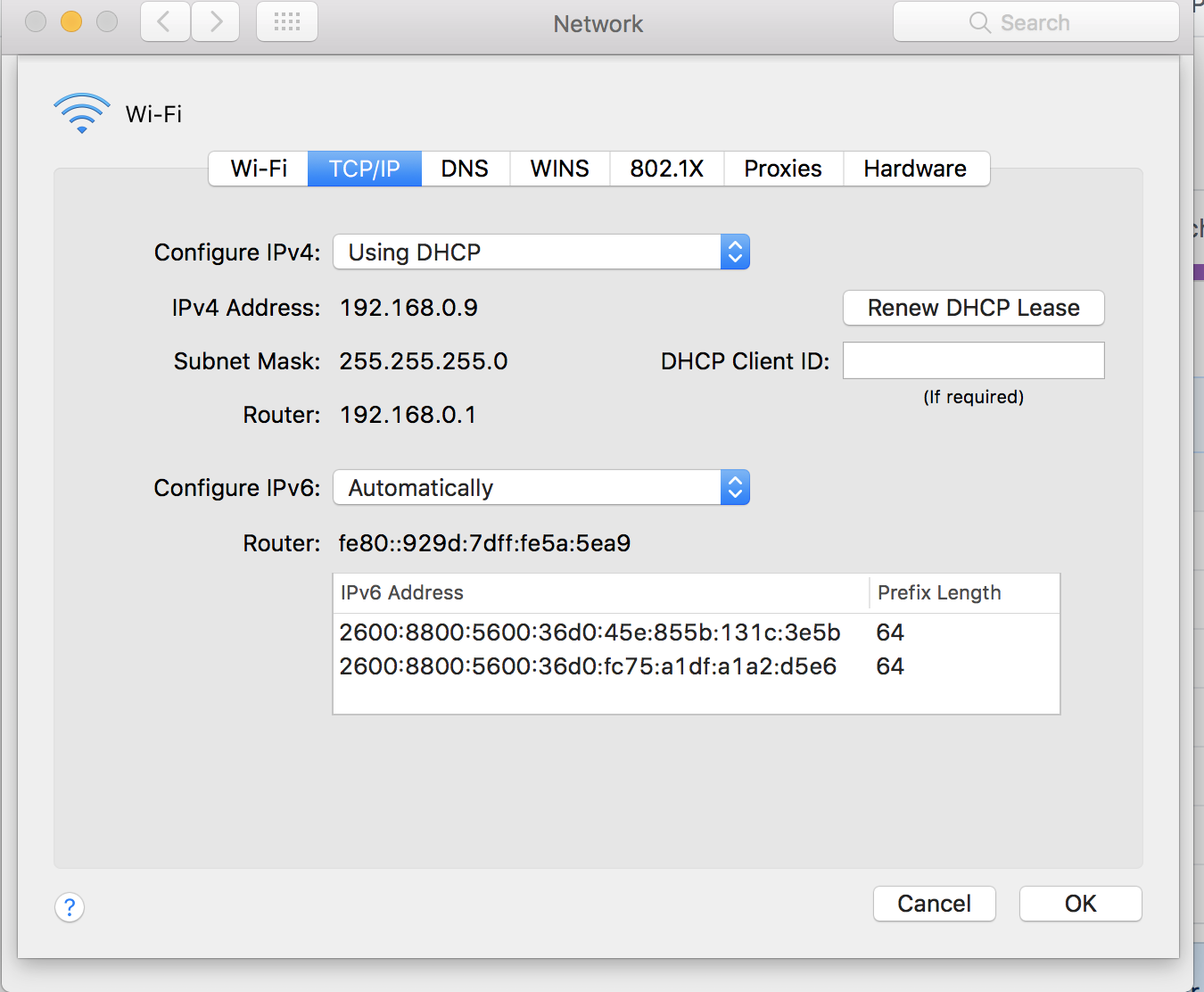
Going off your screenshot, the Mac's DNS is pointing to 192.168.0.13 which matches the IP of your Pi-hole based off the debug log. That's good, but I'll also need a screenshot of the TCP/IP tab to confirm what the router is set to (which should hopefully reflect the Pi-hole DHCP server which you have active you're right, it's not enabled. My bad!).
Could you also run the following command via Terminal on both your Pi-hole and Mac? nslookup pi.hole
WaLLy3K
on 22 Jul 2017
asoliman
on 22 Jul 2017
root@raspberrypi:~# nslookup pi.hole
Server: 127.0.0.1
Address: 127.0.0.1#53
Name: pi.hole
Address: 192.168.0.13
MacBook-Pro:~ root# nslookup pi.hole
Server: 2001:578:3f::30
Address: 2001:578:3f::30#53
Non-authoritative answer:
Name: pi.hole
Address: 92.242.140.2
asoliman
on 22 Jul 2017
It looks like the router at 192.168.0.1 has its own DHCP server that provides another set of DNS servers for clients on your LAN to use. You should look there and see what settings, if any, can be changed.
Start with seeing if you can disable the routers DHCP server, which will then let the Pi-hole take over the function since you've already enabled that via Web Admin.
WaLLy3K
on 22 Jul 2017

I do not have DHCP enabled via web admin
asoliman
on 22 Jul 2017
I have already tried disabling DHCP on my router and enabling pihol DHCP server. but that did not fix my issue.
asoliman
on 22 Jul 2017
You're right, it wasn't enabled when you provided the debug log, my bad!
I have already tried disabling DHCP on my router and enabling pihol DHCP server. but that did not fix my issue.
Did you renew the DHCP lease and flush the DNS cache after disabling the router's DHCP and enabling the Pi-hole DHCP?
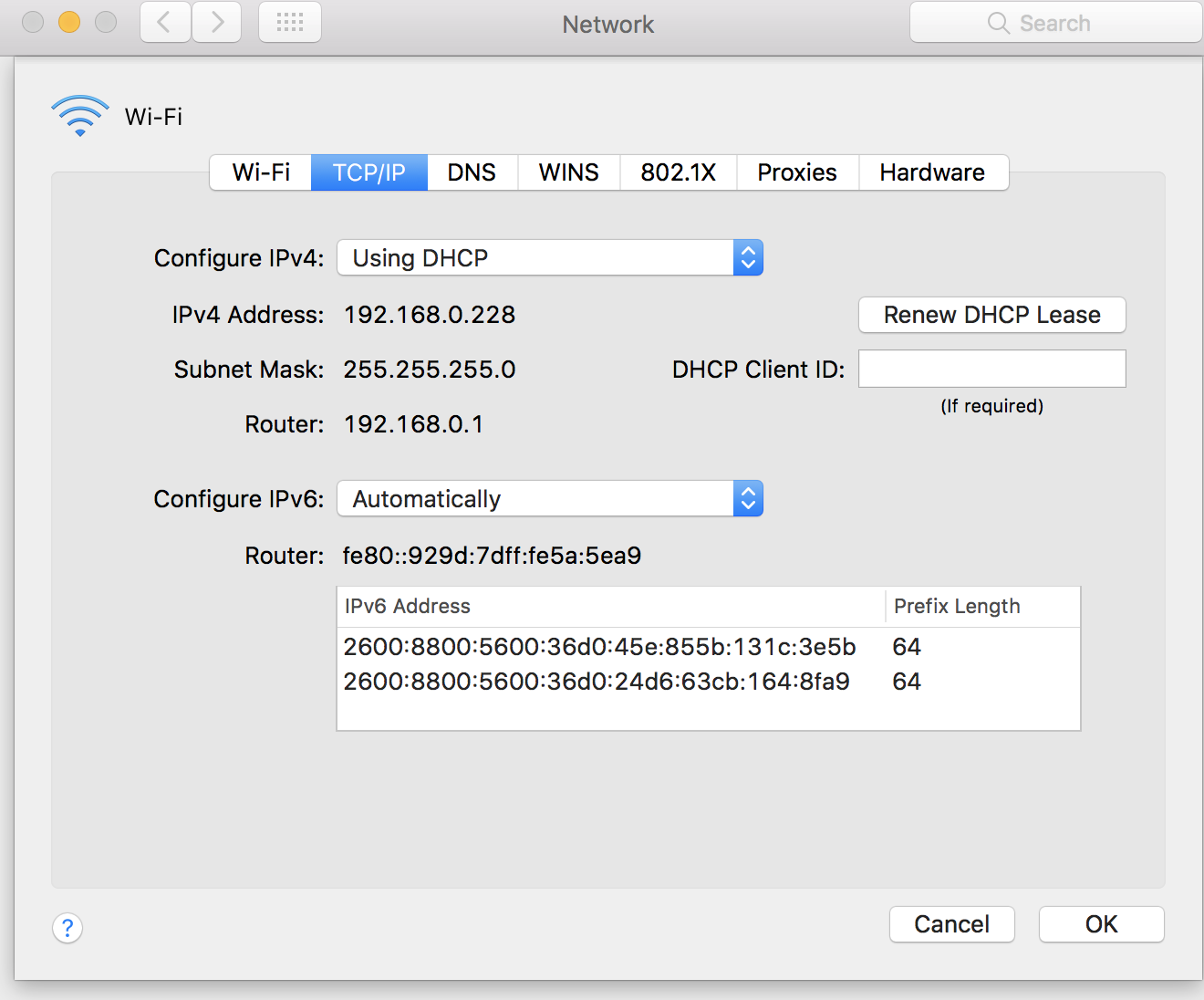
Your Mac's configured to use the IPv4 of your Pi-hole, but macOS will always give priority to an IPv6 address - and neither of the two IPv6 addresses in the screenshots above match the IPv6's in the debug log.
WaLLy3K
on 22 Jul 2017
Should I flush the DNS logs on the web admin page for the pihole?
asoliman
on 22 Jul 2017
I feel that considering that the clients on the network are not configured to use Pi-hole, the DNS logs on Web Admin aren't a concern.
WaLLy3K
on 22 Jul 2017
So how do I flush my DNS log on macOS?
asoliman
on 22 Jul 2017
Since you're using WiFi on macOS, just turn your Mac's Wi-Fi off for a second or two, and turn it on again.
WaLLy3K
on 22 Jul 2017
That did not work.
asoliman
on 22 Jul 2017
To confirm, you've disabled the routers DHCP, and enabled Pi-hole's DHCP server?
Could you take another look at the TCP/IP and DNS tabs, then provide me with new screenshots if they have changed from the ones you posted earlier?
WaLLy3K
on 22 Jul 2017
asoliman
on 22 Jul 2017
It shows the lease have been renewed .. but the issue remains.
asoliman
on 22 Jul 2017
Yeah, TCP/IP tab looks like it's using the Pi-hole DHCP server.
What about DNS? Does it still show the same IPv6 addresses? If it does, then could you confirm whether you can click on any of the addresses and use the MINUS button on the bottom left? This will remove any manually configured DNS servers that macOS may be preferring over the IPv4 server.
If it's different, a screenshot would be very helpful. If it's the same, let me know.
If it now only shows the Pi-hole IP addresses, toggle WiFi again and see how you go.
WaLLy3K
on 22 Jul 2017
It's not clickable.
asoliman
on 22 Jul 2017
Another thing. this is not just on macbook. its also happening on all the other devices I have on my wifi network
asoliman
on 22 Jul 2017
Please look at both images below.
The first image I am connected to my vpn server which is hard wired to my router at home(its a synology device) I am connected to the vpn over Verizon network. Ads are being blocked.
The second picture I turned off vpn and connected to my wifi at my house. Ads are not being blocked.


asoliman
on 22 Jul 2017
I have my VPN server configured to use the pihole as my DNS server.

asoliman
on 22 Jul 2017
Everything you've said enforces the fact that Pi-hole as a DNS filter is working, but that there's some configuration issue (either relating to DHCP, IPv6 or both) that's causing it to not work for your LAN clients.
At this point in time, I don't have any suggestions - is there any further troubleshooting that you'd be able to perform?
WaLLy3K
on 22 Jul 2017
Am I supposed to be using pihole as my DHCP server instead of my gw in order for pihole to work properly?
asoliman
on 23 Jul 2017
Do you have DNS server enabled on your synology? Do you have VPN client software installed on the nodes?
 ryzunice
on 23 Jul 2017
ryzunice
on 23 Jul 2017
No you do not need to run DHCP server on Pihole. Sounds like run VPN client is using IPv4 and there is a bug with IPv6 on Pihole.
ryzunice
on 23 Jul 2017
I don't have a DNS server on synology.. but I am using a manual DNS for my VPN server by pointing it to the pihole.
No VPN clients installed on the nodes.
How do we fix the IPv6 bug?
asoliman
on 23 Jul 2017
I just wanted to let you guys know that I have fixed my issue. I had to enable IPv6 DNS override under IPv6 LAN settings on my router and point it to my raspberry pi's IPv6 address. Now pihole is working as expected. Thank you so much for pointing me in the right direction! you guys ROCK!!!!
asoliman
on 26 Jul 2017
Related issues
 zimmertr
·
63Comments
zimmertr
·
63Comments
 Gartonious
·
58Comments
Gartonious
·
58Comments
 emmtte
·
33Comments
emmtte
·
33Comments
 JobbeDeluxe
·
37Comments
JobbeDeluxe
·
37Comments
 nicolasvac
·
35Comments
nicolasvac
·
35Comments