Phpmyadmin: Corrupt internal DB allows more permissions
In the import.php
you can run the sql statement and delete or drop the data as you like (Possible Remote Code Execution ) via that evil Function
for the business logic this is very bad function to open the SQL terminal via the import and if there any policy or user privilege it can be privilege escalation for the you can fix that by when the Get request enter any page make sure to add the # after the link and every request contian that and also the request can't be done without #
i have sent screenshot for the security[at]phpmyadmin.net , and steps
 Abdallah-Fouad-X
All 39 comments
@williamdes @ibennetch , any update about this security issue ?!
Abdallah-Fouad-X
on 20 Nov 2019
From what we've been able to tell from your report, this is consistent with the expected behavior. A user who is logged in can execute any SQL commands (though the Import page, the SQL page, or by uploading any .sql file) including potentially destructive commands such as DROP and EMPTY. I have not been able to find any way an evil user could elevate their privileges beyond what the database administrator has granted them, nor have I found a way for an attacker who is not logged in as a valid user to execute SQL.
If you have found a way of circumventing the MySQL authentication or user permissions, then we certainly want to fix it, but as we currently understand your report it seems this is the intended behavior.
 ibennetch
on 26 Nov 2019
ibennetch
on 26 Nov 2019
I have check that and i found something suspicious
i have created user test with password and i have destroy the session and login with his password
and here is screenshot for the user privileged and as you can see the account has 0 privilege
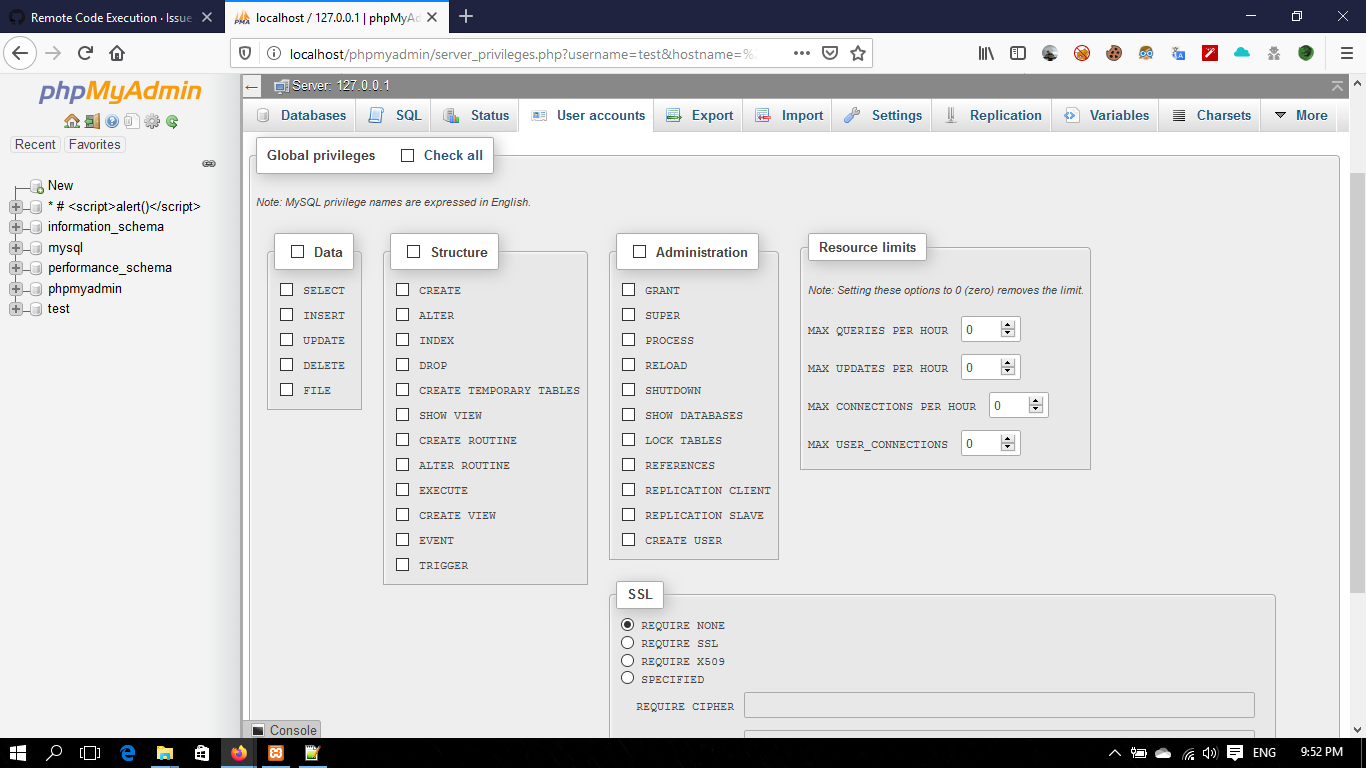
and from the import option i was able to upload the tables and i don't have any privilege to do that
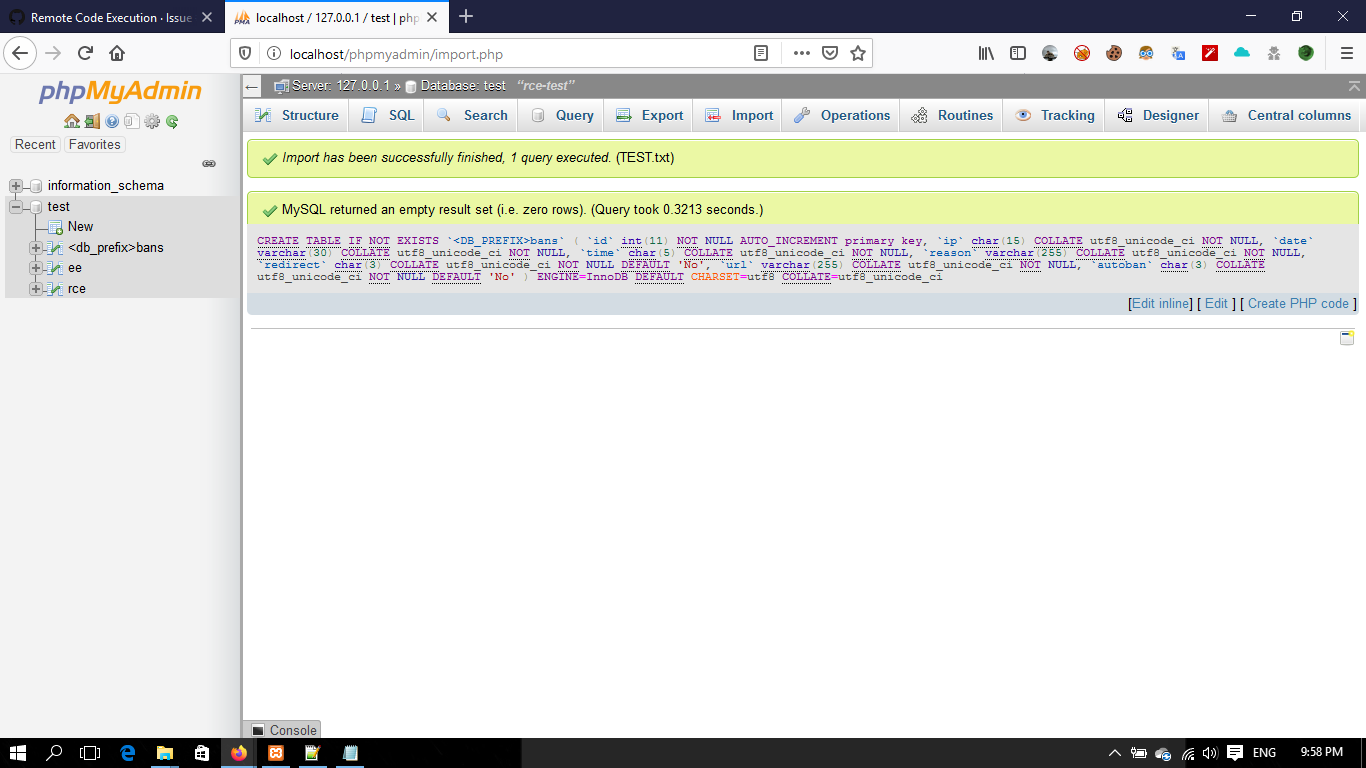
i have check it again to execute the sql commands over the import options and if that is the application behavior it's okay , But you have point for a critical point i have not test it yet the user permissions , And i have found this ,(the uploaded screen shot) , Also i don't know are that the expected behavior for the application to accept create tables from 0 privilege user as you can see
Abdallah-Fouad-X
on 26 Nov 2019
@ibennetch I Have send over mail new problem and provided screen can you check it .
Abdallah-Fouad-X
on 27 Nov 2019
I have check that and i found something suspicious
i have created user test with password and i have destroy the session and login with his password
and here is screenshot for the user privileged and as you can see the account has 0 privilege
and from the import option i was able to upload the tables and i don't have any privilege to do that
i have check it again to execute the sql commands over the import options and if that is the application behavior it's okay , But you have point for a critical point i have not test it yet the user permissions , And i have found this ,(the uploaded screen shot) , Also i don't know are that the expected behavior for the application to accept create tables from 0 privilege user as you can see
@ibennetch are this consider a privilege escalation or that is the normal action for the application ?
Abdallah-Fouad-X
on 27 Nov 2019
@OverRide-BT I am quite sure that you would have the same result by pasting your script in the sql query box ?
 williamdes
on 27 Nov 2019
williamdes
on 27 Nov 2019
@OverRide-BT I am quite sure that you would have the same result by pasting your script in the sql query box ?
Yes indeed, but how and the account do not have privilege to creat or editing tables ( as you can see in the user permissions) , if that you have already know that is normal action to creat or edit tables with user do not have that permission and this acceptable by the application you can close the issue
Abdallah-Fouad-X
on 27 Nov 2019
Yes indeed, but how and the account do not have privilege to creat or editing tables ( as you can see in the user permissions) , if that you have already know that is normal action to creat or edit tables with user do not have that permission and this acceptable by the application you can close the issue
Since we are not a database server but only a web UI I think there is no vulnerability :)
williamdes
on 27 Nov 2019
Yes indeed, but how and the account do not have privilege to creat or editing tables ( as you can see in the user permissions) , if that you have already know that is normal action to creat or edit tables with user do not have that permission and this acceptable by the application you can close the issue
Since we are not a database server but only a web UI I think there is no vulnerability :)
In this cases I agree with you, But this must be in the backend and the application logic , how user doesn't have any permission to creat or edit, it acutely have the privilege to do that ! @ibennetch
Should I close this from my side ! Or you have other opinions @williamdes
Abdallah-Fouad-X
on 27 Nov 2019
@OverRide-BT From your screenshot, it's not clear if that user has database-level permissions; could you post here the permissions? From the User privileges page, look for that user and click the "Export" button on the right (such as you can see here:)

From there, you can simply copy and paste the SQL from the popup box.
ibennetch
on 27 Nov 2019
@OverRide-BT From your screenshot, it's not clear if that user has database-level permissions; could you post here the permissions? From the User privileges page, look for that user and click the "Export" button on the right (such as you can see here:)
From there, you can simply copy and paste the SQL from the popup box.
here is the screen :
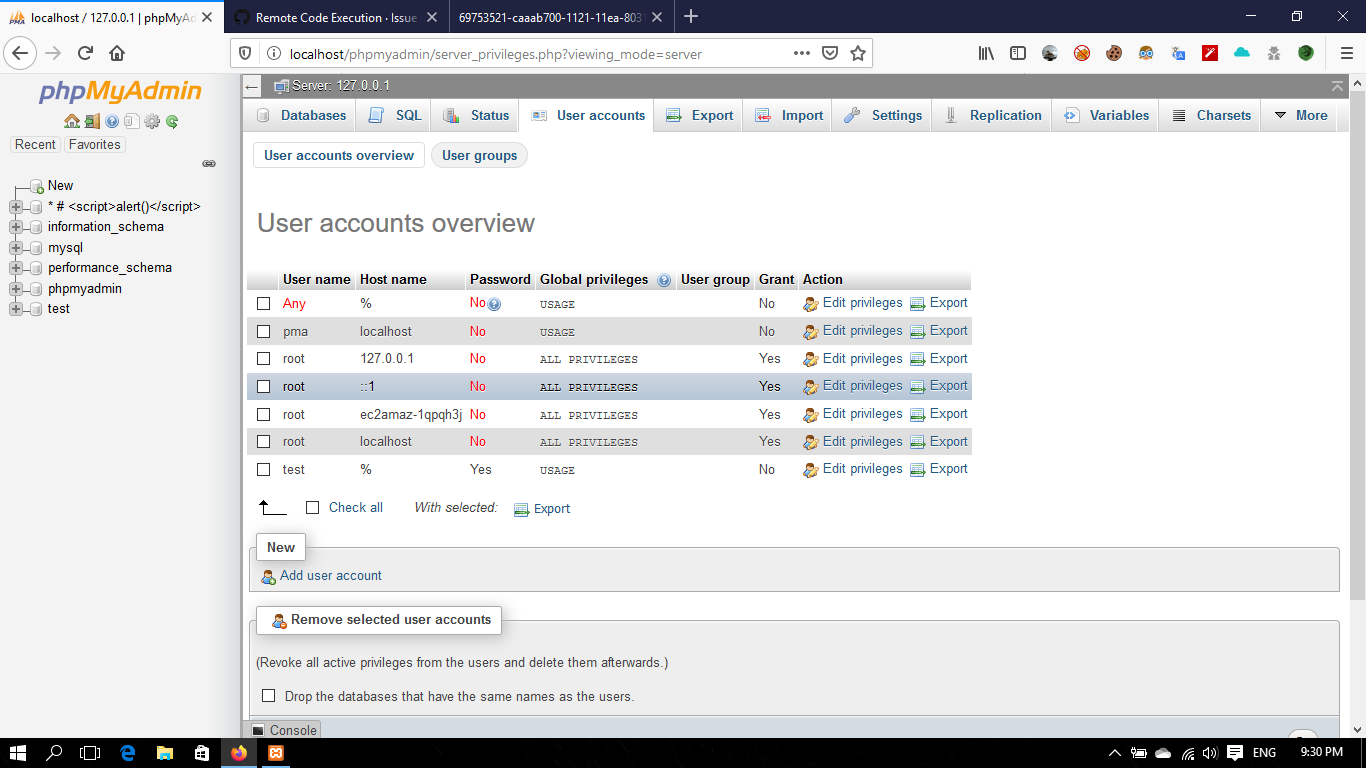
and here is the SQL :
GRANT USAGE ON *.* TO 'test'@'%' IDENTIFIED BY PASSWORD '*23AE809DDACAF96AF0FD78ED04B6A265E05AA257';
Abdallah-Fouad-X
on 27 Nov 2019
Based on the information I see in this ticket, I'm not able to reproduce this at all. I'm not sure what to do for further troubleshooting with this.
ibennetch
on 27 Nov 2019
Based on the information I see in this ticket, I'm not able to reproduce this at all. I'm not sure what to do for further troubleshooting with this.
i have send all the information , steps ,and screen , how you don't able to reproduce this .
[NOTE]
should i record video from creating the user till the create tables with this user ?
is this issue or just positive vulnerability (Not Bug)
Abdallah-Fouad-X
on 27 Nov 2019
This is what I've done:
- Create a new user with no permissions and password 'rce':
GRANT USAGE ON *.* TO 'rce'@'%' IDENTIFIED BY PASSWORD '*203A468DBF7CB663ACC6F024DE6520E4E702FD0F';(or without a password, asGRANT USAGE ON *.* TO 'rce'@'%';) - Log out as the superuser and log in as user rce, which I can verify on the main page:

- From the "Import" tab, import the rce.sql file
rce.sql file:
CREATE TABLE IF NOT EXISTS `<DB_PREFIX>bans` (
`id` int(11) NOT NULL AUTO_INCREMENT primary key,
`ip` char(15) COLLATE utf8_unicode_ci NOT NULL,
`date` varchar(30) COLLATE utf8_unicode_ci NOT NULL,
`time` char(5) COLLATE utf8_unicode_ci NOT NULL,
`reason` varchar(255) COLLATE utf8_unicode_ci NOT NULL,
`redirect` char(3) COLLATE utf8_unicode_ci NOT NULL DEFAULT 'No',
`url` varchar(255) COLLATE utf8_unicode_ci NOT NULL,
`autoban` char(3) COLLATE utf8_unicode_ci NOT NULL DEFAULT 'No'
) ENGINE=InnoDB DEFAULT CHARSET=utf8 COLLATE=utf8_unicode_ci
Actual result:
An error page is shown with the error message:
MySQL said: Documentation
1046 - No database selected
If I add a "use test" line to the .sql file, the error instead is:
1044 - Access denied for user 'rce'@'%' to database 'test'
If you can create a video, that would be quite helpful.
ibennetch
on 27 Nov 2019
This is what I've done:
1. Create a new user with no permissions and password 'rce': `GRANT USAGE ON *.* TO 'rce'@'%' IDENTIFIED BY PASSWORD '*203A468DBF7CB663ACC6F024DE6520E4E702FD0F';` (or without a password, as `GRANT USAGE ON *.* TO 'rce'@'%';`)

2. Log out as the superuser and log in as user rce, which I can verify on the main page:
- From the "Import" tab, import the rce.sql file
rce.sql file:
CREATE TABLE IF NOT EXISTS `<DB_PREFIX>bans` (
`id` int(11) NOT NULL AUTO_INCREMENT primary key,
`ip` char(15) COLLATE utf8_unicode_ci NOT NULL,
`date` varchar(30) COLLATE utf8_unicode_ci NOT NULL,
`time` char(5) COLLATE utf8_unicode_ci NOT NULL,
`reason` varchar(255) COLLATE utf8_unicode_ci NOT NULL,
`redirect` char(3) COLLATE utf8_unicode_ci NOT NULL DEFAULT 'No',
`url` varchar(255) COLLATE utf8_unicode_ci NOT NULL,
`autoban` char(3) COLLATE utf8_unicode_ci NOT NULL DEFAULT 'No'
) ENGINE=InnoDB DEFAULT CHARSET=utf8 COLLATE=utf8_unicode_ci
Actual result:
An error page is shown with the error message:MySQL said: Documentation
1046 - No database selected
If I add a "use test" line to the .sql file, the error instead is:
1044 - Access denied for user 'rce'@'%' to database 'test'
If you can create a video, that would be quite helpful.
i have send the video by mail you can check it ,
Abdallah-Fouad-X
on 27 Nov 2019
The video you sent does show the behavior you've described, but this should not be possible due to MySQL permissions. The list of available databases changes, which is particularly strange to me.
Could you try logging in with a user that doesn't exist at all, such as test3, and see whether you see any databases listed or are able to run the import?
ibennetch
on 27 Nov 2019
The video you sent does show the behavior you've described, but this should not be possible due to MySQL permissions. The list of available databases changes, which is particularly strange to me.
Could you try logging in with a user that doesn't exist at all, such as test3, and see whether you see any databases listed or are able to run the import?
I have try to login with it and the same action is happened
Did you try it with the same steps , but the action is different ( not the same in the video)
Abdallah-Fouad-X
on 28 Nov 2019
I have try to login with it and the same action is happened
This seems to me like your database server is not running properly. Perhaps it's running with the --skip-grant-tables or some other means to bypass any authentication (although why you are only shown certain databases baffles me).
Can you try connecting from the command line client as the 'test3' user and running these commands and reporting the results back here?
SHOW DATABASES;USE `test`; SHOW TABLES;USE `phpmyadmin`; SHOW TABLES;
Did you try it with the same steps , but the action is different ( not the same in the video)
Yes, correct — when I try, I still get errors about my user not having enough permissions.
ibennetch
on 28 Nov 2019
* SHOW DATABASES;
First commend
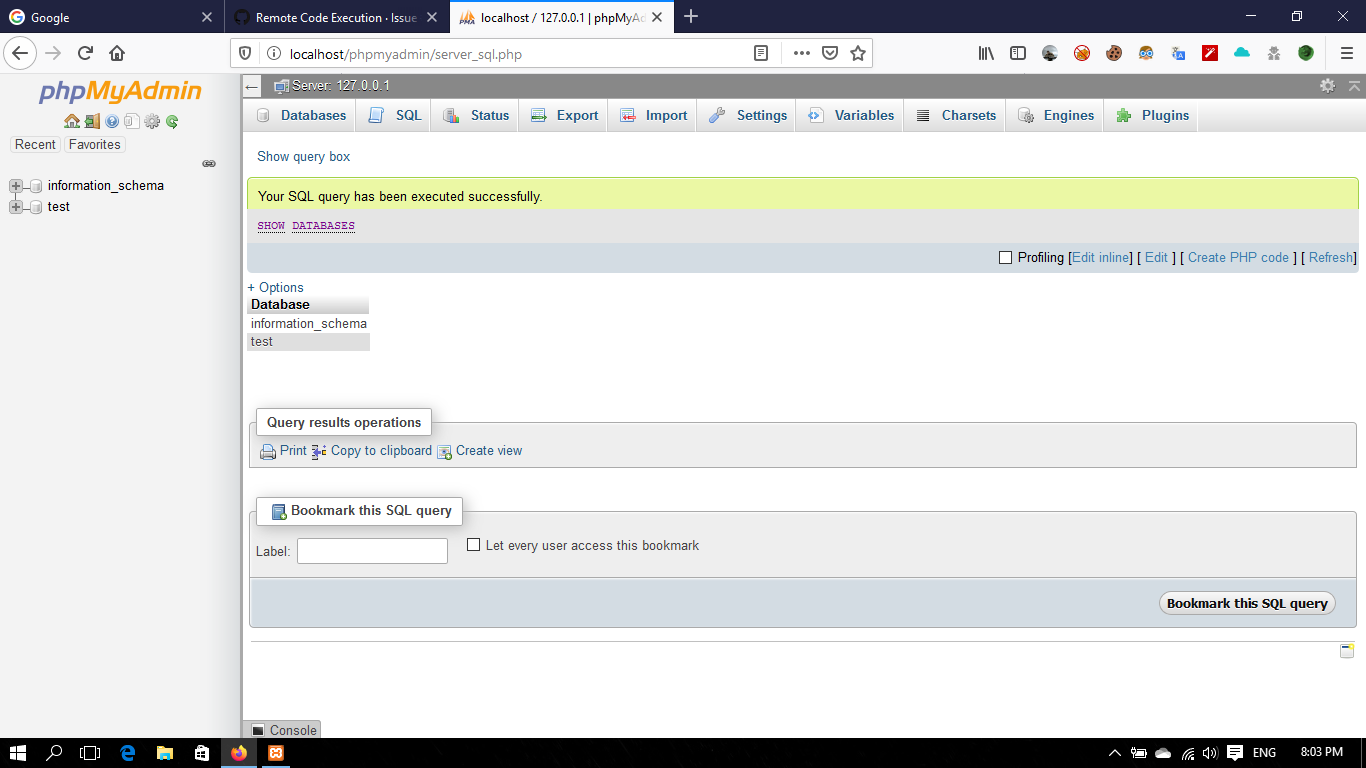
Second commend :
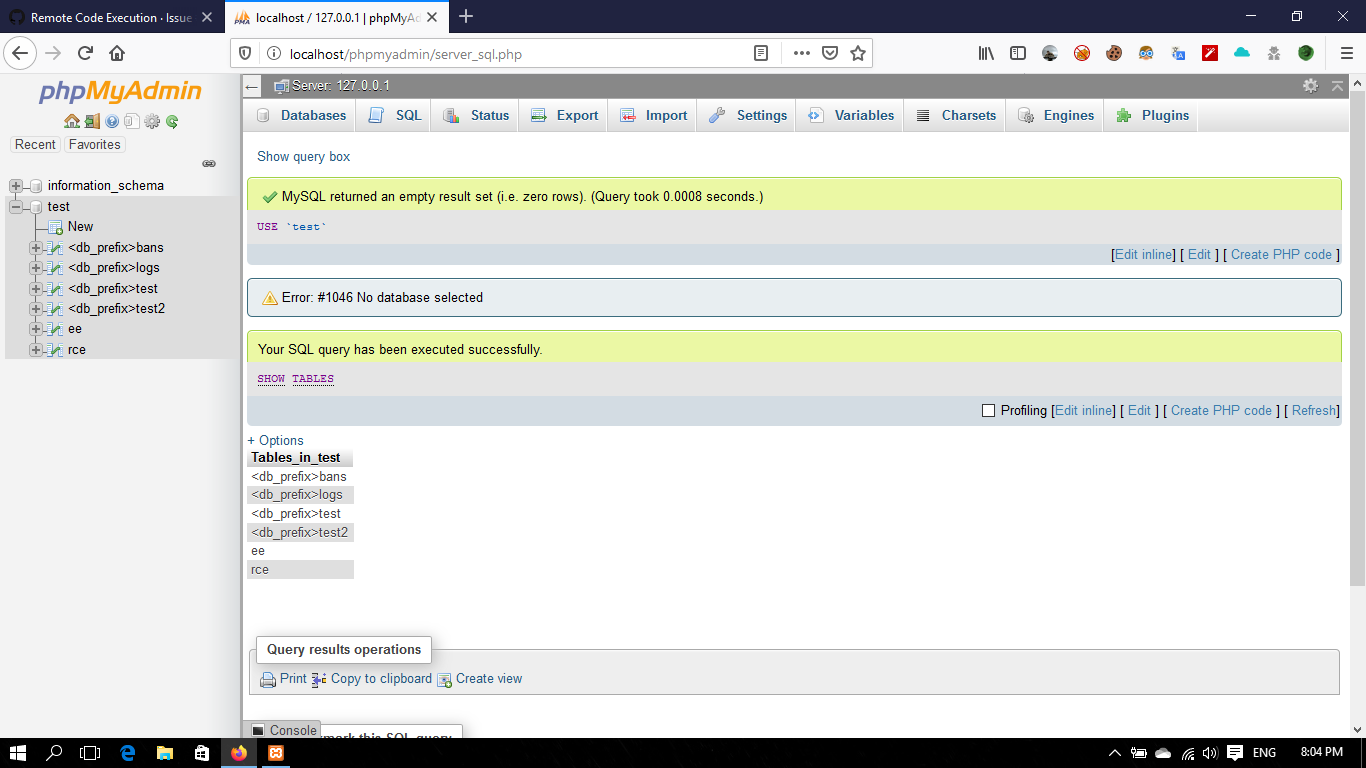
Last Commend :
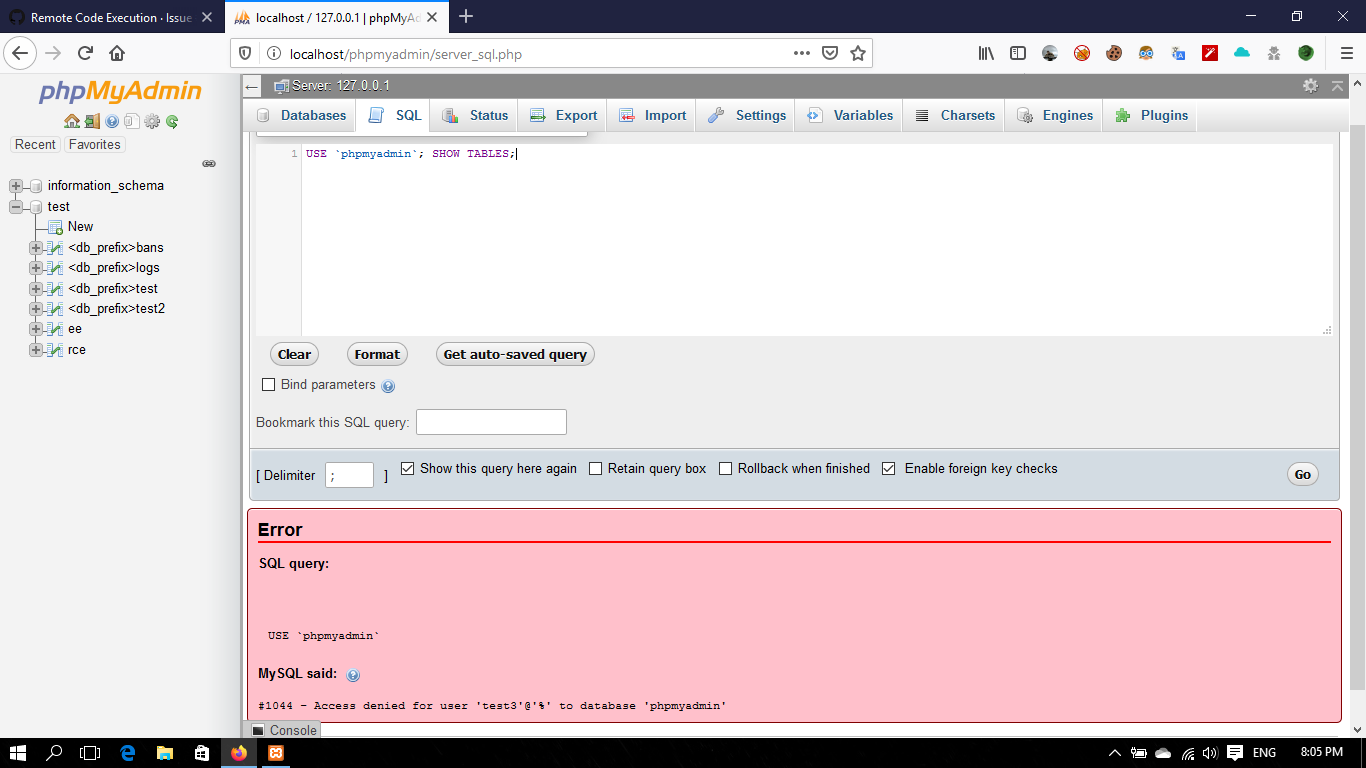
not having enough permissions. in the last command for using phpmyadmin database
i only have the permission to access to the test database and information_schema .
Abdallah-Fouad-X
on 28 Nov 2019
If you can repeat those steps from the command-line client, we can confirm for certain whether this is related to phpMyAdmin or your database server.
ibennetch
on 29 Nov 2019
If you can repeat those steps from the command-line client, we can confirm for certain whether this is related to phpMyAdmin or your database server.
the same result here also :

in the last commend i don't have permission
Abdallah-Fouad-X
on 29 Nov 2019
Thanks for checking that! I still can't quite figure out what's happened here, but I am now confident this isn't related to phpMyAdmin.
ibennetch
on 29 Nov 2019
Thanks for checking that! I still can't quite figure out what's happened here, but I am now confident this isn't related to phpMyAdmin.
You are welcome, you are right i can't know why this happened i will search for the case of that if i found that case definitely i will mail you with it , thanks for being helpful @ibennetch
Abdallah-Fouad-X
on 29 Nov 2019
@ibennetch in the user account as you can see :
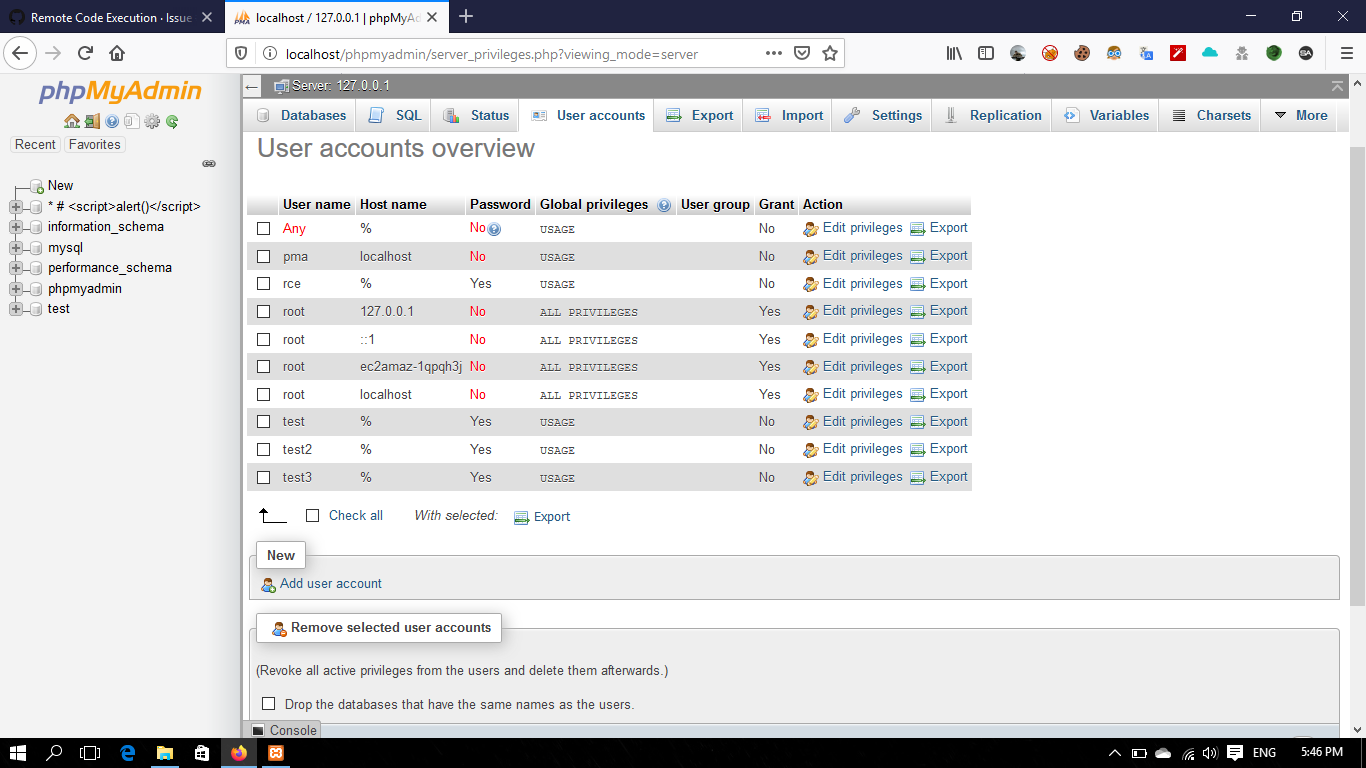
user name test3 :
GRANT USAGE ON *.* TO 'test3'@'%' IDENTIFIED BY PASSWORD '*E6CC90B878B948C35E92B003C792C46C58C4AF40';
the host '%' so every thing is work great here so i start to check the database [Check privileges]
in the database name test :
i found this
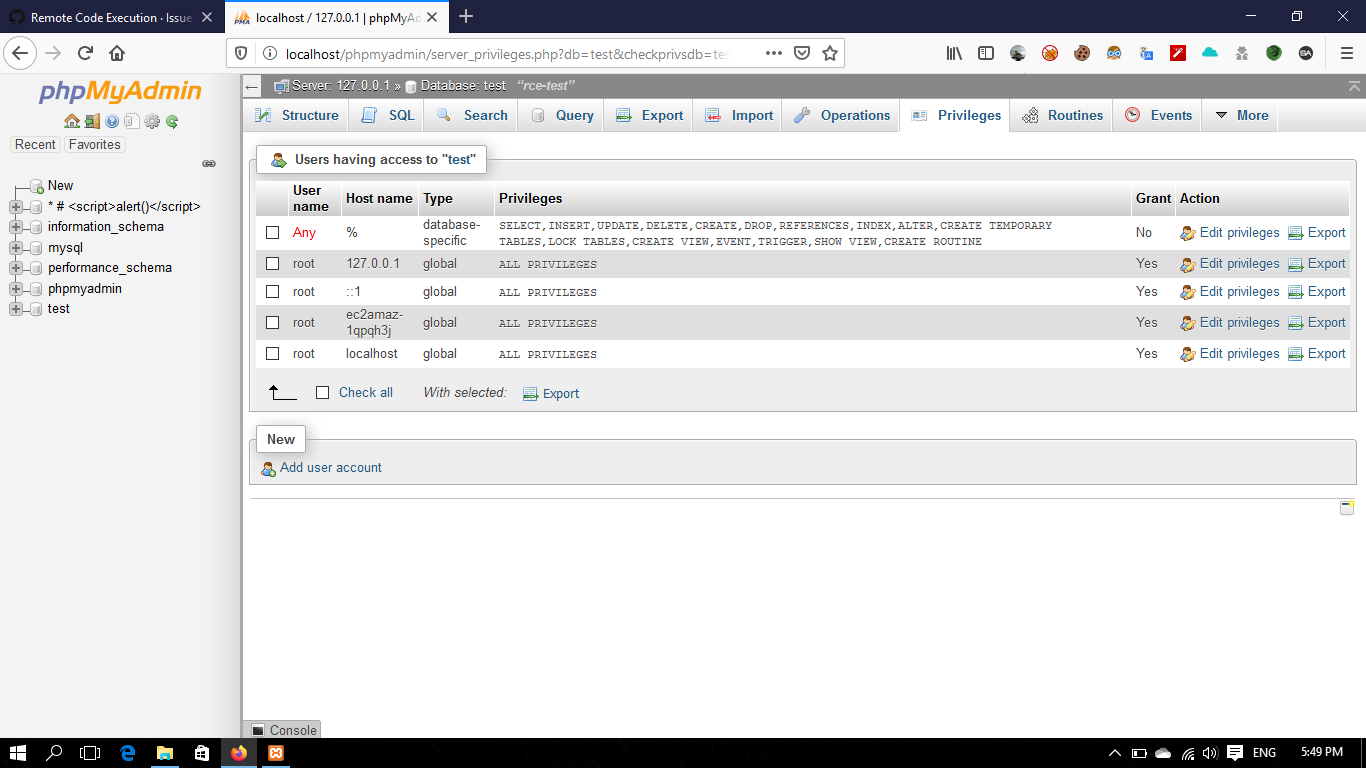
as you can see the user name ANY and host '%' have the root privilege
then i check for the information_schema
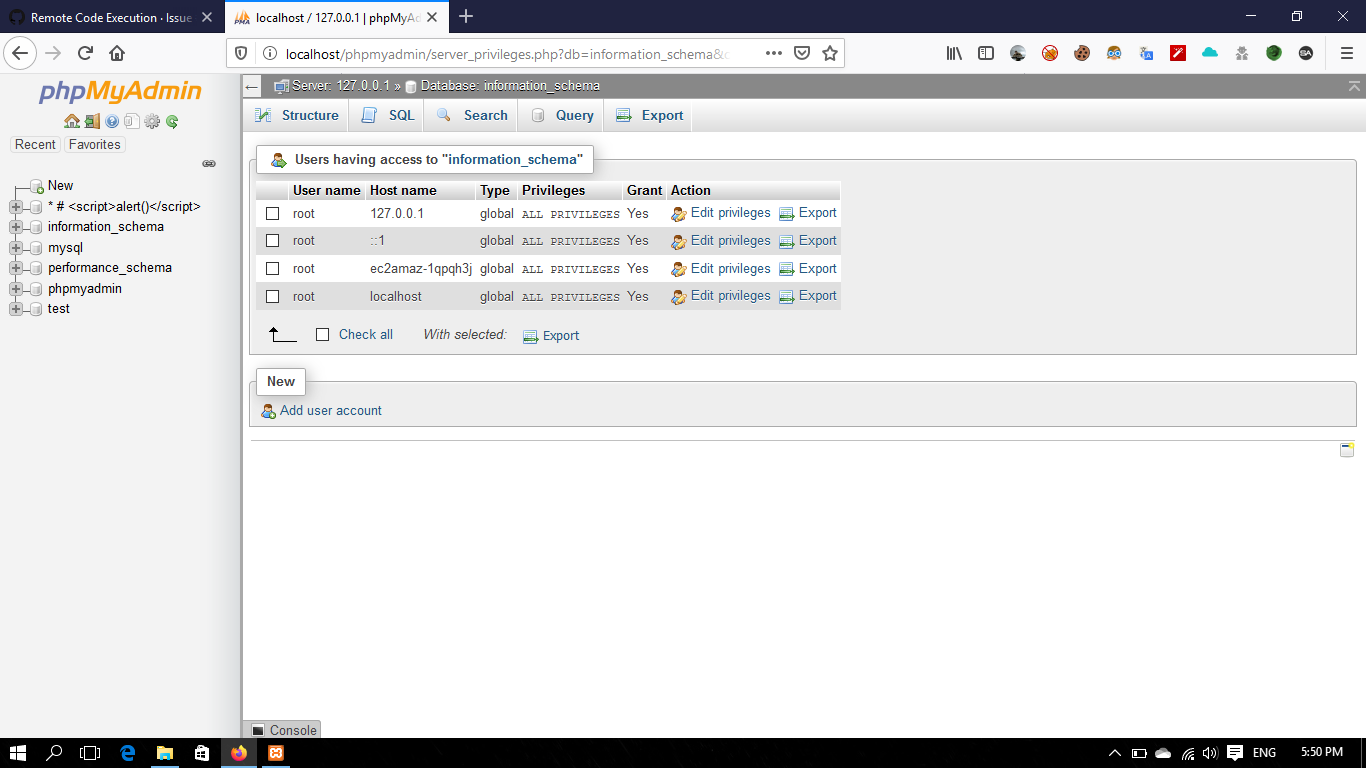
i didn't found ANY user with Host '%' in the [Check privileges] this so wired because when i login with the user name test3 this database show for me so i tried to add table in this database
and this what happened 🗡
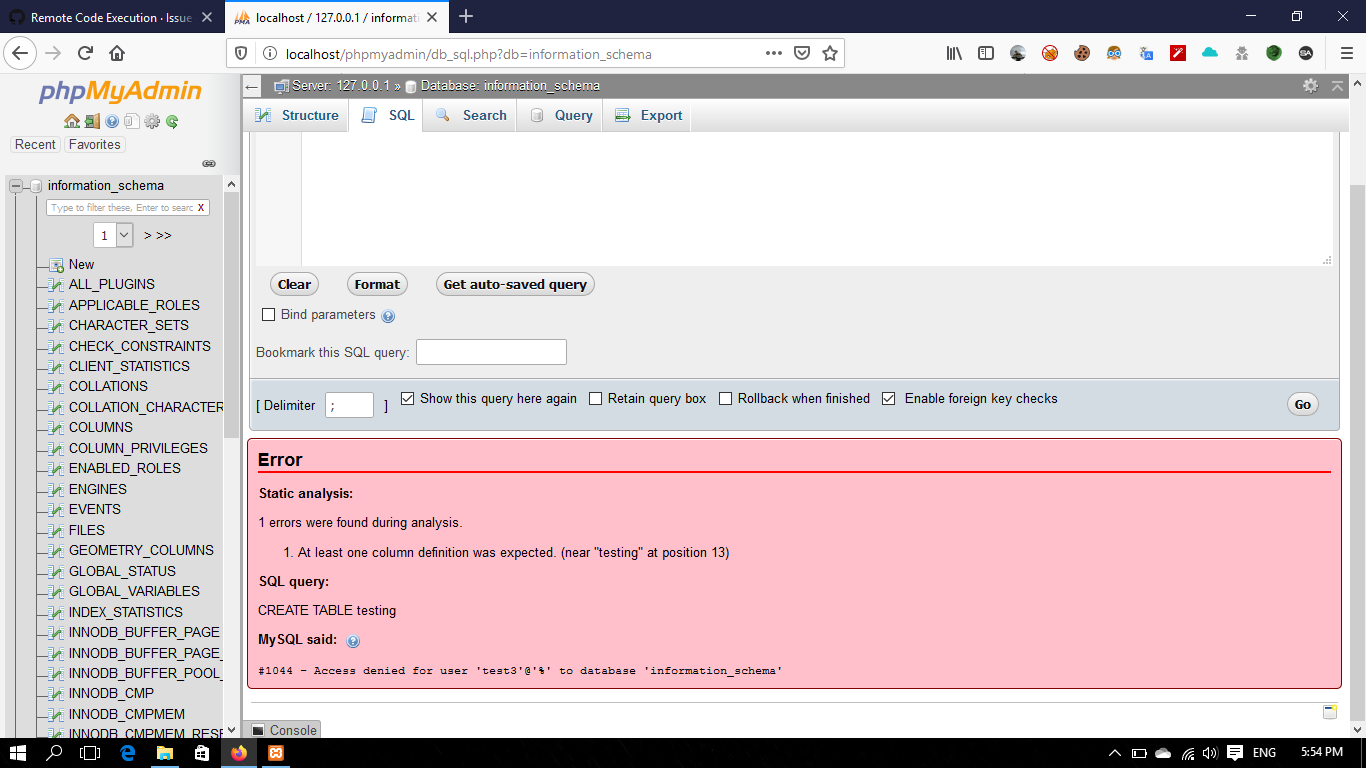
so from here this in the phpmyadmin issues i guess not the server
Abdallah-Fouad-X
on 1 Dec 2019
Seeing the Any user with any type of database-specific permissions is quite odd to me. I have an anonymous user but it doesn't have access to any specific database. One thing you could try, as root, is creating a new database entirely and seeing what permissions exist for that.
information_schema is a built-in MySQL database-like object that is not generally meant to be edited by users, so it's not surprising that you're unable to create a table there.
It's looking to me like somehow your permissions got messed up or out of sync, and the odd behavior you're seeing relatest to that. I don't see anything here that looks like a phpMyAdmin problem, unless there's a way that phpMyAdmin itself created the privilege inconsistency (which is unlikely, but it's plausible). I'd delete that user, clear out all the permissions related to it, and start over from scratch on that account.
ibennetch
on 1 Dec 2019
Seeing the Any user with any type of database-specific permissions is quite odd to me. I have an anonymous user but it doesn't have access to any specific database. One thing you could try, as root, is creating a new database entirely and seeing what permissions exist for that.
sure this is very odd, So i have create a new database "d1"
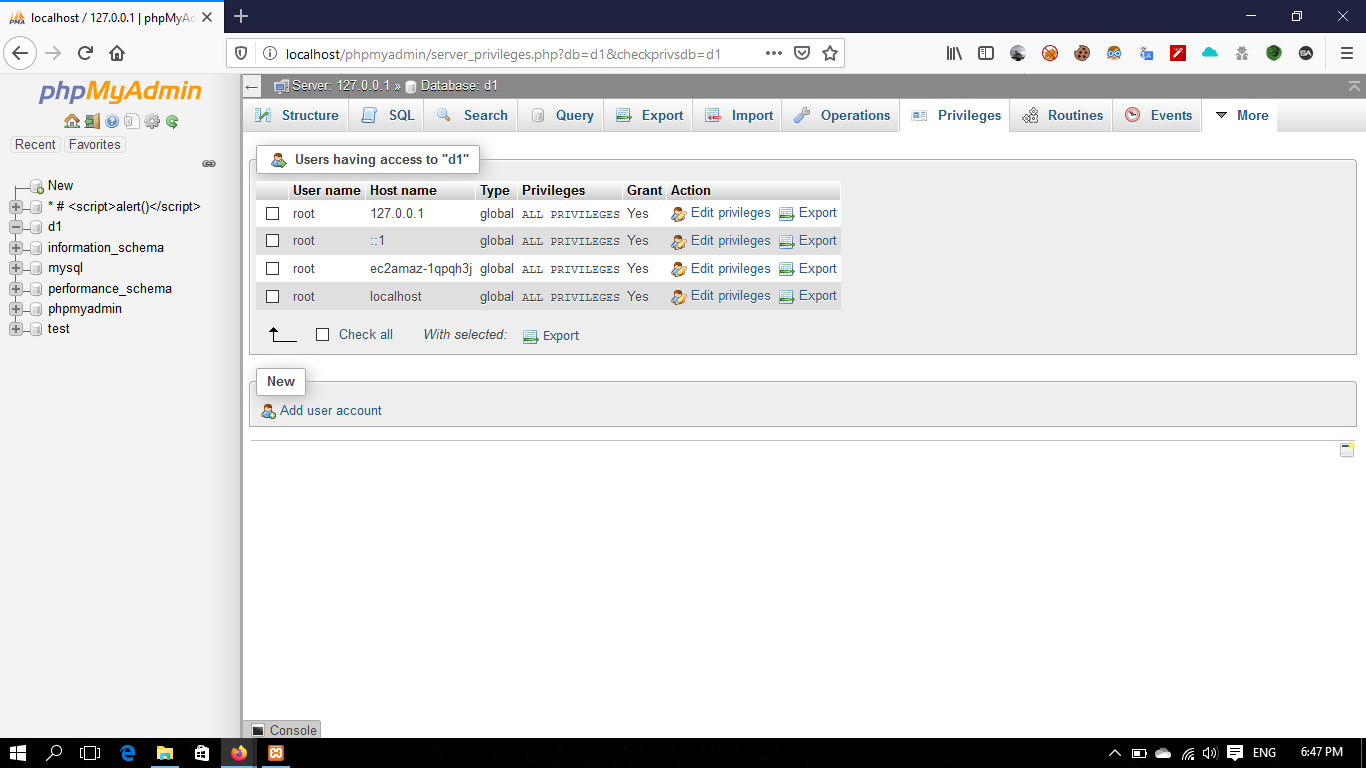
information_schemais a built-in MySQL database-like object that is not generally meant to be edited by users, so it's not surprising that you're unable to create a table there.yes , But how this show for the user test3 and he have not the permission for the database
It's looking to me like somehow your permissions got messed up or out of sync, and the odd behavior you're seeing relatest to that. I don't see anything here that looks like a phpMyAdmin problem, unless there's a way that phpMyAdmin itself created the privilege inconsistency (which is unlikely, but it's plausible). I'd delete that user, clear out all the permissions related to it, and start over from scratch on that account.
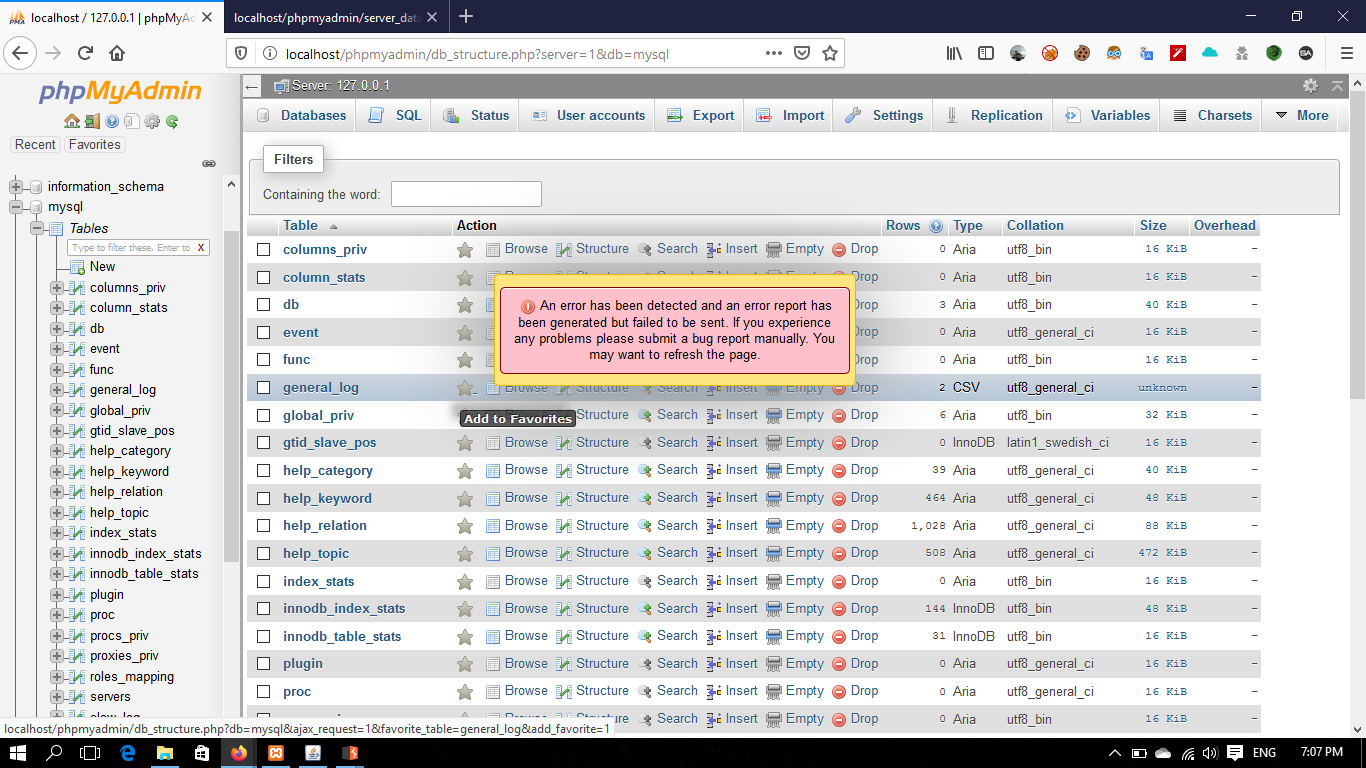
when i search in the database i found this error and i think it related to our problem : ->
Warning in .\libraries\classes\Dbi\DbiMysqli.php#213
mysqli_query(): (HY000/1034): Index for table 'db' is corrupt; try to repair it

Backtrace

.\libraries\classes\Dbi\DbiMysqli.php#213: mysqli_query(
,
string 'SELECT * FROM `mysql`.`db` WHERE `User` = \'test\' AND `Host` = \'%\' ORDER BY `Db` ASC',
integer 0,
)
.\libraries\classes\DatabaseInterface.php#319: PhpMyAdmin\Dbi\DbiMysqli->realQuery(
string 'SELECT * FROM `mysql`.`db` WHERE `User` = \'test\' AND `Host` = \'%\' ORDER BY `Db` ASC',
,
integer 0,
)
.\libraries\classes\DatabaseInterface.php#169: PhpMyAdmin\DatabaseInterface->tryQuery(
string 'SELECT * FROM `mysql`.`db` WHERE `User` = \'test\' AND `Host` = \'%\' ORDER BY `Db` ASC',
integer 256,
integer 0,
boolean true,
)
.\libraries\classes\Server\Privileges.php#3294: PhpMyAdmin\DatabaseInterface->query(string 'SELECT * FROM `mysql`.`db` WHERE `User` = \'test\' AND `Host` = \'%\' ORDER BY `Db` ASC')
.\libraries\classes\Server\Privileges.php#3375: PhpMyAdmin\Server\Privileges::getUserSpecificRights(
string 'test',
string '%',
string 'database',
string '',
)
.\libraries\classes\Server\Privileges.php#4856: PhpMyAdmin\Server\Privileges::getHtmlForAllTableSpecificRights(
string 'test',
string '%',
string 'database',
)
.\server_privileges.php#461: PhpMyAdmin\Server\Privileges::getHtmlForUserProperties(
string '',
string '',
string 'test',
string '%',
string '',
string '',
)

then when i have try to report it :
Abdallah-Fouad-X
on 1 Dec 2019
Hi @ibennetch @williamdes
I have sent screenshots for the error in mysql did you see it (my last comment) are this supposed to happened !?
Abdallah-Fouad-X
on 22 Dec 2019
I think we should be able to catch an error in this query in order to handle it more gracefully when we get an error back from MySQL. @mauriciofauth, is this something you would be willing to look at whether we can fix this?
It looks like our offending area is:
Warning in .librariesclasses\Dbi\DbiMysqli.php#213
mysqli_query(): (HY000/1034): Index for table 'db' is corrupt; try to repair it
ibennetch
on 23 Dec 2019
:ping_pong:
williamdes
on 15 May 2020
@williamdes , i didn't get any update yet!
Abdallah-Fouad-X
on 19 May 2020
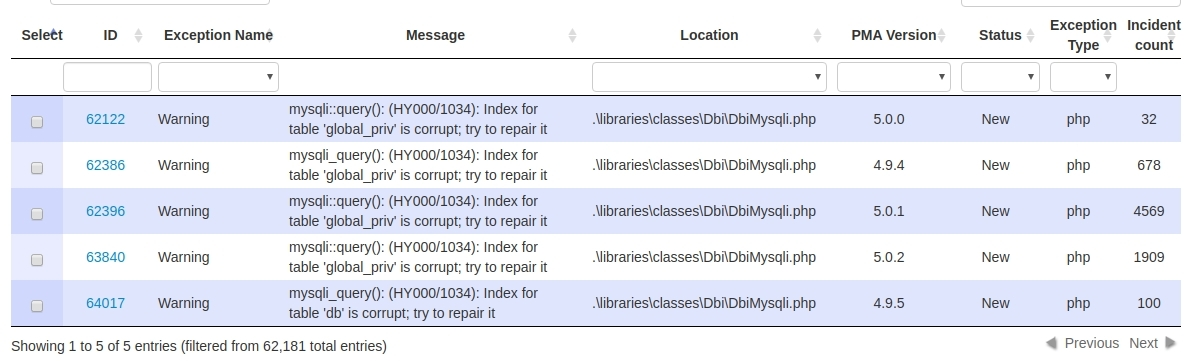
@Abdallah-Fouad-X Is there a security vulnerability or not ?
Could you post a detailed step by step using one or the demo servers:
Demo servers (root, no password)
williamdes
on 19 May 2020
@williamdes , as @ibennetch said before:I think we should be able to catch an error in this query in order to handle it more gracefully when we get an error back from MySQL. @mauriciofauth, is this something you would be willing to look at whether we can fix this?
Then happened when i execute SQL query with no user privileged to use the sql terminal , so i think something related with that error when i post it before , but i didn't get any update from this issue .
Warning in .\libraries\classes\Dbi\DbiMysqli.php#213
mysqli_query(): (HY000/1034): Index for table 'db' is corrupt; try to repair it

Backtrace

.\libraries\classes\Dbi\DbiMysqli.php#213: mysqli_query(
,
string 'SELECT * FROM `mysql`.`db` WHERE `User` = \'test\' AND `Host` = \'%\' ORDER BY `Db` ASC',
integer 0,
)
.\libraries\classes\DatabaseInterface.php#319: PhpMyAdmin\Dbi\DbiMysqli->realQuery(
string 'SELECT * FROM `mysql`.`db` WHERE `User` = \'test\' AND `Host` = \'%\' ORDER BY `Db` ASC',
,
integer 0,
)
.\libraries\classes\DatabaseInterface.php#169: PhpMyAdmin\DatabaseInterface->tryQuery(
string 'SELECT * FROM `mysql`.`db` WHERE `User` = \'test\' AND `Host` = \'%\' ORDER BY `Db` ASC',
integer 256,
integer 0,
boolean true,
)
.\libraries\classes\Server\Privileges.php#3294: PhpMyAdmin\DatabaseInterface->query(string 'SELECT * FROM `mysql`.`db` WHERE `User` = \'test\' AND `Host` = \'%\' ORDER BY `Db` ASC')
.\libraries\classes\Server\Privileges.php#3375: PhpMyAdmin\Server\Privileges::getUserSpecificRights(
string 'test',
string '%',
string 'database',
string '',
)
.\libraries\classes\Server\Privileges.php#4856: PhpMyAdmin\Server\Privileges::getHtmlForAllTableSpecificRights(
string 'test',
string '%',
string 'database',
)
.\server_privileges.php#461: PhpMyAdmin\Server\Privileges::getHtmlForUserProperties(
string '',
string '',
string 'test',
string '%',
string '',
string '',
)
also as you can see with my last comment the screenshot for this error
Abdallah-Fouad-X
on 19 May 2020
I think I understand this issue, please re-title this issue :)
If the DB is corrupt then all privileges are given, maybe this is what you are describing
williamdes
on 19 May 2020
okay what should i re-title with :) , yeah the DB corrupted * After i run sql command with user name don't have any privilege to use it * as you can see : https://github.com/phpmyadmin/phpmyadmin/issues/15576#issuecomment-559241696
Abdallah-Fouad-X
on 19 May 2020
Done, this is very interesting and I am happy to understand the issue now
williamdes
on 19 May 2020
Great ,So what supposed to happen now?
Abdallah-Fouad-X
on 19 May 2020
Great ,So what supposed to happen now?
Nothing on our side, but I would like that we implement some code to show a pretty error to the user and stop reporting it to our reporting server.
williamdes
on 19 May 2020
williamdes
on 19 May 2020
That's great
Abdallah-Fouad-X
on 19 May 2020
Related issues
 ntinti
·
54Comments
ntinti
·
54Comments
 rolfjentsch
·
39Comments
rolfjentsch
·
39Comments
 Ninos
·
48Comments
williamdes
·
71Comments
Ninos
·
48Comments
williamdes
·
71Comments
 linjialiang
·
36Comments
linjialiang
·
36Comments
Most helpful comment
This seems to me like your database server is not running properly. Perhaps it's running with the
--skip-grant-tablesor some other means to bypass any authentication (although why you are only shown certain databases baffles me).Can you try connecting from the command line client as the 'test3' user and running these commands and reporting the results back here?
SHOW DATABASES;USE `test`; SHOW TABLES;USE `phpmyadmin`; SHOW TABLES;Yes, correct — when I try, I still get errors about my user not having enough permissions.