Phpmyadmin: 4.9.2+ Failed to set session cookie. Maybe you are using HTTP instead of HTTPS
Getting the same error. Tried using Chrome (all extension disabled), IE, Firefox. Tried options of clearing cookies. Nothing in phpmyadmin, php, or apache error logs. No luck.
using myPHPAdmin 4.9.2 with PHP Version 7.3.12 and MySQL version 8.0.18 with standard authentication.
Failed to set session cookie. Maybe you are using HTTP instead of HTTPS to access phpMyAdmin.
_Originally posted by @Btazbt in https://github.com/phpmyadmin/phpmyadmin/issues/14184#issuecomment-563838701_
 williamdes
All 71 comments
@Btazbt Are you using a load balancer, a proxy, ~strange browser extensions~
~What is your browser~
~Did you try private browsing~
Are you using Microsoft IIS?
Does any other php website using sessions work fine on your server?
williamdes
on 10 Dec 2019
With the link https://example.com/phpmyadmin/ everything is ok.
In the case of a view link
https://example.com////phpmyadmin/
We get the error:
Failed to set session cookie. Maybe you are using HTTP instead of HTTPS to access phpMyAdmin.
 click0
on 10 Dec 2019
click0
on 10 Dec 2019
@click0 Okay, can you send as much info about your setup ?
I assume you are using 4.9.2 ;)
williamdes
on 10 Dec 2019
phpMyAdmin Version 4.9.2
OS: FreeBSD 12.1
web server: nginx/1.16.1
PHP(php-fpm): 7.2.24
config.inc.php:
<?php
$cfg['PmaAbsoluteUri_DisableWarning'] = TRUE;
$cfg['blowfish_secret'] = 'ccccccccccccccccc';
$cfg['Servers'][1] = array(
'verbose' => 'MySQL',
'auth_type' => 'cookie',
'user' => '',
'host' => 'localhost',
'ForceSSL' => 'false',
'TempDir' => './tmp/'
);
@click0 So you are not using a proxy and access phpMyAdmin with the nginx server
Can you paste the nginx config here ?
williamdes
on 10 Dec 2019
You are using PmaAbsoluteUri @click0 ?
williamdes
on 10 Dec 2019
@williamdes
The contents of the config.inc.php file I provided above.
I am NOT using PmaAbsoluteUri.
A piece of nginx config to use phpmyadmin:
phpmyadmin.conf:
...
location /111111111111 {
alias /usr/local/www/phpMyAdmin;
autoindex off;
index index.php;
allow all;
}
location ^~ /111111111111/libraries {deny all;}
location ^~ /111111111111/setup/lib {deny all;}
location ~* ^/111111111111/(.+\.(jpg|jpeg|gif|png|svg|js|css|mp3|ogg|mpe?g|avi|zip|gz|bz2?|rar|swf))$ {
alias /usr/local/www/phpMyAdmin/$1;
}
location ~ ^/111111111111/(.*\.php)$ {
fastcgi_pass unix:/var/run/php.www.sock;
include fastcgi_params;
fastcgi_param QUERY_STRING $query_string;
fastcgi_param SCRIPT_FILENAME /usr/local/www/phpMyAdmin/$1;
fastcgi_param DOCUMENT_ROOT /usr/local/www/phpMyAdmin;
}
...
@click0 I am confused, I could not reproduce the issue you have
server {
listen 443 ssl http2;
listen 80;
access_log /var/log/nginx/access_localhost.pma.ssl.local.log;
error_log /var/log/nginx/error_localhost.pma.ssl.local.log error;
server_name pma.ssl.local;
index index.php index.html;
location /111111111111 {
alias /mnt/Dev/pma/4.9.2;
autoindex off;
index index.php;
allow all;
}
location ^~ /111111111111/libraries {deny all;}
location ^~ /111111111111/setup/lib {deny all;}
location ~* ^/111111111111/(.+\.(jpg|jpeg|gif|png|svg|js|css|mp3|ogg|mpe?g|avi|zip|gz|bz2?|rar|swf))$ {
alias /mnt/Dev/pma/4.9.2/$1;
}
location ~ ^/111111111111/(.*\.php)$ {
fastcgi_pass unix:/var/run/php/php7.3-fpm.sock;
include fastcgi_params;
fastcgi_param QUERY_STRING $query_string;
fastcgi_param SCRIPT_FILENAME /mnt/Dev/pma/4.9.2/$1;
fastcgi_param DOCUMENT_ROOT /mnt/Dev/pma/4.9.2;
}
}
<?php
$cfg['PmaAbsoluteUri_DisableWarning'] = TRUE;
$cfg['blowfish_secret'] = 'are,orgneigelgnergliengreoigregeilrguelrgeug';
$cfg['Servers'][1] = array(
'verbose' => 'MySQL',
'auth_type' => 'cookie',
'user' => '',
'host' => '172.20.0.1',
'ForceSSL' => 'false',
'TempDir' => './tmp/'
);
php 7.2 and php7.3
nginx/1.17.6 from docker library
williamdes
on 10 Dec 2019
@click0 I even tried free BSD 12 for the first time !
nginx version: nginx/1.16.1
Works fine, had to install php72 php72-mbstring php72-json php72-mysqli php72-session php72-hash
williamdes
on 10 Dec 2019
I also have memcache as a repository for php sessions:
memcache.session_save_path => no value => no value
session.save_handler => memcache => memcache
session.save_path => localhost:11211 => localhost:11211
Are you sure you can not reproduce the problem when you login inside the panel at https://pma.ssl.local///////111111111111/ ?
click0
on 10 Dec 2019
Are you sure you can not reproduce the problem when you login inside the panel at https://pma.ssl.local///////111111111111/ ?
I had totally missed that, reproduced !
Thank you !
williamdes
on 10 Dec 2019
Set-Cookie: goto=deleted; expires=Thu, 01-Jan-1970 00:00:01 GMT; Max-Age=0; path=/111111111111/
Set-Cookie: back=deleted; expires=Thu, 01-Jan-1970 00:00:01 GMT; Max-Age=0; path=/111111111111/
Set-Cookie: pma_lang=fr; expires=Thu, 09-Jan-2020 19:31:03 GMT; Max-Age=2592000; path=/111111111111/; HttpOnly
Set-Cookie: phpMyAdmin=58douf7t77236jisf62rt84o5b; path=/111111111111/; HttpOnly
The cookie path is wrong or from another point of view the URL of the user is wrong
williamdes
on 10 Dec 2019
Check still such url - https://pma.ssl.local:8443/index.php
click0
on 10 Dec 2019
Check still such url - https://pma.ssl.local:8443/index.php
Works fine
williamdes
on 10 Dec 2019
(the script can be vulnerable but adds some indication of the mistake)
diff --git a/libraries/common.inc.php b/libraries/common.inc.php
index b938bd00983..949ba19603f 100644
--- a/libraries/common.inc.php
+++ b/libraries/common.inc.php
@@ -198,7 +198,9 @@ if ($_SERVER['REQUEST_METHOD'] == 'POST') {
trigger_error(
__(
'Failed to set session cookie. Maybe you are using '
- . 'HTTP instead of HTTPS to access phpMyAdmin.'
+ . 'HTTP instead of HTTPS to access phpMyAdmin. '
+ . 'We think the path is ' . $GLOBALS['PMA_Config']->getRootPath() . ' '
+ . 'and the path you are using is ' . str_replace(basename($_SERVER['PHP_SELF']), '', $_SERVER['REQUEST_URI']) . ''
),
E_USER_ERROR
);
This is a bad thought.
You must be allowed to use URIs with consecutive characters /.
click0
on 10 Dec 2019
This is a bad thought.
I agree
But something must be stripping them for some strange reason
williamdes
on 10 Dec 2019
@Btazbt Are you using a load balancer, a proxy, ~strange browser extensions~
~What is your browser~
~Did you try private browsing~Are you using Microsoft IIS?
Does any other php website using sessions work fine on your server?
nothing special. it's a home server on a windows platform. WordPress works fine as a user and admin
 Btazbt
on 11 Dec 2019
Btazbt
on 11 Dec 2019
@Btazbt can you apply the diff and send the new message?
Diff :https://github.com/phpmyadmin/phpmyadmin/issues/15634#issuecomment-564229694
williamdes
on 11 Dec 2019
@Btazbt can you apply the diff and send the new message?
Diff :#15634 (comment)
Here is the error.
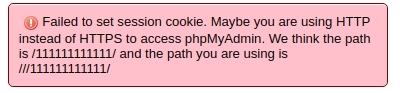
Failed to set session cookie. Maybe you are using HTTP instead of HTTPS to access phpMyAdmin. We think the path is /C:/phpmyadmin/ and the path you are using is /phpmyadmin/
phpmyadmin is installed in c:/<dir a>/<dir b>/<dir c>/phpmyadmin
Btazbt
on 13 Dec 2019
Thank you @Btazbt for this precious information
williamdes
on 16 Dec 2019
@CallMarl can you try to apply the patch ?
williamdes
on 16 Dec 2019
I have this error and my phpinfo shows
Directive | Local Value | Master Value
-- | -- | --
session.save_handler | files | files
session.save_path | no value | no value
williamdes
on 6 Jan 2020
I am stuck in a situation where a browser can not login anymore and when using private browsing it works fine.
"Failed to set session cookie. Maybe you are using HTTP instead of HTTPS to access phpMyAdmin."
Currently searching for the reason.
williamdes
on 7 Jan 2020


So if you have a secure cookie in your storage you will not be able to overwrite it and you will have the message for ever.
williamdes
on 7 Jan 2020
I had this problem and was able to find a fix in my situation:
phpMyAdmin Version 5.0.1 (but tried with 4.9.0 as well)
OS: Windows 10
web server: Apache v2.4.41 with fcgid v2.3.10
PHP: 7.4.3
PMA is installed in C:\Apache24\htdocs\phpmyadmin (virtualhost http://phpmyadmin.localhost) but when I tried the patch it returned "C:\" as the path.
The fix was to remove "FcgidFixPathinfo 1" from my httpd.conf.
FixPathinfo 1 is a common setting, so I guess this should be fixed on the PMA side.
 mrror
on 16 Mar 2020
mrror
on 16 Mar 2020
Thank you @mrror !
https://httpd.apache.org/mod_fcgid/mod/mod_fcgid.html#fcgidfixpathinfo
williamdes
on 16 Mar 2020
I can't find FcgidFixPathinfo 1 inside my httpd.conf file. I am still having this issue. However, I am using a reverse proxy using nginx. The weird thing is that I can access and login using HTTP but not USING HTTPS
 fahadshery
on 22 Mar 2020
fahadshery
on 22 Mar 2020
@fahadshery Could you post your nginx config file ?
williamdes
on 22 Mar 2020
my nginx.conf as requested:
user nobody;
worker_processes auto;
events {
worker_connections 1024;
}
http {
include mime.types;
default_type application/octet-stream;
server_tokens off;
sendfile on;
keepalive_timeout 65;
# Redirect all HTTP traffic to HTTPS
server {
listen 80 default_server;
listen [::]:80 default_server;
return 301 https://$host$request_uri;
}
# Import server blocks for all subdomains
include "vdomains/*.conf";
}
~
here is virtual domain conf inside vdomains/
server {
listen 443 ssl http2;
server_name fuse.example.com;
access_log /var/log/nginx/fuse.access.log;
error_log /var/log/nginx/fuse.error.log;
include snippets/example.com.cert.conf;
include snippets/ssl_common.conf;
location / {
include snippets/proxy_params.conf;
include snippets/internal-access-rules.conf;
proxy_pass "http://192.168.0.101/phpmyadmin/";
}
}
example.com.cert.conf contains ssl certs paths etc.
here is the 'ssl_common.conf`
ssl_prefer_server_ciphers off;
ssl_session_timeout 1d;
# Disable SSLv2 and SSLv3 (BEAST and POODLE attacks)
ssl_protocols TLSv1 TLSv1.1 TLSv1.2;
# Enable our strong DH Key
ssl_dhparam /etc/ssl/dh4096.pem;
# Cipher-list for PFS.
ssl_ciphers "EECDH+AESGCM:EDH+AESGCM:ECDHE-RSA-AES128-GCM-SHA256:AES256+EECDH:DHE-RSA-AES128-GCM-SHA256:AES256+EDH:ECDHE-RSA-AES256-GCM-SHA384:DHE-RSA-AES256-GCM-SHA384:ECDHE-RSA-AES256-SHA384:ECDHE-RSA-A
ES128-SHA256:ECDHE-RSA-AES256-SHA:ECDHE-RSA-AES128-SHA:DHE-RSA-AES256-SHA256:DHE-RSA-AES128-SHA256:DHE-RSA-AES256-SHA:DHE-RSA-AES128-SHA:ECDHE-RSA-DES-CBC3-SHA:EDH-RSA-DES-CBC3-SHA:AES256-GCM-SHA384:AES12
8-GCM-SHA256:AES256-SHA256:AES128-SHA256:AES256-SHA:AES128-SHA:DES-CBC3-SHA:HIGH:!aNULL:!eNULL:!EXPORT:!DES:!MD5:!PSK:!RC4";
# Requires nginx => 1.3.7
resolver local_resolver_ip_address_here valid=300s;
resolver_timeout 5s;
# HSTS Support
add_header Strict-Transport-Security "max-age=63072000;includeSubdomains; preload";
here is the proxy_params.conf:
proxy_set_header Host $host;
proxy_set_header X-Real-IP $remote_addr;
proxy_set_header X-Forwarded-For $proxy_add_x_forwarded_for;
proxy_set_header X-Forwarded-Proto $scheme;
proxy_set_header X-Forwarded-Host $server_name;
proxy_set_header X-Forwarded-Ssl on;
proxy_set_header Upgrade $http_upgrade;
proxy_set_header Connection "upgrade";
proxy_http_version 1.1;
I can access and login with no issues at: http://192.168.0.101/phpmyadmin/
The page loads at: fuse.example.com. But doesn't let me login and throws the error Failed to set session cookie. Maybe you are using HTTP instead of HTTPS to access phpMyAdmin.
fahadshery
on 22 Mar 2020
@fahadshery I would recommend you to try removing headers to find the faulty one
Let me know when you found the right one so I can know if we need to fix something ;)
proxy_set_header X-Real-IP $remote_addr;
proxy_set_header X-Forwarded-For $proxy_add_x_forwarded_for;
proxy_set_header X-Forwarded-Proto $scheme;
proxy_set_header X-Forwarded-Host $server_name;
proxy_set_header X-Forwarded-Ssl on;
On last thing, before any change please try the latest 5.0 version (5.0.2)
williamdes
on 22 Mar 2020
I can't take off:
proxy_set_header X-Forwarded-Proto $scheme;
Because it gives me the error:
There is a mismatch between HTTPS indicated on the server and client. This can lead to a non working phpMyAdmin or a security risk. Please fix your server configuration to indicate HTTPS properly.
I have checked one by one taking out the rest, still getting the same error.
I will try the latest 5 version and report back
fahadshery
on 23 Mar 2020
I just downloaded and installed the latest pma 5.0.2. But getting internal 500 error. Here is the log:
[Mon Mar 23 13:40:42.983664 2020] [php7:error] [pid 75767] [client 192.168.0.140:54512] PHP Fatal error: Uncaught Error: Call to undefined function Symfony\\Component\\DependencyInjection\\hash() in /usr/local/www/apache24/data/phpMyAdmin/vendor/symfony/dependency-injection/ContainerBuilder.php:1573\nStack trace:\n#0 /usr/local/www/apache24/data/phpMyAdmin/vendor/symfony/dependency-injection/Loader/YamlFileLoader.php(150): Symfony\\Component\\DependencyInjection\\ContainerBuilder::hash('/usr/local/www/...')\n#1 /usr/local/www/apache24/data/phpMyAdmin/libraries/common.inc.php(94): Symfony\\Component\\DependencyInjection\\Loader\\YamlFileLoader->load('../services.yml')\n#2 /usr/local/www/apache24/data/phpMyAdmin/index.php(23): require_once('/usr/local/www/...')\n#3 {main}\n thrown in /usr/local/www/apache24/data/phpMyAdmin/vendor/symfony/dependency-injection/ContainerBuilder.php on line 1573
~@fahadshery are you using a php 7 version?~
Did you extract the zip correctly?
williamdes
on 23 Mar 2020
I resolved the issue by installing:
pkg install php72-session php72-hash
I can now load and login using HTTP locally i.e. http://192.168.0.11/phpMyAdmin
But getting the same error via HTTPS.
Here is httpd -V
Server version: Apache/2.4.41 (FreeBSD)
Server built: unknown
Server's Module Magic Number: 20120211:88
Server loaded: APR 1.7.0, APR-UTIL 1.6.1
Compiled using: APR 1.7.0, APR-UTIL 1.6.1
Architecture: 64-bit
Server MPM: prefork
threaded: no
forked: yes (variable process count)
Server compiled with....
-D APR_HAS_SENDFILE
-D APR_HAS_MMAP
-D APR_HAVE_IPV6 (IPv4-mapped addresses disabled)
-D APR_USE_FLOCK_SERIALIZE
-D APR_USE_PTHREAD_SERIALIZE
-D SINGLE_LISTEN_UNSERIALIZED_ACCEPT
-D APR_HAS_OTHER_CHILD
-D AP_HAVE_RELIABLE_PIPED_LOGS
-D DYNAMIC_MODULE_LIMIT=256
-D HTTPD_ROOT="/usr/local"
-D SUEXEC_BIN="/usr/local/bin/suexec"
-D DEFAULT_PIDLOG="/var/run/httpd.pid"
-D DEFAULT_SCOREBOARD="/var/run/apache_runtime_status"
-D DEFAULT_ERRORLOG="/var/log/httpd-error.log"
-D AP_TYPES_CONFIG_FILE="etc/apache24/mime.types"
-D SERVER_CONFIG_FILE="etc/apache24/httpd.conf"
but you are using httpd or nginx ?
williamdes
on 23 Mar 2020
where the PMA is installed, that is a apache24. The reverse proxy box is running nginx
fahadshery
on 23 Mar 2020
Could you paste the apache2 config?
williamdes
on 23 Mar 2020
there you go:
root@fuse3:~ # cat /usr/local/etc/apache24/httpd.conf
ServerRoot "/usr/local"
#
# Listen: Allows you to bind Apache to specific IP addresses and/or
# ports, instead of the default. See also the <VirtualHost>
# directive.
#
# Change this to Listen on specific IP addresses as shown below to
# prevent Apache from glomming onto all bound IP addresses.
#
#Listen 12.34.56.78:80
Listen 80
#
# Dynamic Shared Object (DSO) Support
#
# To be able to use the functionality of a module which was built as a DSO you
# have to place corresponding `LoadModule' lines at this location so the
# directives contained in it are actually available _before_ they are used.
# Statically compiled modules (those listed by `httpd -l') do not need
# to be loaded here.
#
# Example:
# LoadModule foo_module modules/mod_foo.so
#
#LoadModule mpm_event_module libexec/apache24/mod_mpm_event.so
LoadModule mpm_prefork_module libexec/apache24/mod_mpm_prefork.so
#LoadModule mpm_worker_module libexec/apache24/mod_mpm_worker.so
LoadModule authn_file_module libexec/apache24/mod_authn_file.so
#LoadModule authn_dbm_module libexec/apache24/mod_authn_dbm.so
#LoadModule authn_anon_module libexec/apache24/mod_authn_anon.so
#LoadModule authn_dbd_module libexec/apache24/mod_authn_dbd.so
#LoadModule authn_socache_module libexec/apache24/mod_authn_socache.so
LoadModule authn_core_module libexec/apache24/mod_authn_core.so
LoadModule authz_host_module libexec/apache24/mod_authz_host.so
LoadModule authz_groupfile_module libexec/apache24/mod_authz_groupfile.so
LoadModule authz_user_module libexec/apache24/mod_authz_user.so
#LoadModule authz_dbm_module libexec/apache24/mod_authz_dbm.so
#LoadModule authz_owner_module libexec/apache24/mod_authz_owner.so
#LoadModule authz_dbd_module libexec/apache24/mod_authz_dbd.so
LoadModule authz_core_module libexec/apache24/mod_authz_core.so
#LoadModule authnz_fcgi_module libexec/apache24/mod_authnz_fcgi.so
LoadModule access_compat_module libexec/apache24/mod_access_compat.so
LoadModule auth_basic_module libexec/apache24/mod_auth_basic.so
#LoadModule auth_form_module libexec/apache24/mod_auth_form.so
#LoadModule auth_digest_module libexec/apache24/mod_auth_digest.so
#LoadModule allowmethods_module libexec/apache24/mod_allowmethods.so
#LoadModule file_cache_module libexec/apache24/mod_file_cache.so
#LoadModule cache_module libexec/apache24/mod_cache.so
#LoadModule cache_disk_module libexec/apache24/mod_cache_disk.so
#LoadModule cache_socache_module libexec/apache24/mod_cache_socache.so
#LoadModule socache_shmcb_module libexec/apache24/mod_socache_shmcb.so
#LoadModule socache_dbm_module libexec/apache24/mod_socache_dbm.so
#LoadModule socache_memcache_module libexec/apache24/mod_socache_memcache.so
#LoadModule watchdog_module libexec/apache24/mod_watchdog.so
#LoadModule macro_module libexec/apache24/mod_macro.so
#LoadModule dbd_module libexec/apache24/mod_dbd.so
#LoadModule dumpio_module libexec/apache24/mod_dumpio.so
#LoadModule buffer_module libexec/apache24/mod_buffer.so
#LoadModule data_module libexec/apache24/mod_data.so
#LoadModule ratelimit_module libexec/apache24/mod_ratelimit.so
LoadModule reqtimeout_module libexec/apache24/mod_reqtimeout.so
#LoadModule ext_filter_module libexec/apache24/mod_ext_filter.so
#LoadModule request_module libexec/apache24/mod_request.so
#LoadModule include_module libexec/apache24/mod_include.so
LoadModule filter_module libexec/apache24/mod_filter.so
#LoadModule reflector_module libexec/apache24/mod_reflector.so
#LoadModule substitute_module libexec/apache24/mod_substitute.so
#LoadModule sed_module libexec/apache24/mod_sed.so
#LoadModule charset_lite_module libexec/apache24/mod_charset_lite.so
#LoadModule deflate_module libexec/apache24/mod_deflate.so
#LoadModule xml2enc_module libexec/apache24/mod_xml2enc.so
#LoadModule proxy_html_module libexec/apache24/mod_proxy_html.so
LoadModule mime_module libexec/apache24/mod_mime.so
LoadModule log_config_module libexec/apache24/mod_log_config.so
#LoadModule log_debug_module libexec/apache24/mod_log_debug.so
#LoadModule log_forensic_module libexec/apache24/mod_log_forensic.so
#LoadModule logio_module libexec/apache24/mod_logio.so
LoadModule env_module libexec/apache24/mod_env.so
#LoadModule mime_magic_module libexec/apache24/mod_mime_magic.so
#LoadModule cern_meta_module libexec/apache24/mod_cern_meta.so
#LoadModule expires_module libexec/apache24/mod_expires.so
LoadModule headers_module libexec/apache24/mod_headers.so
#LoadModule usertrack_module libexec/apache24/mod_usertrack.so
#LoadModule unique_id_module libexec/apache24/mod_unique_id.so
LoadModule setenvif_module libexec/apache24/mod_setenvif.so
LoadModule version_module libexec/apache24/mod_version.so
#LoadModule remoteip_module libexec/apache24/mod_remoteip.so
#LoadModule proxy_module libexec/apache24/mod_proxy.so
#LoadModule proxy_connect_module libexec/apache24/mod_proxy_connect.so
#LoadModule proxy_ftp_module libexec/apache24/mod_proxy_ftp.so
#LoadModule proxy_http_module libexec/apache24/mod_proxy_http.so
#LoadModule proxy_fcgi_module libexec/apache24/mod_proxy_fcgi.so
#LoadModule proxy_scgi_module libexec/apache24/mod_proxy_scgi.so
#LoadModule proxy_uwsgi_module libexec/apache24/mod_proxy_uwsgi.so
#LoadModule proxy_fdpass_module libexec/apache24/mod_proxy_fdpass.so
#LoadModule proxy_wstunnel_module libexec/apache24/mod_proxy_wstunnel.so
#LoadModule proxy_ajp_module libexec/apache24/mod_proxy_ajp.so
#LoadModule proxy_balancer_module libexec/apache24/mod_proxy_balancer.so
#LoadModule proxy_express_module libexec/apache24/mod_proxy_express.so
#LoadModule proxy_hcheck_module libexec/apache24/mod_proxy_hcheck.so
#LoadModule session_module libexec/apache24/mod_session.so
#LoadModule session_cookie_module libexec/apache24/mod_session_cookie.so
#LoadModule session_crypto_module libexec/apache24/mod_session_crypto.so
#LoadModule session_dbd_module libexec/apache24/mod_session_dbd.so
#LoadModule slotmem_shm_module libexec/apache24/mod_slotmem_shm.so
#LoadModule slotmem_plain_module libexec/apache24/mod_slotmem_plain.so
#LoadModule ssl_module libexec/apache24/mod_ssl.so
#LoadModule dialup_module libexec/apache24/mod_dialup.so
#LoadModule http2_module libexec/apache24/mod_http2.so
#LoadModule proxy_http2_module libexec/apache24/mod_proxy_http2.so
#LoadModule lbmethod_byrequests_module libexec/apache24/mod_lbmethod_byrequests.so
#LoadModule lbmethod_bytraffic_module libexec/apache24/mod_lbmethod_bytraffic.so
#LoadModule lbmethod_bybusyness_module libexec/apache24/mod_lbmethod_bybusyness.so
#LoadModule lbmethod_heartbeat_module libexec/apache24/mod_lbmethod_heartbeat.so
LoadModule unixd_module libexec/apache24/mod_unixd.so
#LoadModule heartbeat_module libexec/apache24/mod_heartbeat.so
#LoadModule heartmonitor_module libexec/apache24/mod_heartmonitor.so
#LoadModule dav_module libexec/apache24/mod_dav.so
LoadModule status_module libexec/apache24/mod_status.so
LoadModule autoindex_module libexec/apache24/mod_autoindex.so
#LoadModule asis_module libexec/apache24/mod_asis.so
#LoadModule info_module libexec/apache24/mod_info.so
<IfModule !mpm_prefork_module>
#LoadModule cgid_module libexec/apache24/mod_cgid.so
</IfModule>
<IfModule mpm_prefork_module>
#LoadModule cgi_module libexec/apache24/mod_cgi.so
</IfModule>
#LoadModule dav_fs_module libexec/apache24/mod_dav_fs.so
#LoadModule dav_lock_module libexec/apache24/mod_dav_lock.so
#LoadModule vhost_alias_module libexec/apache24/mod_vhost_alias.so
#LoadModule negotiation_module libexec/apache24/mod_negotiation.so
LoadModule dir_module libexec/apache24/mod_dir.so
#LoadModule imagemap_module libexec/apache24/mod_imagemap.so
#LoadModule actions_module libexec/apache24/mod_actions.so
#LoadModule speling_module libexec/apache24/mod_speling.so
#LoadModule userdir_module libexec/apache24/mod_userdir.so
LoadModule alias_module libexec/apache24/mod_alias.so
#LoadModule rewrite_module libexec/apache24/mod_rewrite.so
LoadModule php7_module libexec/apache24/libphp7.so
# Third party modules
IncludeOptional etc/apache24/modules.d/[0-9][0-9][0-9]_*.conf
<IfModule unixd_module>
#
# If you wish httpd to run as a different user or group, you must run
# httpd as root initially and it will switch.
#
# User/Group: The name (or #number) of the user/group to run httpd as.
# It is usually good practice to create a dedicated user and group for
# running httpd, as with most system services.
#
User www
Group www
</IfModule>
# 'Main' server configuration
#
# ServerAdmin: Your address, where problems with the server should be
# e-mailed. This address appears on some server-generated pages, such
# as error documents. e.g. [email protected]
#
ServerAdmin [email protected]
#
# If your host doesn't have a registered DNS name, enter its IP address here.
#
#ServerName www.example.com:80
ServerName localhost
#
# Deny access to the entirety of your server's filesystem. You must
# explicitly permit access to web content directories in other
# <Directory> blocks below.
#
<Directory />
AllowOverride none
Require all denied
</Directory>
#
# DocumentRoot: The directory out of which you will serve your
# documents. By default, all requests are taken from this directory, but
# symbolic links and aliases may be used to point to other locations.
#
DocumentRoot "/usr/local/www/apache24/data"
<Directory "/usr/local/www/apache24/data">
#
# Possible values for the Options directive are "None", "All",
# or any combination of:
# Indexes Includes FollowSymLinks SymLinksifOwnerMatch ExecCGI MultiViews
#
# Note that "MultiViews" must be named *explicitly* --- "Options All"
# doesn't give it to you.
#
# The Options directive is both complicated and important. Please see
# http://httpd.apache.org/docs/2.4/mod/core.html#options
# for more information.
#
Options Indexes FollowSymLinks
#
# AllowOverride controls what directives may be placed in .htaccess files.
# It can be "All", "None", or any combination of the keywords:
# AllowOverride FileInfo AuthConfig Limit
#
AllowOverride None
#
# Controls who can get stuff from this server.
#
Require all granted
</Directory>
#
# DirectoryIndex: sets the file that Apache will serve if a directory
# is requested.
#
<IfModule dir_module>
DirectoryIndex index.php index.html
</IfModule>
#
# The following lines prevent .htaccess and .htpasswd files from being
# viewed by Web clients.
#
<Files ".ht*">
Require all denied
</Files>
#
# ErrorLog: The location of the error log file.
# If you do not specify an ErrorLog directive within a <VirtualHost>
# container, error messages relating to that virtual host will be
# logged here. If you *do* define an error logfile for a <VirtualHost>
# container, that host's errors will be logged there and not here.
#
ErrorLog "/var/log/httpd-error.log"
#
# LogLevel: Control the number of messages logged to the error_log.
# Possible values include: debug, info, notice, warn, error, crit,
# alert, emerg.
#
LogLevel warn
<IfModule log_config_module>
#
# The following directives define some format nicknames for use with
# a CustomLog directive (see below).
#
LogFormat "%h %l %u %t \"%r\" %>s %b \"%{Referer}i\" \"%{User-Agent}i\"" combined
LogFormat "%h %l %u %t \"%r\" %>s %b" common
<IfModule logio_module>
# You need to enable mod_logio.c to use %I and %O
LogFormat "%h %l %u %t \"%r\" %>s %b \"%{Referer}i\" \"%{User-Agent}i\" %I %O" combinedio
</IfModule>
#
# The location and format of the access logfile (Common Logfile Format).
# If you do not define any access logfiles within a <VirtualHost>
# container, they will be logged here. Contrariwise, if you *do*
# define per-<VirtualHost> access logfiles, transactions will be
# logged therein and *not* in this file.
#
CustomLog "/var/log/httpd-access.log" common
#
# If you prefer a logfile with access, agent, and referer information
# (Combined Logfile Format) you can use the following directive.
#
#CustomLog "/var/log/httpd-access.log" combined
</IfModule>
<IfModule alias_module>
#
# ScriptAlias: This controls which directories contain server scripts.
# ScriptAliases are essentially the same as Aliases, except that
# documents in the target directory are treated as applications and
# run by the server when requested rather than as documents sent to the
# client. The same rules about trailing "/" apply to ScriptAlias
# directives as to Alias.
#
ScriptAlias /cgi-bin/ "/usr/local/www/apache24/cgi-bin/"
</IfModule>
<IfModule cgid_module>
#
# ScriptSock: On threaded servers, designate the path to the UNIX
# socket used to communicate with the CGI daemon of mod_cgid.
#
#Scriptsock cgisock
</IfModule>
#
# "/usr/local/www/apache24/cgi-bin" should be changed to whatever your ScriptAliased
# CGI directory exists, if you have that configured.
#
<Directory "/usr/local/www/apache24/cgi-bin">
AllowOverride None
Options None
Require all granted
</Directory>
<IfModule headers_module>
#
# Avoid passing HTTP_PROXY environment to CGI's on this or any proxied
# backend servers which have lingering "httpoxy" defects.
# 'Proxy' request header is undefined by the IETF, not listed by IANA
#
RequestHeader unset Proxy early
</IfModule>
<IfModule mime_module>
#
# TypesConfig points to the file containing the list of mappings from
# filename extension to MIME-type.
#
TypesConfig etc/apache24/mime.types
# If the AddEncoding directives above are commented-out, then you
# probably should define those extensions to indicate media types:
#
AddType application/x-compress .Z
AddType application/x-gzip .gz .tgz
#
# AddHandler allows you to map certain file extensions to "handlers":
# actions unrelated to filetype. These can be either built into the server
# or added with the Action directive (see below)
#
# To use CGI scripts outside of ScriptAliased directories:
# (You will also need to add "ExecCGI" to the "Options" directive.)
#
#AddHandler cgi-script .cgi
# For type maps (negotiated resources):
#AddHandler type-map var
#
# Filters allow you to process content before it is sent to the client.
#
# To parse .shtml files for server-side includes (SSI):
# (You will also need to add "Includes" to the "Options" directive.)
#
#AddType text/html .shtml
#AddOutputFilter INCLUDES .shtml
</IfModule>
# Configure mod_proxy_html to understand HTML4/XHTML1
<IfModule proxy_html_module>
Include etc/apache24/extra/proxy-html.conf
</IfModule>
# Secure (SSL/TLS) connections
#Include etc/apache24/extra/httpd-ssl.conf
#
# Note: The following must must be present to support
# starting without SSL on platforms with no /dev/random equivalent
# but a statically compiled-in mod_ssl.
#
<IfModule ssl_module>
SSLRandomSeed startup builtin
SSLRandomSeed connect builtin
</IfModule>
Include etc/apache24/Includes/*.conf
<FilesMatch "\.php$">
SetHandler application/x-httpd-php
</FilesMatch>
<FilesMatch "\.phps$">
SetHandler application/x-httpd-php-source
</FilesMatch>
Thank you, I will do my best to have a docker version running of your context and try to help you find out the issue
williamdes
on 23 Mar 2020
'''
Failed to set session cookie. Maybe you are using HTTP instead of HTTPS to access phpMyAdmin.
'''
fahadshery
on 6 Apr 2020
I'm getting this error when logging in - Failed to set session cookie. Maybe you are using HTTP instead of HTTPS to access phpMyAdmin. (running v5.0.2). I hit "login" again, and it always works fine. I've always had this issue (for years).
I think I only get this error when the previous session was left to time out. I don't appear to be able to reproduce it otherwise.
What may, or may not, be relevant: I see two phpMyAdmin_https cookies being set, with identical paths but with different values, when it logs me in successfully (headers below, partially obfuscated). That seems to me to be behaviour that can only end in tears, since the browser doesn't really know which to pick. I'd suspect it's a bug.
If not entirely clear from the below - I run phpMyAdmin on its own domain-name, at root.
Server: Apache
Set-Cookie: phpMyAdmin_https=l568bccccccccccccccccc; path=/; secure; HttpOnly
Set-Cookie: goto_https=deleted; expires=Thu, 01-Jan-1970 00:00:01 GMT; Max-Age=0; path=/; secure
Set-Cookie: back_https=deleted; expires=Thu, 01-Jan-1970 00:00:01 GMT; Max-Age=0; path=/; secure
Set-Cookie: phpMyAdmin_https=4sgldalcccccccccccccccc; path=/; secure; HttpOnly
Set-Cookie: pmaUser-1_https=ccccccccccccc; expires=Sun, 17-May-2020 09:34:51 GMT; Max-Age=2592000; path=/; secure; HttpOnly
Set-Cookie: pmaAuth-1_https=cccccccccccccc; path=/; secure; HttpOnly
Vary: Accept-Encoding
 jamescridland
on 17 Apr 2020
jamescridland
on 17 Apr 2020
That seems to me to be behaviour that can only end in tears, since the browser doesn't really know which to pick. I'd suspect it's a bug.
The browser will pick HTTPS ones on HTTPS connexions and non _https ones on a normal connexion because of the "secure" attribute limiting access. (I did the phpMyAdmin implementation and read the RFC about that behavior ;) )
I think I only get this error when the previous session was left to time out. I don't appear to be able to reproduce it otherwise.
This is what causes the error message :)
williamdes
on 17 Apr 2020
Set-Cookie: phpMyAdmin_https=l568bccccccccccccccccc; path=/; secure; HttpOnly
Set-Cookie: phpMyAdmin_https=4sgldalccccccccccccccc; path=/; secure; HttpOnly
Both are marked "secure", both have the same path, both have the same name, both marked HttpOnly (i.e. unavailable to JavaScript) - in short, both are identical. This is not serving me one securely and one non-securely.
My server forces all traffic to https.
Are you explaining that this is expected behaviour?
jamescridland
on 17 Apr 2020
Are you explaining that this is expected behaviour?
Having 2 identical Set-Cookie is a bug and is not expected, thank you for reporting this.
This is not serving me one securely and one non-securely.
"My server forces all traffic to https." so you will only have a secure one ;)
williamdes
on 17 Apr 2020
"My server forces all traffic to https." so you will only have a secure one ;)
Or two, if this code has anything to do with it... ;)
Incidentally, the identical Set-Cookie statements happen with every page load.
(That doesn't explain the error message, by the way. I'll try to remember to trace it again next time it's timed out.)
jamescridland
on 17 Apr 2020
"My server forces all traffic to https." so you will only have a secure one ;)
Or two, if this code has anything to do with it... ;)
Incidentally, the identical Set-Cookie statements happen with every page load.
(That doesn't explain the error message, by the way. I'll try to remember to trace it again next time it's timed out.)
Thank you, if you find something I will be very happy to be able to fix this bug with your help :pray:
williamdes
on 17 Apr 2020
I think I'm nearer a method of reproducing this issue:
Failed to set session cookie. Maybe you are using HTTP instead of HTTPS to access phpMyAdmin.
I was previously signed in with, say, user2. That connection timed out overnight. I went to sign in with user1.
In Chrome's network tab, I can see the correct username/password for user1 being submitted. There's a set_session value being submitted of n5fp2s0CCCCCCCCCCC7n200h0
My login request also sends a set of cookies, which are:
pma_lang=en; pmaUser-1=%7B%22iv%22%3A%22VHpSBd9x%5C%2FRKVXrQxVcRnNQ%3D%3D%22%2C%22mac%22%3A%22dc9cc12241cabf6f52CCCCCCCCCCa4be8139e6%22%2C%22payload%22%3A%22D67EibqhopN4eKIrfwKakA%3D%3D%22%7D; pma_lang_https=en; pmaUser-1_https=%7B%22iv%22%3A%223pEOylJIHZ3vkugWqiXcOQ%3D%3D%22%2C%22mac%22%3A%2202e4f87f40f7eb3663cCCCCCCCCCCCC290587%22%2C%22payload%22%3A%22YoQGh%5C%2FlGGBjiPfQfyhWScg%3D%3D%22%7D; phpMyAdmin_https=q5c0uiihemCCCCCCCC20jcd7u
The response back includes four cookies:
Set-Cookie: phpMyAdmin_https=q5c0uiihemCCCCCCCCCCcd7u; path=/; secure; HttpOnly
Set-Cookie: goto_https=deleted; expires=Thu, 01-Jan-1970 00:00:01 GMT; Max-Age=0; path=/; secure
Set-Cookie: back_https=deleted; expires=Thu, 01-Jan-1970 00:00:01 GMT; Max-Age=0; path=/; secure
Set-Cookie: phpMyAdmin_https=tb1oub2mCCCCCCCCCCqu197; path=/; secure; HttpOnly
So - two identical phpMyAdmin_https cookies. One is a replica of the (expired) session cookie that I sent with my signin (starting q5c0). That session cookie is for a different user, though. The other one is a new-looking one.
Upon repeating the login attempt, there's a set_session value being submitted of tb1oubCCCCCCCCi3cqu197
Cookies being sent this time are...
pma_lang=en; pmaUser-1=%7B%22iv%22%3A%22VHpSBd9x%5C%2FRKVXrQxVcRnNQ%3D%3D%22%2C%22mac%22%3A%22dc9cc12241cabf6CCCCCCCCCCCCCCCe8139e6%22%2C%22payload%22%3A%22D67EibqhopN4eKIrfwKakA%3D%3D%22%7D; pma_lang_https=en; pmaUser-1_https=%7B%22iv%22%3A%223pEOylJIHZ3vkugWqiXcOQ%3D%3D%22%2C%22mac%22%3A%2202e4f87f40f7eCCCCCCCCCCCCCCCee290587%22%2C%22payload%22%3A%22YoQGh%5C%2FlGGBjiPfQfyhWScg%3D%3D%22%7D; phpMyAdmin_https=tb1oub2mbCCCCCCCCCqu197
...and this time, I'm given these cookies in return, in a successful 302 to the dashboard
Set-Cookie: phpMyAdmin_https=tb1oub2CCCCCCCCCCCCCCcqu197; path=/; secure; HttpOnly
Set-Cookie: goto_https=deleted; expires=Thu, 01-Jan-1970 00:00:01 GMT; Max-Age=0; path=/; secure
Set-Cookie: back_https=deleted; expires=Thu, 01-Jan-1970 00:00:01 GMT; Max-Age=0; path=/; secure
Set-Cookie: phpMyAdmin_https=pek70ge9CCCCCCCCCCCCCulfop5; path=/; secure; HttpOnly
Set-Cookie: pmaUser-1_https=%7B%22iv%22%3A%22KkYlZLMlHui7u%5C%2FDFFOBmqw%3D%3D%22%2C%22mac%22%3A%22ef59f764732eCCCCCCCCCCCC776d6286f%22%2C%22payload%22%3A%22KYqtESg7PQ9jAlt4k%2BAdeQ%3D%3D%22%7D; expires=Thu, 28-May-2020 03:17:57 GMT; Max-Age=2592000; path=/; secure; HttpOnly
Set-Cookie: pmaAuth-1_https=%7B%22iv%22%3A%22gKuCaQPKTiZlJVhgqEkPyA%3D%3D%22%2C%22mac%22%3A%22f01b12563d13f4a7CCCCCCCCCCC8caf6ae%22%2C%22payload%22%3A%22xAUZuBuaV1alP%5C%2FUjfUvts1kTlobNHbmdYctMZOy0EIA%3D%22%7D; path=/; secure; HttpOnly
In this case, I'm still being sent two identical phpMyAdmin_https cookies, which looks wrong. But in this case, the session cookie belongs to the same user, user1, that I'm trying to log in with.
Is this helpful, @williamdes ?
jamescridland
on 28 Apr 2020
I just made a fresh install of phpMyAdmin on Opensuse 43 and keep getting this cookie error. Been working on it for 2 hours now and simply can't login. Clearing cookies/cache doesn't work. Incognito doesn't work. Changing inc.config.php doesn't work either. Running version 4.9.2.
 dspaan
on 14 May 2020
dspaan
on 14 May 2020
@dspaan are you using Apache?
Could you post the config here?
williamdes
on 14 May 2020
Yes, Apache. For some reason it's working now after changed config.inc.php with auth_type config and a blowfish key. Which config do you want to see? /etc/apache2/httpd.conf?
dspaan
on 14 May 2020
Yes, Apache. For some reason it's working now after changed config.inc.php with auth_type config and a blowfish key. Which config do you want to see? /etc/apache2/httpd.conf?
Yeah it "works" because it does not use cookies (if I am right)
Any non standard config file you modified if possible, did you follow a tutorial ?
williamdes
on 14 May 2020
No i didn't follow a tutorial. I only modified confic.inc.php by reading the official phpmyadmin documentation. I tried 3 different browsers. Can i do anything to help figure out what's causing this?
dspaan
on 14 May 2020
Okay then:
- Do you use a proxy
- Is your installation local
- Operating System
- version of apache
- version of anything else between the browser and the server
- version of php, php-fpm, or anything related
I think we will have a good starting point here :)
Could you apply https://github.com/phpmyadmin/phpmyadmin/issues/15634#issuecomment-564229694 and let us know the error message ?
williamdes
on 14 May 2020
No proxy
Install is on an OpenSUSE Leap 43.1 server in the cloud, not local.
Apache/2.4.35 (Linux/SUSE)
I tested from an RDP machine and my local laptop, nothing in between.
PHP Version 5.5.14
I can see php-fpm is running but no idea how to find the version.
I just replaced my modified config.inc.php with the sample again and reloaded and to my amazement i can login now again, no idea how that is possible. It also works from an incognito window. So i can't reproduce the error right now.
dspaan
on 14 May 2020
Ok i have tried to reproduce the problem and installed phpMyAdmin on two other servers but it worked flawlessly. I noticed the config.sample.inc.php was owned by root:root and the non-working configuration had wwwrun:www so i changed the ownership of that file to wwwrun:www and my install broke immediately again. Now i changed it back to root:root but it's still broken and can't get it working anymore even by using config.inc.php with blowfish/config auth it still not working...........mind is blown. I broke my install again.
I have also installed the suggested patch and then i get this error output:
Failed to set session cookie. Maybe you are using HTTP instead of HTTPS to access phpMyAdmin. We think the path is /phpMyAdmin/ and the path you are using is //phpMyAdmin/
dspaan
on 15 May 2020
No idea what's happening but my install is still broken. I made a tar.gz from the /srv/www/htdocs/phpMyAdmin of a server where it is working fine and exacted that on the problem server but it's still not working.
dspaan
on 15 May 2020
And if you chmod -R 777 phpMyAdminFolder does it solve this issue ?
williamdes
on 16 May 2020
Yeah i already tried that and lots of other permission combinations. But for whatever reason right now it's working again while during my last post it didn't and i did not change anything in between. So maybe a reboot or another mechanism fixed it. Even though i restarted apache after every change i made.
dspaan
on 18 May 2020
Yeah i already tried that and lots of other permission combinations. But for whatever reason right now it's working again while during my last post it didn't and i did not change anything in between. So maybe a reboot or another mechanism fixed it. Even though i restarted apache after every change i made.
Quite strange, thank you for the feedback.
I hope to find out someday what goes wrong.
IMO we should split the message and add debug infos
williamdes
on 19 May 2020
Example URL: https://pma.ssl.local///////111111111111/
This is a bad thought.
You must be allowed to use URIs with consecutive characters/.
Source: https://github.com/phpmyadmin/phpmyadmin/issues/15634#issuecomment-564260553
@nijel did you intentionally remove consecutive characters / in 3b6ed1f9ecaab86c488d106b1588d7683a6d53ef ?
williamdes
on 19 May 2020
I am also having this issue with version 4.9.5 running on Ubuntu 18.04, Apache 2.4.29, PHP 7.2.24 over HTTP (not HTTPS). I use multiple servers in my config.inc.php script, 4 specifically all configured with auth_type = cookie.
Doesn't let me login via Chrome (on Windows 10) always giving the error Failed to set session cookie. Maybe you are using HTTP instead of HTTPS to access phpMyAdmin.. I've tried multiple times. It works if you go Incognito on Chrome, then it lets you login.
I've ensured no addons to Chrome are causing the issue. Disabled all.
 bakhtiya
on 21 May 2020
bakhtiya
on 21 May 2020
@bakhtiya could you delete all the cookies for the "website" phpMyAdmin is on, in the developer console ?
williamdes
on 21 May 2020
@williamdes - I'm still getting intermittent errors when trying to log in on Chrome. When it manifests itself, the behaviour is always "Failed to set session cookie. Maybe you are using HTTP instead of HTTPS" on the first attempt; and then it always works on the second attempt.
This does not happen using Firefox, and only appears to be an issue in Chrome. Above, I highlight that PHPMyAdmin is sending two conflicting phpMyAdmin_https cookies on login. I can only guess that Firefox deals better with two cookies being set than Chrome does.
Is this the same bug as is being otherwise discussed here, or is it worth spinning this bug report out separately?
jamescridland
on 3 Sep 2020
Is this the same bug as is being otherwise discussed here, or is it worth spinning this bug report out separately?
It seems to be the same bug, anyone that can work out a pull-request is very welcome :)
You seem to have pointed out a bug, could you try to find the root cause ?
williamdes
on 3 Sep 2020
My bug appears to be with session management - it seems to be setting the old session, before having a change of heart and setting a new session cookie.
What I'm not fully understanding is this bit of AuthenticationSignon.php:
        foreach (['lifetime', 'path', 'domain', 'secure', 'httponly'] as $key) {
            if (isset($sessionCookieParams[$key])) {
                continue;
            }

            $sessionCookieParams[$key] = $defaultCookieParams($key);
        }

        if (isset($sessionCookieParams['samesite'])
            && ! in_array($sessionCookieParams['samesite'], ['Lax', 'Strict'])) {
                // Not a valid value for samesite
                unset($sessionCookieParams['samesite']);
        }

        if (version_compare(PHP_VERSION, '7.3.0', '>=')) {
            session_set_cookie_params($sessionCookieParams);
        }

        session_set_cookie_params(
            $sessionCookieParams['lifetime'],
            $sessionCookieParams['path'],
            $sessionCookieParams['domain'],
            $sessionCookieParams['secure'],
            $sessionCookieParams['httponly']
        );
If you have PHP v7.3.0 or above - which I do! - this would appear to set a cookie twice - once using the $sessionCookieParams full array with the potential of a 'samesite' cookie attribute, which is only available in PHP v7.3.0 and above... but THEN, if you're running PHP v7.3.0, it immediately sets the cookie all over again without that 'samesite' cookie attribute in the older format.
This is entirely unrelated, I suspect since the issue isn't setting an identical cookie twice, it's setting an identically-named cookie twice with different content. But the above would seem as if it's missing an } else { statement.
jamescridland
on 3 Sep 2020
If you have PHP v7.3.0 or above - which I do! - this would appear to set a cookie twice - once using the $sessionCookieParams full array with the potential of a 'samesite' cookie attribute, which is only available in PHP v7.3.0 and above... but THEN, if you're running PHP v7.3.0, it immediately sets the cookie all over again without that 'samesite' cookie attribute in the older format.
This is entirely unrelated, I suspect since the issue isn't setting an identical cookie twice, it's setting an identically-named cookie twice with different content. But the above would seem as if it's missing an } else { statement.
You pointed out one potential bug, I fixed it by 330747998dac27bde2d86df2190b814bfeacc823
Thank you for reporting this, I hope this will be fixed now.
williamdes
on 7 Sep 2020
To me it seems not to work ... even in phpMyAdmin 5.0.4.
 Eutychus69
on 16 Oct 2020
Eutychus69
on 16 Oct 2020
To me it seems not to work ... even in phpMyAdmin 5.0.4.
Could you open a new issue so we can discuss and find out what is wrong?
williamdes
on 16 Oct 2020
Same here.
phpMyAdmin 5.0.4
Google App Engine Standard php74
config.inc.php:
$cfg['blowfish_secret'] = 'MAKSED'; /* YOU MUST FILL IN THIS FOR COOKIE AUTH! */

/*
 * Servers configuration
 */
$i = 0;

// Change this to use the project and instance that you've created.
$host = '/cloudsql/{{ MASKED }}';
$type = 'socket';

/*
* First server
*/
$i++;
/* Authentication type */
$cfg['Servers'][$i]['auth_type'] = 'cookie';
/* Server parameters */
$cfg['Servers'][$i]['socket'] = $host;
$cfg['Servers'][$i]['connect_type'] = $type;
$cfg['Servers'][$i]['compress'] = false;
/* Select mysql if your server does not have mysqli */
$cfg['Servers'][$i]['extension'] = 'mysqli';
$cfg['Servers'][$i]['AllowNoPassword'] = false;
/*
 * End of servers configuration
 */

/*
 * Directories for saving/loading files from server
 */
$cfg['UploadDir'] = '';
$cfg['SaveDir'] = '';

/*
* Other settings
*/
$cfg['PmaNoRelation_DisableWarning'] = true;
$cfg['ExecTimeLimit'] = 60;
$cfg['CheckConfigurationPermissions'] = false;
$cfg['DefaultCharset'] = 'utf8mb4';
$cfg['TempDir'] = '/tmp';
app.yaml
service: phpmyadmin
runtime: php74

instance_class: F2

automatic_scaling:
  min_instances: 0
  max_instances: 2

handlers:

  - url: /(.+\.(ico|jpg|png|gif|htm|html|css|js))$
    static_files: \1
    upload: (.+\.(ico|jpg|png|gif|htm|html|css|js))$

  - url: .*
    script: auto
    secure: always
php.ini
google_app_engine.enable_functions = "php_uname, getmypid"
 ericsssan
on 23 Nov 2020
ericsssan
on 23 Nov 2020
Related issues
 aschuch247
·
41Comments
aschuch247
·
41Comments
 Abdallah-Fouad-X
·
39Comments
Abdallah-Fouad-X
·
39Comments
 adjerbetian
·
34Comments
adjerbetian
·
34Comments
 ntinti
·
54Comments
ntinti
·
54Comments
 bokuwaboingo
·
31Comments
bokuwaboingo
·
31Comments
Most helpful comment
My bug appears to be with session management - it seems to be setting the old session, before having a change of heart and setting a new session cookie.
What I'm not fully understanding is this bit of
AuthenticationSignon.php:If you have PHP v7.3.0 or above - which I do! - this would appear to set a cookie twice - once using the $sessionCookieParams full array with the potential of a 'samesite' cookie attribute, which is only available in PHP v7.3.0 and above... but THEN, if you're running PHP v7.3.0, it immediately sets the cookie all over again without that 'samesite' cookie attribute in the older format.
This is entirely unrelated, I suspect since the issue isn't setting an identical cookie twice, it's setting an identically-named cookie twice with different content. But the above would seem as if it's missing an
} else {statement.