PCSX2 version:
v1.5.0-dev-2671-gca68ddd0d
PCSX2 options:
Defaults
Plugins used:
GSdx-AVX2, Defaults
Description of the issue:
This change introduced a memory leak for all renderers of GSdx in rare cases such as MLB Power Pros.
How to reproduce the issue:
Boot the game, find a section with 3D rendering.
Last known version to work:
r1548, introduced in r1549
PC specifications:
[email protected], GTX 1070, Windows 10 64-Bit Home.
In GSState.cpp:
template<int i> void GSState::ApplyTEX0(GIFRegTEX0& TEX0)
{
    GL_REG("Apply TEX0_%d = 0x%x_%x", i, TEX0.u32[1], TEX0.u32[0]);

    // Handle invalid PSM here
    switch (TEX0.PSM) {
        case 3:
            TEX0.PSM = PSM_PSMT8; // International Star Soccer (menu)
            break;
        default:
            break;
    }

    // even if TEX0 did not change, a new palette may have been uploaded and will overwrite the currently queued for drawing
    bool wt = m_mem.m_clut.WriteTest(TEX0, m_env.TEXCLUT);

    // clut loading already covered with WriteTest, for drawing only have to check CPSM and CSA (MGS3 intro skybox would be drawn piece by piece without this)

    uint64 mask = 0x1f78001c3fffffffull; // TBP0 TBW PSM TW TCC TFX CPSM CSA

    if(wt || PRIM->CTXT == i && ((TEX0.u64 ^ m_env.CTXT[i].TEX0.u64) & mask))
    {
        Flush();
    }

    TEX0.CPSM &= 0xa; // 1010b

    if((TEX0.u32[0] ^ m_env.CTXT[i].TEX0.u32[0]) & 0x3ffffff) // TBP0 TBW PSM
    {
        m_env.CTXT[i].offset.tex = m_mem.GetOffset(TEX0.TBP0, TEX0.TBW, TEX0.PSM);


    }
In the bottom if statement: commenting out m_env.CTXT[i].offset.tex = m_mem.GetOffset(TEX0.TBP0, TEX0.TBW, TEX0.PSM); will resolve the memory leak.
 MrCK1
MrCK1
All 23 comments
Just a guess, but maybe we should delete m_env.CTXT[i].offset.tex before assigning something new to it?
 arcum42
on 15 Nov 2018
arcum42
on 15 Nov 2018
Test if changing https://github.com/PCSX2/pcsx2/blob/ca68ddd0d0c0854039e9cc800240dff5e603e7ea/plugins/GSdx/GSLocalMemory.cpp#L497
to
for(auto &i : m_omap) delete i.second;
works. The memory is allocated with new, not _aligned_malloc, so it should be deleted with delete, not _aligned_free.
 turtleli
on 15 Nov 2018
turtleli
on 15 Nov 2018
Unfortunately that change didn't work. Let me know if there's any other info I should post/look for.
MrCK1
on 15 Nov 2018
Maybe the problem is in the GSOffset constructor?
I see in the line:
m_env.CTXT[i].offset.tex = m_mem.GetOffset(TEX0.TBP0, TEX0.TBW, TEX0.PSM);,
which removal fixes the leak, the called function m_mem.GetOffset creates the new GSOffset object:
So maybe in the constructor at:
there is the root cause of the leak in that case.
 iMineLink
on 15 Nov 2018
iMineLink
on 15 Nov 2018
is this a memory leak like in destroy all humans and in street racing syndicate?
 RinMaru
on 15 Nov 2018
RinMaru
on 15 Nov 2018
@RinMaru Not sure. (There's a few different ways GSdx can hog memory) See if they leak with this test plugin. If they don't, it would be safe to say that those games are affected by this issue as well.
(rename the extension to .dll. Also, make sure you give it some time to sit while testing. MLB Power Pros still tends to use a bit more memory then other games do but after a minute or so, the memory usage will hover around a fixed amount.
MrCK1
on 15 Nov 2018
hmm it might be a diff issue since it has no affect on either titles CPU and ram just start choking. don't have MLB to test
RinMaru
on 15 Nov 2018
@turtleli @AlessandroVetere Would this be a logical change? I replaced _aligned_free with delete and it seems to stop the leak.
MrCK1
on 15 Nov 2018
I don't think that's correct. The memory there is allocated with _aligned_malloc, so using _aligned_free there should be correct.
https://github.com/PCSX2/pcsx2/blob/ca68ddd0d0c0854039e9cc800240dff5e603e7ea/plugins/GSdx/GSLocalMemory.cpp#L2160-L2162
turtleli
on 15 Nov 2018
@MrCK1 Maybe upload a blockdump with a savestate as well so others can help with solving the issue.
 lightningterror
on 16 Nov 2018
lightningterror
on 16 Nov 2018
Nvm; I confused an array with map.
iMineLink
on 18 Nov 2018
Is this ever deleted?
https://github.com/PCSX2/pcsx2/blob/ca68ddd0d0c0854039e9cc800240dff5e603e7ea/plugins/GSdx/GSLocalMemory.cpp#L2103
EDIT: this seems to affect only SW mode, and there the deletion of such allocation is managed by GSTextureCacheSW or GSRendererSW
iMineLink
on 18 Nov 2018
It doesn't look like it's deleted anywhere but fiddling around with that didn't have an effect.
MrCK1
on 18 Nov 2018
Here is a blockdump and savestate for anybody else who feels like testing. Unfortunately, the blockdump uncompressed is 1GB in size due to the memory leak I presume. (You'll have to press X 2-3 times to go-ingame where the leak occurs.)
(rename to .7z)
MLB_PowerPros_Blockdump.zip
MrCK1
on 19 Nov 2018
Couldn't it be that the GSLocalMemory::GetOffset function, which is the only place in the code (correct me if I'm wrong) it is allocated a new GSOffset object, just accumulates too many GSOffset objects in the m_omap cache of GSLocalMemory?
Maybe we should check if the cache has too many items and clear it before adding a new entry.
EDIT: In fact, offsets allocated with GSLocalMemory::GetOffset are never deleted during normal usage.
iMineLink
on 20 Nov 2018
FWIW

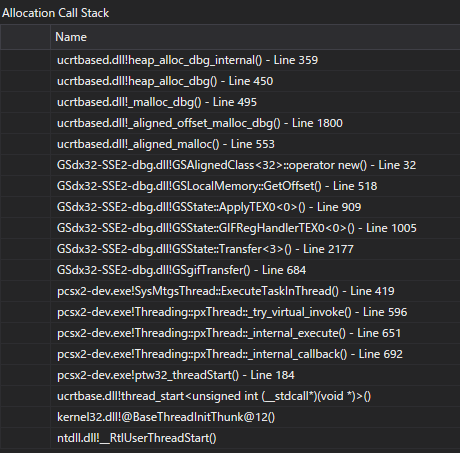
EDIT: No idea why this happens. I have games that hit this line of code and don't have this leak (at least not that I've noticed). DoC: FFVII hits that same line of code.
 tadanokojin
on 20 Nov 2018
tadanokojin
on 20 Nov 2018
Aaand the line calling GSLocalMemory::GetOffset is just the one which removed fixes the leak as indicated by OP:
In fact GSOffset objects are never deleted until the GSLocalMemory is, they are just accumulated in the cache.
So we might need to clean the cache from time to time, requiring usage of shared pointers and such to safe deleting items before insert.
Refactoring the code could be a PITA though.
iMineLink
on 20 Nov 2018
Is the "leak" that big ? The number of GSoffset should be limited as you have 1 by texture "format".
 gregory38
on 23 Nov 2018
gregory38
on 23 Nov 2018
I'd say so. In this instance, memory usage will reach 2GB in about 40 seconds.
MrCK1
on 23 Nov 2018
https://github.com/PCSX2/pcsx2/blob/master/plugins/GSdx/GSDrawingContext.h#L84
Just a thought, but wold this line serve better in the reset() function? The GSOffset's would be reset each time the reset() function is called, instead of only when the GSDrawingContext() function is called (which calls reset() anyway).
 Lothar635
on 7 May 2019
Lothar635
on 7 May 2019
I'm going to go ahead and say this issue has been resolved, retested with dev-3205 in DX11/OGL and seems to have no spikes with VRAM usage, crashing, ect. (Sparse texture hack was disabled for these tests of course)
This is likely due to the recent changes that have been made to texture cache by @AlessandroVetere and @gregory38 . If the issue pops up again, we'll go from there :)
MrCK1
on 1 Aug 2019
Game is spamming nonsense TEX0 writes which is filling up the GSOffset cache:
bp: 35c1, bw: 53, psm: 1a
bp: 228c, bw: 60, psm: 0
bp: 1b46, bw: 61, psm: 2
bp: 3cad, bw: 11, psm: 16
bp: 2985, bw: 35, psm: 1e
bp: 1f5e, bw: 53, psm: 1a
bp: c0f, bw: 62, psm: 31
bp: 1660, bw: 53, psm: 32
bp: 3fad, bw: 42, psm: 11
bp: 14e1, bw: 39, psm: 1d
bp: 29f6, bw: 1, psm: 20
bp: 15d7, bw: 7, psm: 17
bp: 3be4, bw: 18, psm: 21
bp: 1e51, bw: 11, psm: 1b
bp: 3e9d, bw: 56, psm: 33
bp: 3b0e, bw: 44, psm: 2e
bp: 2bf1, bw: 42, psm: 37
bp: 2318, bw: 7, psm: 3d
bp: 30be, bw: 23, psm: e
bp: cdf, bw: 26, psm: b
bp: a4d, bw: 30, psm: 38
bp: 32a5, bw: 41, psm: 34
bp: 30e7, bw: 39, psm: 23
bp: e01, bw: 25, psm: 38
bp: 1518, bw: 44, psm: 3f
bp: edd, bw: 62, psm: 6
bp: 1174, bw: 48, psm: 1f
bp: 2857, bw: 62, psm: 37
bp: 1f9, bw: 62, psm: 37
bp: 37bd, bw: 15, psm: c
bp: 1015, bw: 55, psm: 37
bp: 2e51, bw: 54, psm: 39
bp: 25b3, bw: 19, psm: 32
bp: 2d2a, bw: 29, psm: 10
bp: 899, bw: 2, psm: 0
bp: 14a5, bw: 54, psm: 30
bp: c94, bw: 59, psm: 30
bp: edc, bw: 44, psm: 5
bp: 3f37, bw: 54, psm: 30
bp: 1f8a, bw: 57, psm: 32
bp: 74, bw: 34, psm: 38
We can add Bouken Jidai Katsugeki Goemon to the list of games affected by this.
tadanokojin
on 8 Dec 2020
Related issues
 XXXBold
·
4Comments
XXXBold
·
4Comments
 mcabel
·
4Comments
RinMaru
·
5Comments
mcabel
·
4Comments
RinMaru
·
5Comments
 AraHaan
·
5Comments
AraHaan
·
5Comments
 leyo96
·
5Comments
leyo96
·
5Comments
Most helpful comment
I'm going to go ahead and say this issue has been resolved, retested with dev-3205 in DX11/OGL and seems to have no spikes with VRAM usage, crashing, ect. (Sparse texture hack was disabled for these tests of course)
This is likely due to the recent changes that have been made to texture cache by @AlessandroVetere and @gregory38 . If the issue pops up again, we'll go from there :)