Pcsx2: Ratchet Gladiator: "Glow effect" misplaced for objects
PCSX2 version:
PCSX2 1.5.0-0 - compiled on Jun 6 2019
PCSX2 options:
- Preset: Balanced, Multithreaded VU enabled
- Apect Ratio/Aspect Ratio Overwrite: Widescreen 16:9
- Wait for Vsync is disabled
Plugins used:
GS:


Description of the issue:
The "Glow" of objects is placed floating apart from their destination. It doesn't happen on OGL SW Mode.
See the screenshots for clarification:

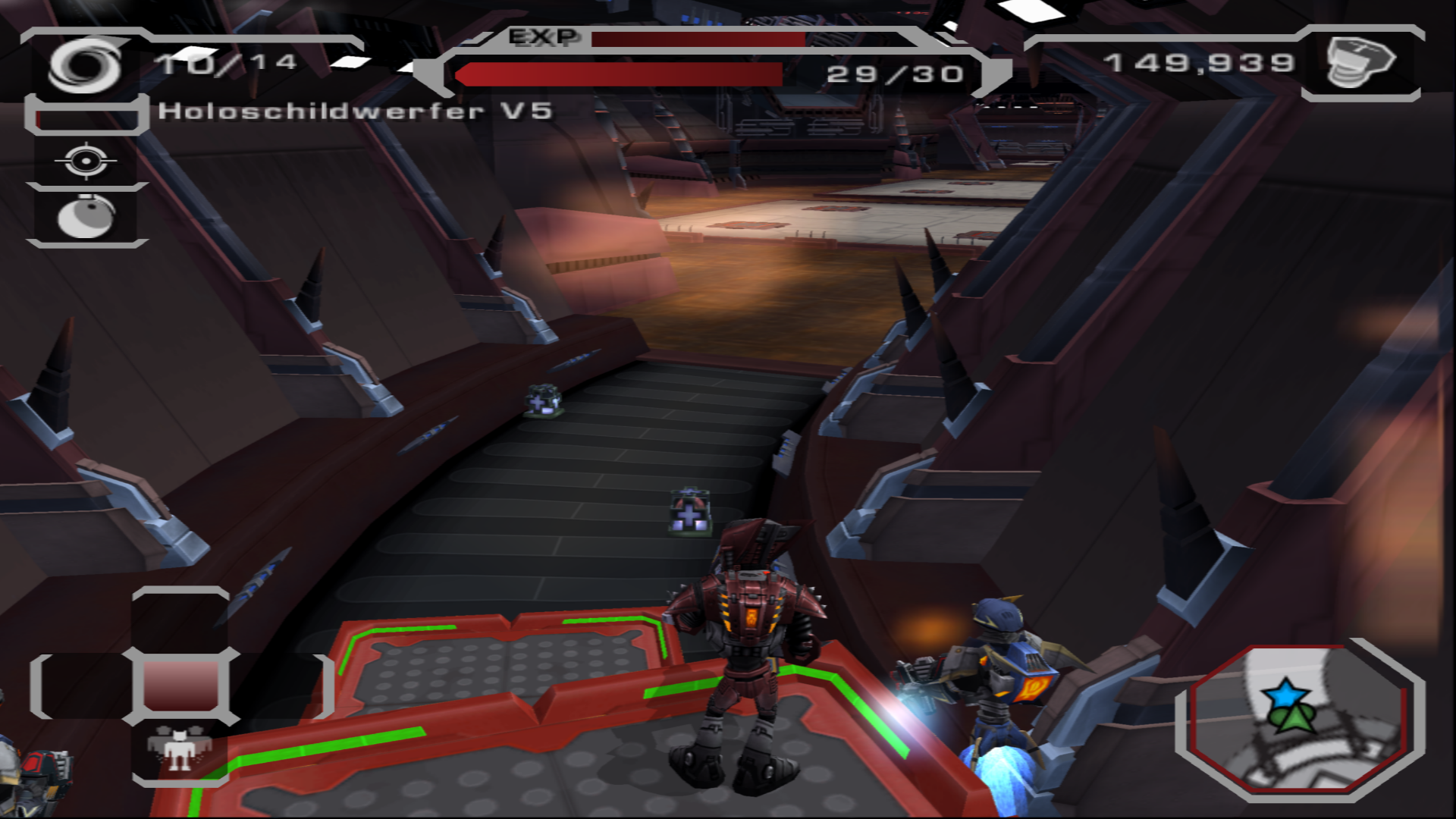


Blockdump: https://www.file-upload.net/download-13628467/Ratchet_Gladiator2019-05-0722-58-04.dump.html
PCSX2 log: https://www.file-upload.net/download-13628471/log.txt.html
How to reproduce the issue:
100% reproducible for me.
Load savegame from memory card: https://www.file-upload.net/download-13628464/MemCard32MB.ps2.html on OpenGL HW.
See one of the bot's (Your personal helper bots) engine which is also affected by the bug.
Last known version to work:
Unknown, 1.4 can't be really used cause graphic is completely broken there.
PC specifications:
https://gist.github.com/XXXBold/007546b9d2e8020dec84795f09e63a30
 XXXBold
All 4 comments
Currently, I think the only way to completely avoid this problem is to play at native resolution (hardware or software renderer). Misaligned bloom is a common upscaling issue (#2860).
You can improve the alignment by using Texture Offsets - at 4x Native, a value of X:360 Y:360 seems to work reasonably well (using PAL version with widescreen hack). Some issues aren't fully fixable - glow effects become smaller at high resolutions, and look "scattered" around fine lines and small or distant objects.
 Dreadmoth
on 9 Jun 2019
Dreadmoth
on 9 Jun 2019
Currently, I think the only way to completely avoid this problem is to play at native resolution (hardware or software renderer). Misaligned bloom is a common upscaling issue (#2860).
You can improve the alignment by using Texture Offsets - at 4x Native, a value of X:360 Y:360 seems to work reasonably well (using PAL version with widescreen hack). Some issues aren't fully fixable - glow effects become smaller at high resolutions, and look "scattered" around fine lines and small or distant objects.
Interesting. Can confirm that the Texture Offset works, looks much better (almost?) original when using it, thanks :)
XXXBold
on 9 Jun 2019
Closing in favor of meta https://github.com/PCSX2/pcsx2/issues/2860
 lightningterror
on 28 Jun 2019
lightningterror
on 28 Jun 2019
I would just say the problem can be resolve with => enable HW Hacks, adcanced settings, and set Half-pixel offset to normal (Vertex) This option fix all ratchet and clank games :)
 Miwasak
on 3 Oct 2019
Miwasak
on 3 Oct 2019
Related issues
 mirh
·
6Comments
mirh
·
6Comments
 leyo96
·
5Comments
leyo96
·
5Comments
 vgturtle127
·
4Comments
vgturtle127
·
4Comments
 Fireboyd78
·
6Comments
Fireboyd78
·
6Comments
 Nezarn
·
6Comments
Nezarn
·
6Comments
Most helpful comment
I would just say the problem can be resolve with => enable HW Hacks, adcanced settings, and set Half-pixel offset to normal (Vertex) This option fix all ratchet and clank games :)