Outlookgooglecalendarsync: New outlook events are synced to Google but in the same sync requested to be deleted
OGCS Version: v2.8.5.0
Installed or Portable: Portable
Problem Description
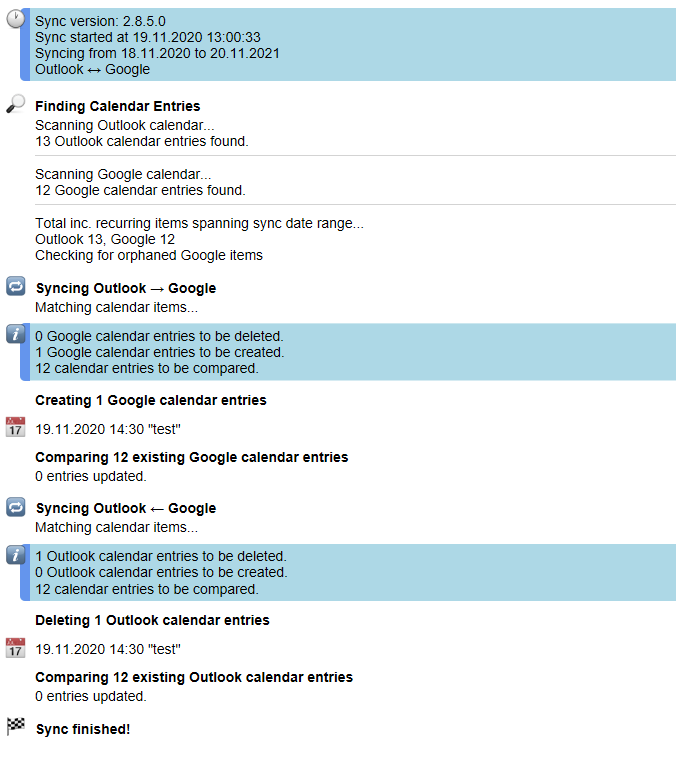
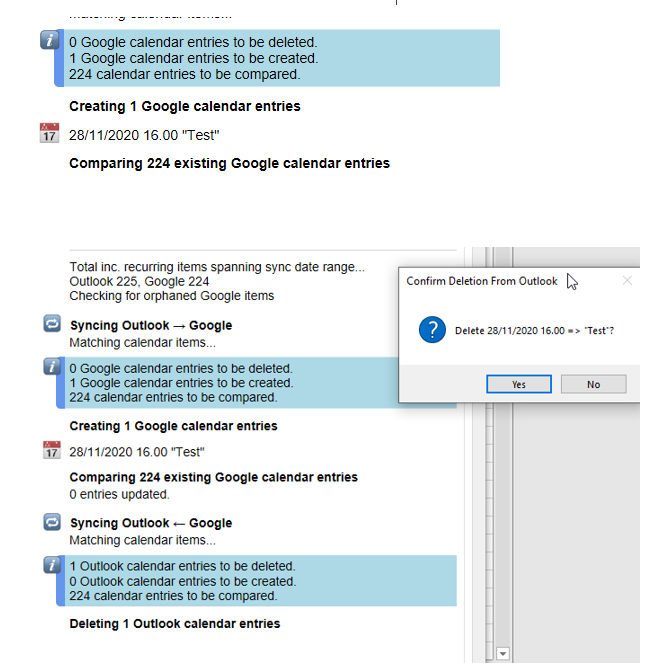
Every new entry I create in outlook creates a popup on sync if I want to delete the entry.'
Deletions with confirmation is activated and bidirectional updates are activated.
Works in 100% of the cases.
Steps to Reproduce the Issue
- Create an event in outlook
- enable deletions with confirmation
- Click "sync" or wait for the next sync
- Popup appears that asks if I want to delete the new event
Any other information
Switched today from 2.8.0.0 to 2.8.5.0 alpha because 2.8.0.0 was not able to access Google calendar anymore. Copied settings.xml from 2.8.0.0 portable to 2.8.5.0 portable folder.
Sync log:
synclog.txt
 phillies
All 35 comments
Hi i got exact the same problem.
 Kimble89
on 19 Nov 2020
Kimble89
on 19 Nov 2020
Me too (v2.8.5.0 Installed)
 eddydee123
on 23 Nov 2020
eddydee123
on 23 Nov 2020
Same Issue, Running 2.8.5.0
 MortenAnd
on 27 Nov 2020
MortenAnd
on 27 Nov 2020
Hi @phillies What link did you follow to raise this issue? It seems to be using an old template, so would like to fix that if you can recall.
Everyone, whilst screenshots are of some value, they are no replacement for providing your OGcalsync.log file. I cannot reproduce this issue and @phillies log file doesn't contain the section that captures the config settings.
 phw198
on 29 Nov 2020
phw198
on 29 Nov 2020
It's really hard to filter out all the private information from the log. Can you say specifically what you need?
eddydee123
on 29 Nov 2020
I know the question is not for me but I followed the link in the app un the Help tap..
I would like to send you the log file, but would prefer to do it on mail.. do not want it to be public available.
This problem started after installing version 2.8.5.0
MortenAnd
on 29 Nov 2020
@eddydee123 As a minimum, click the Save button on the Settings tab and then provide all the OutlookGoogleCalendarSync.Settings lines in the log file. Thanks!
@MortenAnd Thanks - you can also provide your OGcalsync.log file via a Google form.
phw198
on 29 Nov 2020
@phw198 Done Hope you get it, Could you please confirm?
MortenAnd
on 29 Nov 2020
Likewise - uploaded the settings for you
eddydee123
on 29 Nov 2020
I too can confirm, when add event to outlook, then sync, I am asked whether I want to delete that event. using version 2.8.5.0
 djpleasure
on 2 Dec 2020
djpleasure
on 2 Dec 2020
any news here?
Kimble89
on 3 Dec 2020
Any news?
MortenAnd
on 8 Dec 2020
Same issue for me. Any updates?
 thekidb
on 8 Dec 2020
thekidb
on 8 Dec 2020
@phw198 any news here?
Kimble89
on 9 Dec 2020
+1
 amig500
on 15 Dec 2020
amig500
on 15 Dec 2020
@phw198 Hi Poul.. Any News for this issue??
MortenAnd
on 16 Dec 2020
Any news for this issue?
I have the same problem since I installed 2.8.5.0 version
In my case, i doesn't happen every time I make a new event in Outlook, but it does most of the time
 xcatasus
on 21 Dec 2020
xcatasus
on 21 Dec 2020
Struggling to get time, but hope to pick this up again very soon...
phw198
on 21 Dec 2020
@phw198 Thanks for feedback and have a great Christmas.
MortenAnd
on 23 Dec 2020
So I think this is an issue for those syncing with an Exchange account using cached mode. That also might explain the rather sporadic/differing nature of the issue between users.
:package: Please try with v2.8.5.14.zip (see instructions for applying) and see if that works.
If not, please try unchecking the cached mode in your Outlook account settings and seeing if that helps (to confirm the problem to me).
phw198
on 27 Dec 2020
I have no Exchange account but exactly the same problem.
amig500
on 27 Dec 2020
@amig500 Here you stated you were on v2.8.0, so given this issue relates specifically to v2.8.5 you do not have exactly the same problem at all.
phw198
on 28 Dec 2020
Thanks, Paul, for sharing this hotfix.
After installing it, I created several new appointments in Outlook, and, for the moment, the resul is successful
xcatasus
on 28 Dec 2020
I am indeed using Exchange cached mode. After applying the hotfix it seems that the issue has been resolved, thanks a lot!
eddydee123
on 28 Dec 2020
@phw198 Thanks.. I have tested and the problem has gone. Thanks
MortenAnd
on 28 Dec 2020
Thanks everyone for the quick turnaround on testing this! Glad the hotfixed worked - that was a strange one.
phw198
on 28 Dec 2020
I use 2.8.5.0 and the issue is not resolved.
amig500
on 4 Jan 2021
Just to confirm I have been running v2.8.5.14 for a week and I have not had the issue since upgrading
eddydee123
on 4 Jan 2021
@eddydee123 where did you get this .14 version ? When I click "check for update" it says I'm using the last version.
amig500
on 4 Jan 2021
See further up in this thread https://github.com/phw198/OutlookGoogleCalendarSync/issues/1123#issuecomment-751502151
eddydee123
on 4 Jan 2021
But this is not even an alpha version omg
amig500
on 4 Jan 2021
also had that problem. Guess the hotfix solved it ... hope so. Before I trusted OGCS so much that I allowed it to just delete events in outlook ...
I wonder if a "who wins" setting would be necessary or at least helpfull - like vdirsyncer has it -
 daniu-de
on 15 Jan 2021
daniu-de
on 15 Jan 2021
@daniu-de Deletion of events can be either turned off, or prompted each time if you would prefer. Deleted items are also recoverable from the deleted item folder/bin for Outlook/Google respectively.
I don't really follow the idea of a "who wins" option, but I'm not sure it's something I would add in - the logic should simply boil down to the item that is more recently modified is the one that should win.
phw198
on 16 Jan 2021
Hi, @phw198
I've tried 2.8.5.14. Two newly created in Outlook appointments were created in Google and immediately removed in Outlook.
2021-01-21 10:55:26,866 INFO 1 OutlookGoogleCalendarSync.Sync.Engine [80] - Scheduled sync started (AutoSyncTimer).
2021-01-21 10:55:27,858 INFO 7 OutlookGoogleCalendarSync.Console [281] - Finding Calendar Entries
2021-01-21 10:55:27,960 INFO 7 OutlookGoogleCalendarSync.Console [281] - Scanning Outlook calendar...
2021-01-21 10:55:28,208 INFO 7 OutlookGoogleCalendarSync.Console [281] - 28 Outlook calendar entries found.
2021-01-21 10:55:28,296 INFO 7 OutlookGoogleCalendarSync.Console [281] - Scanning Google calendar...
2021-01-21 10:55:29,307 INFO 7 OutlookGoogleCalendarSync.Console [281] - 23 Google calendar entries found.
2021-01-21 10:55:29,352 INFO 7 OutlookGoogleCalendarSync.Console [281] - 1 are exceptions to recurring events.
2021-01-21 10:55:29,353 INFO 7 OutlookGoogleCalendarSync.Console [281] - Total inc. recurring items spanning sync date range...
2021-01-21 10:55:37,307 INFO 7 OutlookGoogleCalendarSync.Console [281] - Outlook 25, Google 23
2021-01-21 10:55:47,621 INFO 7 OutlookGoogleCalendarSync.OutlookOgcs.Calendar [790] - 2 unclaimed orphan appointments found.
2021-01-21 10:55:47,623 INFO 7 OutlookGoogleCalendarSync.OutlookOgcs.Calendar [792] - These will be kept due to configuration settings.
2021-01-21 10:55:47,623 INFO 7 OutlookGoogleCalendarSync.Console [281] - Syncing Outlook → Google
2021-01-21 10:55:47,705 INFO 7 OutlookGoogleCalendarSync.Console [281] - Matching calendar items...
2021-01-21 10:55:51,303 INFO 7 OutlookGoogleCalendarSync.Console [281] - 0 Google calendar entries to be deleted.
2021-01-21 10:55:51,304 INFO 7 OutlookGoogleCalendarSync.Console [281] - 2 Google calendar entries to be created.
2021-01-21 10:55:51,305 INFO 7 OutlookGoogleCalendarSync.Console [281] - 23 calendar entries to be compared.
2021-01-21 10:55:51,341 INFO 7 OutlookGoogleCalendarSync.Console [281] - Creating 2 Google calendar entries
2021-01-21 10:55:54,030 INFO 7 OutlookGoogleCalendarSync.Sync.Engine [636] - Done.
2021-01-21 10:55:54,031 INFO 7 OutlookGoogleCalendarSync.Console [281] - Comparing 23 existing Google calendar entries
2021-01-21 10:56:12,558 INFO 7 OutlookGoogleCalendarSync.Console [281] - 0 entries updated.
2021-01-21 10:56:12,646 INFO 7 OutlookGoogleCalendarSync.Console [281] - Syncing Outlook ← Google
2021-01-21 10:56:21,895 INFO 7 OutlookGoogleCalendarSync.Console [281] - 2 Outlook calendar entries to be deleted.
2021-01-21 10:56:21,895 INFO 7 OutlookGoogleCalendarSync.Console [281] - 0 Outlook calendar entries to be created.
2021-01-21 10:56:21,896 INFO 7 OutlookGoogleCalendarSync.Console [281] - 23 calendar entries to be compared.
2021-01-21 10:56:21,995 INFO 7 OutlookGoogleCalendarSync.Console [281] - Deleting 2 Outlook calendar entries
2021-01-21 10:56:22,128 INFO 7 OutlookGoogleCalendarSync.Sync.Engine [727] - Done.
2021-01-21 10:56:22,132 INFO 7 OutlookGoogleCalendarSync.Console [281] - Comparing 23 existing Outlook calendar entries
2021-01-21 10:56:52,268 INFO 7 OutlookGoogleCalendarSync.Console [281] - 0 entries updated.
2021-01-21 10:56:53,006 INFO 1 OutlookGoogleCalendarSync.Console [281] - Sync finished!
Then I restored deleted meetings, turned on verbose logging and started sync again. But this time the meetings were not deleted.
 ralfeus
on 21 Jan 2021
ralfeus
on 21 Jan 2021
Hi @phillies What link did you follow to raise this issue? It seems to be using an old template, so would like to fix that if you can recall.
Everyone, whilst screenshots are of some value, they are no replacement for providing your
OGcalsync.logfile. I cannot reproduce this issue and @phillies log file doesn't contain the section that captures the config settings.
Sorry, I somehow missed the notification: I used the bug report from within the 2.8.5.0 alpha version. And I just checked the .14 which seems to solve the issue for me. Thanks :-)
phillies
on 22 Jan 2021
Related issues
 fyates
·
4Comments
fyates
·
4Comments
 AmauryGaia
·
4Comments
AmauryGaia
·
4Comments
 sunk818
·
3Comments
sunk818
·
3Comments
 gsemel
·
4Comments
gsemel
·
4Comments
 tdalon
·
5Comments
tdalon
·
5Comments
Most helpful comment
@phw198 Thanks for feedback and have a great Christmas.