Outlookgooglecalendarsync: timezone mapping popup: couldn't it be avoided?
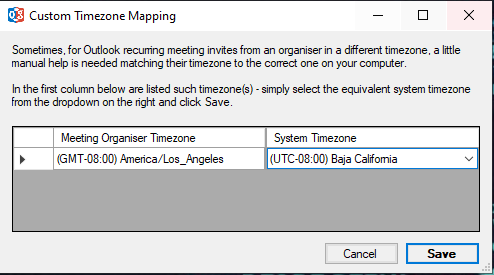
I have updated to the new version and now get this popup requiring to map some appointment timezone to my system timezone.
I don't understand why it is required.
My system timezone does not change. Maybe it could be read from my Windows or Outlook settings. At least I shall only have to set it once for all.
I find this popup quite annoying.
Do I miss something here?
Is your feature request related to a problem? Please describe.
A clear and concise description of what the problem is. Eg. I'm always frustrated when [...]
Describe the solution you'd like
A clear and concise description of what you want to happen.
Describe alternatives you've considered
A clear and concise description of any alternative solutions or features you've considered.
Additional context
Add any other context or screenshots about the feature request here.
 tdalon
All 5 comments
You've not provided the timezone that OGCS is not able to automatically map to one on your computer, so it's not possible to say 100%.
But yes, it's likely you missed something: Issue #843
However, there's a slight bug with it, in that it might not save the mapping your specify - resulting in repeated prompts for the same map. That's a bug that I was already working on fixing...
 phw198
on 14 Jan 2020
phw198
on 14 Jan 2020
:package: Repeated prompts should now be resolved with hotfix v2.8.3.1.zip (see instructions for applying).
phw198
on 14 Jan 2020
I seem to have the same problem, as the following pop up, pops up often, even though my answer is always the same and slightly different than the default that is in the UI. I just installed the hotfix to see if it fixes it.
 YasharF
on 21 Jan 2020
YasharF
on 21 Jan 2020
I can confirm that applying the hotfix fixes the issue. I had the same problem and applied it.
 krambock
on 5 Feb 2020
krambock
on 5 Feb 2020
I have been running hotfix v2.8.3.1 for 30 days at this point and have not seen that pop-up since installing the hotfix.
YasharF
on 20 Feb 2020
Related issues
 burneremail
·
6Comments
burneremail
·
6Comments
 gsemel
·
4Comments
gsemel
·
4Comments
 LHuisingh
·
6Comments
LHuisingh
·
6Comments
 dutch55
·
4Comments
dutch55
·
4Comments
 jesseelliott
·
4Comments
jesseelliott
·
4Comments