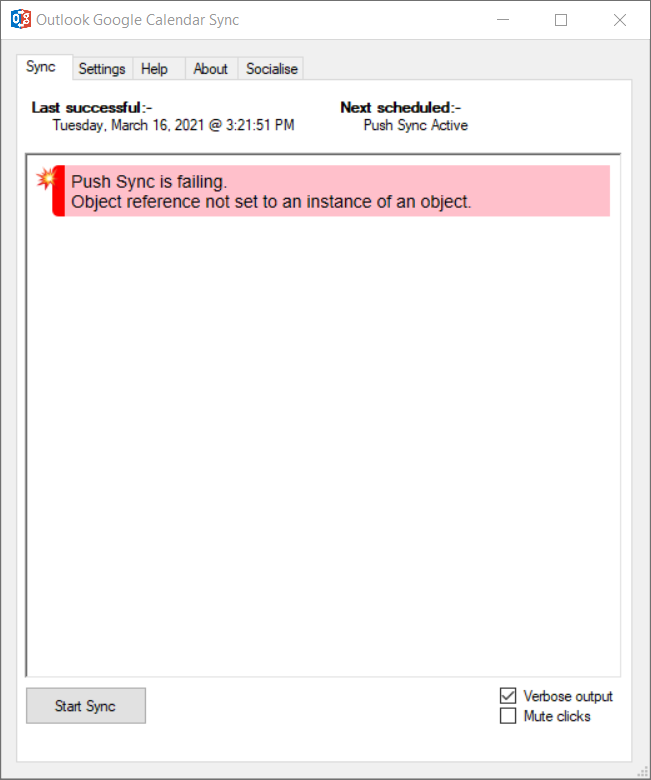
Outlookgooglecalendarsync: Push Sync is failing. Object reference not set to an instance of an object
- [x] [Upgrade](https://github.com/phw198/OutlookGoogleCalendarSync/wiki/Upgrading) to the latest release (alpha if available)
- [x] Reproduce the issue
- [x] Complete the information below
- [x] Provide your
OGcalsync.logfile (see how-to)

OGCS Version: v1.2.3.4
Edition: Installed / Portable
Sync Direction: G->O / O->G / O<->G
Bug Description
A clear and concise description of what the bug is.
Steps to Reproduce the Issue
- Go to...
- Click on...
Any other information
Any additional information that may help troubleshoot the issue.
:paperclip: Attach your OGcalsync.log file.
Hello,
I have been getting the "Push Sync is failing. Object reference not set to an instance of an object" error when I launch Outlook in the morning and check OGCS to see if things are syncing. I'm running Windows 10 x64 and I think the computer is coming from a Sleep state.
I got this error in the last version I was running, and the alpha 2.8.6.0. I will attach logs for both.
I use the installed versions.
I sync O -> G
- I wake up my computer and login.
- I launch Outlook.
- OGCS is in the system tray and I open it to check if things are syncing.
- Error message is displayed on the screen.
- I can sync manually if I remember to do it.
OGcalsync.log.2021-03-16.log
OGcalsync.log.2021-04-14.log
OGcalsync.log
 fyates
All 4 comments
:package: I haven't been able replicate this issue, or therefore test the fix, but please see if the issue is now resolved with hotfix v2.8.6.8.zip (see instructions for applying).
Please let me know how it goes.
 phw198
on 18 Apr 2021
phw198
on 18 Apr 2021
Thank you so much. I followed the instructions and applied the fix. I will keep an eye on it for the next few weeks as meetings are added to my work calendar. I will come back and post an update then. I appreciate your help!
fyates
on 18 Apr 2021
I also applied this fix. I'll report back at next sync to say if it's fixed or not.
 Rosmaninho
on 25 Apr 2021
Rosmaninho
on 25 Apr 2021
I have been watching things closely for the past two weeks since I applied the fix, and everything is working seamlessly. No errors at all and every meeting for work is showing up in my personal calendar. Thank you so much!
fyates
on 3 May 2021
Related issues
 AmauryGaia
·
4Comments
AmauryGaia
·
4Comments
 invalidCards
·
4Comments
phw198
·
3Comments
invalidCards
·
4Comments
phw198
·
3Comments
 schwaben-github
·
5Comments
schwaben-github
·
5Comments
 mkorenbl
·
6Comments
mkorenbl
·
6Comments