Outlookgooglecalendarsync: Sign In With Google Temporarily disabled for this app
OGCS Version: v1.2.3.4
Installed or Portable: Portable
Problem Description
Google Wont allow login
Steps to Reproduce the Issue
Started app - tried beta and alpha and same issue
Any other information
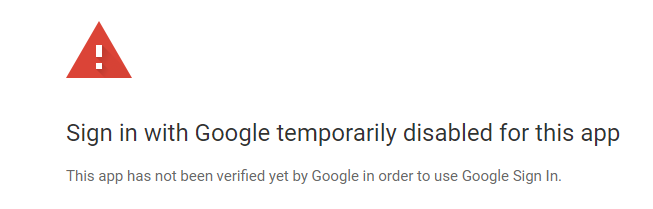
When googling it seems this is something that has to be fixed by the dev
Thanks in advance!
 nrcarnevali
All 7 comments
Has to be fixed by the dev
Yes and no. You're basically on one of the API quotas that is being run down, as Google haven't approved it yet (a new process recently introduced by the overlords). There's nothing to stop you continuing to use it - just that you need to click on the "Proceed anyway" link off the bottom of your screenshot.
I can assure you that this quota app is configured in _exactly_ the same way as the others that Google have approved :slightly_smiling_face:
 phw198
on 8 Dec 2019
phw198
on 8 Dec 2019
Hi Paul,
Thanks for the reply - but perhaps I am missing something. There is no approve or proceed anyway link..

nrcarnevali
on 9 Dec 2019
Forgot to add.. I am also seeing this as well with a different app (MailCal) I use to sync calendars on my phone (in case my laptop is off and OGCS is not running).
nrcarnevali
on 9 Dec 2019
Ah yes, apparently as that API quota has not yet been verified, Google only allow up to 100 users to _start_ using it (even though there are lots of people still using it already) - otherwise they block it entirely.
Go to the Settings > Google > Disconnect Account and then go through the OAuth process from scratch - you should go onto a different, authorised API app...
phw198
on 9 Dec 2019
Thanks - That worked perfectly.
Thanks,
Nick
nrcarnevali
on 9 Dec 2019
Unfortunately , disconnecting account didn't work for me . Have tried reconnecting many times but continue to receive and can't get past Error Message: " Sign in with Google temporarily disable for this app etc " .. It would seem looking at the dates on this thread that the denied Google permission is no longer temporary , but permanent. Shame - I rather liked the app.
 MW65
on 8 Dec 2020
MW65
on 8 Dec 2020
@MW65 The OGCS app is still very much verified and approved by Google, but I can't tell why you might be receiving this error without your OGcalsync.log file.
phw198
on 20 Dec 2020
Related issues
 gsemel
·
4Comments
gsemel
·
4Comments
 tdalon
·
5Comments
phw198
·
3Comments
tdalon
·
5Comments
phw198
·
3Comments
 fyates
·
4Comments
fyates
·
4Comments
 dutch55
·
4Comments
dutch55
·
4Comments
Most helpful comment
Thanks - That worked perfectly.
Thanks,
Nick