Opentoonz: tcomposer add options -width and -height to set a different resolution via cli
I am currently developing the Opentoonz module for RenderChan and it already works https://github.com/morevnaproject-org/RenderChan/pull/62
I cannot use the GUI render dialog, so I am using tcomposer to cli render. But it lacks most of the additional rendering options that are in the GUI render dialog, in particular the ability to set a different scene resolution for rendering.
For example of this kind:
tcomposer /patch/scene.tnz -o /patch/render/001/image.tiff -nthreads all -width 480 -height 270
For reference:
_RenderChan is a tool for automatization of animation project rendering. It takes a file for rendering and analyses all its dependencies. If any of the dependent files needs to be rendered (or changed since the last rendering), then dependency is submitted for rendering together with an original file. So, RenderChan constructs a list of tasks for rendering with consideration of changes in the project tree and existing renderings. The resulting list of tasks can be executed locally on the single machine or passed to renderfarm._
https://morevnaproject.org/renderchan/
And the ability to change resolutions is needed so that to work with a project it is not necessary to work with images in high resolution, but rather, it is even preferable to work with scenes (for video editing and other processing, for example, integration with 3d scenes) in low resolution for better performance and speed. And after the project is ready, it can be fully automatically rendered to FullHD either on a powerful workstation or on a server.
 ave4
ave4
All 3 comments
@ave4
First, congratulations on getting RenderChan to this point.
This is great news.
I had never noticed that the command line rendering data didn't contain the resolution. Very interesting.
Apparently it uses the default Camera settings from the scene file.
Perhaps a near equivalent would be the present text file (.txt extension) that can be generated by the output settings render dialog which is then saved at C:\OpenToonz stuff\config\outputpresets ?
Attached is an example preset file generated via Output Settings.
The Farm room records other default options (or options changed by the user via GUI.
Example: tcomposer.exe "C:\OpenToonz stuff\sandbox\scenes\testscene.tnz" -o "C:\OpenToonz stuff\sandbox\outputs\testscene.tif" -range 1 1 -step 1 -shrink 1 -multimedia 0 -nthreads all -maxtilesize none
With the exception of the range I must assume you are having RenderChan use the defaults: i.e. -step 1, =shrink 1 -multimedia -1 (i.e. off), -nthreads all (which you display in your example) and -maxtilesize none.
I would think that each of those you could allow the user to change. For example changing -shrink 1 to -shrink 2 to render out to half the resolution or -shrink 4 to render to 4x smaller than the default resolution.
Regardlng the Preset file, perhaps that might be a method Renderchan can use to supply the required options.
Users would then adjust that preset file's data as required.
 RodneyBaker
on 15 Sep 2020
RodneyBaker
on 15 Sep 2020
Thanks to @RodneyBaker. As a temporary solution, I wrote shrink = 4 in project.conf and I got the right resolution. But I want @morevnaproject to write a comment.
project.conf.txt
ave4
on 16 Sep 2020
It would be better to have a possibility to set dimensions directly. For example, we might need to render in higher resolution, than specified in tnz file.
I do not think we should introduce additional option in project.conf file, because it will duplicate width and height options.
As temporary workaround we can calculate shrink value using following (approximate formula):
shrink = round( width_from_tnz_file / width_from_project_file )
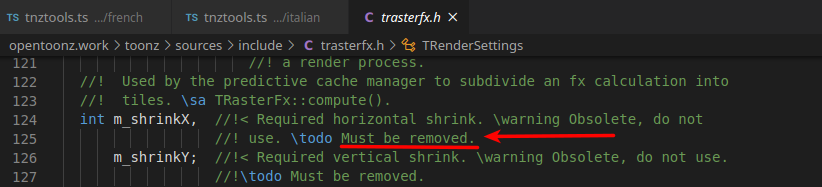
Another reason to worry is that the shrink options are marked as obsolete in TRenderSettings class:
 morevnaproject
on 18 Sep 2020
morevnaproject
on 18 Sep 2020
Related issues
 tushantin
·
4Comments
tushantin
·
4Comments
 konero
·
5Comments
konero
·
5Comments
 shun-iwasawa
·
3Comments
shun-iwasawa
·
3Comments
 ebarranco
·
3Comments
ebarranco
·
3Comments
 digitallysane
·
5Comments
digitallysane
·
5Comments