Openstreetmap-carto: Render building=roof differently to expose underlying features
There are a couple of issues, logically (but not technically) related to this situation: #2037 and #688 , but this is a bit different thing.
Often, building=roof area covers something: a platform, a roadway, or even another building. Examples are: gas stations with offices or small stores, located under the roof, but not constructed as a single building with it; public transport platforms; covered galleries or passage ways.
Logically, building=roof should presume larger value of layer= than everything else under it. But using layer= on it explicitly seems redundant because of its nature, so it is actually rarely used. Another problem is, if (when) #688 will be resolved, it will be impossible to see objects hidden under the roofs.
Honestly, I don't know what kind of rendering to suggest, because transparency doesn't seem like a good idea (discussed in #688 ) while transparent patterns could look quite ugly and cause different issues. But I want to point at this situation anyway just in case if someone has a better idea.
 BushmanK
All 51 comments
I have already shown this multiple times in the other threads, but just for the sake of keeping the discussion going, I post here two new examples of Amsterdam Centraal Station and Haarlem Station in the Netherlands, that show that a fine overlay pattern (non-transparent), can work for solving this issue.
Logically, building=roof should presume larger value of layer= than everything else under it. But using layer= on it explicitly seems redundant because of its nature, so it is actually rarely used.
And yes, I render this on top of everything else (at least above buildings), and don't require and ignore any layer=x values.
As rendered by my ArcGIS Renderer. Notice the fine grating above the platforms of the railway stations, representing the platform / station roofs. Click the images to see at 100%. To me personally, this solution feels very natural and understandable (which can not always be said of the use of transparency):


 mboeringa
on 28 Nov 2016
mboeringa
on 28 Nov 2016
I agree, that crosshatching looks well as a part of this particular style. However, this kind of fine pattern has one fundamental problem: it causes moire (regular interference pattern, actually) when printed. I honestly don't know, if printability is among the considerations of developers.
Another thing is, function of the OSM Standard style is technical visualization. And it might make more sense to have similar color for all building= tags. Could you, please, render the same area using a bit tweaked style with CBBCBC color of building=roof hatching to make it similar to other buildings?
BushmanK
on 29 Nov 2016
I honestly don't know, if printability is among the considerations of developers.
No, it's not - we already cover wide set of goals and it's enough:
https://github.com/gravitystorm/openstreetmap-carto/blob/master/CARTOGRAPHY.md#main-goals
Brown hatching might be better. Maybe you could also prepare some code? I would be happy to test it. I also lack the roofs to be seen over other objects and this solution is acceptable for me.
 kocio-pl
on 29 Nov 2016
kocio-pl
on 29 Nov 2016
Logically, building=roof should presume larger value of layer= than everything else under it. But using layer= on it explicitly seems redundant because of its nature, so it is actually rarely used
Even if we assumed a layer for building=roof, it would not change how it renders relative to roads and other features, only relative to other buildings.
 pnorman
on 29 Nov 2016
pnorman
on 29 Nov 2016
@pnorman , as far as I understand what's going on with #688 and #2037, these issues, once resolved, will implement rendering behavior similar to assumed larger layer=.
BushmanK
on 29 Nov 2016
@pnorman , as far as I understand what's going on with #688 and #2037, these issues, once resolved, will implement rendering behavior similar to assumed larger layer=.
Those issues are both about changing where the buildings layer sits relative to other layers and have nothing to do with the layer tag.
pnorman
on 29 Nov 2016
Also, it's worth noting that the resolution to those issues could be to do nothing. This is very common with layering issues where we're faced with tradeoffs and have to weigh one type of problem vs another
pnorman
on 29 Nov 2016
I'm talking about rendering behavior, not about layer= defaults. If the resolution will be to do nothing, than it's basically a closure, not a resolution in general meaning. So, that would be completely different story.
BushmanK
on 29 Nov 2016
It's not clear to me if you
- want to render buildings on top of amenities (gas stations, stores, etc) with some kind of hatching for
building=roof - want to render
building=roofafter other buildings - want to move
building=roofto its own layer and do something else with it
pnorman
on 29 Nov 2016
In this issue, I'm originally talking about rendering building=roof in a certain manner that allows to see underlying features through it. Regarding of that, I like the idea brought by @mboeringa in his example renderings.
Here, I'm not insisting on any certain drawing order, just referring to it as described in other issues, because it seems logical to me (and I hope, it will be implemented that way). So, think about this issue as about one depending on others, requesting certain building drawing order changes. If buildings will not be rendered (at least) over the highway areas and platforms, it doesn't make any sense to change style for building=roof because it will not cover anything, so you don't need to be able to see through it.
Rendering roofs over amenities doesn't seem logical to me, so, I'm not talking about that at all.
BushmanK
on 29 Nov 2016
sent from a phone
Il giorno 29 nov 2016, alle ore 06:25, Paul Norman notifications@github.com ha scritto:
want to move building=roof to its own layer and do something else with it
+1, this would be a way to insert it between the roads. On squares for example, but also more generally anytime there are roads below, you'd want to render the roof after the highway area, but before the ways atop of the roof.
 dieterdreist
on 29 Nov 2016
dieterdreist
on 29 Nov 2016
On squares for example, but also more generally anytime there are roads below, you'd want to render the roof after the highway area, but before the ways atop of the roof.
@dieterdreist
What you describe is a bridge or viaduct, or parking deck of a building, not a roof.
A (building=)roof - at least IMO - is:
_"A lightweight structure to keep the elements out"_
not a load bearing structure designed to drive or walk on.
Just because a 5 storey car-parking building is open on all sides, doesn't make it a building=roof, you would most likely tag it an amenity=parking, parking=multi-storey, building=yes.
Admittedly, I have seen multiple examples of the kind of usage you describe, but I generally consider this a poor tagging practice, which doesn't seem to follow the initial main intend of the Wiki page of building=roof.
Also, as extension of the statement directly above, the Wiki (http://wiki.openstreetmap.org/wiki/Tag:building%3Droof) says on the first line:
_"For roof features which are part of another building use building:part=roof"_
mboeringa
on 29 Nov 2016
sent from a phone
On 29 Nov 2016, at 18:22, mboeringa notifications@github.com wrote:
A (building=)roof - at least IMO - is:
"A lightweight structure to keep the elements out"
not a load bearing structure designed to drive or walk on.
a building can be lightweight or heavy weight, it is usually designed to walk on at least for maintenance, but could also be designed to be used frequently (roof garden/roof terrace for example).
I don't know where your definition comes from, but it is much more restrictive than what I find in the osm wiki.
dieterdreist
on 30 Nov 2016
sent from a phone
On 29 Nov 2016, at 18:22, mboeringa notifications@github.com wrote:
Also, as extension of the statement directly above, the Wiki (http://wiki.openstreetmap.org/wiki/Tag:building%3Droof) says on the first line:
"For roof features which are part of another building use building:part=roof"
this is there to distinguish standalone roofs from those attached to a bigger building
dieterdreist
on 30 Nov 2016
Is anybody willing to write this code? I would still like to test it, but have some other things to do currently.
kocio-pl
on 11 Dec 2016
@Penegal Would you like to test the brown hatching, maybe similar to #3104 or with crosshatching as proposed by @mboeringa?
kocio-pl
on 8 Mar 2018
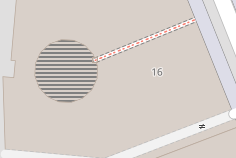
@kocio-pl: just gave it a try using the same recipe than with intermittent waters, but here the transparent zones are rendered with a strange dark color:

I don't understand why; could someone tell me? The code is at https://github.com/Penegal/openstreetmap-carto/tree/roof
 Penegal
on 9 Mar 2018
Penegal
on 9 Mar 2018
I think it would be better to use a dashed outline and no fill for roofs.
dieterdreist
on 9 Mar 2018
I think it would be better to use a dashed outline and no fill for roofs.
We should check both ways to compare.
As with the water areas straight lines were good working, in buildings case I would like to see a 45-degree version too.
 Tomasz-W
on 9 Mar 2018
Tomasz-W
on 9 Mar 2018
In such cases the more testing, the better. Intermittent water area solution came after the proposed solution didn't work too well, we probably wouldn't hear about different one if we haven't failed.
kocio-pl
on 9 Mar 2018
Without filling:

With a half opacity filling:

With a half opacity filling plus dashed border:

With 45° stripes:

For this one, I don't understand: setting opacity to the fill colour correctly showed the background, but PNG transparency is filled with a dark grey. Ideas?
Penegal
on 9 Mar 2018
Thank you for this work! I'm happy that someone started to do something more than commenting here ;)
Unfortunely, examples from above says not too much, because there is nothing under the roof. I think this feature should be tested on more complicated cases. Here's a list of locations which I would like to see (I don't know is it technically possible for you to do it, but if yes, it would be great):
https://www.openstreetmap.org/way/525860847
https://www.openstreetmap.org/way/261913276
https://www.openstreetmap.org/way/276725913
https://www.openstreetmap.org/way/497490695
https://www.openstreetmap.org/relation/6416391
https://www.openstreetmap.org/way/438175854
I think we can exclude 'without filling' version at the beginning - it's not intuitive and too similar to other feature, parking space (https://github.com/gravitystorm/openstreetmap-carto/pull/3092)
Tomasz-W
on 9 Mar 2018
Is there a problem with the Docker files? I got the following when trying to import data for @Tomasz-W's tests:
~/openstreetmap-carto (roof|✚3) $ docker-compose up import
openstreetmapcarto_db_1 is up-to-date
Recreating 3ab0106fcc1b_3ab0106fcc1b_3ab0106fcc1b_3ab0106fcc1b_openstreetmapcarto_import_1 ... error

ERROR: for 3ab0106fcc1b_3ab0106fcc1b_3ab0106fcc1b_3ab0106fcc1b_openstreetmapcarto_import_1  no such image: sha256:b78e2c0ea48b2f6ec0ca47950884322f90a2fbf44b36064e653e5c823a38470a: No such image: sha256:b78e2c0ea48b2f6ec0ca47950884322f90a2fbf44b36064e653e5c823a38470a

ERROR: for import  no such image: sha256:b78e2c0ea48b2f6ec0ca47950884322f90a2fbf44b36064e653e5c823a38470a: No such image: sha256:b78e2c0ea48b2f6ec0ca47950884322f90a2fbf44b36064e653e5c823a38470a
ERROR: Encountered errors while bringing up the project.
I tried to drop all images to force a full rebuild and re-dowloaded the data.osm.pbf, but that wasn't enough, the error is still here even with fresh containers and data. Do you guys know what the problem could be.
Penegal
on 11 Mar 2018
"no such image" means probably that something is broken with the image files. I would try to delete the images, not just containers. I guess Docker should download missing images automatically, but maybe some parts of them were broken and maybe it works different then.
kocio-pl
on 11 Mar 2018
I deleted all images, with the related containers, and downloaded them from the servers.
Penegal
on 11 Mar 2018
And you still get the error messages like these? Then it might be something bad with your Docker?
Anyway, could you post the code to the stripes version? Andy has been very vocal opponent of using opacity, so I'd like to avoid it, hence dashed outline and different hatching patterns seems to be most interesting, at least as an initial idea.
kocio-pl
on 11 Mar 2018
Penegal
on 11 Mar 2018
Oh, wait: I have 2 PCs for such developments, both with Debian 9 stable, but, on the one failing to docker-compose, I recently installed Wine, which implied, among others, to add the i386 (32 bit) architecture in addition of 64 bits. The other one, on which I did nothing like that, is working very well.
I'll investigate that later, if I can; for now, that means that I'm able to resume development for this roof issue. I'll post test shots of @Tomasz-W's test locations ASAP.
Penegal
on 12 Mar 2018
Test shots with @Tomasz-W's roofs:
stripped version
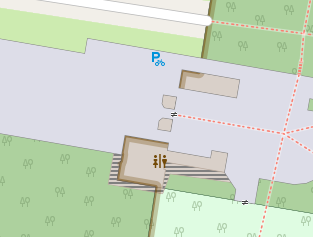
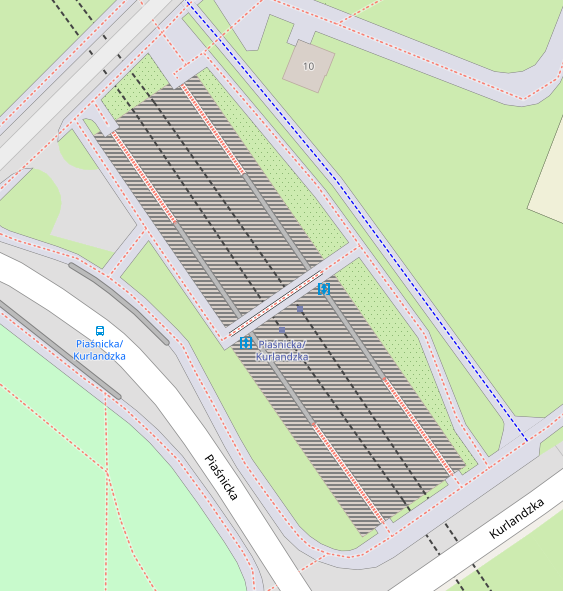

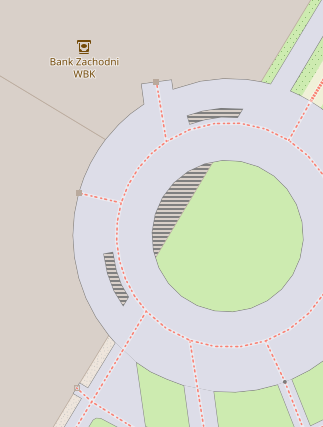
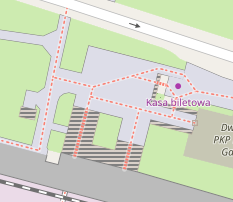
dashed outline version

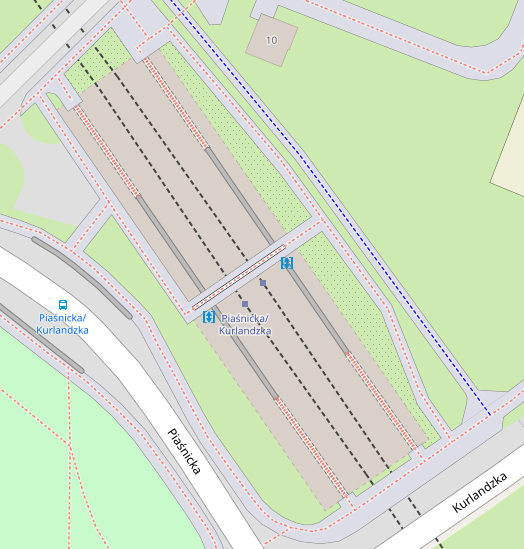
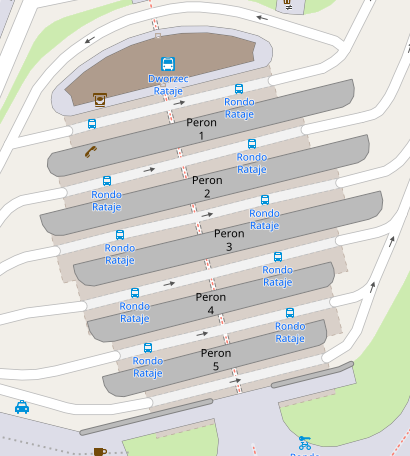
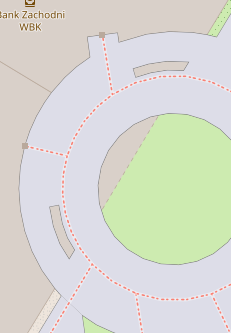
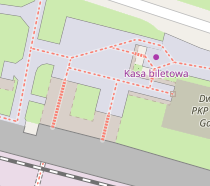
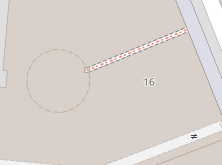
It seems that none can be used as is: the stripes display the dark grey I previously warned about instead of transparency, and the dashed outline is overwritten by other features. In both cases, it looks like the rendering order should be changed. Opinions?
Penegal
on 13 Mar 2018
Leaving transparency and render order aside:
The darks stripes are much too strong and give the roof too much importance.
The dashed outline works fine for me. It symbolises the roof as a building without walls.
Outlines without any fill cannot be distinguished from other lines like barriers.
 polarbearing
on 13 Mar 2018
polarbearing
on 13 Mar 2018
In both cases, it looks like the rendering order should be changed
I agree and I imagine it like that: move roof areas above landcovers, and make it striped (half-building color, half-transparent).
Dashed outline is not a solution for me, I think we should look for a ways to show roofs and what's under it, at the same time. As you can see in the test renderings above, with dashed outline only, you can just guess that is a roof by it's short visible parts
Tomasz-W
on 13 Mar 2018
I could use some help to remove the dark stripes: they are not in the roof pattern I created but are introduced by another element instead of transparent stripes; perhaps a bug, but more likely by a fault in current rendering, maybe its ordering. Whatever, if someone understand what it could be, that would help me to correct it.
Penegal
on 13 Mar 2018
It doesn't make sense to me either. Maybe you can debug by removing the layers from project.mml one by one?
 matthijsmelissen
on 13 Mar 2018
matthijsmelissen
on 13 Mar 2018
Could you publish the code of stripes and dashed lines?
kocio-pl
on 27 Mar 2018
Stripped version: https://github.com/Penegal/openstreetmap-carto/commit/83e7cd74c0760f657959cf094cb9a90dbf868ef4
Dashed outline version: https://github.com/Penegal/openstreetmap-carto/commit/61014258c987df94887c3caca0471eee053b38b8
Penegal
on 28 Mar 2018
@Penegal - please use the word 'striped' or 'hatched' since 'stripped' triggers my spam filter ;-)
@Tomasz-W - when we show what is under the roof (without walls) we should - with the same logic - show what is inside a building (roof with walls)?
polarbearing
on 28 Mar 2018
I've found that the problem is with polygon-clip variable - no matter if its value is false or true, it produces dark background. But when you remove it, it works as expected.
@talaj: I suspect that might be a Mapnik bug (tested with 3.0.20). What do you think?
polygon-clip=false/polygon-clip=true

lack of polygon-clip

Styling part in XML looks like this:
- https://gist.githubusercontent.com/kocio-pl/6187d8c35f41cbfcccdb84ff07dfb1f0/raw/cb9e31b4768912bfd2e712c22fefc3f2a58ba501/clip-false.xml
- https://gist.githubusercontent.com/kocio-pl/6187d8c35f41cbfcccdb84ff07dfb1f0/raw/cb9e31b4768912bfd2e712c22fefc3f2a58ba501/clip-none.xml
and the diff shows no color changes by Carto CSS:
$ diff project.xml.false project.xml.none
10371d10370
<     <PolygonSymbolizer clip="false" />
10380d10378
<     <PolygonSymbolizer clip="false" />
10385d10382
<     <PolygonSymbolizer fill="#d9d0c9" clip="false" />
10386a10384
>     <PolygonSymbolizer fill="#d9d0c9" />
10392c10390
<     <PolygonSymbolizer fill="#d1c6bd" clip="false" />
---
>     <PolygonSymbolizer fill="#d1c6bd" />
10396d10393
<     <PolygonSymbolizer clip="false" />
10398,10402d10394
<   </Rule>
<   <Rule>
<     <MaxScaleDenominator>100000</MaxScaleDenominator>
<     <MinScaleDenominator>25000</MinScaleDenominator>
<     <PolygonSymbolizer clip="false" />
Similar problem has been observed in 2013: https://github.com/gravitystorm/openstreetmap-carto/issues/93#issuecomment-27710362, however back then the fill color was not specified. I don't know why clip touches colors, on the other hand this option is not even documented:
kocio-pl
on 15 May 2018
Description of poligon-clip in Carto CSS:
https://carto.com/docs/carto-engine/cartocss/properties/#polygon-clip-boolean
If we want to have it, at least partially, we can try the #293 way. My branch with such fix is here:
https://github.com/kocio-pl/openstreetmap-carto/tree/roof
I like the output - all the building types rendering:

https://www.openstreetmap.org/way/525860847

https://www.openstreetmap.org/way/261913276

https://www.openstreetmap.org/way/276725913

https://www.openstreetmap.org/way/497490695

https://www.openstreetmap.org/relation/6416391

https://www.openstreetmap.org/way/438175854

kocio-pl
on 15 May 2018
@kocio-pl: Glad you found out the issue! I like your striped version.
Penegal
on 15 May 2018
@kocio-pl The output of discussion was to render roofs as stripped areas above landcovers. It would be way more intuitive on map (and harder to confuse with something placed underground). Can you make a test renderings with building=roof moved above landcovers? It would be also nice to see versions with wider stripes and 45 degree stripes to compare them and choose the best solution.
Tomasz-W
on 15 May 2018
@kocio-pl, why that diff is showing <PolygonSymbolizer clip="false" />? This will render polygon with default fill, which is RGB(128, 128, 128). I think this is where the dark color comes from.
I think I know where is the problem. You should use polygon-pattern-clip instead of polygon-clip.
 talaj
on 15 May 2018
talaj
on 15 May 2018
Can you make a test renderings with building=roof moved above landcovers?
Sure, just give me example places to see it better. However you can spot it on residential, forest or grass.
It would be also nice to see versions with wider stripes and 45 degree stripes to compare them and choose the best solution.
It's easy to test it now too - one can just remove clipping option as a temporary fix.
kocio-pl
on 15 May 2018
Sure, just give me example places to see it better
Places showed above are enough for those tests, I think. What I mean is that we should use this stripped-transparency also for highway areas and platforms (landcover features). When a roof is under them, it looks more like some underground object.
Tomasz-W
on 15 May 2018
@talaj I think that it's at best inconsistent and confusing that it has some default value for clipping and then it works good, without adding gray filling, but when clipping is explicitly mentioned, it adds some filling, no matter if the clipping is true or false.
I consider it a bug to behave differently with default value than when this value is set by user. I also think that adding color when clipping does not require it (I believe it's geometrical feature) makes no sense.
kocio-pl
on 16 May 2018
@kocio-pl, it's how CartoCSS works and it's the same case as in https://github.com/mapnik/mapnik/issues/3813#issuecomment-368292879.
The following CartoCSS snippet
polygon-pattern-file: url('symbols/building_roof_dark.png');
polygon-clip: false;
generates two symbolizers, something like this:
<PolygonPatternSymbolizer file="symbols/building_roof_dark.png" />
<PolygonSymbolizer clip="false" />
I see now... How should it look like to define clipping off with pattern and without adding gray?
kocio-pl
on 16 May 2018
@kocio-pl
polygon-pattern-file: url('symbols/building_roof_dark.png');
polygon-pattern-clip: false;
@jragusa Can you provide test renderings of some of these locations with both hatching/ opacity versions to compare which one would fit better roofs and which one underground buildings?
https://www.openstreetmap.org/way/525860847
https://www.openstreetmap.org/way/261913276
https://www.openstreetmap.org/way/276725913
https://www.openstreetmap.org/way/497490695
https://www.openstreetmap.org/relation/6416391
https://www.openstreetmap.org/way/438175854
PS. Are you able and interested in writing PR for https://github.com/gravitystorm/openstreetmap-carto/issues/688?
Tomasz-W
on 12 Dec 2018
@Tomasz-W we need first to resolve #688 to test correctly rendering so I will work on it and once merged, we can come back to this issue.
 jragusa
on 13 Dec 2018
jragusa
on 13 Dec 2018
Also see #4164 requesting different rendering for building=construction
 jeisenbe
on 1 Sep 2020
jeisenbe
on 1 Sep 2020
Related issues
 d1g
·
4Comments
d1g
·
4Comments
 manfredbrandl
·
5Comments
Tomasz-W
·
4Comments
manfredbrandl
·
5Comments
Tomasz-W
·
4Comments
 boothym
·
5Comments
boothym
·
5Comments
 lakedistrictOSM
·
3Comments
lakedistrictOSM
·
3Comments