Openfoodnetwork: Stripe SCA refunds not working (for payments taken with StripeConnect)
Description
Issuing credit back to a customer who paid by credit card via Stripe results in a failed process and snail page if the Stripe SCA setting is used.
Expected Behavior
User refunds a customer for missing item or faulty goods. The order has credit owed and was paid for initially by Stripe SCA.
User visits Orders -> Edit Order -> Payments and selects the 'tick' beside the payment to issue a refund back to customer's credit/debit card. Refund goes through as expected.
Actual Behaviour
User refunds a customer for missing item or faulty goods. The order has credit owed and was paid for initially by Stripe SCA.
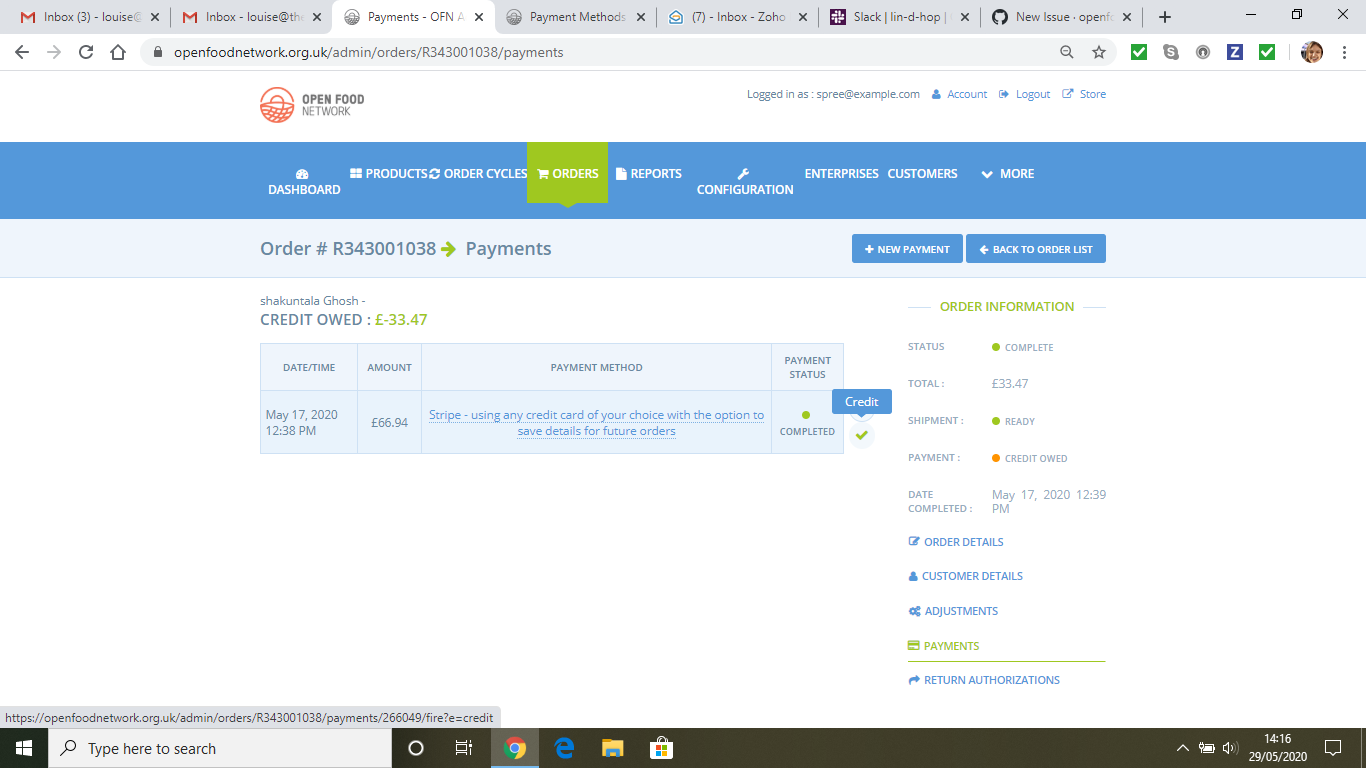
User visits Orders -> Edit Order -> Payments and selects the 'tick' beside the payment to issue a refund back to customer's credit/debit card. Screen goes to snail page and refund is not processed.
Steps to Reproduce
- Enterprise Stripe payment method = Stripe SCA; customer paid by Stripe; order is in credit
- Orders -> Edit Order -> Payments
- Select tick by the side of original card payment
4.
Animated Gif/Screenshot
Workaround
Severity
S3
Your Environment
- Version used:
- Browser name and version:
- Operating System and version (desktop or mobile):
Possible Fix
 lbwright22
All 7 comments
 lbwright22
on 29 May 2020
lbwright22
on 29 May 2020
Hey @lbwright22 ,
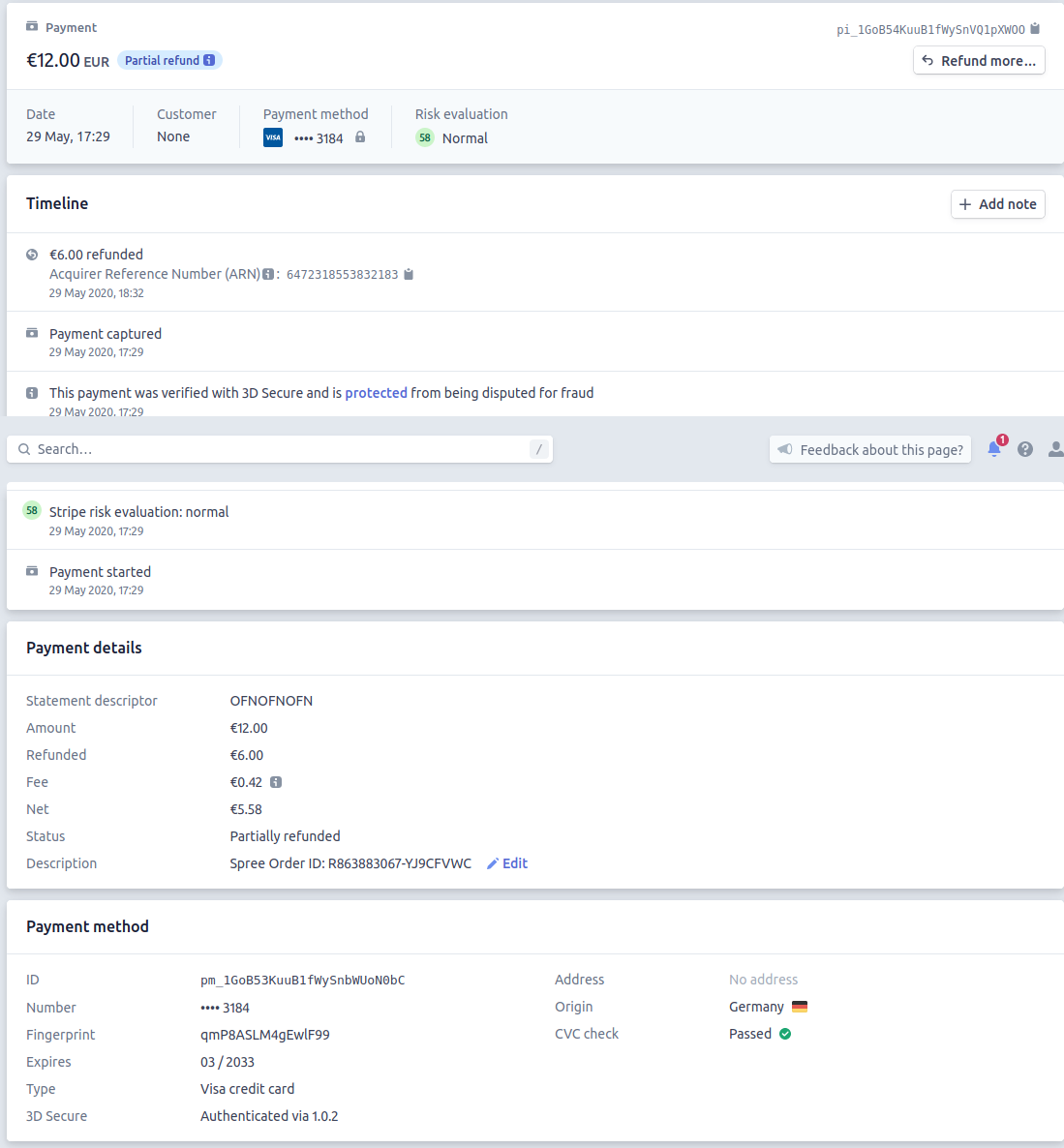
I have tried to reproduce this in release testing (v2.9.11) and was able to issue a partial refund, after removing an item from an order paid with a Stripe SCA 3D secure card:
4000002760003184 | This card requires authentication on all transactions, regardless of how the card is set up.
The partial refund appears as expected in Stripe's dashboard, in test mode:
So, maybe the type of card plays a role? Any chance of knowing what type of card the customer used, in this case? Thoughts @lin-d-hop @RachL @luisramos0 ?
I did not manage to get a full refund, as pointed out in #5258. The warning "You cannot cancel this PaymentIntent because it has a status of succeeded. Only a PaymentIntent with one of the following statuses may be cancelled: requires_payment_method, requires_capture, requires_confirmation, requires_action." gets triggered, but no snail, nor bugsnag.
 filipefurtad0
on 29 May 2020
filipefurtad0
on 29 May 2020
This issue has been linked to an error in Bugsnag
NoMethodError in spree/admin/payments#fire
 Matt-Yorkley
on 9 Jun 2020
Matt-Yorkley
on 9 Jun 2020
I think I found the problem.
I found the related error in bugsnag. It's using StripeSCA code to try the refund and it's not working.
In UK live database I can see 31 StripeSCA refunds done successful and only this order has this problem. This is not a generic problem then.
Looking at the DB I can see the payment method is now pointing at StripeConnect. That means that meanwhile the payment method was switched back to StripeConnect.
I think the conclusion is that when we switch to StripeSCA, refunding orders with payments done with StripeConnect will not work and give this error. The workaround will be to temporarily switch the payment method back to StripeConnect and click the refund button.
In this order, because the payment method is now as StripeConnect, I think the refund should work.
Anyway, I am 100% sure this is a problem with taking payment with one Stripe payment method and trying to refunding with the other one. Not something we should address with code, right? I am moving to Test Ready for confirmation.
 luisramos0
on 9 Jun 2020
luisramos0
on 9 Jun 2020
That's definitely a key factor here @luisramos0, trying to refund with a Stripe method which doesn't exist anymore.
To check this, I placed orders through the shopfront, with Stripe method A, then deleted this Stripe method and attempted refund with a remaining Stripe method B, and vice-versa. So, basically I observed that:
- orders paid with Stripe-Connect can't be refunded through Stripe-SCA
- orders paid with Stripe-SCA can't be refunded through Stripe-Connect
As you mention, this would explain perfectly what @lbwright22 describes :tada:
Maybe related:
Not only with Stripe, but with all payment methods there is an error 500, if the payment method is deleted after an order has been placed, and one attempts to view the payment method in the back office. This is described in detail under #5118 .
filipefurtad0
on 11 Jun 2020
awesome, I think we can close this issue. We will not support those cases with code.
luisramos0
on 11 Jun 2020
Thanks for the investigations!
I was sure we checked SCA refunds worked in the general case (otherwise I would have blocked SCA rollout). Really made me doubt myself this one... phew!
 lin-d-hop
on 12 Jun 2020
lin-d-hop
on 12 Jun 2020
Related issues
 sauloperez
·
3Comments
luisramos0
·
3Comments
sauloperez
·
3Comments
luisramos0
·
3Comments
 andrewpbrett
·
3Comments
andrewpbrett
·
3Comments
 shen-sat
·
3Comments
filipefurtad0
·
3Comments
shen-sat
·
3Comments
filipefurtad0
·
3Comments
Most helpful comment
I think I found the problem.
I found the related error in bugsnag. It's using StripeSCA code to try the refund and it's not working.
In UK live database I can see 31 StripeSCA refunds done successful and only this order has this problem. This is not a generic problem then.
Looking at the DB I can see the payment method is now pointing at StripeConnect. That means that meanwhile the payment method was switched back to StripeConnect.
I think the conclusion is that when we switch to StripeSCA, refunding orders with payments done with StripeConnect will not work and give this error. The workaround will be to temporarily switch the payment method back to StripeConnect and click the refund button.
In this order, because the payment method is now as StripeConnect, I think the refund should work.
Anyway, I am 100% sure this is a problem with taking payment with one Stripe payment method and trying to refunding with the other one. Not something we should address with code, right? I am moving to Test Ready for confirmation.