Office-js: addHandlerAsync ItemChanged not working correctly with conversation items and pinned Add-In in browsers
Expected Behavior
ItemChanged event should always fire when user switches between conversation items with pinned Add-In.
Current Behavior
ItemChanged event fires only once per each item in conversation. And then after switching it doesn't fire again.
For example - we have 4 items in conversation:
item1 - received
item2 - sent
item3 - received
item4 - sent
User goes to item1, opens Add-In, pins it and switches to the next item2. In this case everything works as expected and ItemChanged event fires.
But when he switches back to the item1, the ItemChanged event doesn't fire.
So, if User clicks on each of conversation items once, the ItemChanged event works well and fires. But then if he/she tries to click some of already clicked items, the ItemChanged event doesn't fire.
it looks like some kind of cache.
Steps to Reproduce, or Live Example
- Link to live example: ______
- Create new Add-in app: yo office. In my case it was:
- Choose a project type: Office Add-in Task Pane project
- Choose a script type: TypeScript
- What do you want to name your add-in? test-add-in
- Which Office client application would you like to support? Outlook
- Add version_overrides to support pin for add-in. Manifest is below:
<?xml version="1.0" encoding="UTF-8" standalone="yes" ?>
<OfficeApp xmlns="http://schemas.microsoft.com/office/appforoffice/1.1" xmlns:xsi="http://www.w3.org/2001/XMLSchema-instance" xmlns:bt="http://schemas.microsoft.com/office/officeappbasictypes/1.0" xmlns:mailappor="http://schemas.microsoft.com/office/mailappversionoverrides/1.0" xsi:type="MailApp">
  <Id>611a1fac-62e2-473a-8c3b-3efdcc5f5f5a</Id>
  <Version>1.0.0.0</Version>
  <ProviderName>Contoso</ProviderName>
  <DefaultLocale>en-US</DefaultLocale>
  <DisplayName DefaultValue="test-add-in" />
  <Description DefaultValue="A template to get started." />
  <IconUrl DefaultValue="https://localhost:3000/assets/icon-32.png" />
  <HighResolutionIconUrl DefaultValue="https://localhost:3000/assets/icon-80.png" />
  <SupportUrl DefaultValue="https://www.contoso.com/help" />
  <AppDomains>
    <AppDomain>contoso.com</AppDomain>
  </AppDomains>
  <Hosts>
    <Host Name="Mailbox" />
  </Hosts>
  <Requirements>
    <Sets>
      <Set Name="Mailbox" MinVersion="1.1" />
    </Sets>
  </Requirements>
  <FormSettings>
    <Form xsi:type="ItemRead">
      <DesktopSettings>
        <SourceLocation DefaultValue="https://localhost:3000/taskpane.html" />
        <RequestedHeight>250</RequestedHeight>
      </DesktopSettings>
    </Form>
  </FormSettings>
  <Permissions>ReadWriteItem</Permissions>
  <Rule xsi:type="RuleCollection" Mode="Or">
    <Rule xsi:type="ItemIs" ItemType="Message" FormType="Read" />
  </Rule>
  <DisableEntityHighlighting>false</DisableEntityHighlighting>
  <VersionOverrides xmlns="http://schemas.microsoft.com/office/mailappversionoverrides" xsi:type="VersionOverridesV1_0">
    <Requirements>
      <bt:Sets DefaultMinVersion="1.3">
        <bt:Set Name="Mailbox" />
      </bt:Sets>
    </Requirements>
    <Hosts>
      <Host xsi:type="MailHost">
        <DesktopFormFactor>
          <FunctionFile resid="Commands.Url" />
          <ExtensionPoint xsi:type="MessageReadCommandSurface">
            <OfficeTab id="TabDefault">
              <Group id="msgReadGroup">
                <Label resid="GroupLabel" />
                <Control xsi:type="Button" id="msgReadOpenPaneButton">
                  <Label resid="TaskpaneButton.Label" />
                  <Supertip>
                    <Title resid="TaskpaneButton.Label" />
                    <Description resid="TaskpaneButton.Tooltip" />
                  </Supertip>
                  <Icon>
                    <bt:Image size="16" resid="Icon.16x16" />
                    <bt:Image size="32" resid="Icon.32x32" />
                    <bt:Image size="80" resid="Icon.80x80" />
                  </Icon>
                  <Action xsi:type="ShowTaskpane">
                    <SourceLocation resid="Taskpane.Url" />
                  </Action>
                </Control>
                <Control xsi:type="Button" id="ActionButton">
                  <Label resid="ActionButton.Label" />
                  <Supertip>
                    <Title resid="ActionButton.Label" />
                    <Description resid="ActionButton.Tooltip" />
                  </Supertip>
                  <Icon>
                    <bt:Image size="16" resid="Icon.16x16" />
                    <bt:Image size="32" resid="Icon.32x32" />
                    <bt:Image size="80" resid="Icon.80x80" />
                  </Icon>
                  <Action xsi:type="ExecuteFunction">
                    <FunctionName>action</FunctionName>
                  </Action>
                </Control>
              </Group>
            </OfficeTab>
          </ExtensionPoint>
        </DesktopFormFactor>
      </Host>
    </Hosts>
    <Resources>
      <bt:Images>
        <bt:Image id="Icon.16x16" DefaultValue="https://localhost:3000/assets/icon-16.png" />
        <bt:Image id="Icon.32x32" DefaultValue="https://localhost:3000/assets/icon-32.png" />
        <bt:Image id="Icon.80x80" DefaultValue="https://localhost:3000/assets/icon-80.png" />
      </bt:Images>
      <bt:Urls>
        <bt:Url id="Commands.Url" DefaultValue="https://localhost:3000/commands.html" />
        <bt:Url id="Taskpane.Url" DefaultValue="https://localhost:3000/taskpane.html" />
      </bt:Urls>
      <bt:ShortStrings>
        <bt:String id="GroupLabel" DefaultValue="Contoso Add-in" />
        <bt:String id="TaskpaneButton.Label" DefaultValue="Show Taskpane" />
        <bt:String id="ActionButton.Label" DefaultValue="Perform an action" />
      </bt:ShortStrings>
      <bt:LongStrings>
        <bt:String id="TaskpaneButton.Tooltip" DefaultValue="Opens a pane displaying all available properties." />
        <bt:String id="ActionButton.Tooltip" DefaultValue="Perform an action when clicked." />
      </bt:LongStrings>
    </Resources>
    <VersionOverrides xmlns="http://schemas.microsoft.com/office/mailappversionoverrides/1.1" xsi:type="VersionOverridesV1_1">
      <Requirements>
        <bt:Sets DefaultMinVersion="1.3">
          <bt:Set Name="Mailbox" />
        </bt:Sets>
      </Requirements>
      <Hosts>
        <Host xsi:type="MailHost">
          <DesktopFormFactor>
            <FunctionFile resid="Commands.Url" />
            <ExtensionPoint xsi:type="MessageReadCommandSurface">
              <OfficeTab id="TabDefault">
                <Group id="msgReadGroup">
                  <Label resid="GroupLabel" />
                  <Control xsi:type="Button" id="msgReadOpenPaneButton">
                    <Label resid="TaskpaneButton.Label" />
                    <Supertip>
                      <Title resid="TaskpaneButton.Label" />
                      <Description resid="TaskpaneButton.Tooltip" />
                    </Supertip>
                    <Icon>
                      <bt:Image size="16" resid="Icon.16x16" />
                      <bt:Image size="32" resid="Icon.32x32" />
                      <bt:Image size="80" resid="Icon.80x80" />
                    </Icon>
                    <Action xsi:type="ShowTaskpane">
                      <SourceLocation resid="Taskpane.Url" />
                      <SupportsPinning>true</SupportsPinning>
                    </Action>
                  </Control>
                  <Control xsi:type="Button" id="ActionButton">
                    <Label resid="ActionButton.Label" />
                    <Supertip>
                      <Title resid="ActionButton.Label" />
                      <Description resid="ActionButton.Tooltip" />
                    </Supertip>
                    <Icon>
                      <bt:Image size="16" resid="Icon.16x16" />
                      <bt:Image size="32" resid="Icon.32x32" />
                      <bt:Image size="80" resid="Icon.80x80" />
                    </Icon>
                    <Action xsi:type="ExecuteFunction">
                      <FunctionName>action</FunctionName>
                    </Action>
                  </Control>
                </Group>
              </OfficeTab>
            </ExtensionPoint>
          </DesktopFormFactor>
        </Host>
      </Hosts>
      <Resources>
        <bt:Images>
          <bt:Image id="Icon.16x16" DefaultValue="https://localhost:3000/assets/icon-16.png" />
          <bt:Image id="Icon.32x32" DefaultValue="https://localhost:3000/assets/icon-32.png" />
          <bt:Image id="Icon.80x80" DefaultValue="https://localhost:3000/assets/icon-80.png" />
        </bt:Images>
        <bt:Urls>
          <bt:Url id="Commands.Url" DefaultValue="https://localhost:3000/commands.html" />
          <bt:Url id="Taskpane.Url" DefaultValue="https://localhost:3000/taskpane.html" />
        </bt:Urls>
        <bt:ShortStrings>
          <bt:String id="GroupLabel" DefaultValue="Contoso Add-in" />
          <bt:String id="TaskpaneButton.Label" DefaultValue="Show Taskpane" />
          <bt:String id="ActionButton.Label" DefaultValue="Perform an action" />
        </bt:ShortStrings>
        <bt:LongStrings>
          <bt:String id="TaskpaneButton.Tooltip" DefaultValue="Opens a pane displaying all available properties." />
          <bt:String id="ActionButton.Tooltip" DefaultValue="Perform an action when clicked." />
        </bt:LongStrings>
      </Resources>
    </VersionOverrides>
  </VersionOverrides>
</OfficeApp>
- Add handler for ItemChanged event in taskpane.ts. And just console.log appropriate result of ItemChanged event. The code of taskpane.ts is below:
/*
    * Copyright (c) Microsoft Corporation. All rights reserved. Licensed under the MIT license.
    * See LICENSE in the project root for license information.
    */

   /* global document, Office */

   Office.onReady(info => {
     if (info.host === Office.HostType.Outlook) {
       document.getElementById("sideload-msg").style.display = "none";
       document.getElementById("app-body").style.display = "flex";
       document.getElementById("run").onclick = run;
     }
     Office.context.mailbox.addHandlerAsync(Office.EventType.ItemChanged, e => {
       console.log("Item Changed", e);
     });
   });

   export async function run() {
     /**
      * Insert your Outlook code here
      */
   }
- Run app with "npm run start:web".
- Open outlook.office.com and sideload the app.
- Open some conversation tree with conversation items.
- Open Add-in and pin it.
- Go to the next item in conversation. As a result: event fires and it appears in browser console.
- Switch between already clicked items. As a result: event doesn't fire.
Context
This issue is critical for us, because we can't handle item change correctly for conversation.
Your Environment
- Platform: Mac, PC desktop
- Host: Outlook
- Office version number: Office 365 for web
- Operating System: Mac OS, Windows 10
- Browser (if using Office Online): Chrome, Safari
 max-yushchuk
All 16 comments
Thank you for reporting this issue. This has been put in our backlog. We unfortunately have no timelines to share at this point.
 exextoc
on 16 Apr 2020
exextoc
on 16 Apr 2020
@exextoc
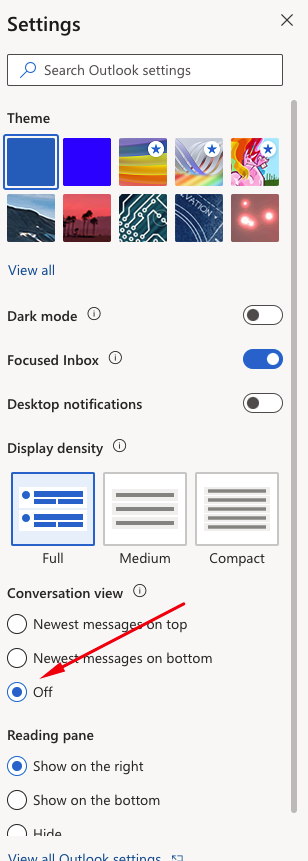
I've just found this issue when Conversation View is off in Office 365 as well.
In this case itemChanged event doesn't fire for all items.
You can check it by disabling Conversation View and try to switch between any items.
It's really critical for us. Can you suggest some workaround for this?
max-yushchuk
on 24 Apr 2020
@max-yushchuk thank you for reporting this new issue. Unfortunately there is no work around as of now. We are looking to fix this bug on priority.
exextoc
on 29 Apr 2020
@exextoc
I've just found this issue when Conversation View is off in Office 365 as well.
In this case itemChanged event doesn't fire for all items.
You can check it by disabling Conversation View and try to switch between any items.It's really critical for us. Can you suggest some workaround for this?
Hello @max-yushchuk Can you please check whether itemchanged event handler with the conversation mode off is still an issue or not?
exextoc
on 28 May 2020
@exextoc, I've just checked and found that OnItemChanged event fires properly. But it doesn't change asyncResult in callback function - subject, internetMessageId and other properties are from previously selected item.
So, it's still an issue.
max-yushchuk
on 29 May 2020
We have fixed this issue and will take ~1 week for 100% rollout in OWA. Thanks for your patience.
exextoc
on 17 Jun 2020
@lindalu-MSFT, I see, you added "Status:fixed". But actually it doesn't work. When will this fix be delivered to end users? Thanks.
max-yushchuk
on 3 Jul 2020
@max-yushchuk can you please confirm now tht the issue is fixed?
 JuaneloJuanelo
on 24 Jul 2020
JuaneloJuanelo
on 24 Jul 2020
@JuaneloJuanelo thanks for adding the needs author feedback tag! That will override "status: fixed" until customer confirms.
 lindalu-MSFT
on 24 Jul 2020
lindalu-MSFT
on 24 Jul 2020
The second issue (when "Conversation View" is "off") was fixed.
But the first and the main issue in this thread (switching between items in conversations) still exists.
max-yushchuk
on 24 Jul 2020
The update given was for the second issue. First issue is in our backlog. We unfortunately have no timelines to share at this point.
exextoc
on 27 Jul 2020
Internal tracking id: OutlookWeb:91155
exextoc
on 30 Jul 2020
Both the issues mentioned are fixed and being deployed.
Should be available globally by 31/08.
exextoc
on 25 Aug 2020
We have fixed the bug and the fix should be available in the latest build.
[Outlook Add-ins Engineering Team]
exextoc
on 2 Sep 2020
This issue has been automatically marked as stale because it is marked as needing author feedback but has not had any activity for 4 days. It will be closed if no further activity occurs within 3 days of this comment. Thank you for your interest in Office Add-ins!
![msftbot[bot] picture](https://avatars.githubusercontent.com/in/26612?v=4&s=40) msftbot[bot]
on 6 Sep 2020
msftbot[bot]
on 6 Sep 2020
Thanks. It works as expected. I'll close this issue.
max-yushchuk
on 7 Sep 2020
Related issues
 tido-ms
·
3Comments
tido-ms
·
3Comments
 leoseccia
·
3Comments
leoseccia
·
3Comments
 sshukurov
·
4Comments
sshukurov
·
4Comments
 mattblackdev
·
4Comments
mattblackdev
·
4Comments
 kushwahav
·
3Comments
kushwahav
·
3Comments