Office-js: Outlook add-in using npm installed office-js library does not work if internet is blocked
Expected Behavior
Outlook add-in accessing npm installed office-js library should work if internet is blocked
Current Behavior
Office-js library gives error when add-in is loaded.
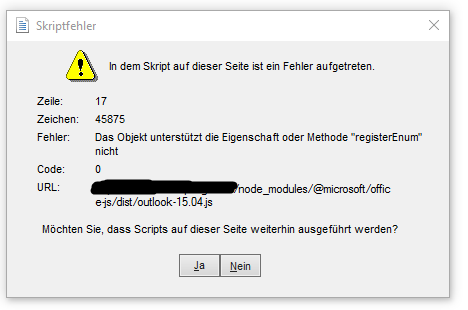
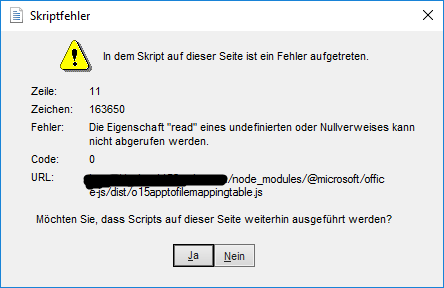
Steps to Reproduce, or Live Example
Client is using outlook add-in which uses office-js library for locale de_CH. Internet is blocked is workstation. On loading add-in it gives error as attached above.
- Additional details:
If internet is enabled and library is accessed from CDN then this add-in works fine.
Context
This add-in is for both online and offline clients and this issue makes it useless for offline clients.
Your Environment
- Platform [PC desktop, Mac, iOS, Office Online]: PC running Windows 10
- Host [Excel, Word, PowerPoint, etc.]: Outlook
- Office version number: Office 2016
- Operating System: Windows 10
- Browser (if using Office Online): ______
Useful logs
- Screenshots are attached with description.
 kushwahav
All 3 comments
I have some questions that will help us reproduce this issue.
What is the version number of the Outlook client that has this issue?
Does this issue also occur when you load the office-js files from your web server (not the Office.js CDN), when internet access is enabled?
Are you able to reproduce the issue on other machines?
 exextoc
on 2 May 2019
exextoc
on 2 May 2019
Here is the requested information:
Outlook version:

This issue does not occur when office-js files are loaded from web server and internet access is enabled.
And this issue is re-producible on multiple machines.
It seems like office-js library is trying to access Ajax library https://ajax.aspnetcdn.com/ajax/3.5/MicrosoftAjax.js which is blocked.
kushwahav
on 3 May 2019
In general, self-hosting these files for Outlook, is not supported. The documentation for the NPM package should be updated with this information. That being said, you could try loading a self-hosted copy of Microsoft Ajax BEFORE Loading the Office.JS file to see if that works...
exextoc
on 8 May 2019
Related issues
 ndeeH
·
5Comments
ndeeH
·
5Comments
 ShannonLCapper
·
5Comments
ShannonLCapper
·
5Comments
 mattblackdev
·
4Comments
mattblackdev
·
4Comments
 sshukurov
·
4Comments
sshukurov
·
4Comments
 tido-ms
·
3Comments
tido-ms
·
3Comments
Most helpful comment
In general, self-hosting these files for Outlook, is not supported. The documentation for the NPM package should be updated with this information. That being said, you could try loading a self-hosted copy of Microsoft Ajax BEFORE Loading the Office.JS file to see if that works...