Office-js: Inserting OfficeOpenXml via setSelectedDataAsync() resets WordOnline Add In
Our add in inserts OfficeOpenXml into Word Online.
When the document does NOT have focus this fails and resets the add in.
Expected Behavior
When the document has focus (once clicked into the document) it works as exptected.
Current Behavior
Only a fragment is inserted and the add in is reloaded (start page).
Steps to Reproduce, or Live Example
See this video to reproduce this issue:
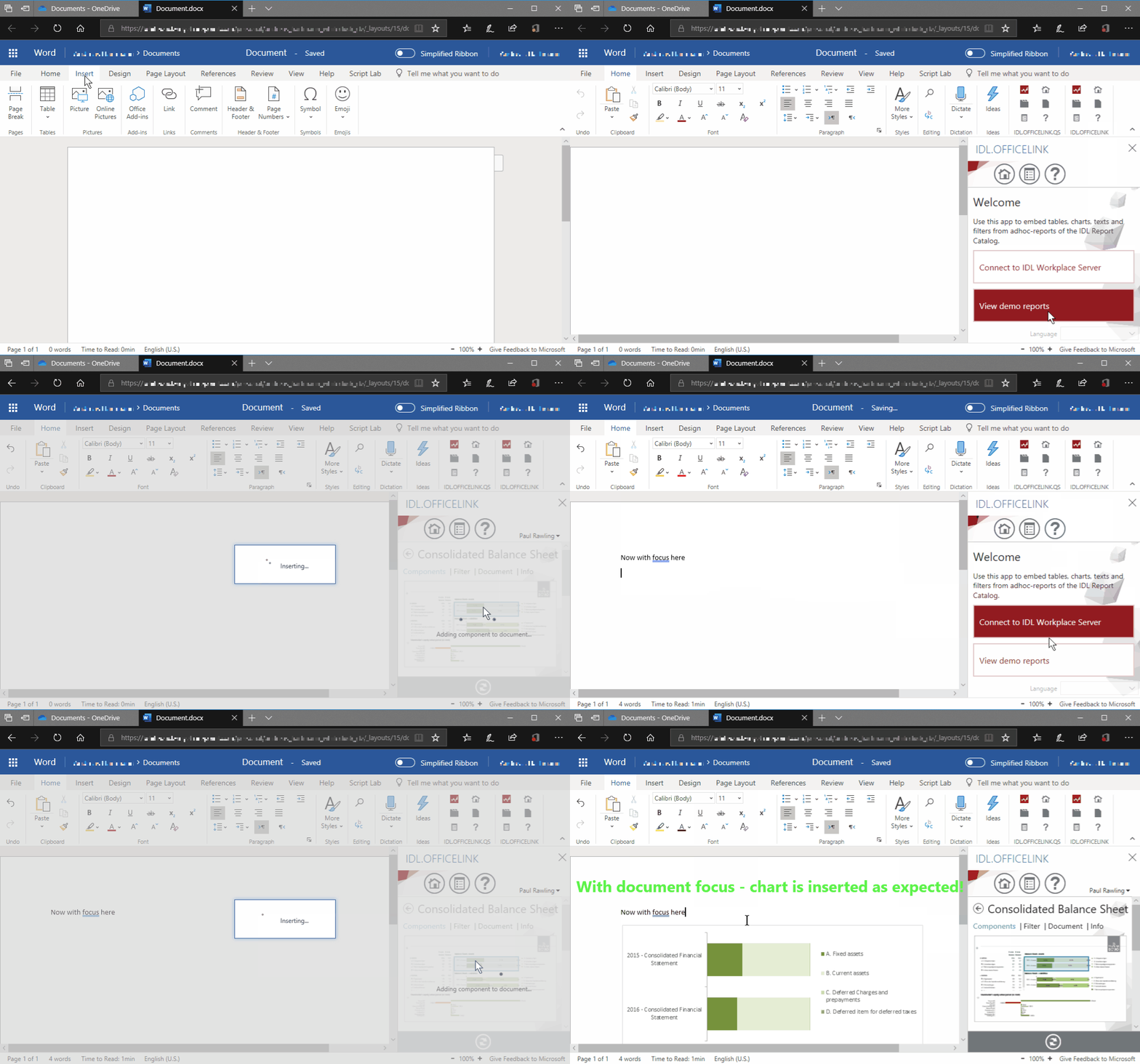
We call:
setSelectedDataAsync(contentControl, { coercionType: Office.CoercionType.Ooxml },
The chart ist inserted itself in a blank content control.
Context
Our add in is already in the store and used very often.
In normal demo cases users will fall into this pit.
Your Environment
- WordOnline
- here Edge (but no other browser will succeed)
 ndeeH
ndeeH
All 14 comments
Hi @weird-dreams , we are unable to repro with the information provide (do you have a specific set of repro setps to try?),, i..e sample ooxml to try?
thanks
 keyur32
on 19 Sep 2019
keyur32
on 19 Sep 2019
Look at the video: Use the add in IDL.OFFICELINK from store to reproduce.
From your side you should be able to log the parameters (Ooxml) which are passed to your API.
TIA
ndeeH
on 19 Sep 2019
Any news?
ndeeH
on 22 Oct 2019
Any news?
@weird-dreams Since the UI is quite different now on online from your clip. I cannot repro your bug on the new UI.
Make it as cannot repro.
If you could repro it again, could you please add more information ?
 crazygao
on 15 Nov 2019
crazygao
on 15 Nov 2019
@crazygao
I still can reproduce this issue. Simplified ribbon might let word look a bit different.
But the add in itself looks almost the same as in video (some screens might now look more gray).
Look at the video above - here are the steps described in words:
(First of all install Add In "IDL.OFFICELINK" from store!)
- Open a new instance of Word Online (_do NOT click inside document content!_)
- Click on "Show Taskpane app"
- Click on Demo Reports
- Navigate into Shared Repository and down to the reports
- Open report by click
- Double click on a chart in the report (_IMPORTANT document content should NOT have a focus!_)
- Add In tries to Insert chart via office.js API and fails and is completely reset.
When you clicked inside the document before step 6 it will work as expected!
 weird-things
on 15 Nov 2019
weird-things
on 15 Nov 2019
@crazygao Any news?
(Sry - described reproduce steps with my other user.)
ndeeH
on 28 Nov 2019
@weird-dreams Yes, I could repro now, but I'm not quite sure about the root cause... I think it quite need some time. Sorry for the late reply
crazygao
on 3 Dec 2019
I investigated and actually the SetSelectedDataAsync operation is successful. You can see the content control in document.
The Chart insertion operation is in the success callback of SetSelectedDataAsync. But The add-in is reload after the ooxml is set, so the callback is not called. And this is why the chart is not inserted.
But why add-in is reloaded?
What i can confirm now is that set ooxml is not the root cause. This is because if you just call set ooxml in an function, add-in will not reload (i tested without any cursor on UI).
So i guess some of your code will trigger some event on Word to refresh your add-in.
So what code triggers the add-in refresh event?
I want to debug your client side code, but there's a lot of promise and i can't easily look thought it.
Can you please provide a simple version of code which can trigger this issue? Better without any of your services code. Thus I can see if anything wrong with the API.
Thanks.
 Kaidali
on 4 Mar 2020
Kaidali
on 4 Mar 2020
Thank you for your deep investigation. At the moment I am too busy to provide a sample to reproduce.
But here I have the relevant calls when we add chart or table content:
this.mDocument.setSelectedDataAsync(contentControl, { coercionType: Office.CoercionType.Ooxml },(asyncResult: any) =>
{
    if (asyncResult.status == Office.AsyncResultStatus.Failed)
    {
        this.mDefered.reject(asyncResult.error.message);
        return;
    }

    // create binding in document to ContentControl
    Office.context.document.bindings.addFromNamedItemAsync(tableId, Office.BindingType.Text, { id: tableId },(asyncResult: any) =>
    {
        if (asyncResult.status == Office.AsyncResultStatus.Failed)
        {
            this.mDefered.reject(asyncResult.error.message);
            return;
        }

        // set Table in ContentControl
        Office.select('bindings#' + tableId).setDataAsync(tableWithBackbone, { coercionType: Office.CoercionType.Ooxml },(asyncResult: any) =>
        {
            if (asyncResult.status == Office.AsyncResultStatus.Failed)
            {
                this.mDefered.reject(asyncResult.error.message);
                return;
            }
Maybe you are able to reproduce it when using this calls. We are not triggering any event that refreshes the add in itself.
TIA, Andi
ndeeH
on 5 Mar 2020
I've already tried this, can't repro the issue. So there must be some other code make add in crash or trigger some weird event.
And i also replace the ooxml with really simple content in your client code, still have same issue. So the ooxml content is not the cause, too.
Kaidali
on 9 Mar 2020
So I have uploaded a non-optimized version of the add in to our QA version of the add in and tried to reproduce.
When stepping through the code the error does occur after:
_this.mDocument.setSelectedDataAsync(contentControl, { coercionType: Office.CoercionType.Ooxml }, function (asyncResult) {
I also saw a warning in the console that might point to a reason:
OsfRuntimeWordWAC.js:18 Unrecognized feature: 'focus-without-user-activation'.
May be I could send you a private message to give you our manifest to reproduce with our QA version.
@crazygao
ndeeH
on 9 Mar 2020
Sould we give you a manifest for our non optimized version - via Private Message?
_How could I send it to you?_
@Kaidali @crazygao
ndeeH
on 24 Mar 2020
@weird-dreams , thanks.
And yes, if possible. Please send it to [email protected].
Thanks.
Kaidali
on 25 Mar 2020
OK. I have sent you the manifest to debug with our add in.
Please tell me when you have done your tests.
@Kaidali @crazygao
ndeeH
on 25 Mar 2020
Related issues
 cawise
·
4Comments
cawise
·
4Comments
 gordonmleigh
·
3Comments
gordonmleigh
·
3Comments
 tido-ms
·
3Comments
tido-ms
·
3Comments
 leoseccia
·
3Comments
leoseccia
·
3Comments
 alx-andru
·
5Comments
alx-andru
·
5Comments