Office-js: Add onSelectionChangeHandler in Excel Online breaks during app initialization
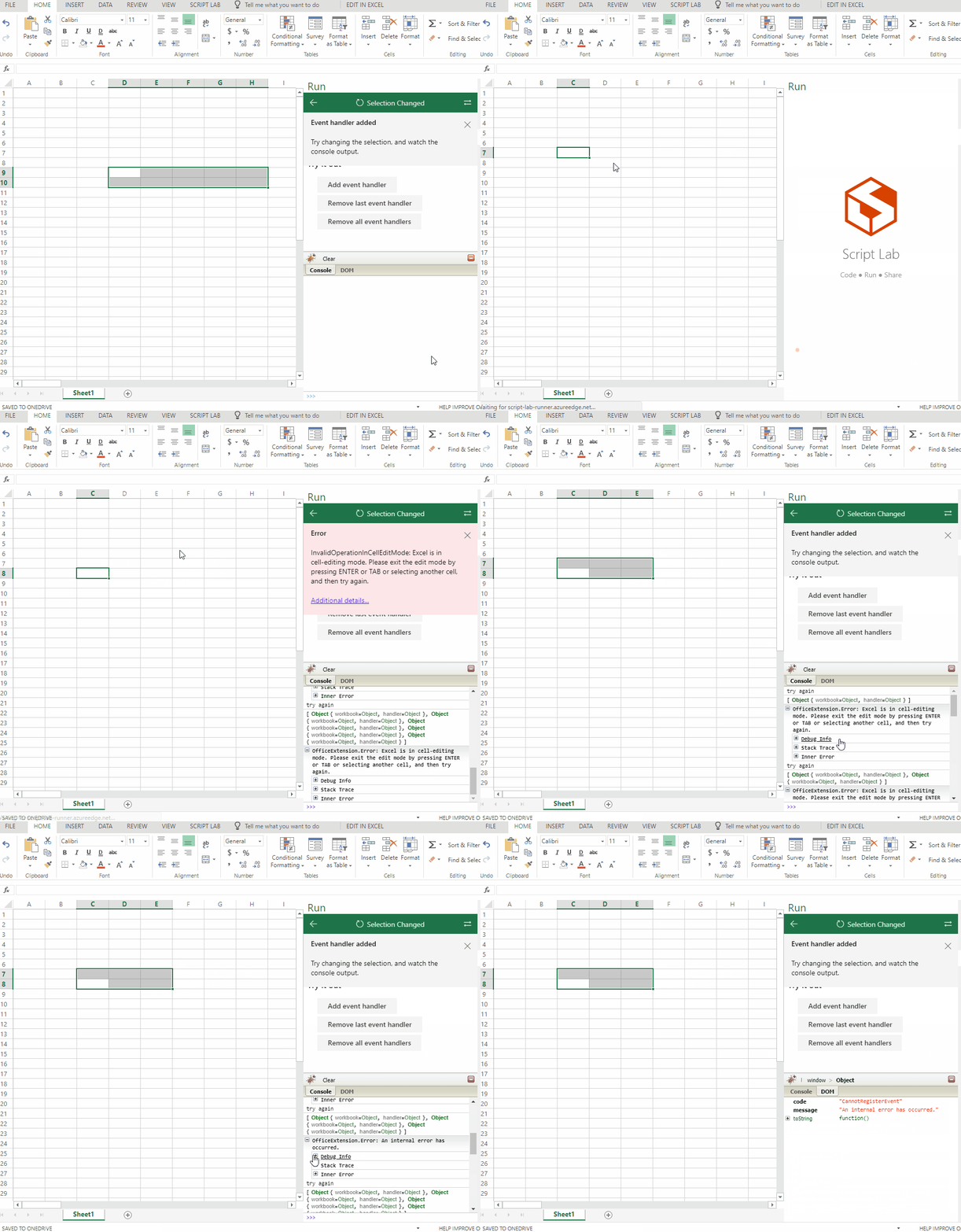
Adding a new 'onSelectionChanged' event during the application load crashes in Excel Online, if during the initialization of the addin, selection changes occur.
Expected Behavior
Application loads, event handlers are registered and trigger the onSelectionChange function which was registered.
Current Behavior
Application loads, adding handler failed and no selectionChangeEvents are triggered.
In some more random cases the event handler could be added, but no events would be triggered.
Adding handlers should work as expected.
Steps to Reproduce, or Live Example
- Load the addin either through the addin-menu or refresh the addin.
- During the load, trigger various onSelectionChanged events by randomly selecting cells and ranges.
- Error happens
I have taken the ScriptLab example for 'Selection Changed' and modified it to imitate the way we use it in our application. Unlike the example, the handler is added as soon as the script is loaded.
https://gist.github.com/alx-andru/c2c93e4e29f60a31880e4c0e2dde63b3
In the case of an error, I try to add the handler again.
A more comprehensive Angular example can be found here, the base code for adding the handler and performing the selection is the same.
https://github.com/alx-andru/office-js-lab
The manifest inside the project points to an azure app service running the example.
Context
As soon as our application is loaded, we'd like to track every selection change and validate the result against our business logic in order to read trigger values. In many cases one or multiple registered ContentControls (we added a binding to it) might be within the selection. We would like to inform the user about which ContentControls are selected and perform validations against those.
During our debugging we came across the issue and narrowed it down to this simplified prototype based on an existing script-lab example.
Your Environment
- Platform [PC desktop, Mac, iOS, Office Online]:
PC, Windows 10, - Host [Excel, Word, PowerPoint, etc.]:
Online Excel only (Excel for Windows works fine, Word online works as well) - Office version number: Microsoft Online, Excel for Windows Version 1801 Build 9001.2138
- Operating System: Windows 10
- Browser (if using Office Online): Chrome, IE 11, Edge, Firefox
Useful logs
- [x] Console errors
```
window>Object
ConsoleDOM
__zone_symbol__currentTask
Object {_zone=Object, runCount=0, ...}
code
"CannotRegisterEvent"
debugInfo
{"code":"CannotRegisterEvent","message":"An internal error has occurred."} {...}
innerError
null
message
"An internal error has occurred."
name
"OfficeExtension.Error"
originalStack
"Error: An internal error has occurred.\n at r.ZoneAwareError (https://script-lab.azureedge.net/bundles/polyfills.2e9078c49c55fa18c57b.bundle.js:1:77489)\n at new r (https://appsforoffice.microsoft.com/lib/1/hosted/excel-web-16.00.js:21:288918)\n at https://appsforoffice.microsoft.com/lib/1/hosted/excel-web-16.00.js:21:272038\n at ZoneDelegate.invoke (https://script-lab.azureedge.net/bundles/polyfills.2e9078c49c55fa18c57b.bundle.js:1:85192)\n at Zone.run (https://script-lab.azureedge.net/bundles/polyfills.2e9078c49c55fa18c57b.bundle.js:1:80018)\n at https://script-lab.azureedge.net/bundles/polyfills.2e9078c49c55fa18c57b.bundle.js:1:77231\n at ZoneDelegate.invokeTask (https://script-lab.azureedge.net/bundles/polyfills.2e9078c49c55fa18c57b.bundle.js:1:85935)\n at Zone.runTask (https://script-lab.azureedge.net/bundles/polyfills.2e9078c49c55fa18c57b.bundle.js:1:80709)\n at drainMicroTaskQueue (https://script-lab.azureedge.net/bundles/polyfills.2e9078c49c55fa18c57b.bundle.js:1:75411)\n at ZoneTask.invoke (https://script-lab.azureedge.net/bundles/polyfills.2e9078c49c55fa18c57b.bundle.js:1:86983)"
stack
"Error: An internal error has occurred.\n at r.ZoneAwareError (https://script-lab.azureedge.net/bundles/polyfills.2e9078c49c55fa18c57b.bundle.js:1:77489)\n at new r (https://appsforoffice.microsoft.com/lib/1/hosted/excel-web-16.00.js:21:288918)\n at https://appsforoffice.microsoft.com/lib/1/hosted/excel-web-16.00.js:21:272038\n at ZoneDelegate.invoke (https://script-lab.azureedge.net/bundles/polyfills.2e9078c49c55fa18c57b.bundle.js:1:85192)\n at Zone.run (https://script-lab.azureedge.net/bundles/polyfills.2e9078c49c55fa18c57b.bundle.js:1:80018)\n at https://script-lab.azureedge.net/bundles/polyfills.2e9078c49c55fa18c57b.bundle.js:1:77231\n at ZoneDelegate.invokeTask (https://script-lab.azureedge.net/bundles/polyfills.2e9078c49c55fa18c57b.bundle.js:1:85935)\n at Zone.runTask (https://script-lab.azureedge.net/bundles/polyfills.2e9078c49c55fa18c57b.bundle.js:1:80709)\n at drainMicroTaskQueue (https://script-lab.azureedge.net/bundles/polyfills.2e9078c49c55fa18c57b.bundle.js:1:75411)\n at ZoneTask.invoke (https://script-lab.azureedge.net/bundles/polyfills.2e9078c49c55fa18c57b.bundle.js:1:86983)"
traceMessages
[]
zoneAwareStack
"Error: An internal error has occurred.\n at r.ZoneAwareError (https://script-lab.azureedge.net/bundles/polyfills.2e9078c49c55fa18c57b.bundle.js:1:77489)\n at new r (https://appsforoffice.microsoft.com/lib/1/hosted/excel-web-16.00.js:21:288918)\n at https://appsforoffice.microsoft.com/lib/1/hosted/excel-web-16.00.js:21:272038\n at ZoneDelegate.invoke (https://script-lab.azureedge.net/bundles/polyfills.2e9078c49c55fa18c57b.bundle.js:1:85192)\n at Zone.run (https://script-lab.azureedge.net/bundles/polyfills.2e9078c49c55fa18c57b.bundle.js:1:80018)\n at https://script-lab.azureedge.net/bundles/polyfills.2e9078c49c55fa18c57b.bundle.js:1:77231\n at ZoneDelegate.invokeTask (https://script-lab.azureedge.net/bundles/polyfills.2e9078c49c55fa18c57b.bundle.js:1:85935)\n at Zone.runTask (https://script-lab.azureedge.net/bundles/polyfills.2e9078c49c55fa18c57b.bundle.js:1:80709)\n at drainMicroTaskQueue (https://script-lab.azureedge.net/bundles/polyfills.2e9078c49c55fa18c57b.bundle.js:1:75411)\n at ZoneTask.invoke (https://script-lab.azureedge.net/bundles/polyfills.2e9078c49c55fa18c57b.bundle.js:1:86983)"
_createDebugInfo
function()
popStackFrame
function()
constructor
function()
toString
function()
```
- [x] Screenshots
Here's a quick illustration of what happens:
- [ ] Test file (if only happens on a particular file)
 alx-andru
All 5 comments
@ShawnNiu please reply.
 sumurthy
on 16 Feb 2018
sumurthy
on 16 Feb 2018
Hey @alx-andru thanks for the super detailed description and for reporting this. I was able to repro this issue and, as described, happens only in Excel Online. {TFS:2158100}
Quick clarification: Excel is not crashing, but we are unsuccessful to register the event in such potentially edge conditions. I think that you are doing the right error handling on ultimately subscribing to the events.
We will investigate an update when we have a plan in place.
Thanks,
Juan.
 JuaneloJuanelo
on 16 Feb 2018
JuaneloJuanelo
on 16 Feb 2018
@JuaneloJuanelo thanks for confirming. I also tested it targeting different api versions of office.js and the beta release seems to be more stable in regards of the selection.
alx-andru
on 16 Feb 2018
Hi @alx-andru
Sorry for the inconvenience, we already recognized the selection change problem under the workbook object, will update the sample in scriptlab accordingly. Thanks for pointing out the problem 👍
Please refer to the selection change api in beta first. Let me know if you have any problem with that.
 ShawnNiu
on 17 Feb 2018
ShawnNiu
on 17 Feb 2018
Hey @ShawnNiu this seems to work way better. Every once in a while we still see the issue though
alx-andru
on 27 Feb 2018
Related issues
 leoseccia
·
3Comments
leoseccia
·
3Comments
 rvanlaak
·
4Comments
rvanlaak
·
4Comments
 sshukurov
·
4Comments
sshukurov
·
4Comments
 barisbikmaz
·
4Comments
barisbikmaz
·
4Comments
 ShannonLCapper
·
5Comments
ShannonLCapper
·
5Comments
Most helpful comment
Hi @alx-andru
Sorry for the inconvenience, we already recognized the selection change problem under the workbook object, will update the sample in scriptlab accordingly. Thanks for pointing out the problem 👍
Please refer to the selection change api in beta first. Let me know if you have any problem with that.