Office-js: Inspect Element does not appear in right click menu on Mac
I'm following this tutorial for debugging a sideloaded Excel add-in on Mac:
https://docs.microsoft.com/en-us/office/dev/add-ins/testing/debug-office-add-ins-on-ipad-and-mac
And using Mac OS 10.14.4 and Office 365 Excel version 16.24 (19041201). After adding:
defaults write com.microsoft.Excel OfficeWebAddinDeveloperExtras -bool true in the terminal, and rebooting: "Inspect Element" does not appear in right click menu inside my Office add-in, in Excel.
Is it because I have a newer OS than High Sierra? Any Ideas?
Expected Behavior
Inspect Element should appear in right click menu so I can access the inspector on mac and be able to debug. This is for an add-in/manifest that works as expected in Windows 10.
Current Behavior
Inspect Element does not appear in the right click menu.
Context
Would like to be able to debug on mac (mainly view the console)
Your Environment
- Platform [PC desktop, Mac, iOS, Office Online]: ____Mac__
- Host [Excel, Word, PowerPoint, etc.]: _____Excel_
- Office version number: ___Excel 16.24 Office 365___
- Operating System: __Mac OS 10.14.4____
- Browser (if using Office Online): ______
Useful logs
- [ ] Console errors
- [ ] Screenshots
- [ ] Test file (if only happens on a particular file)
 misaunde
All 18 comments
The same happens to me
 georgiik-welldone
on 16 May 2019
georgiik-welldone
on 16 May 2019
+1
 paulpublic
on 21 May 2019
paulpublic
on 21 May 2019
@keyur32, Can you please take a look?
 AlexJerabek
on 24 May 2019
AlexJerabek
on 24 May 2019
Please see the documentation:https://docs.microsoft.com/en-us/office/dev/add-ins/testing/debug-office-add-ins-on-ipad-and-mac#debugging-with-safari-web-inspector-on-a-mac
 akrantz
on 25 May 2019
akrantz
on 25 May 2019
@akrantz This should the correct configuration right?
> defaults read com.microsoft.Excel OfficeWebAddinDeveloperExtras
1
With that setting I can't open Inspect Element. I think this issue started after a macos update (i'm on 10.14.5)
paulpublic
on 27 May 2019
Yup, we are investigating this. We will respond once investigation completes. Have added a bug label to this issue. Thanks!
 keyur32
on 30 May 2019
keyur32
on 30 May 2019
Hey folks, sorry! we haven't been able to repro this across multiple machines on 10.14.4 and 10.14.5 -- it all works, when we set it. We may need to jump on a call. + @JuaneloJuanelo / @akrantz to help coordinate that..
keyur32
on 31 May 2019
Hi @keyur32, any update here? I'm on macOS 10.12.6, word 16.27, and I have the same problem. I'm happy to help you with debugging if you need anything.
edit:
My mistake didn't saw High Sierra requirement, after updating macOS to 10.13.1 it works. 👍
_At the same time, I also cleaned cache._
 jdrzj
on 25 Jul 2019
jdrzj
on 25 Jul 2019
I'm also having this problem with mac OS 10.14.5 and outlook 16.27
 fraziermork
on 1 Aug 2019
fraziermork
on 1 Aug 2019
Hey folks, can you verify your writes command was set:
https://docs.microsoft.com/en-us/office/dev/add-ins/testing/debug-office-add-ins-on-ipad-and-mac?
thanks!
keyur32
on 7 Aug 2019
Still doesn't work
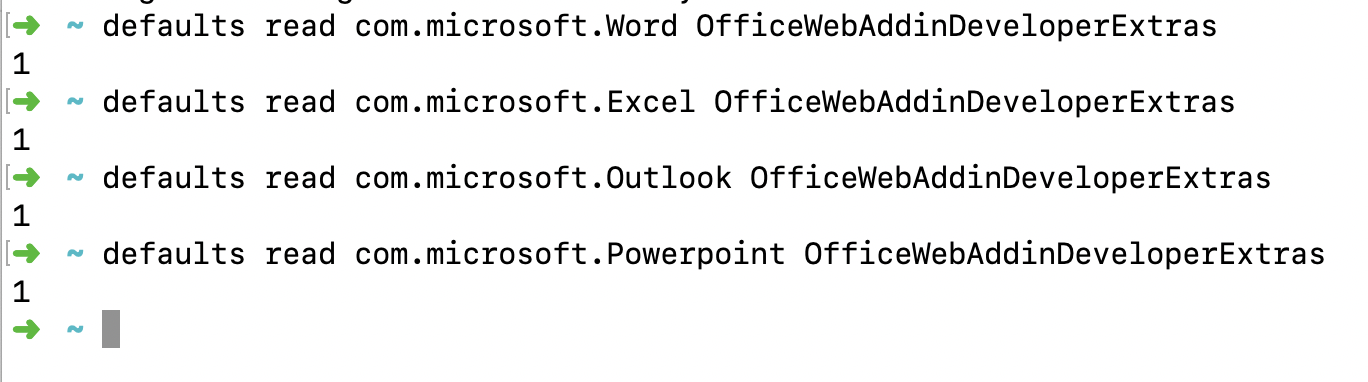
Environment
MacOS 10.14.4 (18E226)
PowerPoint 16.27 (19071500)
georgiik-welldone
on 12 Aug 2019
Update: We think this is specific to the Mac App Store Build of Office, which currently doesn't support these flags. To workaround this, you will need to get a non App Store build. You can get one by signing up for the developer program and getting a tenant: https://aka.ms/o365devprogram.
keyur32
on 12 Aug 2019
Closing this issue, as it seems like @keyur32's most recent comment explains root cause and identifies a work-around. If you need further assistance with this issue, please comment here and we'll re-open it. Thanks!
 kbrandl
on 2 Sep 2019
kbrandl
on 2 Sep 2019
Hi, I have the same issue this time on macOS: 10.15 and word: 16.29
jdrzj
on 6 Nov 2019
Did you install Office from the App Store? You will need to install it from https://www.office.com to get access to debug capabilities.
 codexeon
on 6 Nov 2019
codexeon
on 6 Nov 2019
@keyur32 can confirm using non app-store version shows the inspect element. Would be nice to have docs updated regarding this :)
 Herz3h
on 23 Mar 2020
Herz3h
on 23 Mar 2020
Re-opening and tagging @keyur32 and @RuoyingLiang
 mscharlock
on 25 Mar 2020
mscharlock
on 25 Mar 2020
Yes, (sorry didn't see this one). Non app store version should have the ability to debug.
keyur32
on 11 May 2020
Related issues
 KantilalJadav
·
4Comments
KantilalJadav
·
4Comments
 alx-andru
·
5Comments
alx-andru
·
5Comments
 leoseccia
·
3Comments
leoseccia
·
3Comments
 kushwahav
·
3Comments
kushwahav
·
3Comments
 dgrudenic
·
4Comments
dgrudenic
·
4Comments
Most helpful comment
Update: We think this is specific to the Mac App Store Build of Office, which currently doesn't support these flags. To workaround this, you will need to get a non App Store build. You can get one by signing up for the developer program and getting a tenant: https://aka.ms/o365devprogram.