Office-js: Can't communicate with the app in the displayDialogAsync
Expected Behavior
It should be possible to send a message back to the app with Office.context.ui.messageParent("test"); when I open the dialog with displayDialogAsync function.
Current Behavior
There is a console error when the dialog is opened. It looks like the origin for the dialog is set to outlook.live.com and so the dialog can't communicate with the origin that opened the dialog in the first place.
Steps to Reproduce, or Live Example
Link to live example: https://github.com/mkoczka/outlook-dialog-bug
This project was generated according to the quick start tutorial in outlook add-in documentationAdditional details:
I open the dialog with the code described below. Location origin in this particular case ishttps://localhost:3000
  Office.context.ui.displayDialogAsync(
    location.origin + "/dialog.html",
    dialog => {
      dialog.addEventHandler(Office.EventType.DialogMessageReceived, a =>
        console.log("This will not  get called")
      );
      dialog.addEventHandler(Office.EventType.DialogEventReceived, a =>
        console.log("This will not  get called")
      );
    }
  );
In the dialog, I call
Office.initialize = () => {
  Office.context.ui.messageParent("test");
};
The result is not propagated back to the application.
Context
We're trying to do custom authentication in the dialog. This issue prevents us from doing this since we can't communicate between the app and the dialog.
Your Environment
- Platform [PC desktop, Mac, iOS, Office Online]: Office Online
- Operating System: Mac OS Mojave 10.14.4
- Browser (if using Office Online): Google Chrome Version 73.0.3683.103 (Official Build) (64-bit)
Useful logs
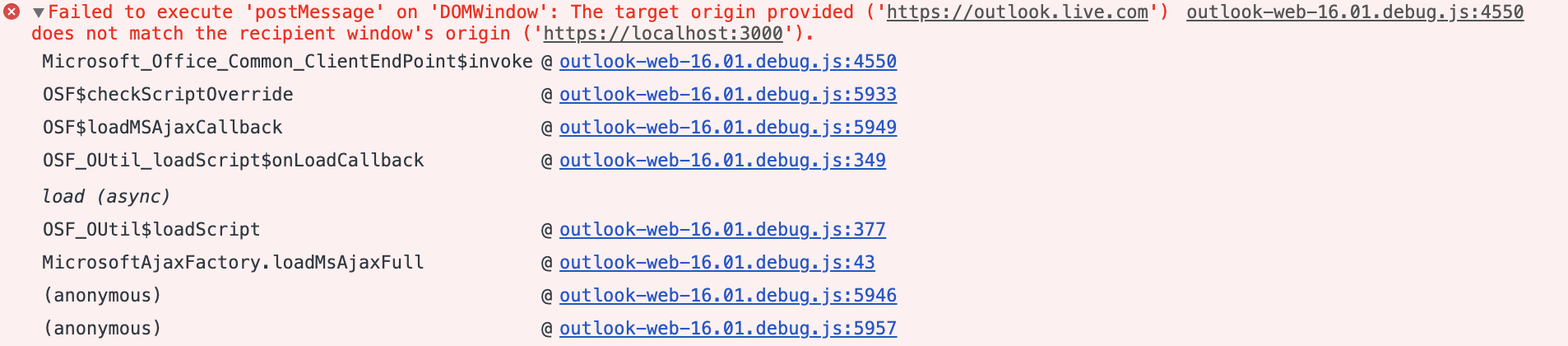
Error message: Failed to execute 'postMessage' on 'DOMWindow': The target origin provided ('https://outlook.live.com') does not match the recipient window's origin ('https://localhost:3000').
 mkoczka
All 25 comments
If you are using different domains, try adding all the domains in your "AppDomains" section of your manifest.
 exextoc
on 25 Apr 2019
exextoc
on 25 Apr 2019
@exextoc We tried to add both https://localhost:3000 and https://outlook.live.com to AppDomains. The result is still the same.
mkoczka
on 25 Apr 2019
I've also come across this issue as well. Tried adding the necessary entry to the apps AppDomains entry in the manifest and still the same.
 jak-hammond
on 30 Apr 2019
jak-hammond
on 30 Apr 2019
Hi, @mkoczka I was able to reproduce the scenario. There seems to be an error in your code, please update from
  Office.context.ui.displayDialogAsync(
    location.origin + "/dialog.html",
    dialog => {
      dialog.addEventHandler(Office.EventType.DialogMessageReceived, a =>
        console.log("This will not  get called")
      );
      dialog.addEventHandler(Office.EventType.DialogEventReceived, a =>
        console.log("This will not  get called")
      );
    }
  );
to
  Office.context.ui.displayDialogAsync(
    location.origin + "/dialog.html",
    (result) => {
      dialog = result.value
      dialog.addEventHandler(Microsoft.Office.WebExtension.EventType.DialogMessageReceived, a =>
        console.log("This will not  get called")
      );
      dialog.addEventHandler(Microsoft.Office.WebExtension.EventType.DialogEventReceived, a =>
        console.log("This will not  get called")
      );
    }
  );
Hey, @exextoc. Thanks for your response. It didn't help. The outcome is still the same. There's still the error message in the dialog's window. So the postMessage can't even reach the origins window.
mkoczka
on 26 May 2019
I'm unable to reproduce the error. Also, I don't think the console error you are seeing is related to this API. So, instead of calling the API in initialize, can you try to attach it to a button click and test it and post the results ?
exextoc
on 30 May 2019
Okay. The example I provided stopped working. It looks like the displayDialogAsync function is now adding unescaped query parameters into the URL in window that dialog is opened. There's an unescaped pipe |. So the node server behind webpack-dev-server is now falling on that.
It looks like the example repo I found in officejs docs is no longer viable option to test the dialog behavior.
Look at the URL

The thing is that these query params in the URL weren't there before. So maybe that's why the dialog communication didn't work before. I will test this in the real application environment where even the unescaped pipe in the URL should work.
mkoczka
on 30 May 2019
@exextoc I am also facing the same issue. any workaround would be helpful

 kathirvalavan
on 9 Jun 2019
kathirvalavan
on 9 Jun 2019
I am having a very similar issue, where my calls to Office.context.ui.messageParent("test") don't seem to reach the parent. Interestingly, dialog close events (code 12006) DO reach the parent.
I will add that I too am seeing the Failed to execute 'postMessage' on 'DOMWindow': The target origin provided ('https://outlook.live.com') does not match the recipient window's origin ('https://localhost:3030') message
The fact that the dialog close event gets picked up by my parent handler seems to point to the fact that SOME communication is possible between the parent panel and the pop-up. Additionally, the parent and the dialog are able to communicate via a shared localStorage, so it seems like the domains are matching up, at least in some context.
UPDATE
my error was seemingly caused by my failure to include the protocol in my AppDomain whitelisting. Adding https://localhost:3030 (where my client code is hosted) and adding https:// to the rest of my AppDomains seemed to be the trick I was missing.
 jmarq
on 12 Jun 2019
jmarq
on 12 Jun 2019
@mkoczka @jak-hammond @kathirvalavan are any of you still having this problem, or can this issue be closed? Thanks!
 kbrandl
on 2 Sep 2019
kbrandl
on 2 Sep 2019
@kbrandl I can now get messages passing between the dialog and the parent add-in fine, although it seems to need the add-ins base URL (in my case https://localhost:3000) added to the AppDomain portion of the manifest file.
I don't recall seeing this mentioned anywhere in the docs, apart from cases where we were wanting to navigate to domains that were different from the domain hosting the app? Is this an oversight in the documentation, an issue with the messageParent implementation or a misunderstanding on my part?
jak-hammond
on 3 Sep 2019
@jak-hammond thanks for providing this information. I've added @lliu113 to this issue, as she's the PM for the Dialog API and knows more about it than I do. @lliu113 can you please respond to @jak-hammond's most recent comment? (If it turns out we need to update the docs, I can open a separate issue in the docs repo.) Thanks!
kbrandl
on 4 Sep 2019
It should not be necessary to add the add-in's own domain to <AppDomains>. This looks like a bug in Outlook. But it is intermittent. We have a very recent Outlook sample that uses messageParent and has nothing in <AppDomains> here: https://github.com/OfficeDev/PnP-OfficeAddins/tree/master/Samples/auth/Outlook-Add-in-Microsoft-Graph-ASPNET
 Rick-Kirkham
on 4 Sep 2019
Rick-Kirkham
on 4 Sep 2019
Adding my voice to the issue here - the docs specifically say:
"Lists any domains in addition to the domain specified in the SourceLocation element that your Office Add-in will use to load pages." (emphasis mine)
I have tried to add the add-in's base URL to the list of AppDomains as mentioned by @jak-hammond and this does seem to allow the message from the dialog to pass through to the parent (taskpane).
However, this new requirement is a breaking change, and affects add-ins already in the wild. Developers like myself would need to submit a new manifest for validation where the only change is in the manifest itself. In the mean time, my customers are stuck, unable to log in to the add-in and work.
Please fix this bug as a matter of priority,
 TheSamsterZA
on 4 Nov 2019
TheSamsterZA
on 4 Nov 2019
@jak-hammond @TheSamsterZA on which Outlook platform(s) did you observe the requirement to add the display dialog domain to <AppDomains>?
I see that the original issue in this thread was reported on Office Online (i.e. OWA), but I don't want to assume that this is the same issue. Thanks!
exextoc
on 4 Nov 2019
@exextoc I noticed this new requirement on Office Online.
TheSamsterZA
on 4 Nov 2019
@exextoc I saw this on Outlook for Mac
jak-hammond
on 4 Nov 2019
@jak-hammond We are not able to replicate the issue, Can you share the version of Outlook for Mac used?
exextoc
on 15 Nov 2019
@exextoc I have had many versions since I first observed this issue, I am developing against the Fast Insider preview, I will get my repro app back out and test again to see if this issue is still present on the latest version
jak-hammond
on 29 Nov 2019
@TheSamsterZA We could not reproduce this on Office Online. Could you give us the endpoint you use (URL) and the code you ran?
exextoc
on 2 Dec 2019
This issue has been automatically marked as stale because it is marked as needing author feedback but has not had any activity for 4 days. It will be closed if no further activity occurs within 3 days of this comment. Thank you for your interest in Office Add-ins!
![msftbot[bot] picture](https://avatars.githubusercontent.com/in/26612?v=4&s=40) msftbot[bot]
on 9 Dec 2019
msftbot[bot]
on 9 Dec 2019
This issue has been closed due to inactivity. Please comment if you still need assistance and we'll re-open the issue.
msftbot[bot]
on 12 Dec 2019
I have the same problem. And i have a workaround solution.
My main problem is on the browser, for browser the Office.context.ui.messageParent("111") api is not work, But window.opener.postMessage("111", "*") worked very well. And most browser can receive the message though dialog.addEventHandler(Microsoft.Office.WebExtension.EventType.DialogMessageReceived, ()=> {}), except IE11. So for IE11 we need to add some code:
function receiveMessage(event) {
messageHandle(arg);
}

var platform = getOutlookPlatform();
    if (platform === 'OfficeOnline') {
        window.addEventListener("message", receiveMessage, false);
    }
SO, the all workaround solution is:
for receiver:
function messageHandle(jsonMessage) {
...
}

function receiveMessage(event) {
messageHandle(event.data);
}

var platform = getOutlookPlatform();
    if (platform === 'OfficeOnline') {
        window.addEventListener("message", receiveMessage, false);
    }
Office.context.ui.displayDialogAsync(link, options,
        function(asyncResult) {
            if (asyncResult.status === Office.AsyncResultStatus.Failed) {
                console.log("asyncResult failed: " + asyncResult.error.code + " : " + asyncResult.error.message);
            } else {
                dialog = asyncResult.value;
                dialog.addEventHandler(Microsoft.Office.WebExtension.EventType.DialogMessageReceived, messageHandle);
                dialog.addEventHandler(Microsoft.Office.WebExtension.EventType.DialogEventReceived, eventHandle);
            }
        }
    );
for sender:
var platform = getOutlookPlatform();
            if (platform == 'OfficeOnline') {
                window.opener.postMessage(jsonMessage, "*");
            } else {
                Office.context.ui.messageParent(jsonMessage);
            }
These code worked for me.
 hello-chenchen
on 13 Dec 2019
hello-chenchen
on 13 Dec 2019
None of the suggestions worked for me in Chrome and Outlook Web, anyone has an update?
 keyvan-m-sadeghi
on 7 Aug 2020
keyvan-m-sadeghi
on 7 Aug 2020
+1
Please can we fix this?
This happens on Outlook for Mac. Our sidepanel is on a specific domain and the dialog is on a different one. When we close the dialog we get the cross-origin error. We have all the domains in the AppDomains section of the manifest.
This works fine on Outlook Web
 fergy-hs
on 7 Oct 2020
fergy-hs
on 7 Oct 2020
Related issues
 leoseccia
·
3Comments
leoseccia
·
3Comments
 tido-ms
·
3Comments
tido-ms
·
3Comments
 sshukurov
·
4Comments
sshukurov
·
4Comments
 dimitri-bourreau
·
4Comments
dimitri-bourreau
·
4Comments
 binarykitchen
·
5Comments
binarykitchen
·
5Comments
Most helpful comment
@exextoc We tried to add both
https://localhost:3000andhttps://outlook.live.comtoAppDomains. The result is still the same.