Octoprint: Changing Blocked Command List requires restart - undocumented
What were you doing?
Attempting to utilize the following in startup GCODE:
M0 S60 Clean Nozzle, press knob
Clicked on Settings tool icon;
Clicked on "GCODE Scripts" menu item;
Added above code to "Before print job starts" textbox
Clicked on "Serial Connection" menu item;
Selected "Firmware & protocol" tab;
Removed "M0, M1" from "Blocked Commands" list;
Clicked "Save"
In Terminal window, sent the above command
What did you expect to happen?
M0 S60 Clean Nozzle command should have been sent to printer
What happened instead?
Octoprint server log indicated:
2020-08-20 12:24:12,607 - octoprint.util.comm - INFO - Not sending M0 to printer, it's configured as a blocked command
After restarting Octoprint from the toolbar and sending the M0 code again, it was correctly sent and processed.
Did the same happen when running OctoPrint in safe mode?
No... but that's because entering safe mode causes a re-read of the updated config file ;)
Version of OctoPrint
1.4.2
Operating System running OctoPrint
Octopi 0.17.0 on RPi 4B 1.1
Printer model & used firmware incl. version
Robo3D R1+ / Marlin bugfix-2.0.x
Proposed resolutions:
- Refresh the Blocked Command list internally when it is updated. 2. If there's some reason why the Blocked Commands list cannot be refreshed without a restart, then that should probably be stated in the commentary under the text entry box.
Yes,I have read the FAQ!
 kapstaad
All 7 comments
Can reproduce this, against virtual printer, stock install except for my current plugin development. Reason is, you have to disconnect & re connect, no need to restart I believe. Think it may be for performance that the setting is only read once, on connect, rather than for every command.
Guessed you meant M0 not G0 in your description?
 cp2004
on 20 Aug 2020
cp2004
on 20 Aug 2020
Reason is, you have to disconnect & re connect, no need to restart I believe. Think it may be for performance that the setting is only read once, on connect, rather than for every command.
Perhaps; but IMHO it should also "force-reload" upon a settings change. That shouldn't have any impact on performance.
Guessed you meant M0 not G0 in your description?
Your guess was correct; edited/fixed, thank you :)
kapstaad
on 21 Aug 2020
Agreed, at the very least it should be noted, the behaviour is not clear. Was considering your solution of force-reload, but what do you do mid-print? Will haves to find out where the serial init is called from, but i could see some tricky hndling needed to not disrupt the print.
cp2004
on 21 Aug 2020
All way above my pay grade. I'm just a lowly end-user (and Patreon supporter) who was confused by the apparent discrepancy and figured I'd make my first-ever GitHub bug report :) Having no knowledge of OctoPrint's internals, it seemed like something OctoPrint could probably change safely on-the-fly... as far as I know, it's a purely client-side decision by OctoPrint whether or not to forward items in the Blocked Commands list? Behavior by the host printer resulting from such changes would seem to fall under 'caveat utilitor'. Or, you know... just a note saying you gotta restart/reconnect ;)
kapstaad
on 21 Aug 2020
All way above my pay grade. I'm just a lowly end-user (and Patreon supporter) who was confused
Documentation is hard to write as the person who made the software, so it's always good to get insight from users.
I'll look at updating the text there, see if I can get a PR in before Gina's back from her break.
cp2004
on 21 Aug 2020
Above PR 'solves' this issue; however there may be other places it is relevant.
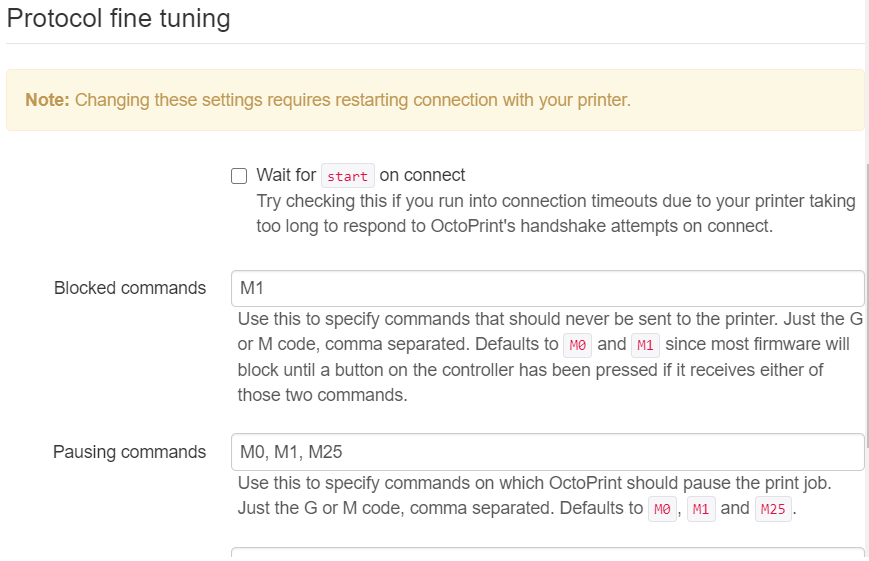
cp2004
on 24 Aug 2020
I've merged this but gone one step further and moved the alert across the whole serial config:
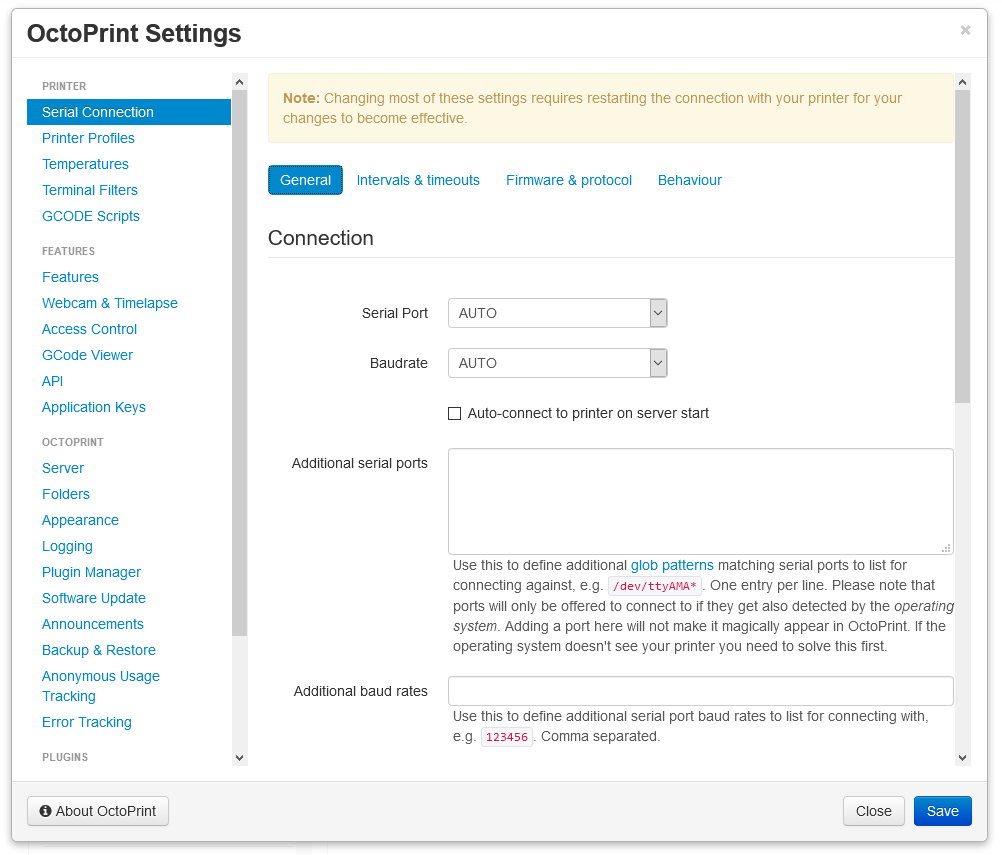
Ready for 1.5.x
 foosel
on 3 Sep 2020
foosel
on 3 Sep 2020
Related issues
foosel
·
50Comments
 foulowl
·
58Comments
foosel
·
43Comments
foulowl
·
58Comments
foosel
·
43Comments
 bbatchelder
·
120Comments
foosel
·
50Comments
bbatchelder
·
120Comments
foosel
·
50Comments
Most helpful comment
I've merged this but gone one step further and moved the alert across the whole serial config:
Ready for 1.5.x